https://github.com/modl-org/modl
Local-first AI image generation toolkit. Pull models, train LoRAs, generate images. One CLI, no glue code.
https://github.com/modl-org/modl
ai cli diffusion flux generative-ai image-generation local-first lora rust self-hosted stable-diffusion
Last synced: 3 months ago
JSON representation
Local-first AI image generation toolkit. Pull models, train LoRAs, generate images. One CLI, no glue code.
- Host: GitHub
- URL: https://github.com/modl-org/modl
- Owner: modl-org
- License: agpl-3.0
- Created: 2026-02-22T18:00:09.000Z (4 months ago)
- Default Branch: main
- Last Pushed: 2026-03-25T22:17:37.000Z (3 months ago)
- Last Synced: 2026-03-25T23:44:56.742Z (3 months ago)
- Topics: ai, cli, diffusion, flux, generative-ai, image-generation, local-first, lora, rust, self-hosted, stable-diffusion
- Language: Rust
- Homepage: https://modl.run
- Size: 7.86 MB
- Stars: 9
- Watchers: 0
- Forks: 2
- Open Issues: 16
-
Metadata Files:
- Readme: README.md
- Changelog: CHANGELOG.md
- Contributing: CONTRIBUTING.md
- License: LICENSE
Awesome Lists containing this project
README
# modl
**Train LoRAs and generate images on your own GPU.** Web UI + CLI. Managed runtime. It just works.
```bash
curl -fsSL https://modl.run/install.sh | sh
modl pull z-image-turbo
modl generate "a cat on mars"
```
**[Website](https://modl.run)** · **[Docs](https://modl.run/docs)** · **[Guides](https://modl.run/guides)** · **[Model Registry](https://github.com/modl-org/modl-registry)** · **[Changelog](CHANGELOG.md)**
---
## Why modl?
**No glue code.** One binary handles model downloads, dependency resolution, image generation, LoRA training, and output management. No separate tools to install, no configs to write.
**Smart model management.** Models are stored once in a content-addressed store. ComfyUI, A1111, and other tools see symlinks — no duplicate 24GB files.
**GPU-aware.** Automatically picks the right model variant (fp16, fp8, quantized) for your VRAM. A 4090 gets full quality. An 8GB card still works.
**Train LoRAs in one command.** Point it at a folder of images, pick a base model, and go. Powered by [ai-toolkit](https://github.com/ostris/ai-toolkit) under the hood, with auto-captioning, dataset prep, and sensible defaults included.
---
## Quick Start
```bash
# Install
curl -fsSL https://modl.run/install.sh | sh
# Pull a model (auto-selects variant for your GPU)
modl pull z-image-turbo
# Generate
modl generate "a photo of a mountain lake at sunset"
```
Or do everything at once:
```bash
curl -fsSL https://modl.run/install.sh | sh -s -- --quick
```
This installs modl, pulls a starter model, and launches the web UI.
---
## Web UI
```bash
modl serve
```
Generate, train, browse outputs, and manage models from the browser at `http://localhost:3939`. Same engine as the CLI.
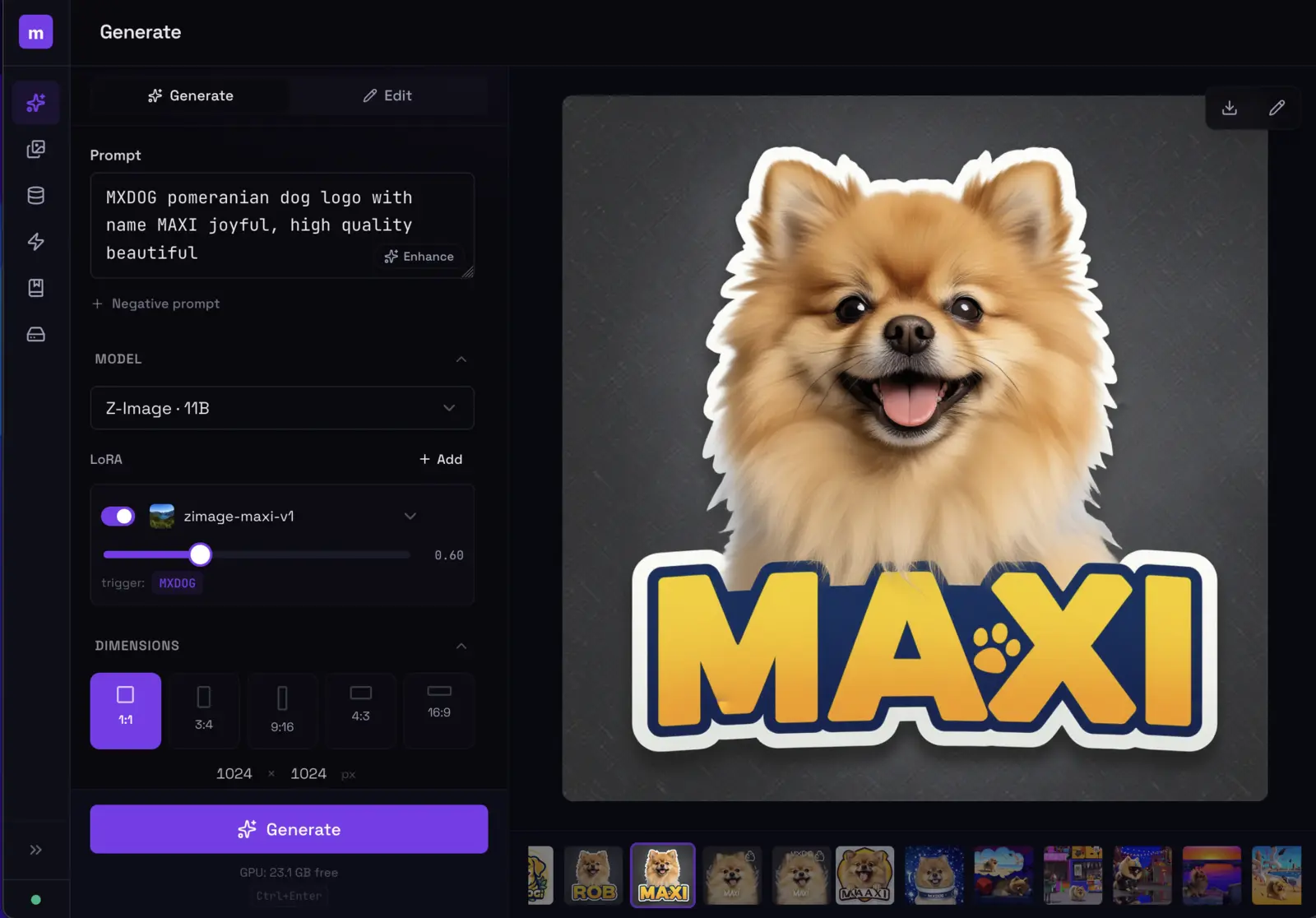
Install as a system service (starts on boot):
```bash
modl serve --install-service
```
---
## Train a LoRA
```bash
# Prepare dataset (auto-captions your images)
modl dataset create my-product --from ~/photos/product-shots/
modl dataset caption my-product
# Train
modl train --dataset my-product --base flux-dev --name product-v1 --lora-type object
# Generate with your LoRA
modl generate "a photo of OHWX on marble countertop" --lora product-v1
```
---
## Supported Models
16 models across 6 families. See the full comparison at **[modl.run/guides/model-comparison](https://modl.run/guides/model-comparison)**.
| Family | Models | Best for |
|--------|--------|----------|
| **Flux 2** | Dev, Klein 4B, Klein 9B | Fast generation (4 steps), editing, best quality/speed |
| **Flux 1** | Dev, Schnell, Fill Dev | Largest ecosystem, LoRAs, ControlNet, inpainting |
| **Chroma** | Chroma | Apache 2.0, negative prompts, 8.9B Flux fork |
| **Z-Image** | Base, Turbo | Strong quality/size, fast turbo, great ControlNet |
| **Qwen Image** | Image, Image Edit | Text rendering (Chinese/English), instruction editing |
| **Legacy SD** | SDXL, SD 1.5 | Low VRAM, massive LoRA library |
Plus 70+ ControlNets, IP-Adapters, VAEs, text encoders, upscalers, and segmentation models. Browse all at **[modl.run/models](https://modl.run/models)**.
```bash
modl pull flux2-klein-4b # fast, 4-step generation + editing
modl pull flux-dev # high quality, best for training
modl pull z-image-turbo # strong quality, fast, great ControlNet
modl pull chroma # open-source (Apache 2.0), negative prompts
```
---
## Image Primitives
### Generation & Editing
```bash
modl generate "prompt" --base flux-dev # text to image
modl generate "prompt" --init-image photo.png # image to image
modl generate "prompt" --init-image img --mask mask.png # inpainting
modl edit "add sunglasses" --image portrait.png # instruction editing
```
### ControlNet & Style Reference
```bash
modl preprocess canny photo.png # extract edges / depth / pose
modl generate "prompt" --controlnet edges.png # structural control
modl generate "prompt" --style-ref painting.png # style transfer
```
### Vision-Language
```bash
modl ground "coffee cup" cafe.png # find objects → bounding boxes
modl describe photo.png # generate captions
modl vl-tag photo.png # auto-tag images
```
### Analysis & Post-Processing
```bash
modl score photo.png # aesthetic quality (1-10)
modl detect photo.png # face detection
modl segment photo.png --bbox 120,340,280,500 # create masks (SAM)
modl face-restore photo.png # fix AI faces
modl upscale photo.png --scale 4 # 4x resolution
modl remove-bg photo.png # transparent PNG
modl compare ref.png target.png # CLIP similarity
```
Every command supports `--json` for scripting and agent pipelines.
---
## Already Have Models?
```bash
modl link --comfyui ~/ComfyUI
modl link --a1111 ~/stable-diffusion-webui
```
modl scans your model folders, hashes files, and moves recognized models into the store — replacing them with symlinks. Your tools keep working, nothing breaks.
---
## Docker
```bash
docker run --gpus all -p 3939:3939 -v modl-data:/workspace ghcr.io/modl-org/modl:latest
```
Set `MODEL=flux-schnell` to auto-pull a model on first boot. Models persist on the volume across restarts.
---
## Architecture
Single Rust binary for speed and distribution. Managed Python runtime for GPU compute. No external dependencies to install.
Full CLI reference: **[modl.run/docs](https://modl.run/docs)**
---
## Author
Created by [Pedro Alonso](https://github.com/pedropaf).
## License
[AGPL-3.0](LICENSE)