https://github.com/moisentinel/flomo
A flowmodoro timer CLI for productivity enthusiasts
https://github.com/moisentinel/flomo
cli flomodoro flowtime hacktoberfest pomodoro-technique productivity stopwatch timer tui
Last synced: about 1 year ago
JSON representation
A flowmodoro timer CLI for productivity enthusiasts
- Host: GitHub
- URL: https://github.com/moisentinel/flomo
- Owner: moiSentineL
- License: mit
- Created: 2024-05-31T14:44:58.000Z (about 2 years ago)
- Default Branch: main
- Last Pushed: 2025-06-09T18:50:14.000Z (about 1 year ago)
- Last Synced: 2025-06-09T19:41:16.593Z (about 1 year ago)
- Topics: cli, flomodoro, flowtime, hacktoberfest, pomodoro-technique, productivity, stopwatch, timer, tui
- Language: Python
- Homepage: http://flomo.nibirsan.org/
- Size: 1.14 MB
- Stars: 12
- Watchers: 4
- Forks: 4
- Open Issues: 15
-
Metadata Files:
- Readme: docs/README.md
- License: LICENSE
Awesome Lists containing this project
README

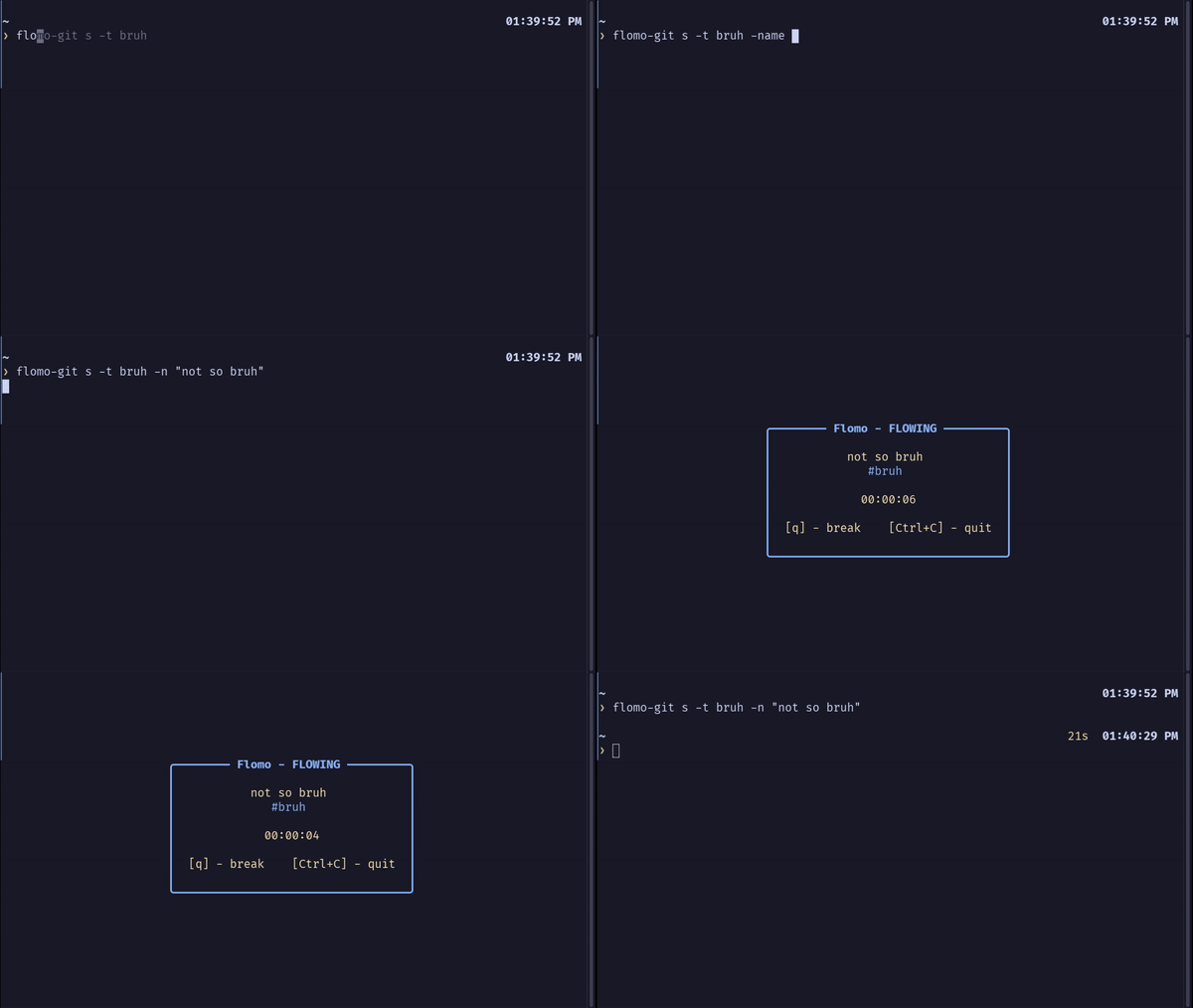
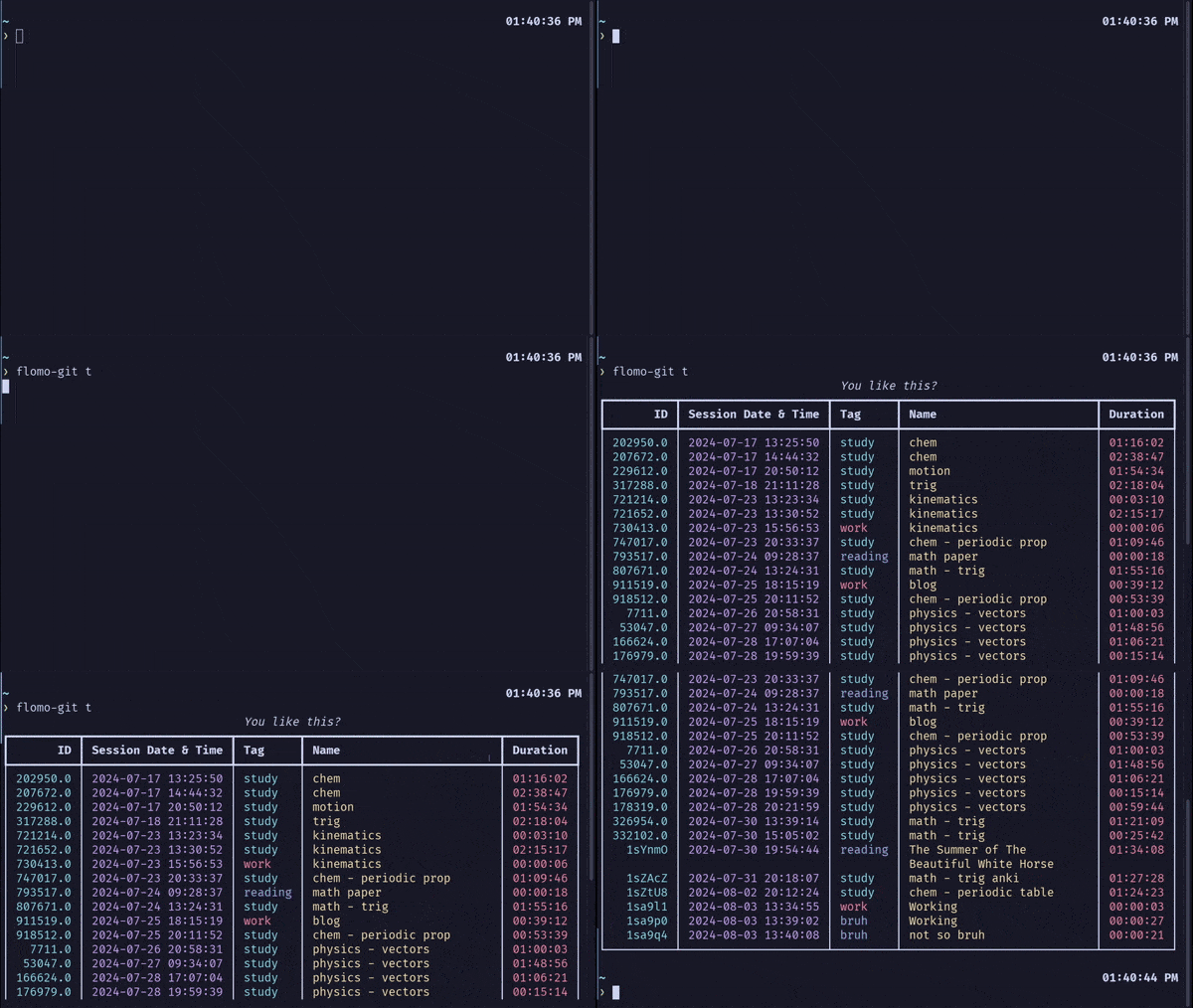
---





---
`flomo` is a crossplatform TUI/CLI for using the Flowtime Technique, also known as the **Flowmodoro** Technique. It's a task execution helper, or in other words, a productivity booster! 🚀
`flomo` allows you to work on tasks in a flow state, manage your work/break time, and track your sessions.
Built with: [rich](https://github.com/Textualize/rich) & [blessed](https://github.com/jquast/blessed) (TUI), [click](https://click.palletsprojects.com/en/8.1.x/) (CLI), [notify-send](https://man.archlinux.org/man/notify-send.1) for Linux notifications, [playsound](https://github.com/TaylorSMarks/playsound) (Windows & Mac sound), [paplay](https://linux.die.net/man/1/paplay) (Linux sound), [sqlite3](https://www.sqlite.org) (database).
## ✨ Features
- **Cross-Platform** 🌐
- Stopwatch for Flow and Timer for Breaks ⏱️
- Session tracker (date, duration, tag, and session) 🗓️
- Session manager: easily manipulate the sessions via CLI ⚙️
- Customizable, Clean UI 🎨
- Notifications (Linux only, for now) 🔔
- Fairly easy-to-use, I suppose 🤔
- (Potential) productivity booster 💥
## 🎉 Background
`flomo` started as a Hackathon ([livestream](https://www.youtube.com/live/xyqQgPEozv0)) on June 6, 2024, with [@Jonak-Adipta-Kalita](https://github.com/Jonak-Adipta-Kalita) and [@AnubhavSC](https://github.com/AnubhavSC). We aimed to create a small project that was fun and could potentially help others. We're all productivity fanatics, and this project is _heavily_ inspired by [pomo](https://github.com/kevinschoon/pomo).
However, two hours in, we realized it was harder than expected. We spent a lot of time debugging and refactoring. [Here](https://nibirsan.org/blog/p/the-hackathon-experience/) are our learnings from the Hackathon.
## 🌟 Flow and Flowtime Technique
[Mihaly Csikszentmihalyi](https://en.wikipedia.org/wiki/Mihaly_Csikszentmihalyi) was known for his work on **Flow Theory**. He describes "flow" as:
> "A state of being in which people become so immersed in the joy of their work or activity 'that nothing else seems to matter.'"
As developers, creators, and romantics, we often experience that state of "flow." This "flow" can **vary**, sometimes increasing or decreasing.
This can be visualized with a graph:

We can take advantage of this by identifying the **right time** to take a break—when the "flow" is depleting. This is the Flowtime technique.
It works like this: **If you work for x minutes, take a break for x/5 minutes. Then, repeat.** ⏳
This requires a good deal of discipline, meaning you need at least some natural focus. If not, check out the [Pomodoro Technique](https://www.pomodorotechnique.com/)! 🍅
## 🛠️ Installation
### 📋 Pre-requisites
- 🐍 [Python](https://www.python.org/) ≥ 3.12
- 📦 [pip](https://pip.pypa.io/en/stable/installation/)
- 🛠️ [GCC Compiler](https://gcc.gnu.org/) **if** installing from source.
### 📦 Instructions
#### Using PyPi package
```bash
pip install flomodoro
```
_Note: If you're on Linux, ensure `/home/user/.local/bin` is in your `PATH`. [More info for Linux newbies](https://linuxize.com/post/how-to-add-directory-to-path-in-linux/)_
#### Installing from source
```bash
git clone https://github.com/moiSentineL/flomo.git
cd flomo
pip install -r requirements.txt
# For Linux Users:
gcc -fPIC -shared -o flomo/session_id.so flomo/session_id.c
# For Windows Users:
gcc -shared -o flomo/session_id.dll flomo/session_id.c
pip install -e .
```
## 🚀 Getting Started
Initialize flomo by:
```bash
flomo init
```
Start a flow by:
```bash
flomo s
```
Start a flow with the tag `work` and the session name `math`:
```bash
flomo s -t work -n math
```
### Check the [wiki](https://github.com/moiSentineL/flomo/wiki) for more info 📚
## 🛤️ Roadmap
- ✅ Add sound on timer/stopwatch start
- ✅ Notification (only Linux for now)
- ✅ Configure colors
- ✅ Track sessions
- ✅ Configure colors
- ✅ Skipping Break
- 🟧 Chart Generation / Statistics
Check our [Kanban Board](https://github.com/users/moiSentineL/projects/2).
## 🤝 How to Contribute
Want to help? Great! Here's how:
1. **Fork** this [repo](https://github.com/moiSentineL/flomo/fork).
2. **Clone** it to your local machine.
3. **Create a branch** for your changes.
4. **Make your edits** and test them.
5. **Commit and push** your changes.
6. **[Open a pull request](https://github.com/moiSentineL/flomo/pulls)** to the `main` branch.
_Note: if you're new to Git and Github, I suggest you read this [Intro to Git and GitHub for Beginners](https://product.hubspot.com/blog/git-and-github-tutorial-for-beginners)._
Let's collaborate! 🌟
[^1]: Csikszentmihalyi, M. (1990). _Flow: The Psychology of Optimal Experience_. New York: Harper and Row. p. 15 [ISBN]() [0-06-092043-2](https://en.wikipedia.org/wiki/Special:BookSources/0-06-092043-2).