https://github.com/molnarmark/ulauncher-subl-projects
💡 Sublime Text Project Manager for Ulauncher
https://github.com/molnarmark/ulauncher-subl-projects
sublime sublime-text sublime-text-3 ulauncher ulauncher-extension ulauncher-extensions
Last synced: over 1 year ago
JSON representation
💡 Sublime Text Project Manager for Ulauncher
- Host: GitHub
- URL: https://github.com/molnarmark/ulauncher-subl-projects
- Owner: molnarmark
- License: mit
- Created: 2020-10-21T01:26:36.000Z (almost 6 years ago)
- Default Branch: master
- Last Pushed: 2020-10-21T12:29:31.000Z (almost 6 years ago)
- Last Synced: 2025-04-10T14:26:21.709Z (over 1 year ago)
- Topics: sublime, sublime-text, sublime-text-3, ulauncher, ulauncher-extension, ulauncher-extensions
- Language: Python
- Homepage: https://ext.ulauncher.io/-/github-molnarmark-ulauncher-subl-projects
- Size: 30.3 KB
- Stars: 6
- Watchers: 1
- Forks: 1
- Open Issues: 0
-
Metadata Files:
- Readme: README.md
- License: LICENSE
Awesome Lists containing this project
README
# 💡 Sublime Text Project Manager for Ulauncher
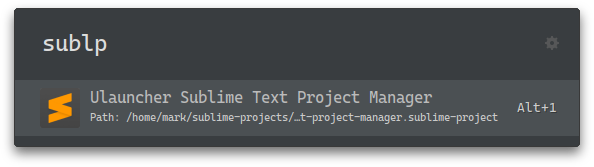
With this Ulauncher extension, you can quickly browse and open your Sublime Text projects.
## Installation
- Launch **Ulauncher**
- Click the ⚙️ icon next to the search field
- Click on the **Extensions** tab
- Click on ➕ **Add extension**
- Paste `https://github.com/molnarmark/ulauncher-subl-projects`
- Click **Add**
## Usage
Set your sublime projects folder path in the extension's preferences. (Default is `~/sublime-projects`) and save some projects in that location with the naming convention mentioned below.
Then simple invoke it by typing `sublp` in Ulauncher.
You can change this in the extension's preferences.
## Naming Convention
This extension uses the `kebab-case` for project file names.
An example would be this project's file name:
`ulauncher-sublime-text-project-manager`