https://github.com/moneroexamples/compile-monero-09-on-arch-linux
Compile Monero 0.9 on Arch Linux
https://github.com/moneroexamples/compile-monero-09-on-arch-linux
Last synced: 3 months ago
JSON representation
Compile Monero 0.9 on Arch Linux
- Host: GitHub
- URL: https://github.com/moneroexamples/compile-monero-09-on-arch-linux
- Owner: moneroexamples
- Created: 2016-05-08T00:45:03.000Z (about 10 years ago)
- Default Branch: master
- Last Pushed: 2017-02-19T02:31:46.000Z (over 9 years ago)
- Last Synced: 2025-04-06T23:41:47.757Z (about 1 year ago)
- Size: 847 KB
- Stars: 1
- Watchers: 1
- Forks: 1
- Open Issues: 0
-
Metadata Files:
- Readme: README.md
Awesome Lists containing this project
README
# Compile Monero 0.9 on Arch Linux
The example shows how to compile the current github version of [Monero](https://getmonero.org/), as of 8 Sep 2016, on [Arch Linux](https://www.archlinux.org/).
## Dependencies
Before proceeding with the compilation, the following packages are required:
```bash
#install git to download latest Monero source code from github
sudo pacman -Su --needed git
# install dependencies to be able to compile Monero
sudo pacman -Su --needed base-devel cmake boost miniupnpc unbound graphviz doxygen libunwind pkg-config openssl curl gtest
```
## Compilation
```bash
# download the latest monero source code from github
git clone https://github.com/monero-project/bitmonero.git
# go into monero folder
cd bitmonero/
# apply patch for using Onion Blockchain Explorer (optional)
# https://github.com/moneroexamples/onion-monero-blockchain-explorer
# curl https://raw.githubusercontent.com/moneroexamples/compile-monero-09-on-ubuntu-16-04/master/res/tx_blob_to_tx_info.patch | git apply -v -
#
# apply a patch for gcc 6.1
wget -q -O - https://raw.githubusercontent.com/moneroexamples/compile-monero-09-on-arch-linux/master/fix_value_initialization.patch | git apply -v -
# compile
make release
```
## Installation
After successful compilation, the Monero binaries should be located in `./build/release/bin` as shown below:
```bash
./build/release/bin/
├── bitmonerod
├── blockchain_converter
├── blockchain_dump
├── blockchain_export
├── blockchain_import
├── cn_deserialize
├── connectivity_tool
├── simpleminer
└── simplewallet
```
I usually move the binaries into `/opt/monero/` folder. This can be done in the following way:
```bash
# optional
sudo mkdir -p /opt/monero
sudo mv -v ./build/release/bin/* /opt/monero/
```
This should result in:
```bash
/opt/monero/
├── monero-blockchain-export
├── monero-blockchain-import
├── monerod
└── monero-wallet-cli
```
Now we can start the Monero daemon, i.e., `monerod`, and let it
download the blockchain and synchronize itself with the Monero network. After that, you can run your the `monero-wallet-cli`.
```bash
# launch the Monero daemon and let it synchronize with the Monero network
/opt/monero/monerod
# launch the Monero wallet
/opt/monero/monero-wallet-cli
```
## Useful aliases (with rlwrap)
`monerod` and `monero-wallet-cli` do not have tab-compliton nor history.
This problem can be overcome using [rlwrap](https://github.com/hanslub42/rlwrap).
```bash
# install rlwrap
sudo pacman -Su rlwrap wget
# download monerod and monero-wallet-cli commands files
wget -O ~/.bitmonero/monerocommands_bitmonerod.txt https://raw.githubusercontent.com/moneroexamples/compile-monero-09-on-xubuntu-16-04-beta-1/master/monerocommands_bitmonerod.txt
wget -O ~/.bitmonero/monerocommands_simplewallet.txt https://raw.githubusercontent.com/moneroexamples/compile-monero-09-on-xubuntu-16-04-beta-1/master/monerocommands_simplewallet.txt
# add aliases to .bashrc
echo "alias moneronode='rlwrap -f ~/.monero/monerocommands_simplewallet.txt /opt/monero/monerod'" >> ~/.bashrc
echo "alias monerowallet='rlwrap -f ~/.bitmonero/monerocommands_bitmonerod.txt /opt/monero/monero-wallet-cli'" >> ~/.bashrc
# reload .bashrc
source ~/.bashrc
```
With this, we can just start the daemon and wallet simply using
`moneronode` and `monerowallet` commands. `rlwrap` will provide
tab-complition and history for the Monero programs.
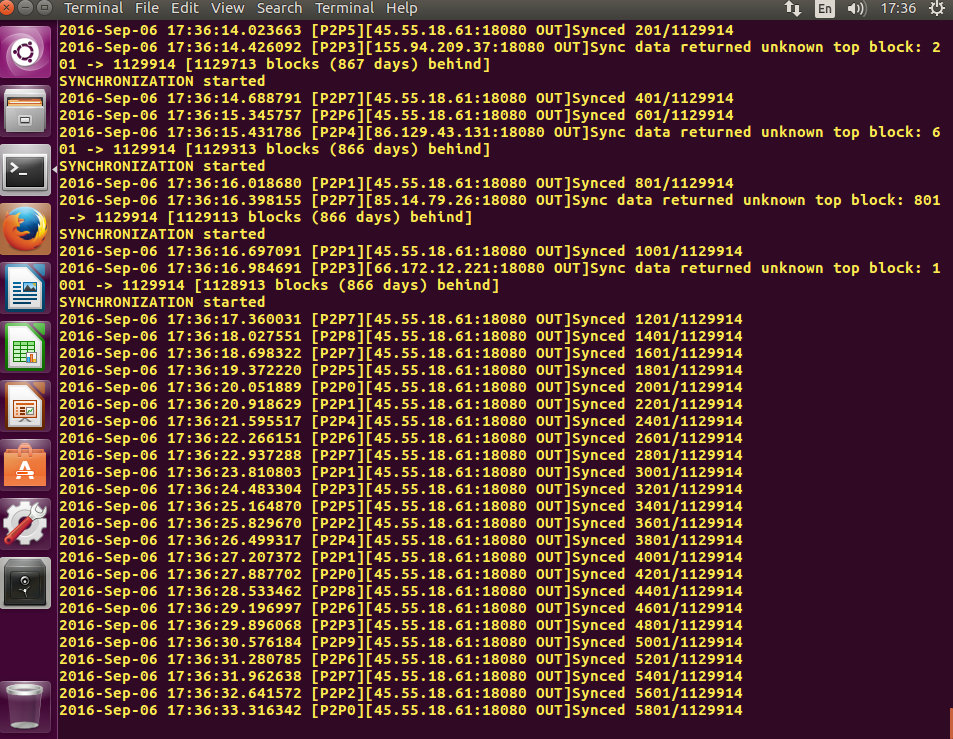
## Example screenshot
## Monero C++11 development (optional)
If you want to develop your own C++11 programs on top of Monero 0.9,
Monero's static libraries and headers will be needed. Below is shown
how they can be setup for use to write your own C++11 programs based
on Monero. An example of such a program is [access-blockchain-in-cpp](https://github.com/moneroexamples/access-blockchain-in-cpp).
### Monero static libraries
When the compilation finishes, a number of static Monero libraries
should be generated. We will need them to link against in our C++11 programs.
Since they are spread out over different subfolders of the `./build/` folder, it is easier to just copy them into one folder. I assume that
`/opt/monero-dev/libs` is the folder where they are going to be copied to.
```bash
# create the folder
sudo mkdir -p /opt/monero-dev/libs
# find the static libraries files (i.e., those with extension of *.a)
# and copy them to /opt/monero-dev/libs
# assuming you are still in monero/ folder which you downloaded from
# github
sudo find ./build/ -name '*.a' -exec cp -v {} /opt/monero-dev/libs \;
```
This should results in the following file structure:
```bash
/opt/monero-dev/libs/
├── libblockchain_db.a
├── libblocks.a
├── libcommon.a
├── libcrypto.a
├── libcryptonote_core.a
├── libcryptonote_protocol.a
├── libdaemonizer.a
├── libgtest.a
├── libgtest_main.a
├── liblmdb.a
├── libminiupnpc.a
├── libmnemonics.a
├── libotshell_utils.a
├── libp2p.a
├── libringct.a
├── librpc.a
└── libwallet.a
```
### Monero headers
Now we need to get Monero headers, as this is our interface to the
Monero libraries. Folder `/opt/monero-dev/headers` is assumed
to hold the headers.
```bash
# create the folder
sudo mkdir -p /opt/monero-dev/headers
# find the header files (i.e., those with extension of *.h)
# and copy them to /opt/monero-dev/headers.
# but this time the structure of directories is important
# so rsync is used to find and copy the headers files
sudo rsync -zarv --include="*/" --include="*.h" --exclude="*" --prune-empty-dirs ./ /opt/monero-dev/headers
```
This should results in the following file structure:
```bash
# ... only part shown to save some space
├── src
│ ├── blockchain_db
│ │ ├── berkeleydb
│ │ ├── blockchain_db.h
│ │ ├── db_types.h
│ │ └── lmdb
│ ├── blockchain_utilities
│ │ ├── blockchain_utilities.h
│ │ ├── blocksdat_file.h
│ │ ├── bootstrap_file.h
│ │ ├── bootstrap_serialization.h
│ │ └── fake_core.h
│ ├── blocks
│ │ └── blocks.h
```
## Other examples
Other examples can be found on [github](https://github.com/moneroexamples?tab=repositories).
Please know that some of the examples/repositories are not
finished and may not work as intended.
## How can you help?
Constructive criticism, code and website edits are always good. They can be made through github.
Some Monero are also welcome:
```
48daf1rG3hE1Txapcsxh6WXNe9MLNKtu7W7tKTivtSoVLHErYzvdcpea2nSTgGkz66RFP4GKVAsTV14v6G3oddBTHfxP6tU
```