https://github.com/monet-ai-editor/monet
Edit videos and Design images with Claude code or Codex
https://github.com/monet-ai-editor/monet
agentic-ai agentic-video-editor ai-video-editor claude-code cli codex coding-agents design electron mcp monet monet-ai monet-ai-editor monet-ai-video-editor remotion semantic-search video-editing
Last synced: 3 months ago
JSON representation
Edit videos and Design images with Claude code or Codex
- Host: GitHub
- URL: https://github.com/monet-ai-editor/monet
- Owner: Monet-AI-Editor
- License: mit
- Created: 2026-04-21T07:49:55.000Z (3 months ago)
- Default Branch: main
- Last Pushed: 2026-04-27T06:58:31.000Z (3 months ago)
- Last Synced: 2026-04-27T08:28:48.024Z (3 months ago)
- Topics: agentic-ai, agentic-video-editor, ai-video-editor, claude-code, cli, codex, coding-agents, design, electron, mcp, monet, monet-ai, monet-ai-editor, monet-ai-video-editor, remotion, semantic-search, video-editing
- Language: TypeScript
- Homepage:
- Size: 4.54 MB
- Stars: 6
- Watchers: 0
- Forks: 0
- Open Issues: 0
-
Metadata Files:
- Readme: README.md
- License: LICENSE
Awesome Lists containing this project
README
Monet
AI video editor and design canvas for coding agents

Local-first video editing, a live design canvas, terminal-native agent workflows, real timeline operations, local transcription, and export in one macOS app.
Monet is no longer just an AI video editor. Use Claude Code or Codex directly inside Monet Canvas to design vector graphics, animate, simulate physics, and drop the result straight into your video timeline.
Built by Het Patel
curl -fsSL https://raw.githubusercontent.com/Monet-AI-Editor/Monet/main/install.sh | bash
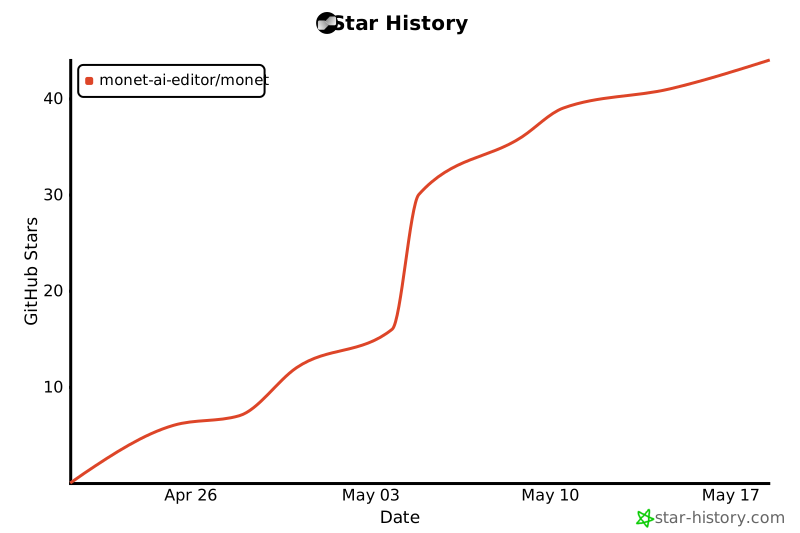
## Star History
## What Monet Is
Monet is a desktop video editor designed for people who want coding agents to work on video directly, not through a fragile bridge into another editor.
The app combines:
- a real timeline and preview
- local project files with autosave and recovery
- an embedded PTY terminal for Claude Code, Codex, and other terminal agents
- deterministic editor tools through `editorctl`, a local API bridge, and MCP
- local transcription with `faster-whisper`
- semantic search powered by embeddings when an OpenAI key is configured
- the same OpenAI key can also be reused for GPT Image 2 generation
Monet is not a chat demo wrapped around a timeline. The terminal, project graph, and editor runtime are the product.
## Features
Agent-native terminal
Claude Code and Codex can run inside Monet's built-in terminal with project-aware context, live editor access, and deterministic commands through editorctl.

Real timeline editing
Import media, scrub, trim, split, move, duplicate, ripple edit, generate captions, add markers, and export from a real multi-track timeline.

Monet Canvas — design alongside the editor
A new artboard-based design surface inside Monet. Ask Claude Code or Codex to draw with Paper.js, simulate physics with Matter.js, or build any HTML/CSS/JS frame. Each rendered frame auto-imports to the video timeline media library, so designs flow straight into your edit. Figma-style click-and-drag panning, inline library bundles (no CDN), and live agent loading animations on each frame.

- **Terminal-first AI workflow** — Use Claude Code or Codex directly in the app instead of relying on a built-in chatbot abstraction
- **Monet Canvas** — design surface with Paper.js + Matter.js + raw HTML modes, live agent loading per frame, auto-export to the video media library, JSON export/import for canvas state, and PNG render for individual frames
- **Deterministic editing tools** — `editorctl`, local API bridge, and MCP entrypoint for inspect/edit/export operations across both timeline and canvas
- **Local transcription** — Uses `faster-whisper` on-device by default, with OpenAI fallback when configured
- **Semantic search** — Search spoken content, metadata, and embedded project context
- **Autosave and recovery** — Reopen current work, recover sessions, and manage multiple saved projects
- **Export pipeline** — 720p, 1080p, and 4K outputs, export progress UI, and one-click `Show in Finder`
- **React video composition** — [Remotion](https://www.remotion.dev) is built in with `PaperCanvas` and `PhysicsScene` compositions plus title cards, lower thirds, kinetic text, audio visualizers — all auto-import as timeline assets
- **Basic motion and compositing** — transforms, opacity, text overlays, chroma key, and layered export baking
- **Privacy-aware telemetry** — Anonymous usage analytics are optional; Sentry handles crash reporting
## Why Monet
Most AI video workflows today still depend on a human driving Premiere, Resolve, or another editor by hand. Even when tools exist, they usually stop at prompts, scripts, or rough cuts.
Monet is built around a different model:
- the project is a structured graph, not an opaque binary
- the terminal is a first-class editing surface
- agents can inspect the live editor state, import media, search transcripts, cut sequences, and export results
The goal is simple: make video editing something coding agents can actually operate.
## Install
### macOS app
Monet is currently macOS-first. Install with one command in your terminal — no Gatekeeper prompts:
```bash
curl -fsSL https://raw.githubusercontent.com/Monet-AI-Editor/Monet/main/install.sh | bash
```
This fetches the latest release ZIP directly (bypassing browser quarantine), installs `Monet.app` to `/Applications`, and launches it.
For a local packaged build from source:
```bash
npm install
npm run dist:mac
```
That produces stable release artifact names like:
- `release/Monet-macOS-arm64.dmg`
- `release/Monet-macOS-arm64.zip`
- `release/mac-arm64/Monet.app`
### Run from source
Requirements:
- Node.js 18+
- `ffmpeg` on your system path
- macOS
- optional telemetry env vars via a local `.env`
Optional local transcription runtime:
```bash
npm run setup:local-transcription
```
Start the app:
```bash
npm install
npm run dev
```
If you want Sentry and Aptabase enabled locally or in release builds, set env vars outside git-tracked files:
```bash
cp .env.example .env
```
Available vars:
- `MONET_SENTRY_DSN`
- `MONET_APTABASE_APP_KEY`
- `VITE_MONET_SENTRY_DSN`
For local use, `VITE_MONET_SENTRY_DSN` can usually match `MONET_SENTRY_DSN`.
## First Run
On first launch, Monet asks for:
- an OpenAI API key for embeddings and semantic search, with the same key reusable for GPT Image 2 generation
- an explicit anonymous usage analytics choice
- nothing else up front
Claude Code and Codex installation help is shown next to the terminal when needed, instead of blocking onboarding.
### Codex sandbox
Monet's embedded terminal automatically launches Codex with `-s danger-full-access` so that `editorctl` can reach the live app API on `localhost:51847`. Without this flag, Codex's default `read-only` sandbox blocks outbound localhost connections and every `editorctl` command falls back to file mode.
This flag is injected by Monet's wrapper script (written to `userData/bin/codex` on each terminal start) and **only applies when Codex is launched from inside Monet**. Codex sessions started from any other terminal are unaffected.
## What Agents Can Do
Through the embedded terminal, `editorctl`, API bridge, and MCP surfaces, agents can operate **both** the video editor and the design canvas.
### Video Editor
- inspect the current project and active sequence
- list assets, tracks, clips, markers, and segments
- import media from disk
- split, trim, move, duplicate, rename, and remove clips
- add tracks and transitions
- generate captions from transcript segments
- create rough cuts and selects from search results
- extract frames and create contact sheets
- run transcription
- generate images with GPT and import to media
- export the active sequence
### Monet Canvas
- create artboard frames in `paperjs`, `matterjs`, or `html` mode
- run any Paper.js script (vector graphics, animation, generative art)
- run any Matter.js scene (2D physics simulations)
- inject inline HTML/CSS/JS for arbitrary web-native designs
- update, rename, resize, or delete individual frames
- export entire canvas state as JSON (full backup) or render any single frame as PNG
- import JSON canvas state, adding to existing frames without overwriting
- auto-import every rendered frame into the video editor's media library
- show live grid loading overlays per frame as the agent works
### Tool Surface
| Surface | Used by | Purpose |
| --- | --- | --- |
| `editorctl` CLI | Claude Code, Codex, terminal scripts | Deterministic timeline + canvas commands inside the embedded terminal |
| MCP server | MCP-aware agent hosts | Same operations exposed as Model Context Protocol tools |
| HTTP API bridge | Anything that can `curl localhost:51847` | Fallback path; auto-discovers a free port if the default is busy |
| `[MONET]` UserPromptSubmit hook | Claude Code | Injects current `activeView` (canvas vs editor) into the agent's context every turn |
### Examples
```bash
# Video editor
editorctl get-state
editorctl search-segments "terminal workflow"
editorctl export /tmp/monet-export.mp4 high 1080p mp4
# Canvas — Paper.js, Matter.js, or raw HTML
editorctl canvas-add-frame "Paper Layout" 1440 900 paperjs
editorctl canvas-add-frame "Glitch" 1280 720 paperjs
editorctl canvas-frames
editorctl canvas-run-paperjs "var c = new Path.Circle({ center: view.center, radius: 100, fillColor: '#7aa2f7' });"
editorctl canvas-render-png ~/Desktop/glitch.png
editorctl canvas-export ~/Desktop/my-canvas.json
```
## Local AI Stack
Monet is intentionally local-first.
- **Transcription**: local `faster-whisper` by default
- **Embeddings**: OpenAI API key required
- **GPT Image 2 generation**: the same OpenAI API key can be reused
- **Export**: local `ffmpeg`
- **Project files**: plain `.aiveproj.json` files plus autosaves
If embeddings or transcripts do not exist yet, Monet should say that directly instead of pretending otherwise.
## Project Model
Monet projects are structured, inspectable, and tool-friendly.
That includes:
- assets
- sequences
- tracks
- clips
- transcript segments
- markers
- captions
- effects
- exports
This is what allows coding agents to operate the editor directly instead of scraping the UI.
## Current Scope
Monet already supports:
- timeline editing
- preview and scrubbing
- autosave / recover
- local transcription
- semantic search foundations
- captions and markers
- terminal-native agent workflows
- packaged macOS app builds
Monet is still evolving in areas like:
- richer color finishing
- deeper motion tooling
- broader codec coverage
- more advanced compositing
- wider platform support beyond macOS
## Privacy
Monet does not collect project content for analytics.
That means:
- no filenames
- no prompts
- no transcript text
- no media content
- no API keys
Anonymous usage analytics are optional. Crash reporting is handled separately.
Telemetry keys are injected from environment variables at build time and are not stored in the repository.
## Build
```bash
npm run build
```
Other useful scripts:
```bash
npm run dev
npm run typecheck
npm run build:cli
npm run build:mcp
npm run dist:mac
```
## Repository Layout
- `src/main` — Electron main process, project store, export, transcription, terminal, updater, analytics
- `src/renderer` — React app UI
- `src/cli` — `editorctl`
- `src/mcp-server` — MCP server entrypoint
- `resources` — screenshots and app icon assets
- `release` — packaged macOS artifacts
## Status
Monet is already usable as a real macOS app, but it is still best described as an early public alpha rather than a finished mass-market editor.
If you want to help shape it:
- open issues
- test the app on real media
- try the terminal agent workflow
- report reliability problems before polish problems
## License
Monet is released under the MIT License.
## Built with
- [xterm.js](https://xtermjs.org) — terminal emulator powering the embedded shell
- [Remotion](https://www.remotion.dev) — React-based video composition and rendering
- [Paper.js](http://paperjs.org) — vector graphics scripting in Monet Canvas (paperjs frames)
- [Matter.js](https://brm.io/matter-js/) — 2D rigid-body physics engine in Monet Canvas (matterjs frames)
- [node-pty](https://github.com/microsoft/node-pty) — pseudo-terminal backend
- [FFmpeg](https://ffmpeg.org) — video export and processing
- [faster-whisper](https://github.com/SYSTRAN/faster-whisper) — local transcription runtime