https://github.com/monnus/practise-copilot
Testing/practising using github copilot from this template
https://github.com/monnus/practise-copilot
Last synced: about 2 months ago
JSON representation
Testing/practising using github copilot from this template
- Host: GitHub
- URL: https://github.com/monnus/practise-copilot
- Owner: Monnus
- License: mit
- Created: 2023-07-22T21:57:12.000Z (almost 3 years ago)
- Default Branch: main
- Last Pushed: 2023-10-01T09:19:17.000Z (over 2 years ago)
- Last Synced: 2025-03-10T17:36:17.534Z (over 1 year ago)
- Language: JavaScript
- Size: 16.6 KB
- Stars: 0
- Watchers: 1
- Forks: 0
- Open Issues: 1
-
Metadata Files:
- Readme: README.md
- License: LICENSE
Awesome Lists containing this project
README
# Code with GitHub Copilot
_GitHub Copilot can help you code by offering autocomplete-style suggestions right in VS Code and Codespaces._
## Step 3: View the GitHub Copilot tab with multiple suggestions
_Nice work! You just used AI code suggestions within a Javascript file by using GitHub Copilot :sparkles:_
Keep in mind that as you continue to use copilot, you may not want some of the suggestions GitHub Copilot offers. GitHub Copilot will show you multiple suggestions in a new tab.
### :keyboard: Activity: Pull the latest code to the Codespace repo.
> **Note**
> Pull MUST be done prior to the next activity.
1. Use the VS Code terminal to pull the latest code:
```
git pull
```
### :keyboard: Activity: Add another Javascript method and view all suggestions
1. From inside the codespace in the VS Code explorer window, create a new file. Note: If you closed the Codespace from above please open it back up or create a new Codespace.
2. Name the file `member.js`
3. In the `member.js` file, type the following function header.
```
function skillsMember()
```
4. Stop typing and view the Copilot suggestion by hovering over the red squiggly and select the `...`
5. Click `Open Completions Panel`. Copilot will synthesize around 10 different code suggestions. You should see something like this:
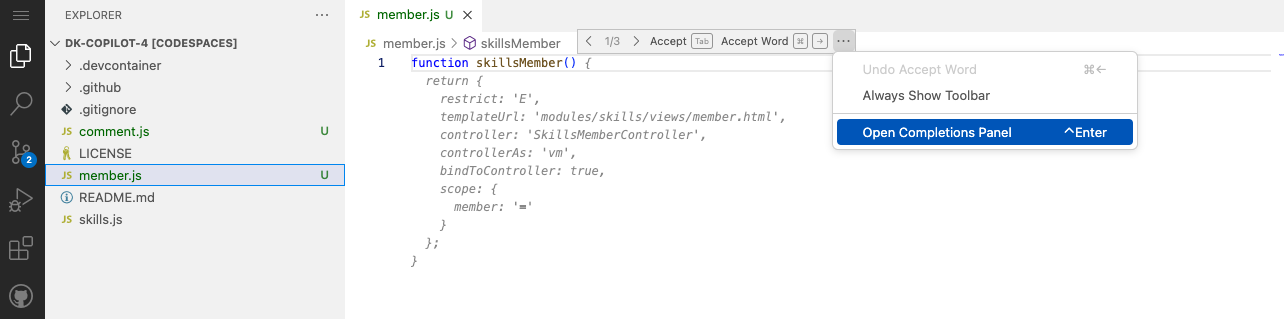
6. Find a solution you like and click `Accept Solution`.
7. Your `member.js` file will be updated with your solution.
### :keyboard: Activity: Push code to your repository from the codespace
1. Use the VS Code terminal to add the `member.js` file to the repository:
```
git add member.js
```
2. Next from the VS Code terminal stage and commit the changes to the repository:
```
git commit -m "Copilot second commit"
```
3. Finally from the VS Code terminal push to code to the repository:
```
git push
```
**Wait about 60 seconds then refresh your repository landing page for the next step.**
---
Get help: [Post in our discussion board](https://github.com/skills/.github/discussions) • [Review the GitHub status page](https://www.githubstatus.com/)
© 2023 GitHub • [Code of Conduct](https://www.contributor-covenant.org/version/2/1/code_of_conduct/code_of_conduct.md) • [MIT License](https://gh.io/mit)