https://github.com/mor10/wptv-redux
Central repo for the WPTV Redux project started at WordCamp Europe 2016 Contributor Day. See Readme.md for full details.
https://github.com/mor10/wptv-redux
Last synced: 4 months ago
JSON representation
Central repo for the WPTV Redux project started at WordCamp Europe 2016 Contributor Day. See Readme.md for full details.
- Host: GitHub
- URL: https://github.com/mor10/wptv-redux
- Owner: mor10
- Created: 2016-07-28T16:20:42.000Z (almost 10 years ago)
- Default Branch: master
- Last Pushed: 2016-07-28T17:48:23.000Z (almost 10 years ago)
- Last Synced: 2025-01-02T01:46:40.672Z (over 1 year ago)
- Homepage:
- Size: 5.86 KB
- Stars: 1
- Watchers: 6
- Forks: 0
- Open Issues: 0
-
Metadata Files:
- Readme: README.md
Awesome Lists containing this project
README
# WPTV - Redux
At the WordCamp Europe 2016 contributor day, a group of WPTV contributors got together to discuss the future of the WPTV site. The major concerns were a) the site is outdated, and b) the site is not open sourced preventing community contribution.
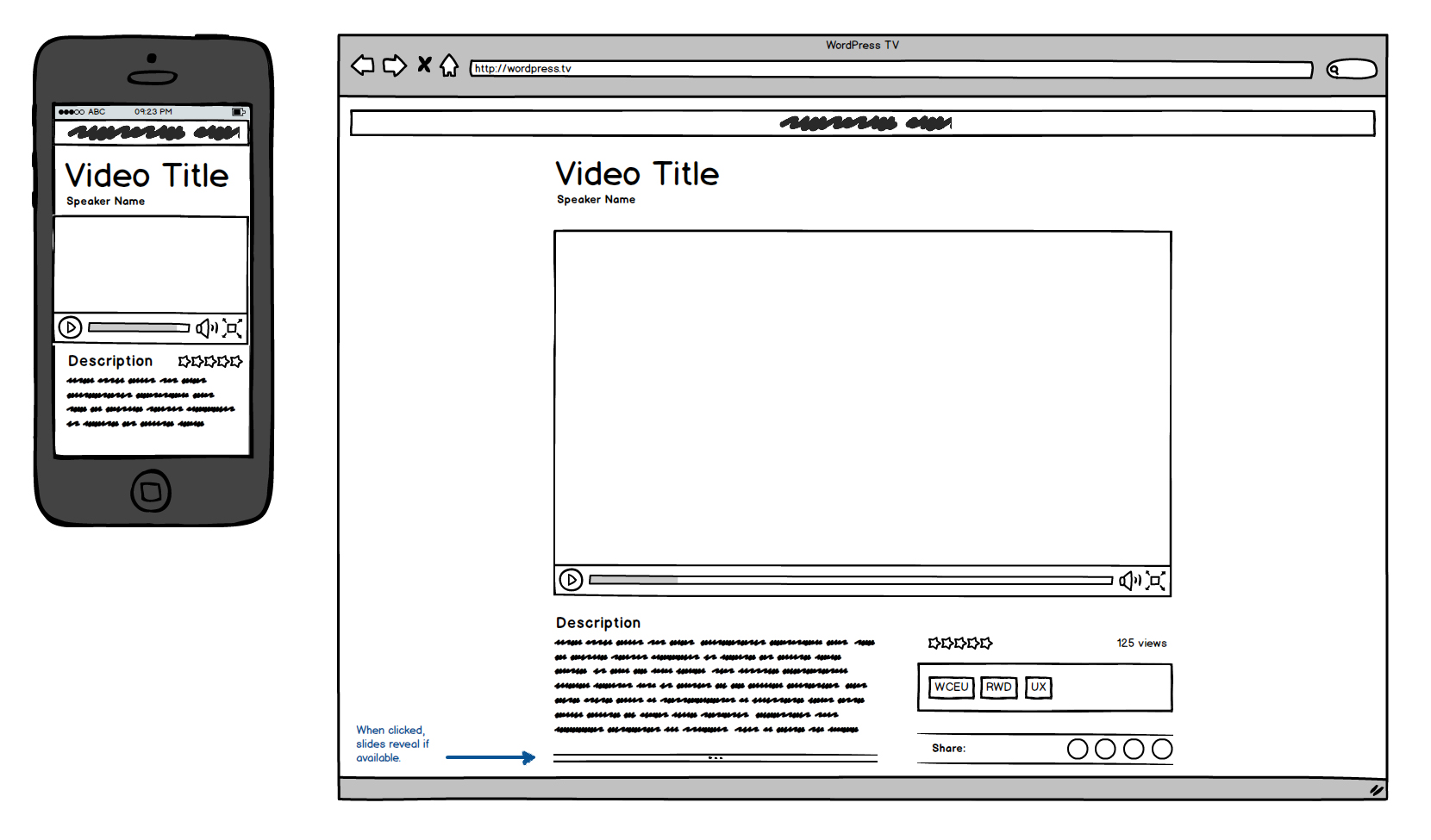
(In-browser mockup for WPTV Redux. Full mockup is appended at the bottom of this document.)
To solve these two issues, and introduce new features into the current experience, the group drafted a proposal for a redux of the project, starting with an open source framework. The proposal sets the following parameters:
- WPTV hosted on an open server with source code available for contribution (through Trac or Github)
- Videos hosted on YouTube (with VideoPress / old WPTV as backup) to leverage YouTube interactive features and extend the reach of official WordPress videos through YouTube viral sharing
- Individual video posts generated and cached from the YouTube API to streamline publishing process
- Leverage existing and custom taxonomies for better organization
To kickstart the process, the group created a priority mockup and wireframe (Balsamiq version available at the bottom of this article). Moving forward, an MVP will be built to test and show the viability of using the YouTube API is a baseline service for the site.
## Proposed publishing workflow
A primary goal of the WPTV Redux project is to leverage the YouTube API to simplify the video publishing workflow and leverage the interactive features offered by the service, in particular the linked transcript that allows viewers to click on any sentence in a transcript to jump to that section within the video. The proposed publishing workflow for the new site will be something like this:
1. Upload video to YouTube
2. Configure video title, description, YouTube taxonomies, etc.
3. Configure captions and translations if available
4. Publish video on YouTube
5. Duplicate video on WPTV server (VideoPress) for backup
6. Create new post on WPTV referencing the YouTube ID
7. WPTV pulls in video, description, and linked transcript
8. Optional: WPTV pulls and maps YouTube taxonomies to WPTV taxonomies
9. Configure WPTV taxonomies (speaker, date, WordCamp, topics, etc)
10. Publish WPTV post
When the WPTV post is published, the YouTube API data is cached on WPTV until the data is updated. This reduced the load on the API while allowing rapid updates. Changes to video title, description, captions, or transcripts on YouTube should be followed by an update of the WPTV post, at which time the API will be re-queried and cached to hold the updated data.
## MVP Scope
To move the process forward, the suggestion is to make a proof-of-concept MVP in plain HTML/CSS/JS that leverages the YouTube API for all information. The proof-of-concept should include at least two but no more than five interconnected pages, and focusses on the single-video view only. The WPTV team has done extensive work on overall site AI which can be used as a basis for further exploration once the decision has been made to revamp the project.
## Breakdown
See full mockup below for visual breakdown. The content hierarchy of the MVP is proposed as follows:
1. Video Title (post title)
2. Speaker name (name taxonomy)
3. Video (YouTube iframe based on ID in custom field)
4. Description (post content generated from cached YouTube video description)
5. Rating (rating taxonomy)
6. Slides (Hidden by default, opened on button click. Optional custom content area featuring oEmbed / similar slide deck when available)
7. Categories / Tags (standard WP taxonomies)
8. Event name (event taxonomy)
9. Date (post date)
10. Languages (language taxonomy split between spoken and available transcripts)
11. Transcript (Progressive reveal. Generated from YouTube API to show transcripts with in-video links)
12. Comments (WP comments)
13. Share (some sort of sharing feature)
14. Related videos (related based on categories / tags)
15. From the same event (random videos from same event)
16. Latest videos (self-explanatory)
## Contribution
This repo is open for contributions. Submit your pull requests based on the hierarchical structure above and mockups below. When contributing, please follow these guidelines (for now):
- MVP is an MVP. That means wireframing, structure, and content, no fancy graphics.
- No CSS frameworks (Bootstrap, Foundation, etc)
- No JS frameworks (React, Angular, whatever)
- Use Rian Rietveld's WordPress, State of the Accessibility as baseline (it has transcripts): https://www.youtube.com/watch?v=oqUUrhF6wIE
Why these restrictions? Because this is an MVP. We are proving the concept of a responsive WPTV video page based on the YouTube API. Once the concept has been proven, we'll build a WordPress-based MVP, and at that point we can discuss frameworks and REST APIs and all that good stuff. For now we're just building a functional prototype.
## The Elephant in the Room
"YouTube you say... That doesn't sound very Open Source to me."
Yes, you are right. Relying on YouTube for WordPress videos is problematic in an Open Source sense. That's why we're not going to rely on YouTube. Rather we'll use YouTube as a go-between to solve some important and pressing issues:
Only 5% of WordPress.tv videos have captions. That is a huge loss, and a huge opportunity, for the WordPress community. YouTube has excellent captioning and translation features that can be accessed by any YouTube user. And at some point in the (distant) future, the auto-captioning will be good enough to be relied on in a pinch.
More importantly, YouTube generates timecoded transcripts from the captions that link directly into the video. Click on a sentence in the transcript, jump to that section within the video.
In the WPTV project, we can leverage this feature in several different ways:
- Simply use the transcript feature as is and embed it into the WPTV site
- Use the exported transcript file combined with some JS to control the embedded YouTube video
- Use the exported transcript file combined with some JS to control the embedded WPTV (VideoPress) video
Once a video is published and the data pulled into WPTV, we can technically sever ties with YouTube and serve up locally hosted content (cached data + VideoPress video). Relying on YouTube just simplifies the process and provides a more future-friendly, responsive, and accessible experience for the visitor.
In this scenario, YouTube becomes an extension of WPTV that provides new features and a broader reach by allowing YouTube users to discover WPTV content and WPTV content to be properly indexed in search engines thanks to complete transcripts. It's a win-win situation.
## Full mockup
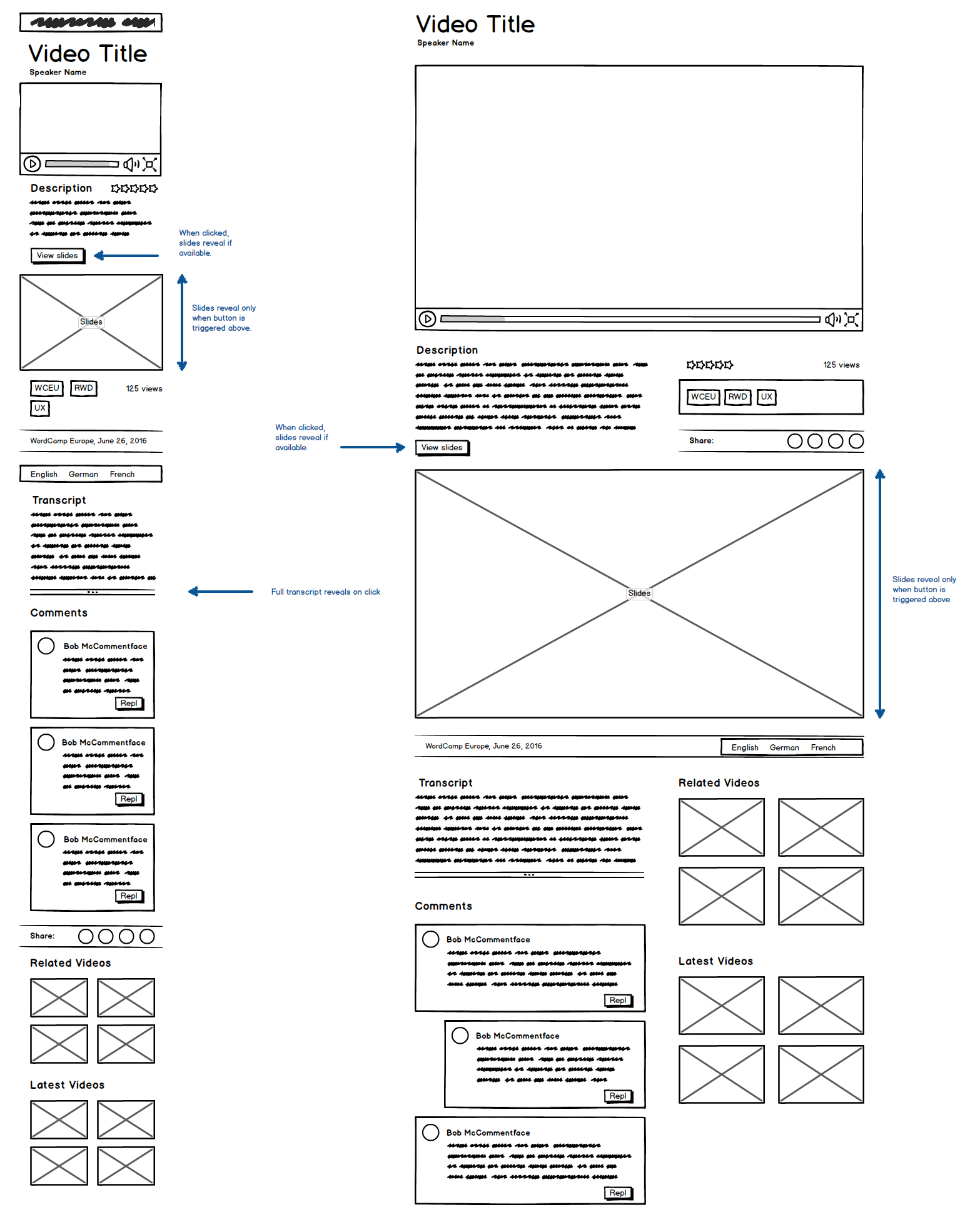
Full hierarchical mockup for WPTV Redux