https://github.com/mor4eza/badgesegments
A customizable Segment View with Badges
https://github.com/mor4eza/badgesegments
Last synced: 8 months ago
JSON representation
A customizable Segment View with Badges
- Host: GitHub
- URL: https://github.com/mor4eza/badgesegments
- Owner: Mor4eza
- License: mit
- Created: 2019-09-22T10:42:43.000Z (almost 7 years ago)
- Default Branch: master
- Last Pushed: 2019-09-22T13:43:31.000Z (almost 7 years ago)
- Last Synced: 2025-09-14T17:48:09.384Z (10 months ago)
- Language: Swift
- Size: 94.7 KB
- Stars: 2
- Watchers: 1
- Forks: 1
- Open Issues: 0
-
Metadata Files:
- Readme: README.md
- License: LICENSE
Awesome Lists containing this project
README
# BadgeSegments
[](https://travis-ci.org/mor4eza/BadgeSegments)
[](https://cocoapods.org/pods/BadgeSegments)
[](https://cocoapods.org/pods/BadgeSegments)
[](https://cocoapods.org/pods/BadgeSegments)
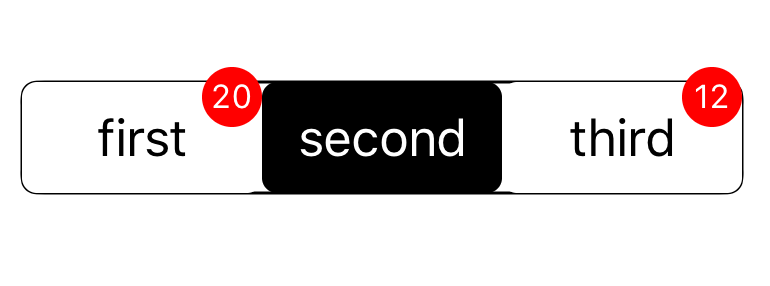
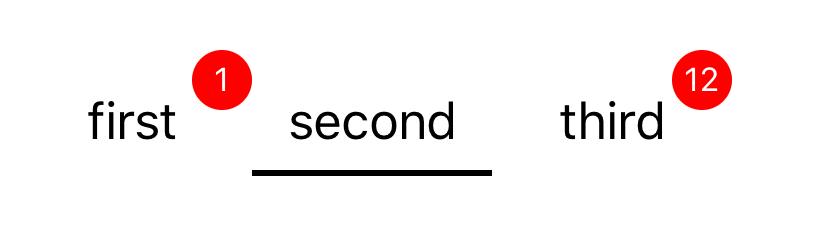
## ScreenShots
**standard**
**Underlined**
## Example
To run the example project, clone the repo, and run `pod install` from the Example directory first.
## Requirements
- Swift => 5
- iOS => 10
## Installation
**Cocoapods**
BadgeSegments is available through [CocoaPods](https://cocoapods.org). To install
it, simply add the following line to your Podfile:
```ruby
pod 'BadgeSegments'
```
**Manual**
simply copy classes folder to your project directory
# How to Use
add a UIView to your view Controller and sub class it from BadgeSegments class
```swift
@IBOutlet weak var badgeSegment: BadgeSegments!
override func viewDidLoad() {
super.viewDidLoad()
let items = [SegmentItem(title: "first",isSelected: false,badgeNumber: 20),
SegmentItem(title: "second",isSelected: true),
SegmentItem(title: "third",isSelected: false,badgeNumber: 12)]
badgeSegment.appearence = .standard
badgeSegment.delegate = self
badgeSegment.setUpSegments(with: items)
}
```
**Delegate**
```swift
class ViewController: UIViewController, BadgeSegmentDelegate {
func didSelectSegment(with index: Int) {
print(index)
}
}
```
**Change Values**
```swift
badgeSegment.setTitle(inIndex: 0, title: "changed")
badgeSegment.setSelected(inIndex: 2)
badgeSegment.setBadgeNumber(inIndex: 1, badgeNum: 12)
```
# TO Do
- [ ] add animation
- [ ] more default appearences
- [ ] support images
- [ ] customize badge view
- [ ] add UITest and UnitTest
# Made with Love in 🇮🇷
Morteza Gharedaghi: Morteza.ghrdi@gmail.com
feel free to create issue or open a pull request ☺️
# Used in
send your application name to me,if you used this library
- Wink App
## License
BadgeSegments is available under the MIT license. See the LICENSE file for more info.