https://github.com/mora9715/haproxy_ddos_protector
DDoS protection system PoC for HaProxy
https://github.com/mora9715/haproxy_ddos_protector
ddos ddos-protection haproxy lua
Last synced: 3 months ago
JSON representation
DDoS protection system PoC for HaProxy
- Host: GitHub
- URL: https://github.com/mora9715/haproxy_ddos_protector
- Owner: mora9715
- License: mit
- Created: 2021-06-06T17:25:44.000Z (about 5 years ago)
- Default Branch: master
- Last Pushed: 2021-06-14T20:00:19.000Z (about 5 years ago)
- Last Synced: 2024-05-27T16:36:47.399Z (about 2 years ago)
- Topics: ddos, ddos-protection, haproxy, lua
- Language: Lua
- Homepage:
- Size: 69.3 KB
- Stars: 20
- Watchers: 3
- Forks: 6
- Open Issues: 0
-
Metadata Files:
- Readme: README.MD
- License: LICENSE.md
Awesome Lists containing this project
README
## HaProxy DDoS protection system PoC
The system provides functionality to protect certain (or all) resources on HaProxy from L7 DDoS attacks.
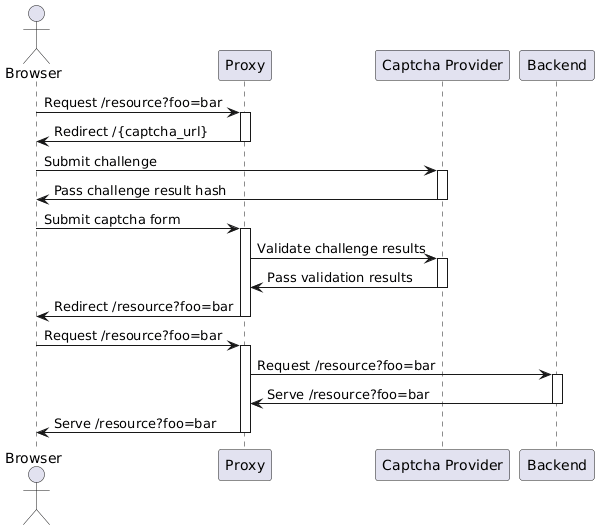
It works by requiring a user to have a specific cookie issued after successful captcha completion. If a user does not have the cookie, he gets redirected to a special captcha page.
It is by no means a cure for all ills, but should help you mitigate a moderate DDoS attack without disrupting the service.
#### How it works
#### How to test
- export hcaptcha sitekey and secret:
```bash
export HCAPTCHA_SITEKEY=xxxXXxxx
export HCAPTCHA_SECRET=xxxXXxxx
```
They can be obtained after creating a free account on https://www.hcaptcha.com/
- run docker compose:
```bash
docker compose up
```
- visit *http://127.0.0.1*
For demostration purposes DDoS-protection mode was enabled by default.
#### Installation
Before installing the tool, ensure that HaProxy is built with Lua support.
- Copy [scripts](src/scripts) to a folder accessible for HaProxy
- Copy haproxy config and make sure that `lua-load` directive contains absolute path to [register.lua](src/scripts/register.lua)
- Copy [libs](src/libs) to a path where Lua looks for modules.
- Copy [ddos-cli](src/cli/ddos-cli) to any convenient path.
- Create `/usr/local/etc/haproxy/domains_under_ddos.txt` with write permissions for HaProxy (feel free to change the map file path, update the HaProxy config correspondingly)
#### CLI
The system comes with CLI. It can be used to manage global and per-domain protection.
Ensure that stat socket is configured in HaProxy for CLI support.
```bash
Usage: ddos-cli [options]
Command line interface to manage per-domain and global DDoS protection.
optional arguments:
-h, --help Show this help message and exit.
Commands:
Global management:
ddos-cli global status Show status of global server ddos mode.
ddos-cli global enable Enable global ddos mode.
ddos-cli global disable Disable global ddos mode.
Domain management:
ddos-cli domain list List all domains with ddos mode on.
ddos-cli domain status Get ddos mode status for a domain.
ddos-cli domain enable Enable ddos mode for a domain.
ddos-cli domain disable Disable ddos mode for a domain.
```
#### TO DO
- [x] Add CLI
- [x] Organize lua dependencies
- [x] Make per-user cookie secrets
- [ ] Add logging to CLI