https://github.com/morewings/next-card
Business card (aka link in bio) website template
https://github.com/morewings/next-card
business-card link-in-bio link-in-bio-template link-instagram nextjs
Last synced: over 1 year ago
JSON representation
Business card (aka link in bio) website template
- Host: GitHub
- URL: https://github.com/morewings/next-card
- Owner: morewings
- License: mit
- Created: 2025-01-29T18:25:08.000Z (over 1 year ago)
- Default Branch: master
- Last Pushed: 2025-04-01T06:39:10.000Z (over 1 year ago)
- Last Synced: 2025-04-01T07:35:23.773Z (over 1 year ago)
- Topics: business-card, link-in-bio, link-in-bio-template, link-instagram, nextjs
- Language: TypeScript
- Homepage: https://morewings.github.io/next-card/
- Size: 12.8 MB
- Stars: 7
- Watchers: 1
- Forks: 0
- Open Issues: 5
-
Metadata Files:
- Readme: README.md
- License: LICENSE
Awesome Lists containing this project
README
[](https://github.com/morewings/next-card/actions/workflows/pages.yml)
# Next Card
[](#)
Jumpstart your online presence with this pre-built website template. Easily create a professional-looking business card or link-in-bio page to share everything you want your audience to know.
Demo: [morewings.github.io/next-card/](https://morewings.github.io/next-card/)
## Quick start
First step, click the 'Use this template' button. It will offer you to clone the repository to your account.
Second, change `./next.config.js` to contain your chosen repository name. This is needed for GitHub pages or other non-index page deployment.
```js
/** @type {import('next').NextConfig} */
module.exports = {
// ...
basePath: '/your-repository',
};
```
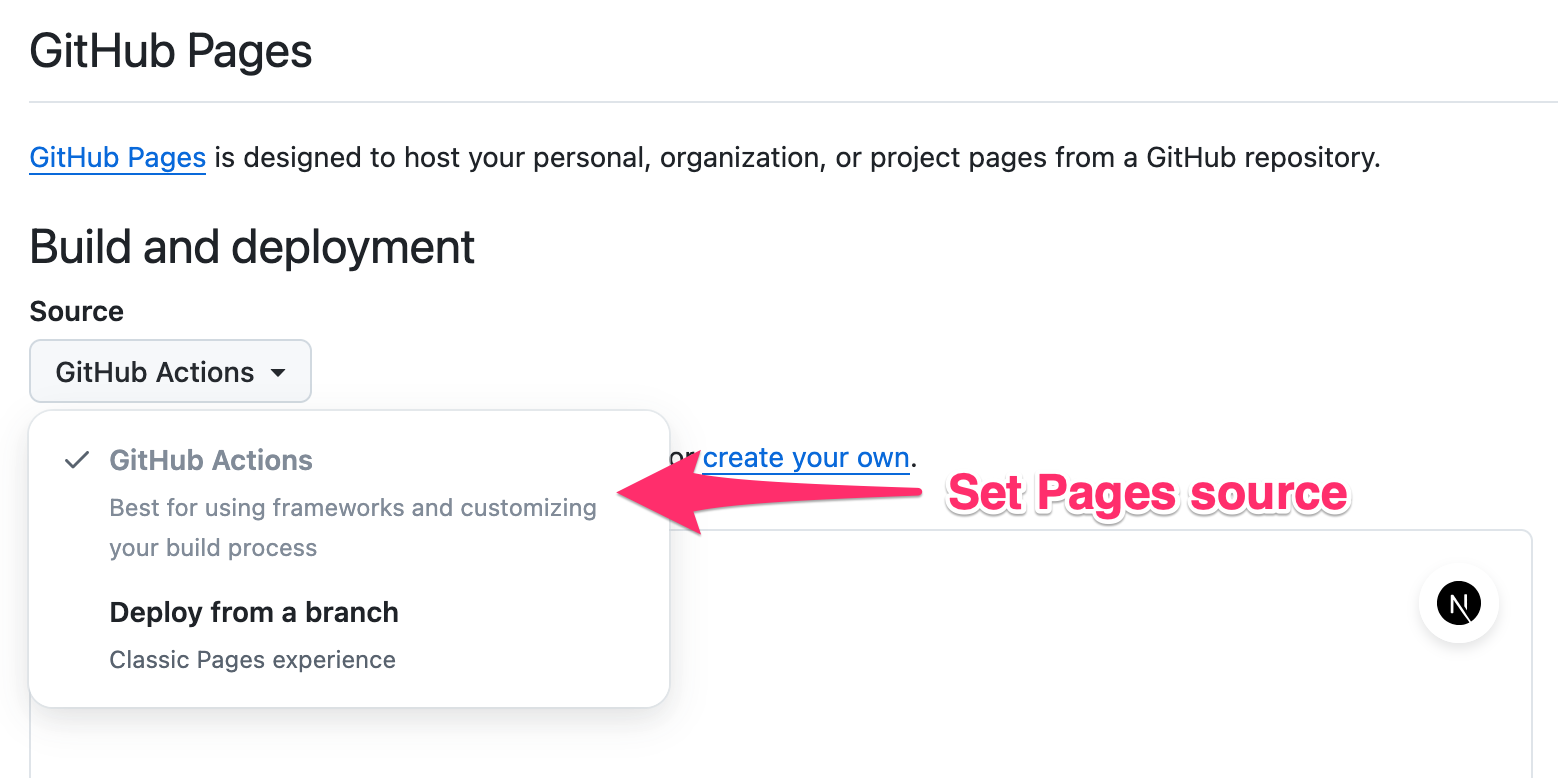
Go to `Settings > Pages` section and enable deployment via GitHub action.
### Fill your info
Now you'll have to replace `./card-image.jpg` with your picture and enter your data into `./config.ts`.
Here are the available settings:
- `title`: Set your or company name.
- `bio`: Add a brief description to display below the name.
- `background`: Select a background style. There are 12 different styles available: fresh, strict, bold, gradient, rainbow, rastafari, sunset, elegant,
selenium, evening, optimistic, mesh. See below.
- `cardImage`: Set the image to be used at the header of the card.
- `gaId`: Set your Google Analytics ID to enable tracking. More later.
- `shareTitle`: Localize the sharing text.
```ts
import image from '@/card-image.jpg';
export const config: Config = {
title: 'Patrick Bateman',
bio: 'Specialist in mergers and acquisitions',
background: 'gradient',
cardImage: image,
gaId: 'G-XXXXXXXXX',
shareTitle: 'Share link',
// ...
}
```
### Add contact links
In the same file, `./config.ts` fill `headerLinks` array with your contact info links and set up your hero links at the `mainLinks` section of the config.
Each entry consists of `title`: the display name of the link; `id`: a unique identifier for the link; `url`: The URL the link points to; `icon`: an icon to be displayed with the link. You can use any icon from the [Phosphor icons collection](https://phosphoricons.com/).
```ts
import {
Envelope,
GithubLogo,
} from '@phosphor-icons/react/dist/ssr';
export const config: Config = {
// ...
headerLinks: [
{
title: 'Email',
id: 'email',
url: 'mailto:user@example.com',
icon: Envelope,
},
],
mainLinks: [
{
id: 'github',
title: 'GitHub',
url: 'https://github.com/user-name',
icon: GithubLogo,
},
],
}
```
### Attach vCard file
A vCard, also known as a VCF (Virtual Contact File), serves as a standardized file format for electronic business cards. This file can be attached to your link in bio, allowing visitors to easily import your contact info into their smartphones, Outlook, and other calendar applications without having to copy/paste. You can configure this at `./config.ts`. You can also enable `isOrganization` to display contact as a company.
```ts
export const config: Config = {
// ...
vCard: {
firstName: 'Patrick',
lastName: 'Bateman',
organization: 'Pierce & Pierce',
title: 'Vice President',
birthday: new Date(1961, 9, 23),
workPhone: '+1 212 555 6342',
email: 'patrick@psycho.us',
// isOrganization: true,
},
}
```
### Deploy website
Commit your changes, push to the main branch and wait until `.github/workflows/pages.yml` is done. Your Next Card is available at `https://.github.io//`.
## Set up analytics
Next Card supports Google Analytics. You just need to set up your property ID in config.
There are two custom events to track: `link_click` and `contact_click`. Each event reports link title as a `value` parameter.
## Custom domain
You can [set up a custom domain](https://docs.github.com/en/pages/configuring-a-custom-domain-for-your-github-pages-site) for your card.
Don't forget to remove `basePath` property from the `./next.config.js`.
## Font support
Next card uses [Rubik font](https://fonts.google.com/specimen/Rubik). By default, it bundles with `latin` subset. You can enable additional subsets at `app/layout.tsx`.
```ts
import {Rubik} from 'next/font/google';
const rubik = Rubik({
subsets: ['latin', 'cyrillic'], // <==
display: 'swap',
});
```
## Available themes
Background example
Preview link

Fresh

Strict

bold

Gradient (Animated)

Rainbow (Animated)

Rastafari

Sunset

Selenium

Evening

Optimistic

Elegant

Mesh