https://github.com/morphx666/diyokee
DJ mixing webapp with streaming support
https://github.com/morphx666/diyokee
audio-player blazor-application dj-mixer mixing-software
Last synced: 9 months ago
JSON representation
DJ mixing webapp with streaming support
- Host: GitHub
- URL: https://github.com/morphx666/diyokee
- Owner: morphx666
- License: mit
- Created: 2025-03-29T16:23:06.000Z (about 1 year ago)
- Default Branch: master
- Last Pushed: 2025-07-26T23:51:47.000Z (11 months ago)
- Last Synced: 2025-08-30T23:50:03.747Z (10 months ago)
- Topics: audio-player, blazor-application, dj-mixer, mixing-software
- Language: CSS
- Homepage:
- Size: 12.2 MB
- Stars: 8
- Watchers: 1
- Forks: 0
- Open Issues: 0
-
Metadata Files:
- Readme: README.md
- License: LICENSE.txt
Awesome Lists containing this project
README
# Diyokee
A work in progress, DJ mixing webapp with streaming support, that runs on your browser... and before you ask, the answer is: why not?
[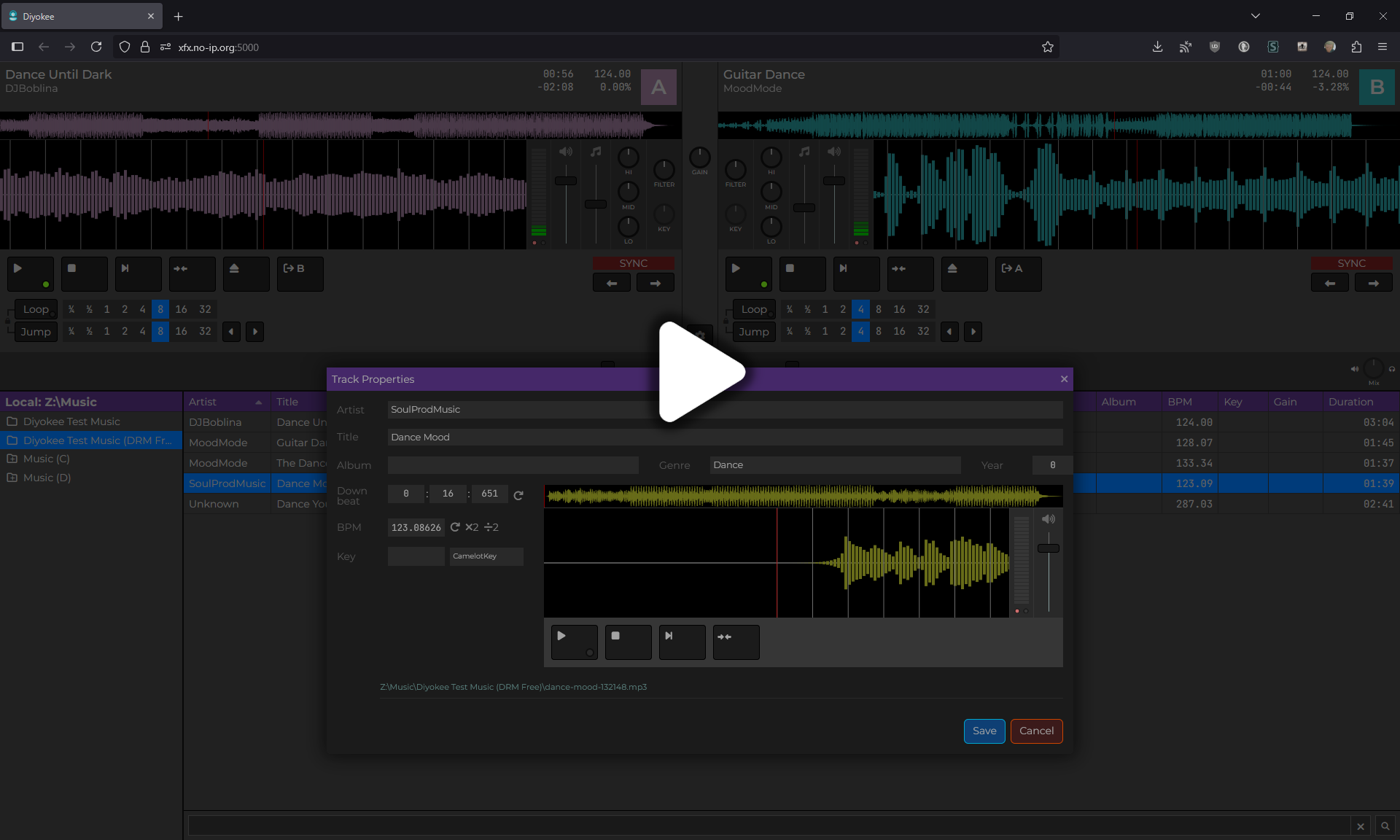](https://xfx.net/ftp/diyokee-releases/diyokee-v1.mp4)
*the video was created using an older version than the one shown in the screenshot above
## App settings
To access the settings dialog, press the `Ctrl+Alt+S` key on your keyboard.
Some settings cannot be yet configured by the Settings dialog, but you can edit the `settings.json` file manually.
## Basic usage
- To load a track into a player, drag & drop the track (by dragging the artist name) or select the track and click the  button.
You can also use `Ctrl+Alt+A` or `Ctrl+Alt+B` keys on your keyboard to load a track into the A or B player, respectively.
- Click the  button to start playing.
- Click the  button to stop playback and move to the beginning of the track.
- Click the  button to define a cue point. At this moment, only one cue point can be defined, and it will always snap to the nearest beat marker.
- Click the  button to jump to the cue point. Leave the button pressed to temporarily play the track from the cue point.
- Click the  button to sync the track to the other player
- Use the  fader to change the volume.
- Use the  fader to change the tempo (BPM).
- Use the Lo/Mid/Hi knobs to change the track's equalization.
Right-click over the Eq control to [display a menu with several presets](http:/xfx.net/ftp/diyokee-releases/diyokee-switch-eq-profiles.mp4) from popular mixing consoles.
- Use the fader between the two players to cross-fade between them.
- Faders and knobs can be used by clicking and dragging or by moving the mouse over them and using the scroll wheel.
- Use the  and
and  buttons under the SYNC section to perform small tempo adjustments.
- You can click and drag over both waveforms (synced and full) to change the playback position.
- Search for files in the textbox at the bottom of the files list. The search is recursive.
- Double-click a track in the files list to open the Track Properties dialog.

## Notable missing features
- A fancy screen for remote connections to the stream
- Searching is quite limited and a bit buggy
- Audio routing is partially implemented but not fully usable
- Key recognition/matching/adustments are not yet supported
- State is not preserved, so if you refresh the page, the backend state is not reflected into the UI
- ...and many more
## Releases
Platform|Architecture|Status|Download|Release Date
---|---|---|:---:|---
Windows|x64|Working|[ ](https://xfx.net/ftp/diyokee-releases/diyokee-win-x64.zip)|2025-07-26
Linux|x64|Working[^1]|[](https://xfx.net/ftp/diyokee-releases/diyokee-linux-x64.zip)|2025-07-26
Linux|Arm|Working[^1]|[](https://xfx.net/ftp/diyokee-releases/diyokee-linux-arm64.zip)|2025-07-26
MacOS|x64|Working[^2]|[](https://xfx.net/ftp/diyokee-releases/diyokee-osx-x64.zip)|2025-07-26
MacOS|Arm|Not Tested|[](https://xfx.net/ftp/diyokee-releases/diyokee-osx-arm64.zip)|2025-04-03
## Acknowledgments
This project wouldn't have been possible without the following:
- [BASS](https://www.un4seen.com/bass.html) audio library
- [AspNetCore.SassCompiler](https://github.com/koenvzeijl/AspNetCore.SassCompiler)
- [BlazorExtensions.Canvas](https://github.com/BlazorExtensions/Canvas)
- [Icons8](https://icons8.com/)
- [Font Awesome](https://fontawesome.com/)
[^1]: File attributes may be lost when unzipping the app under Linux-like systems, including macOS.
Use `chmod +x` to set the executable bit on the `diyokee-server` binary.
[^2]: Before running the program, open a Terminal and change to the directory where you unzipped the file (usually `~/Downloads/diyokee-osx-x64`).
Next, set the executable attribute on the `pre-run.sh` file: `chmod +x pre-run.sh`.
Then, run the script: `./pre-run.sh`.
Now, you can launch the app by double-clicking the `Diyokee-server` file in the Finder or by running `./Diyokee-server` in the Terminal.