https://github.com/moshfeu/dictation-tel-bot
Use Telegram Bot to create a diction game
https://github.com/moshfeu/dictation-tel-bot
bot chat-bot firebase nodejs telegram-bot typescript
Last synced: about 2 months ago
JSON representation
Use Telegram Bot to create a diction game
- Host: GitHub
- URL: https://github.com/moshfeu/dictation-tel-bot
- Owner: moshfeu
- License: mit
- Created: 2018-01-10T20:51:36.000Z (over 8 years ago)
- Default Branch: master
- Last Pushed: 2018-01-27T20:53:52.000Z (over 8 years ago)
- Last Synced: 2025-03-26T05:46:45.477Z (over 1 year ago)
- Topics: bot, chat-bot, firebase, nodejs, telegram-bot, typescript
- Language: TypeScript
- Homepage:
- Size: 33.2 KB
- Stars: 1
- Watchers: 0
- Forks: 0
- Open Issues: 0
-
Metadata Files:
- Readme: README.md
- License: LICENSE
Awesome Lists containing this project
README
Create a dictation game on Telegram using Telegram Bot and firebase on node.js
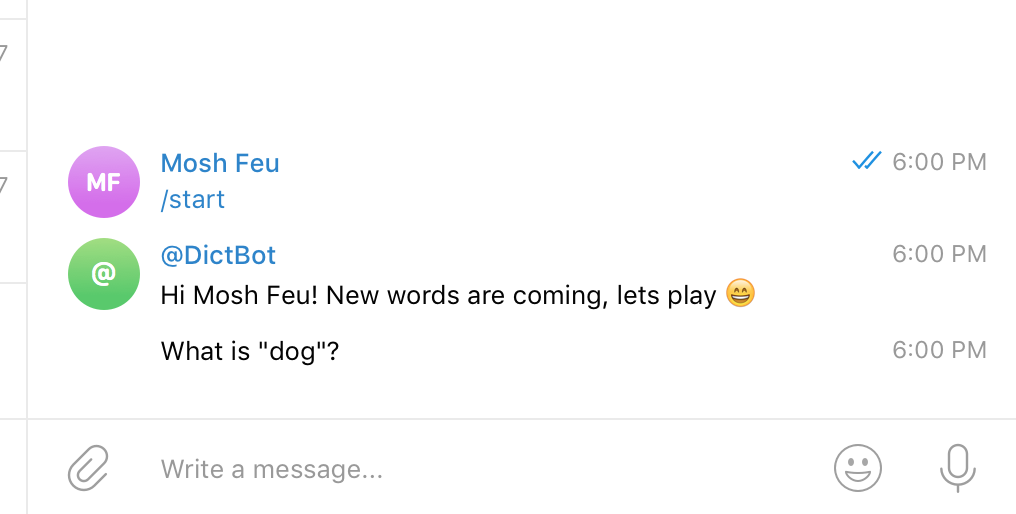
Thanks to [@yagop](https://github.com/yagop) for the great package [node-telegram-bot-api](https://github.com/yagop/node-telegram-bot-api)
# Installation
```
typings install --global dt~es6-shim
```
If your code is public and you care about sensitive data, please read the [`build`](#build) section.
1. create `config` folder (at root)
2. put `serviceAccountKey.json` from [firebase](https://firebase.google.com/docs/admin/setup#add_firebase_to_your_app).
3. add a node in firebase **realtime** called `words`, like this:
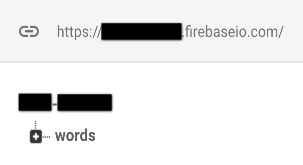
4. create `config.json`. it should contains this props:
```
{
"botToken": "bot api from BotFather",
"firebaseDatabaseUrl": "https://{database_name}.firebaseio.com"
}
```
- `botToken` - from [`botFather`](https://core.telegram.org/bots#6-botfather)
- `firebaseDatabaseURL` - from [`firebase` dashboard](https://firebase.google.com/docs/database/web/start)
5. add texts.json to `config` folder, it should contains:
```
{
"compliments": [
"good",
"http://yoursite.com/audio.mp3",
"http://yoursite.com/audio.ogg",
"http://yoursite.com/image.gif",
], // array of strings. support texts and url of .gif, .mp3 and .ogg
"corrections": []
}
```
# Usage
Bot [commands](https://core.telegram.org/bots#global-commands):
1. `/start` start the bot.
2. `/test` start the test.
3. `/add` add words to the game.
4. `/list` review and delete words from the list.
# Build
If your code is not public, just remove the `config` folder from `.gitignore` so it will push all of the files to the server.
Otherwise, make sure that `env` will contains the following variables:
- appURL
- botToken
- firebaseConfig
- firebaseDatabaseURL
- prod -> `true`
And read the next section
*Some facts:*
- I'm using _Heroku_ to host my app.
- The messages about right/wrong answer can be configured in `config/texts.json`.
- We want to allow people to use thier own files (such as `.gif` etc.)
- Therefore:
- The file contents shouldn't be public
- We are storing the data in `env` variable.
- We need to update `env` from the `texts.json` file.
**Conclution**
`build/pre-push.js` push `texts.json` content as `env` param.
*If you are using defferent hosting than _Heroku_, modify this file so it will push the texts to your server*
*TODO*
1. Add more commands (`/delete` etc.).
2. Add tests