https://github.com/mossipcams/autosnooze
Temporarily pause Home Assistant automations with automatic re-enabling
https://github.com/mossipcams/autosnooze
automation custom-integration hacs home-assistant
Last synced: 5 months ago
JSON representation
Temporarily pause Home Assistant automations with automatic re-enabling
- Host: GitHub
- URL: https://github.com/mossipcams/autosnooze
- Owner: mossipcams
- License: mit
- Created: 2025-12-15T19:45:24.000Z (6 months ago)
- Default Branch: main
- Last Pushed: 2026-01-20T02:21:27.000Z (5 months ago)
- Last Synced: 2026-01-20T08:59:16.344Z (5 months ago)
- Topics: automation, custom-integration, hacs, home-assistant
- Language: JavaScript
- Homepage:
- Size: 1.8 MB
- Stars: 26
- Watchers: 1
- Forks: 0
- Open Issues: 0
-
Metadata Files:
- Readme: README.md
- Changelog: CHANGELOG.md
- License: LICENSE
Awesome Lists containing this project
README
# AutoSnooze
[](https://github.com/hacs/integration)
[](https://github.com/mossipcams/autosnooze/releases)

[](https://github.com/mossipcams/autosnooze/actions)
[](https://www.home-assistant.io/)
**Temporarily pause Home Assistant automations with automatic re-enabling.**
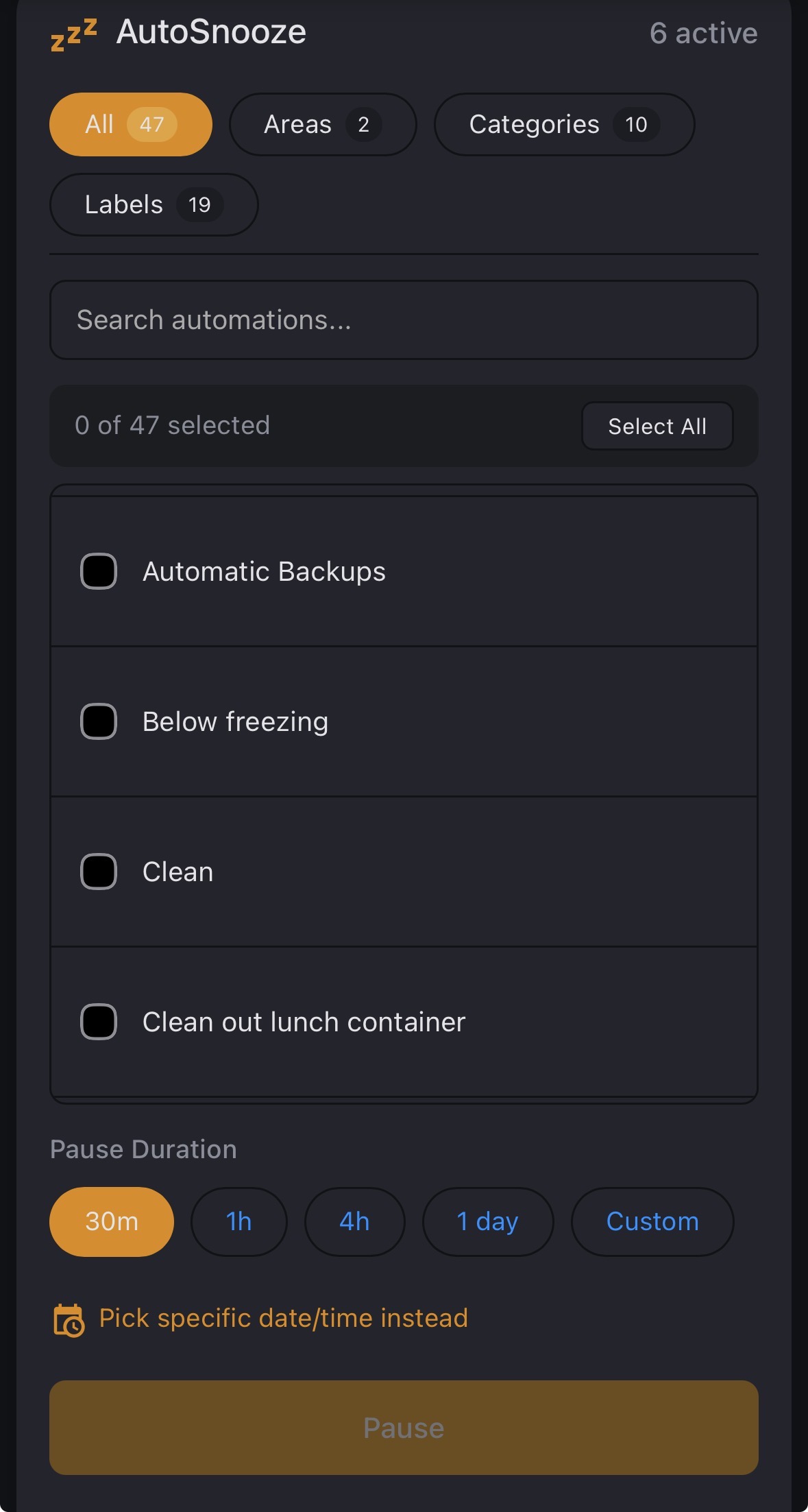
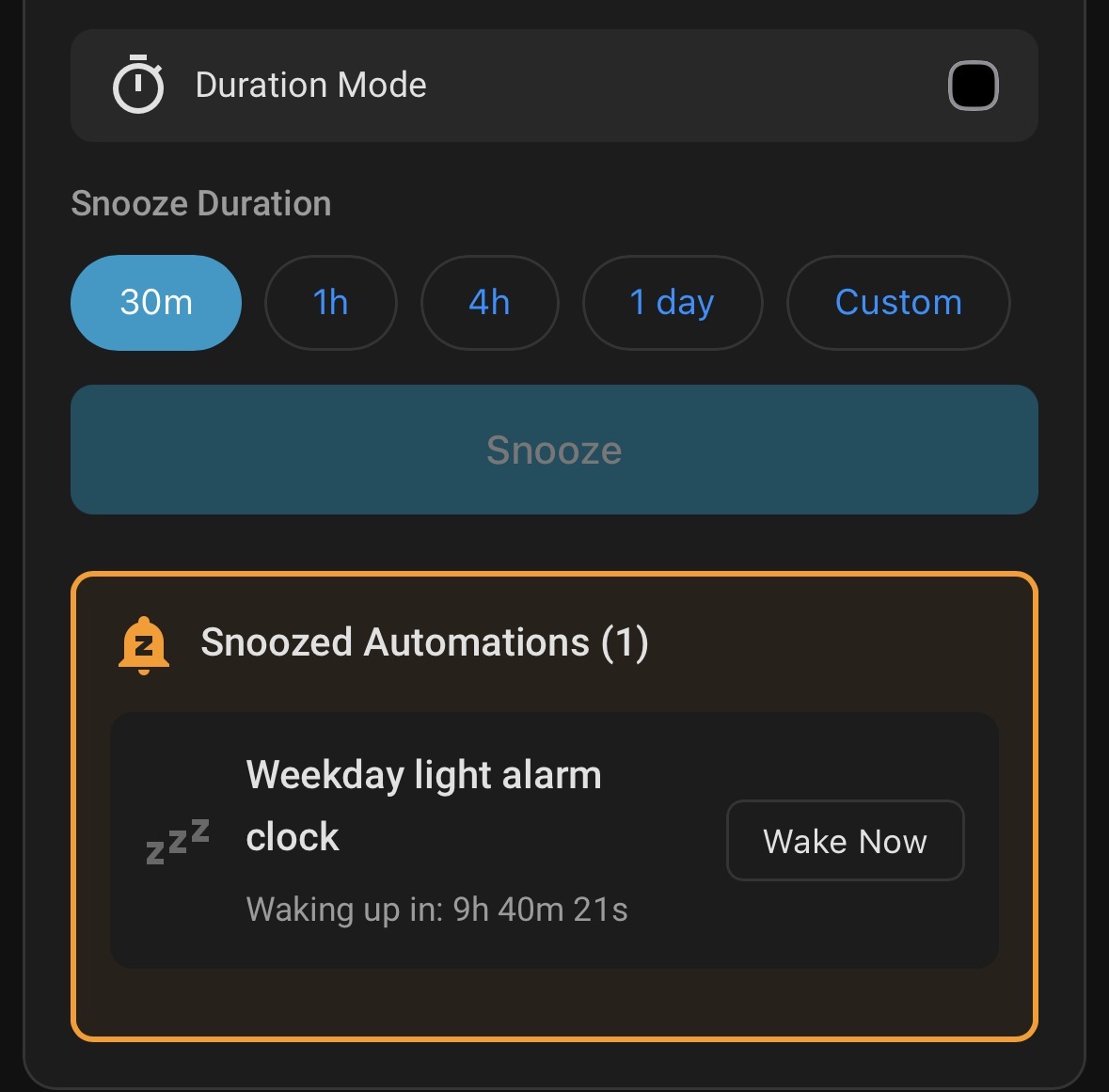
-----
## The Problem
Your motion lights keep turning off during dinner. Your wake-up routine fires while you’re on vacation. You disable automations for maintenance and forget which ones.
## The Solution
Snooze automations for a set duration. They re-enable automatically when the timer expires. No more forgotten disabled automations.
-----
## Features
|Feature |Description |
|--------------------|---------------------------------------------------|
|**Smart Filtering** |Filter by Area, Label, or search by name |
|**Preset Durations**|Quick-tap 30m, 1h, 4h, 1 day, or custom |
|**Live Countdown** |Real-time timers show exactly when automations wake|
|**Restart Survival**|Timers persist through reboots and power outages |
|**Quick Wake** |Cancel individual snoozes or wake all at once |
|**Schedule Mode** |Snooze until a specific date/time |
|**Status Sensor** |Track snoozed count in automations and dashboards |
-----
## Installation
### HACS (Recommended)
1. Open HACS in Home Assistant
2. Search for AutoSnooze
3. Click the download button
4. Restart Home Assistant
### HACS (Manual Install)
1. Open HACS in Home Assistant
1. Click the 3-dot menu → **Custom repositories**
1. Add `https://github.com/mossipcams/autosnooze` as type **Integration**
1. Search for “AutoSnooze” and click **Download**
1. Restart Home Assistant
1. Go to **Settings → Devices & Services → Add Integration → AutoSnooze**
The dashboard card is automatically registered when the integration loads. Just add the card to your dashboard and you’re ready to go.
-----
## Dashboard Card
Add to any Lovelace dashboard:
```yaml
type: custom:autosnooze-card
title: AutoSnooze
```
### Card Options
|Option |Type |Default |Description |
|-------|------|------------|-----------------|
|`title`|string|`AutoSnooze`|Card header title|
### Filtering with Labels
Control which automations appear in the card using Home Assistant labels:
|Label|Behavior|
|-----|--------|
|`autosnooze_include`|**Whitelist mode**: Only automations with this label are shown|
|`autosnooze_exclude`|**Blacklist mode**: Automations with this label are hidden|
**How it works:**
- If **any** automation has the `autosnooze_include` label, the card switches to whitelist mode and only shows automations with that label
- Otherwise, the card shows all automations except those with `autosnooze_exclude`
**To set up:**
1. Go to **Settings → Labels** and create `autosnooze_include` or `autosnooze_exclude`
2. Edit an automation and assign the label under **Labels**
This is useful for hiding automations you never want to snooze (like critical security automations) or limiting the card to only show specific automations.
-----
## Usage Examples
### Dinner Party
> “Pause dining room motion lights for 4 hours”
**Areas** → Dining Room → Select automations → **4h** → **Snooze**
### Vacation Mode
> “Pause wake-up routine for a week”
**Search** “wake up” → Select → **Custom** → 7 days → **Snooze**
### Sensor Maintenance
> “Pause all security automations while fixing sensors”
**Labels** → Security → Select all → **1h** → **Snooze**
-----
## Services
### `autosnooze.pause`
Snooze one or more automations.
```yaml
service: autosnooze.pause
data:
entity_id:
- automation.motion_lights
- automation.door_notify
hours: 4
```
|Parameter |Required|Description |
|------------|--------|--------------------------------------------------|
|`entity_id` |Yes |Automation entity ID(s) |
|`days` |No |Duration in days |
|`hours` |No |Duration in hours |
|`minutes` |No |Duration in minutes |
|`resume_at` |No |Datetime when to re-enable (overrides duration) |
|`disable_at`|No |Datetime when to start the snooze (for scheduling)|
### `autosnooze.cancel`
Wake a specific snoozed automation.
```yaml
service: autosnooze.cancel
data:
entity_id: automation.motion_lights
```
### `autosnooze.cancel_all`
Wake all snoozed automations immediately.
```yaml
service: autosnooze.cancel_all
```
### `autosnooze.pause_by_area`
Snooze all automations in specified areas.
```yaml
service: autosnooze.pause_by_area
data:
area_id:
- living_room
- kitchen
hours: 2
```
### `autosnooze.pause_by_label`
Snooze all automations with specified labels.
```yaml
service: autosnooze.pause_by_label
data:
label_id:
- security
- motion
hours: 1
```
### `autosnooze.cancel_scheduled`
Cancel a scheduled snooze before it activates.
```yaml
service: autosnooze.cancel_scheduled
data:
entity_id: automation.motion_lights
```
-----
## Sensor
Track snoozed automations programmatically:
```yaml
sensor.autosnooze_snoozed_automations
```
- **State**: Count of currently snoozed automations
- **Attributes**: Details of each snoozed automation
### Example: Conditional Automation
```yaml
condition:
- condition: numeric_state
entity_id: sensor.autosnooze_snoozed_automations
below: 1
```
### Example: Dashboard Badge
```yaml
type: entity
entity: sensor.autosnooze_snoozed_automations
name: Snoozed
icon: mdi:sleep
```
-----
## Troubleshooting
### Card not appearing
The card should register automatically. If it doesn’t:
1. Clear browser cache and hard refresh (`Ctrl+Shift+R`)
1. Check **Settings → Dashboards → Resources** for the autosnooze entry
1. If missing, manually add the resource:
- URL: `/autosnooze-card.js`
- Type: **JavaScript module**
**For YAML mode dashboards:** The automatic registration only works with storage mode (UI-managed) dashboards. If you use YAML mode for Lovelace, add the resource manually to your `configuration.yaml`:
```yaml
lovelace:
mode: yaml
resources:
- url: /autosnooze-card.js
type: module
```
Or add it directly to your dashboard YAML file under `resources:`.
### Automations not re-enabling
1. Check **Developer Tools → States** for the sensor state
1. Verify Home Assistant hasn’t restarted during the snooze
1. Check logs for errors: **Settings → System → Logs**
### Card shows “Integration not found”
Ensure the AutoSnooze integration is configured in **Settings → Devices & Services**.
-----
## Requirements
- Home Assistant **2024.1** or newer
- Areas and Labels configured (optional, enables filtering features)
-----
## Contributing
Contributions are welcome! Please:
1. Fork the repository
1. Create a feature branch (`git checkout -b feature/amazing-feature`)
1. Run tests (`npm test && pytest tests/`)
1. Commit changes (`git commit -m 'Add amazing feature'`)
1. Push to branch (`git push origin feature/amazing-feature`)
1. Open a Pull Request
-----
## Support
- [Report a Bug](https://github.com/mossipcams/autosnooze/issues/new?template=bug_report.md)
- [Request a Feature](https://github.com/mossipcams/autosnooze/issues/new?template=feature_request.md)
- [Discussions](https://github.com/mossipcams/autosnooze/discussions)
-----
## License
MIT License - see for details.