https://github.com/mostlygeek/millionbook-firefox-addon
Firefox for Android add-on to make millionbook.com fonts bigger
https://github.com/mostlygeek/millionbook-firefox-addon
Last synced: 12 months ago
JSON representation
Firefox for Android add-on to make millionbook.com fonts bigger
- Host: GitHub
- URL: https://github.com/mostlygeek/millionbook-firefox-addon
- Owner: mostlygeek
- Created: 2014-12-25T09:49:27.000Z (over 11 years ago)
- Default Branch: master
- Last Pushed: 2024-04-03T19:09:03.000Z (over 2 years ago)
- Last Synced: 2025-04-06T11:18:27.599Z (about 1 year ago)
- Language: JavaScript
- Size: 209 KB
- Stars: 1
- Watchers: 1
- Forks: 0
- Open Issues: 0
-
Metadata Files:
- Readme: README.md
Awesome Lists containing this project
README
# About
I built this as a last minute 🎄 Christmas 🎄 present for my mom. She often reads Chinese stories on Firefox on her tablet. Unfortunately, even the maximum text zoom is too small for her and strains her eyes. [1]
"That's bullshit!", I exclaimed! I can FTFY with Greasemonkey! Oops. Turns out Greasemonkey isn't supported on Firefox for Android. #sadness.
After much grumbling and searching it turned out a custom add-on would do the trick!
## How I built it
* Started at [Firefox's Add-On SDK docs](https://developer.mozilla.org/en-US/Add-ons/SDK) and installed the `cfx` command line utility
* Using the [page-mod SDK](https://developer.mozilla.org/en-US/Add-ons/SDK/High-Level_APIs/page-mod), I run a custom script, [resizer.js](https://github.com/mostlygeek/millionbook-firefox-addon/blob/master/data/resizer.js) on the [millionbook.com](http://millionbook.com) website
* `resizer.js` adds a floating button, that when clicked will change an inline css style to resize the font. It will also remember the last zoom level across pages.
* Here's how it looks: (*I don't read Chinese so if text is NSFW, oops!*)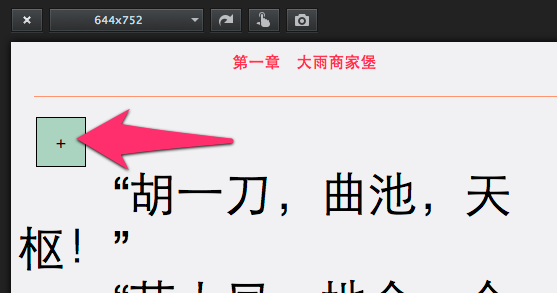
* Built into an XPI file for Android: `$ cfx xpi --force-mobile`
* Put it into my Dropbox and bit.ly linked it: [http://bit.ly/_millionbook](http://bit.ly/_millionbook) so I can open it on the tablet
* \o/
## How to work on it
* See [Developing extension for Firefox for Android](https://extensionworkshop.com/documentation/develop/developing-extensions-for-firefox-for-android/)
* Need to have an Android emulator installed
* Create a Tablet sized virtual machine, enable Android Developer Mode
* Testing it
* in android emulator:
* use Android Studio GUI to create a new tablet emulator
* use `~/Library/Android/sdk/emulator`: `./emulator -list-avds`, `./emulator -avd XXXX` to start one
* use `adb devices` to find id of running emulators
* `web-ext run -t firefox-android --android-device=emulator-XXXX` to run in Firefox in emulator. Firefox Beta must be installed. Android Developer mode + USB debugging must be enabled. Remote debugging via USB must be enabled in Firefox.
* on Desktop: `web-ext run` - to test locally
* Building it: `web-ext build`
* try opening this URL: https://millionbook.net/gd/y/yiming/qlxjn/001.htm
----
[1] [official fix in the works - bug 1074381](https://bugzilla.mozilla.org/show_bug.cgi?id=1074381)