https://github.com/motorro/rxlcemodel
An Android library for data load with cache and loading state
https://github.com/motorro/rxlcemodel
android data-cache data-loading disklrucache invalidation lru-cache lrucache rxjava2 ui-status
Last synced: 3 months ago
JSON representation
An Android library for data load with cache and loading state
- Host: GitHub
- URL: https://github.com/motorro/rxlcemodel
- Owner: motorro
- License: apache-2.0
- Created: 2019-02-26T09:43:11.000Z (over 7 years ago)
- Default Branch: master
- Last Pushed: 2026-04-11T19:50:58.000Z (3 months ago)
- Last Synced: 2026-04-11T21:23:39.858Z (3 months ago)
- Topics: android, data-cache, data-loading, disklrucache, invalidation, lru-cache, lrucache, rxjava2, ui-status
- Language: Kotlin
- Size: 2.17 MB
- Stars: 5
- Watchers: 4
- Forks: 0
- Open Issues: 2
-
Metadata Files:
- Readme: README.md
- License: LICENSE
Awesome Lists containing this project
README
# RxLceModel
[](https://github.com/motorro/RxLceModel/actions/workflows/check.yml) [](https://repo1.maven.org/maven2/com/motorro/rxlcemodel/rx/)
A reactive data loading for Android based on
[RxJava](https://github.com/ReactiveX/RxJava). The library follows the guidelines recommended in official
[Android guide to app architecture](https://developer.android.com/jetpack/docs/guide) to load data and report an
operation state (`Loading`/`Content`/`Error`).
A compiled javadoc is available at [Github Pages](https://motorro.github.io/RxLceModel/)
Dart/Flutter port of the library is available: [DartLceModel](https://github.com/motorro/DartLceModel)
## Features
- Widely used design with `Loading`/`Content`/`Error` states
- Uses cache as a 'source of truth' with [CacheThenNetLceModel](#cachethennetlcemodel).
- Checks data is valid (up-to-date or whatever).
- Falls back to invalid cache data if failed to refresh which allows offline application use.
- Supports data _refresh_ or _update_ to implement reload or server data update operations.
- Cache may be _invalidated_ separately from loading to allow lazy data updates and complex data linking.
- Extendable architecture on every level.
- Thoroughly tested.
## Sample application
Included as a `sample` module - a classic notes application that illustrates `RxLceModel` use along with:
* [Dagger2](https://github.com/google/dagger)
* [Android architecture components](https://developer.android.com/topic/libraries/architecture):
* [LiveData](https://developer.android.com/topic/libraries/architecture/livedata)
* [ViewModel](https://developer.android.com/topic/libraries/architecture/viewmodel)
* [Navigation components](https://developer.android.com/guide/navigation/navigation-getting-started)
* [WorkManager](https://developer.android.com/topic/libraries/architecture/workmanager)
If you have questions on a general use of these tools in Android projects please refer to the following excellent
articles by [James Shvarts](https://github.com/jshvarts):
* [Implementing MVVM using LiveData, RxJava, Dagger Android](https://proandroiddev.com/mvvm-architecture-using-livedata-rxjava-and-new-dagger-android-injection-639837b1eb6c)
* [Navigation Architecture Component for the Rest of Us](https://proandroiddev.com/navigation-architecture-component-for-the-rest-of-us-faafa890e5)
## Table of Contents
* [v5.x](#v5x)
* [Setting up the dependency](#setting-up-the-dependency)
* [Enabling desugaring](#enabling-java8-desugaring-for-android)
* [LceState](#lcestate)
* [LceModel](#lcemodel)
* [CacheThenNetLceModel](#cachethennetlcemodel)
* [Getting and caching data](#getting-and-caching-data)
* [Choosing EntityValidator](#choosing-entityvalidator)
* [Displaying 'invalid' data and cache fall-back](#displaying-invalid-data-and-cache-fall-back)
* [Cache invalidation and data updates](#cache-invalidation-and-data-updates)
* [On-demand cache refetch](#on-demand-cache-refetch)
* [Cache service implementation and DiskLruCache](#cache-service-implementation-and-disklrucache)
* [A complete example of model setup](#a-complete-example-of-model-setup)
* [Kotlin serialization](#kotlin-serialization)
* [Cache key normalization](#cache-key-normalization)
* [ProGuard configuration](#proguard-configuration)
* [Updating data on server](#updating-data-on-server)
* [Getting data-only stream](#getting-data-only-stream)
* [LCE ViewModel](#lce-viewmodel)
## v5.x
Originally written for RxJava, the version `5.x` introduces the experimental coroutines port.
To upgrade the version you need to change the dependency as described in the [migration guide](MIGRATION_5.md).
Different artifacts for the main use-cases are to be required depending on which library you choose.
## Setting up the dependency
`Rx` Usecase module
[](https://repo1.maven.org/maven2/com/motorro/rxlcemodel/rx/):
```groovy
dependencies {
// Base model components
implementation "com.motorro.rxlcemodel:rx:x.x.x"
}
```
`Coroutines` Usecase module [](https://repo1.maven.org/maven2/com/motorro/rxlcemodel/coroutines/):
```groovy
dependencies {
// Base model components
implementation "com.motorro.rxlcemodel:coroutines:x.x.x"
}
```
Optional: [Jake Wharton's DiskLruCache](https://github.com/JakeWharton/DiskLruCache) cache delegate for RxLceModel [](https://repo1.maven.org/maven2/com/motorro/rxlcemodel/disklrucache/):
```groovy
dependencies {
// Jake Wharton's DiskLruCache delegate for cache implementation
implementation "com.motorro.rxlcemodel:disklrucache:x.x.x"
}
```
Optional: [Kotlin serialization](https://github.com/Kotlin/kotlinx.serialization/) serializer for DiskLruCache delegate [](https://repo1.maven.org/maven2/com/motorro/rxlcemodel/kserializer/):
```groovy
dependencies {
// Data serializer for DiskLruCache using Kotlin serialization
implementation "com.motorro.rxlcemodel:kserializer:x.x.x"
}
```
Optional: LCE ViewModel and base view ready to accept LCE use-case for your view [](https://repo1.maven.org/maven2/com/motorro/rxlcemodel/viewmodel/):
```groovy
dependencies {
// Data serializer for DiskLruCache using Kotlin serialization
implementation "com.motorro.rxlcemodel:viewmodel:x.x.x"
}
```
Optional: Compose LCE view [](https://repo1.maven.org/maven2/com/motorro/rxlcemodel/composeview/):
```groovy
dependencies {
// Data serializer for DiskLruCache using Kotlin serialization
implementation "com.motorro.rxlcemodel:composeview:x.x.x"
}
```
### Enabling Java8 desugaring for Android
**IMPORTANT** Version 3.x takes advantage of AGP 4.x Java8 desugaring. Follow [instructions](https://developer.android.com/studio/write/java8-support)
to enable desugaring.
## LceState
A modern approach to architecting the reactive application suggests packing the combined state of the application into a
flow of immutable state-objects. Each of them should contain the whole set of data required to process, transform,
and display according to the business requirement. The most commonly used information besides the data itself is a state
of data-loading pipeline.
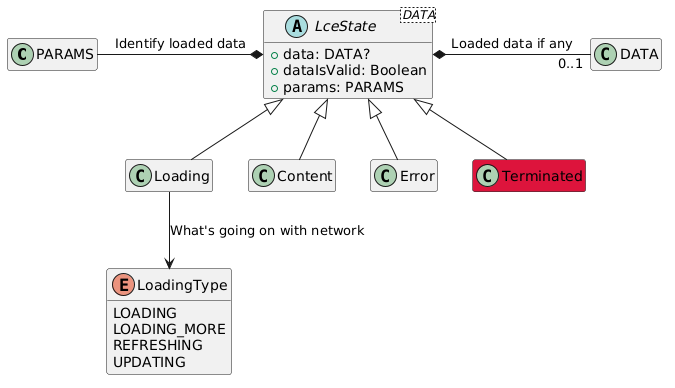
Each `LceState` subclass represents a data-loading phase and contains the following data:
* `data: DATA?` - Loaded data
* `dataIsValid: Boolean` - The validity of data at the time of emission. May be used by caching services to indicate
the need of data refresh. More about it in [CacheThenNetLceModel](#cachethennetlcemodel) section.
States being emitted are:
* `Loading` - data is being loaded or updated. May contain some data. The exact state is defined by `type` property:
```kotlin
/**
* Loading type
*/
enum class Type {
/**
* Just loads. May be initial load operation
*/
LOADING,
/**
* Loading more items for paginated view
*/
LOADING_MORE,
/**
* Refreshing content
*/
REFRESHING,
/**
* Updating data on server
*/
UPDATING,
}
```
* `Content` - data is loaded.
* `Error` - some error while loading or updating data. May also contain some data.
* `Terminated` - a special state to indicate that resource identified by `params` is not available anymore. The sample
application demonstrates the use of `Terminated` to indicate that the note is deleted and view should be destroyed:
```kotlin
override fun processTermination() {
findNavController().popBackStack()
}
```
The sample fragment that demonstrates the use of LCE state to update it's view may be found [here](sample/src/main/kotlin/com/motorro/rxlcemodel/sample/view/note/NoteFragment.kt).
## LceModel
`LceState` in this library is being produced by a simple model [interface](rx/src/main/kotlin/com/motorro/rxlcemodel/rx/LceModel.kt):
```kotlin
interface LceModel {
val state: Observable>
val refresh: Completable
val params: PARAMS
}
```
The model contains the following properties:
* `state` - the `Observable` that emits `LceState`
* `refresh` - the `Completable` to perform data refresh
* `params` - arbitrary parameters that identify the data being loaded
As you may see, parameters for model is a property - thus making the model immutable itself. This approach makes
things a bit easier in many cases like:
* When you share your model and it's emission
* You don't need to supply an Observable for `PARAMS` which complicates design a lot
If you need dynamic params - just flat-map your params with creating a new model for each parameter value like this:
```kotlin
val params = Observable.just("peach", "banana", "apple")
val state = params.switchMap { createNewModelWith(it).state }
```
## CacheThenNetLceModel
As you may guess from it's name this kind of model tries to get cached data first and than loads data from network if
nothing found. It goes along with current [Android guide to app architecture](https://developer.android.com/jetpack/docs/guide). This type of model is called
`CacheThenNetLceModel`. Here is the sequence diagram of data loading using this type of model:
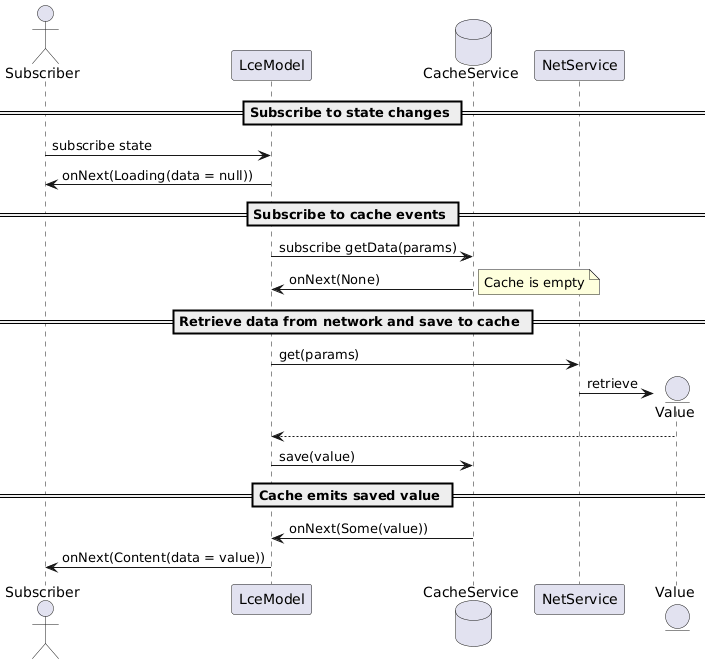
The model creates a data observable for given `PARAMS` in a [cache-service](rx/src/main/kotlin/com/motorro/rxlcemodel/rx/service/CacheService.kt)
and transmits it to subscriber. If cache does not contain any data or data is not valid (more on validation later) the
model subscribes a [net-service](rx/src/main/kotlin/com/motorro/rxlcemodel/rx/service/NetService.kt) to download
data from network and saves it to cache for a later use.
It is worth nothing that `cache` and `net` here is just a common use-case of data-sources: locally stored data (`cache`)
and some data that is maybe not that easy to get (`net`). You may easily adopt data sources of your choice to that
approach. Say you have a resource-consuming computation result which may be cached and consumed later. The computation
itself than becomes a `net-service` while the result is being stashed to a `cache-service` of
your choice for later reuse.
To create new `CacheThenNet` model call a factory function:
```kotlin
protected open fun createLceModel() = LceModel.cacheThenNet(
params = "user_123",
net = netService, // Gets original data
cache = cacheService, // Caches it to local storage
ioScheduler = Schedulers.io(), // Optional scheduler to use for internal IO operations
logger = Logger { level, message -> }, // Optional adapter to your debug-logger
)
```
## Getting and caching data
As already mentioned above caching model uses two services to get data from network and to store it locally.
* [NetService](rx/src/main/kotlin/com/motorro/rxlcemodel/rx/service/NetService.kt) - loads data from network.
* [CacheService](rx/src/main/kotlin/com/motorro/rxlcemodel/rx/service/CacheService.kt) - saves data locally.
Caching data always brings up a problem of cache updates and invalidation. Be it a caching policy of your backend team
or some internal logic of your application the data validity evaluation may be easily implemented:
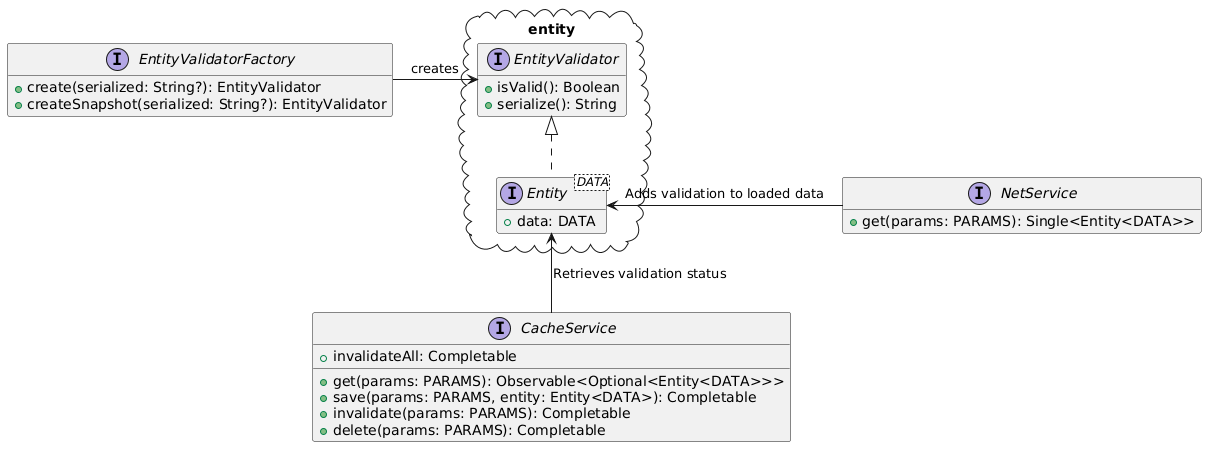
The `NetService` retrieved data and packages it to [Entity](rx/src/main/kotlin/com/motorro/rxlcemodel/rx/entity/Entity.kt)
wrapper - effectively the data itself and some `EntityValidator` to provide information when data expires.
Validator is a simple interface with only three essential methods:
* `isValid(): Boolean` - being used by loading pipeline to determine if data is still valid
* `serialize(): String` - being called by `CacheService` to save data validation parameters along with data
* `createSnapshot(): EntityValidator` - creates a 'snapshot' of `isVAlid()` value at the moment of creation (more
about it later).
The resulting `Entity` is then saved using `CacheService` preserving the data itself and the way to tell when data
expires.
To convert `Any` data to `Entity` within your services use the following function:
```kotlin
fun createValidator() {
// Create a validator
}
val data = "Some data"
val entity = data.toEntity(createValidator())
```
## Choosing EntityValidator
There are some validators available already:
* `EntityValidator.Simple` - just a data-class that is initialized with boolean validity status.
* `EntityValidator.Never` - never valid.
* `EntityValidator.Always` - always valid.
* `EntityValidator.Lifespan` - A validator that is initialized with Time-To-Live value and becomes invalid after it
expires.
While the first three of above-listed validators are easy to use and intuitive the last one needs a to be explained.
`Lifespan` when created gets a reference to a system clock and evaluates it's validity against it every time it is being
asked of it. Thus `Lifespan` is not an immutable and is an object with a self-changing internal state. A valid `Entity`
with `Lifespan` validator that just seats in memory will expire eventually and become non-valid. That may be a desired
behavior however in most cases the most useful way to deal with validity is to take a shapshot of data state at the time
data is being emitted from the `CacheService`. To be able to do this both `EntityValidator` and `Entity` wrappers both
have `createSnapshot()` methods that fix the validation status at the time of function is called.
To create a `LifeSpan` validator, there is a helper-factory that takes a single parameter of TTL in a constructor:
```kotlin
// Creates validators that are valid for 5 seconds
val validatorFactory = LifespanValidatorFactory(5000L)
```
The `LifespanValidatorFactory` is an implementation of [EntityValidatorFactory](rx/src/main/kotlin/com/motorro/rxlcemodel/rx/entity/EntityValidatorFactory.kt)
that you may implement in case you need your own custom validator.
## Displaying 'invalid' data and cache fall-back
Having a cache of required data besides eliminating extra network calls gives us the ability to fall-back to cached data
in case network is not available and to keep working. This is an easy way to create an offline-capable mobile app when
complex state synchronization between the app and server is not required. With 'cache-then-net' model you get the cache
fall-back already implemented. Here is what you get when network connection is not available:
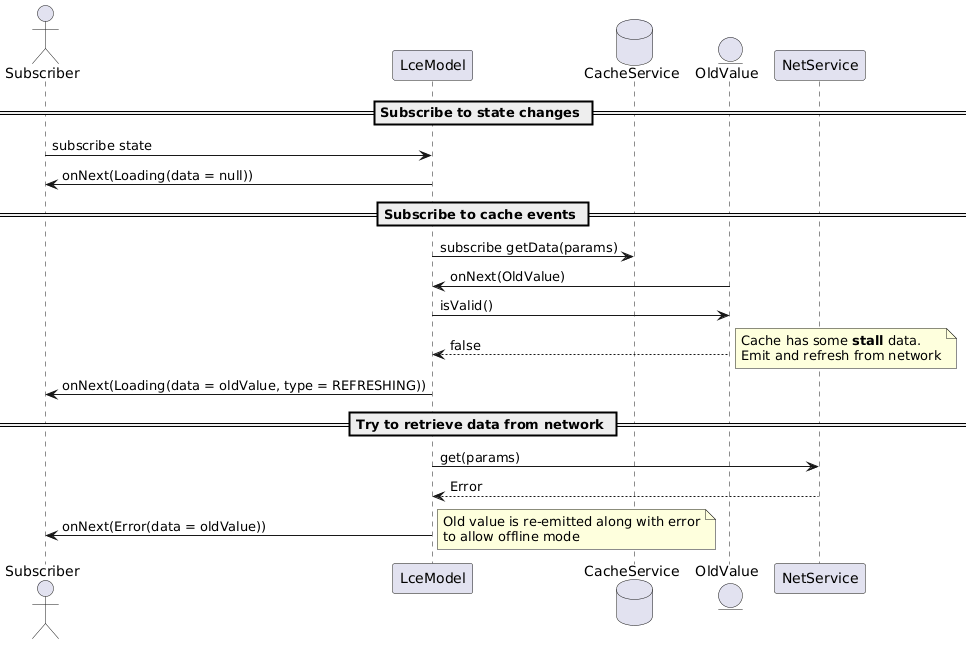
When there is no cached data available you just get `null` for `data` property in emitted `LceState.Error`.
## Cache invalidation and data updates
A common task in complex applications may be the need to refresh some data in a part of application whenever something
happens in another part. Reloading a list of messages in a chat application when push arrives may be a simple example.
There are different ways of doing this - event-buses, Rx-subjects, you name it.
With reactive cache-service the library provides such an invalidation is made in a simple and clean way:
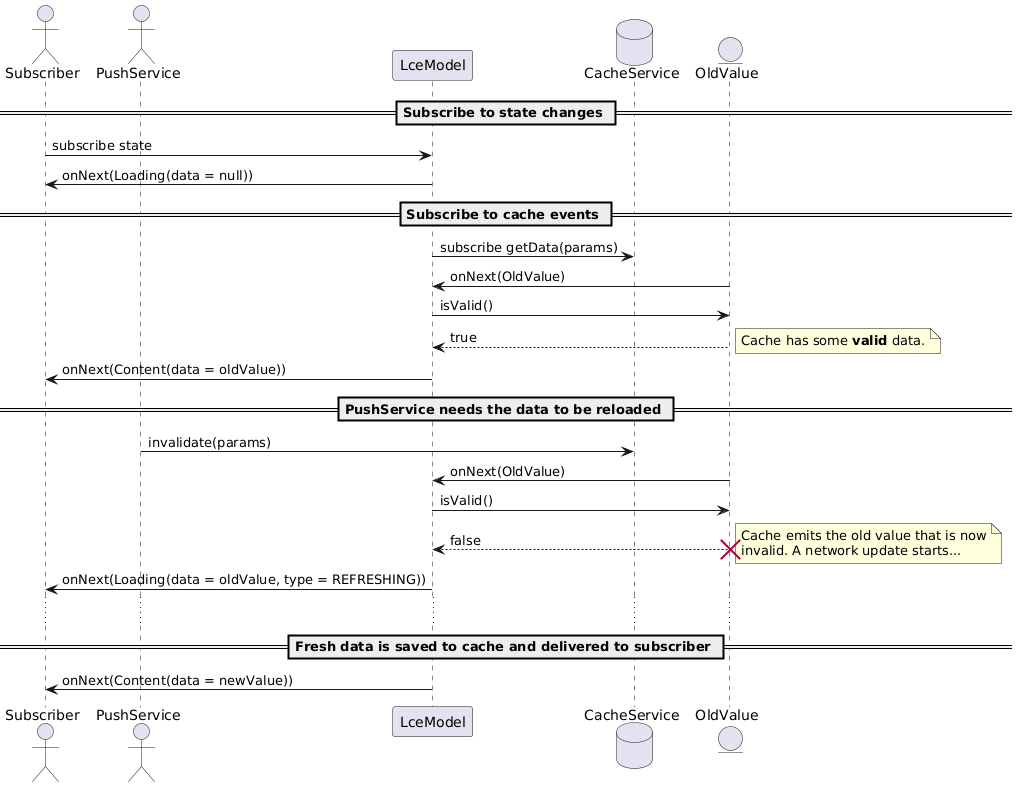
If the push-message brings a pyload that is enough to display data change you could simply save the new data to cash
with `save` method or delete it with `delete` method of [CacheService](rx/src/main/kotlin/com/motorro/rxlcemodel/rx/service/CacheService.kt) interface:
The sample application demonstrates cache invalidation with notes CRUD. Here is how the delete use-case invalidates
notes list and removes a note from cache if successfully deleted on server:
```kotlin
/**
* Deletes note
*/
fun delete(noteId: Int): Completable = connectionChecker.connectionCheck
.andThen(netRepository.deleteNote(noteId))
.andThen(noteCache.delete(noteId))
.andThen(listCache.invalidateAll)
```
## On-demand cache refetch
Consider a cache service with complex internal structure that is updated by some internal logic.
For example a database that saves entities and something that updates records directly.
In case of Room you may observe a query and get updates if something changes underneath. But sometimes
you have a complex entity with relations that are not so easy to fetch as they need conditional processing
in synchronous way.
In this case you may write an SQL delegate for sync-delegate service (see below) to implement reactive cache.
When you get/put the whole entity the solution works. But as soon as you start to update entity parts
you need some way to notify subscribers of data change.
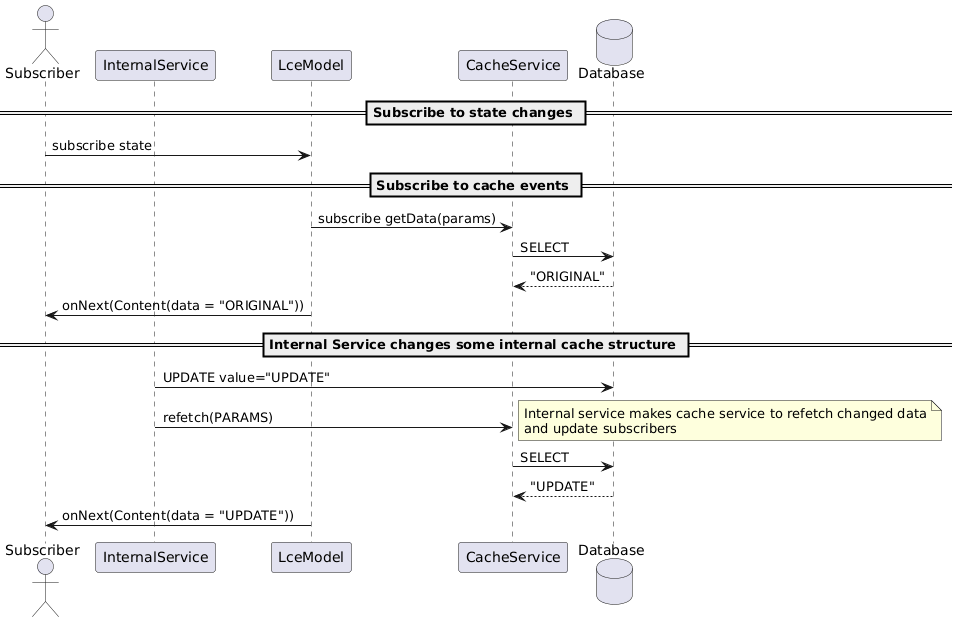
[CacheService](rx/src/main/kotlin/com/motorro/rxlcemodel/rx/service/CacheService.kt)
has two methods that when called makes it to refetch data and update its active clients:
- `refetch(params: P): Completable` - makes cache service to refetch data for `params` and update corresponding clients
- `refetchAll: Completable` - makes cache service to refetch data for all subscribers
## Cache service implementation and DiskLruCache
While you can implement any cache-service you like the library comes with a simple [SyncDelegateCacheService](rx/src/main/kotlin/com/motorro/rxlcemodel/rx/service/SyncDelegateCacheService.kt)
which uses the following delegate for data IO:
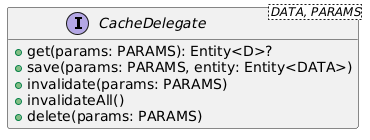
The interface is self-explanatory and does all the IO for `CacheService` in a synchronous way.
The library comes with a delegate that uses famous [Jake Wharton's DiskLruCache](https://github.com/JakeWharton/DiskLruCache)
cache delegate to store cache in files. The delegate is to be plugged-in as a separate dependency as described in
[Setting up the dependency](#setting-up-the-dependency).
The delegate requires a [CacheDelegateSerializerDeserializer](rx/src/main/kotlin/com/motorro/rxlcemodel/rx/service/CacheSerializersDeserealizers.kt)
to save/restore data from file streams. The implemented serializer that comes with the library uses `ObjectStream` and
requires cached data to be `Serializable`.
The delegate is designed to use the same directory for several delegates each maintaining the cache of specific type or
data kind. It might come in handy if you need to destroy all cached data at once - say when user logs out. Thus delegate
constructor has a `prefix` parameter that is used to distinguish it's cache files from others.
The [DiskLruCacheSyncDelegate](disklrucache/src/main/kotlin/com/motorro/rxlcemodel/disklrucache/DiskLruCacheSyncDelegate.kt)
requires `PARAMS` to be `String` as it becomes a part of a file name.
The effort to configure delegate may seem overwhelming but thanks to Kotlin reified generics there is a couple of
[factory functions](disklrucache/src/main/kotlin/com/motorro/rxlcemodel/disklrucache/factory.kt) that make things easier
in everyday life. Follow the example below and the [CacheModule](sample/src/main/kotlin/com/motorro/rxlcemodel/sample/di/CacheModule.kt)
in sample application.
## A complete example of model setup
Here is a complete setup of LceModel with services using `DiskLruCacheDelegate`:
```kotlin
/**
* Data.
* If using common setup mind the Serializable
*/
data class Data(val a: Int, val b: String) : Serializable {
companion object {
private const val serialVersionUID: Long = 1
}
}
val data = mapOf( 1 to Data(1, "One"))
/**
* Cache is valid for 5 seconds
*/
val validatorFactory = LifespanValidatorFactory(5000L)
/**
* Net service - loads data from network
*/
val netService = object : NetService {
override fun get(params: Int): Single> = Single.just(
data[params]?.toEntity(validatorFactory.create()) ?: throw IllegalArgumentException("Not found")
)
}
/**
* DiskLru cache setup
*/
val diskCache = DiskLruCacheSyncDelegate.DiskLruCacheProvider(
directory = context.cacheDir,
appVersion = BuildConfig.VERSION_CODE,
maxSize = 20 * 1024 * 1024
)
/**
* Cache service
*/
val cacheService: CacheService = CacheService.withSyncDelegate(
diskCache.withObjectStream(validatorFactory) { toString() }
)
/**
* A model to load [Data] identified by [1]
*/
val model = LceModel.cacheThenNet(
params = 1,
net = netService,
cache = cacheService
)
```
## Kotlin serialization
Instead of using Java serialization in cache delegate you may add `kserializer` library and use
`@Serializable` data classes.
Here is an updated above configuration using kotlin serialization:
```kotlin
/**
* Data.
*/
@Serializable
data class Data(val a: Int, val b: String)
/**
* Cache service
*/
val cacheService: CacheService = CacheService.withSyncDelegate(
diskCache.withKotlin(validatorFactory, Data.serializer()) { toString() }
)
```
## Cache key normalization
Sometimes the data that form your key is too long for your cache key. For example the latest
published version of [DiskLruCache](https://github.com/JakeWharton/DiskLruCache/issues/98)
has the following pattern to validate key: `[a-z0-9_-]{1,64}`.
Also the total length of cash key in [DiskLruCache delegate](#cache-service-implementation-and-disklrucache)
includes the length of `prefix` used to construct delegate so stringifying `params` should result
in even shorter string to fit into 64 symbols.
Thus if your parameters exceed the maximum length or has unsupported symbols you'll want to make use
of some hashing function to generate cache key which may (depending on the has algorithm used) lead
to key collisions and wrong results from cache.
To make things easier there are several utility classes and functions you may use to automate hasing
and validation:
```kotlin
/**
* Cache service with Serializable
*/
val cacheService: CacheService = CacheService.withObjectStreamNormalized(
diskCache.withObjectStream(validatorFactory) { toString() }
)
/**
* Cache service with kotlin
*/
val cacheService: CacheService = CacheService.withSyncDelegateNormalized (
diskCache.withKotlinNormalized(validatorFactory, Data.serializer()) { toString() }
)
```
These functions create a wrapping [CacheFriendDelegate](rx/src/main/kotlin/com/motorro/rxlcemodel/rx/service/CacheFriendDelegate.kt)
which stores data along with original key to be able to compare it to the one used when reading data.
If original keys do not match - `null` is returned.
Besides that the key is normalized before going to `DiskLruCache` - if it is considered invalid then
it is being hashed.
To make delegate do less transformations and to try to avoid hashing your `PARAMS` class may
implement the following interface:
```kotlin
/**
* Generates a cache-friendly key value for parameters
*/
interface CacheFriend {
/**
* A cache key
*/
val cacheKey: String get() = toString()
}
```
All delegate factories have overloads to accept parameters of that kind.
## ProGuard configuration
Nothing special is required for library itself. If you use `DiskLruCache` delegate than you may want to add general
rules for `Serializable` classes as [described](https://www.guardsquare.com/en/products/proguard/manual/examples#serializable)
in the official guide.
## Updating data on server
With `LceModel` you can update data easily with update operation state being transmitted through a `state` property just
as with data loading. The updates are made with descendants of [UpdateWrapper](rx/src/main/kotlin/com/motorro/rxlcemodel/rx/UpdateWrapper.kt).
The idea behind is to wrap an existing `LceModel` and to mix the update status to the existing state stream.
The selection of ready-to use wrappers is:
* `UpdatingLceModelWrapper` - the wrapper that updates the whole `DATA` using the `UPDATE` class.
The existing model may be extended with the factory function:
```kotlin
val serviceSet = object: UpdatingServiceSet {
override val net: UpdatingNetService = net
override val cache: CacheService = cache
}
val read = LceModel.cacheThenNet(
params = 1,
serviceSet = serviceSet
)
val write = read.withUpdates(serviceSet)
// Update data
write.update(Data(10, "Ten")).subscribe()
```
* `StrategyUpdateWrapper` - may perform any update (patch) using a strategy passed to class instance:
```kotlin
// A repository interface
interface DataRepository {
// Patching `a` property of `Data`
fun updateA(id: Int, value: Int): Single
}
val read = LceModel.cacheThenNet(
params = 1,
net = netService, // Gets original data
cache = cacheService // Caches it to local storage
)
val write = StrategyUpdateWrapper(
upstream = read,
cache = cacheService // Caches new data to local storage
)
// Patch `Data`
write.update { id ->
dataRepository
.updateA(id, 10) // Patch data
.map { it.toEntity(validatorFactory.create()) } // Create new entity
}.subscribe()
```
* A subclass of `UpdateWrapper` - implement any logic you like calling `doUpdate` to perform update. An [example](sample/src/main/kotlin/com/motorro/rxlcemodel/sample/view/note/NoteViewModel.kt)
may be found in sample application.
## Getting data-only stream
You may transform the `state` property `Observable` to strip state information and to get only the data. The library
ships with some of the functions already implemented like:
* `dataStopOnErrors` - emits data stopping on any error
* `dataStopOnEmptyErrors` - emits data and terminates on error only if there is no data in original emission
(`LceState.Error` with `null` for `data` property)
* `dataNoErrors` - emits data and ignores errors
* `validData` - emits data only if it is valid
More information about them may be found in [documentation](docs/com.motorro.rxlcemodel.rx/io.reactivex.rxjava3.core.-observable/index.md)
or in a source code.
## LCE ViewModel
You may also take a look at basic Android [ViewModels](https://developer.android.com/topic/libraries/architecture/viewmodel)
provided as a separate package. Use them as-is or as a delegate in your own `ViewModel` system.
There are three main classes:
* `BaseLceModel` - a common frame for LCE view-model having a signature for all common tasks to:
* Load data
* Dismiss error
* Refresh data
* `BaseLceModel.Impl` - a common implementation to subclass if you need advanced logic
* `BaseLceModel.WithUpdates` - for those models that run some update operations on loaded data.
This model will mix loading and error states from an operation to main data state.
See usage example in a [sample application](sample/src/main/kotlin/com/motorro/rxlcemodel/sample/view/addnote/AddNoteViewModel.kt).
To create a model from an `LceUseCase` call `BaseLceModel.create` methods and pass your state
use-cases or `LCE` observables to `ViewModel`
You may also want to use basic views to switch your display according to LCE state:
* [LceStateView](viewmodel/src/main/kotlin/com/motorro/rxlcemodel/view/LceStateView.kt) - for Android
view system.
* [LceStateView](composeview/src/main/kotlin/com/motorro/rxlcemodel/composeview/LceStateView.kt) - for Android
Compose view system.