https://github.com/mplodowski/formbuilder-plugin-public
https://octobercms.com/plugin/renatio-formbuilder
https://github.com/mplodowski/formbuilder-plugin-public
octobercms-plugin
Last synced: 5 months ago
JSON representation
https://octobercms.com/plugin/renatio-formbuilder
- Host: GitHub
- URL: https://github.com/mplodowski/formbuilder-plugin-public
- Owner: mplodowski
- Created: 2018-07-15T19:07:07.000Z (almost 8 years ago)
- Default Branch: master
- Last Pushed: 2025-12-01T14:17:38.000Z (7 months ago)
- Last Synced: 2025-12-04T03:12:47.303Z (7 months ago)
- Topics: octobercms-plugin
- Homepage: https://octobercms.com/plugin/renatio-formbuilder
- Size: 26.4 KB
- Stars: 2
- Watchers: 1
- Forks: 0
- Open Issues: 1
-
Metadata Files:
- Readme: README.md
Awesome Lists containing this project
README
# Form Builder plugin
**Demo URL:** https://october-demo.renatio.com/backend/backend/auth/signin
**Login:** formbuilder
**Password:** formbuilder
Plugin allows you to build custom front-end forms with ease.
Without any technical knowledge create functional forms for all your needs.
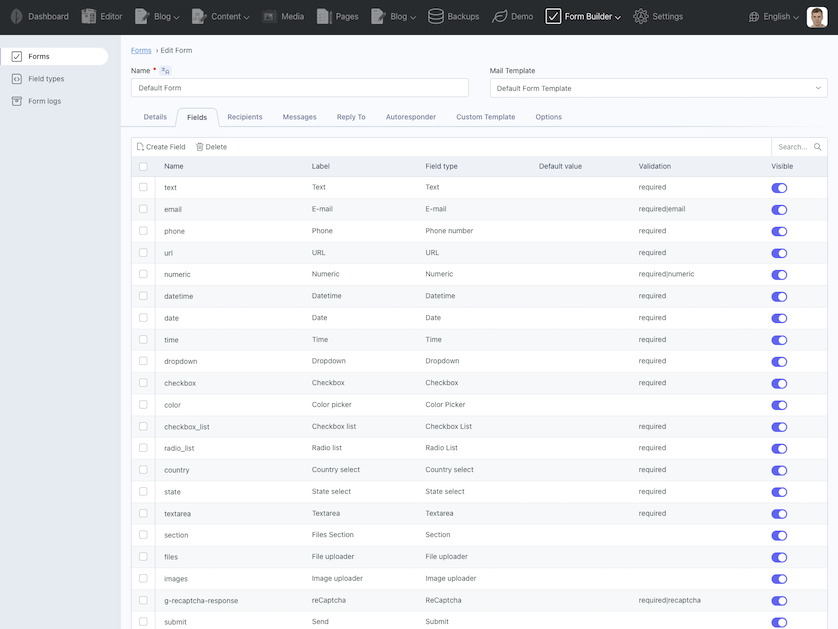
## Features
* Build and manage your forms in OctoberCMS backend
* Use custom HTML markup for fields
* Create custom fields
* Reorder fields
* Example form with all default form controls
* Simple contact form included
* Native ajax files upload
* Basic responsive mail templates
* Google reCaptcha support
* RainLab Translate Plugin support with Multisite
* RainLab Location Plugin support
* RainLab Pages Plugin support to use form as snippet
* Duplicate form and field types
* Reply to functionality and autoresponder with custom mail template
* Form submissions with export functionality
* Event for extending default functionality
* Custom Form Template
* [Spam Protection Plugin](https://octobercms.com/plugin/renatio-spamprotection) support
## Why is this a paid plugin?
Something that is free has little or no perceived value. Users do not commit to free products and only use them until
something else looks nice and is free comes along. When I invest my time in the development of a new plugin I commit to
supporting and maintaining it. I ask my customers to do the same. I do not make money from this plugin by
advertisements, upgrades or additional services like hosting or setup.
Did you know that 30% of your purchase or donation goes to help fund the October Project?
My plugins take many hours to develop (40-120+) and even more hours to document and maintain. My paid plugins have to
pay for both this time, and the time I am spending on free plugins and less successful paid plugins. This means that it
will take even a successful plugin years to become profitable. Please consider buying an extended license if you want me
to continue to maintain these plugins for the very small fee I ask in return or hire me for adding functionality that
you feel is missing but valuable.
## Like this plugin?
If you like this plugin, give this plugin a Like or Make donation with [PayPal](https://www.paypal.me/mplodowski).
## My other plugins
Please check my other [plugins](https://octobercms.com/author/Renatio).
## Support
Please use [GitHub Issues Page](https://github.com/mplodowski/formbuilder-plugin-public/issues) to report any issues
with plugin.
> Reviews should not be used for getting support, if you need support please use the Plugin support link.
Icon made by [Darius Dan](https://www.flaticon.com/authors/darius-dan)
from [www.flaticon.com](https://www.flaticon.com/).
# Documentation
## Usage
After installation plugin will register backend **Form Builder** menu position. From there you will be able to manage
your forms.
There will be three sub-menus, Forms, Field types and Form logs.
Forms list all created forms.
Field types list all available field types.
Form logs list all forms submissions.
There will be two example forms included after installation. Simple contact form and default form, that will demonstrate
all available fields.
Plugin will register `renderForm` component to use it on CMS page. After adding component to CMS page, you must inspect
it (by clicking on it) and choose the form.
Plugin uses Ajax Framework to process form. Remember to add following code in layout:
```
{% framework extras %}
{% scripts %}
```
Please check if you have a following code in your layout `` section.
```
{% styles %}
```
### Example of placing form component on CMS page
`/themes/demo/pages/contact.htm`
```
url = "/contact"
layout = "default"
[renderForm contactForm]
formCode = "contact-form"
==
{% component 'contactForm' %}
```
### Example of placing form component on CMS partial
`/themes/demo/pages/contact.htm`
```
url = "/contact"
layout = "default"
[renderForm contactForm]
formCode = "contact-form"
==
{% ajaxPartial "contact" %}
```
`/themes/demo/partials/contact.htm`
```
{% component 'contactForm' %}
```
> **Important note:** For form handler to work you must use `{% ajaxPartial %}` instead of normal partial
> tag `{% partial %}`.
## Forms
### Spam Protection
If you need Spam protection for your forms I recommend to install following
plugin: [Spam Protection Plugin](https://octobercms.com/plugin/renatio-spamprotection)
After you install this plugin it will automatically protect all your forms. It will work out of the box.
### Custom template
By default, the plugin will automatically generate the template when the **Custom Template** field is empty. If you want to replace the default markup generated by the plugin, you can write your own template here. You have access to special `form_field()` function which takes one parameter: the name of the field.
Example that will display two fields in one row:
```
{{ form_field('first_name') }}
{{ form_field('last_name') }}
```
### Floating labels
Simple form labels that float over your input fields. This requires to use Bootstrap 5.
## Fields
### Custom HTML markup for fields
You can change HTML markup for each field by going to Form Builder -> Field types and updating the field type.
Recommended approach is to duplicate field type and then modify it as you wish.
### Custom field types
You can create custom field types by going to Form Builder -> Field types and clicking **New field type** button.
For example if you want to create **Email** field type just duplicate the markup from **Text** field type and change the
type of the input from text to email.
Now after saving this field it will be possible to use it in your form.
In markup section you can use Twig and following variables:
Property | Type | Description
-------------------|--------|----------------------------------------------------
label | String | Label for the field.
field_id | String | Unique field ID useful when pairing labels with inputs.
label_class | String | Label CSS classes.
name | String | HTML name attribute. Also used in mail template.
default | String | Default value for the field.
comment | String | Help block for the field.
class | String | HTML class.
wrapper_class | String | HTML wrapper class.
placeholder | String | Placeholder for the field.
options | Array | Options for dropdown, radio list, checkbox list.
custom_attributes | String | Custom HTML attributes. For example id="my-field".
### Available field types
#### Text
Renders a single line text box.
#### E-mail
Renders e-mail address field.
#### Phone number
Renders phone number field.
#### URL
Renders URL field.
#### Numeric
Renders numeric field.
#### Datetime
Renders datetime field.
#### Date
Renders date field.
#### Time
Renders time field.
#### Color Picker
Renders a color picker.
#### Textarea
Renders a multiline text box.
#### Dropdown
Renders a dropdown with specified options.
#### Checkbox
Renders a single checkbox.
#### Checkbox List
Renders a list of checkboxes.
#### Radio List
Renders a list of radio options, where only one item can be selected at a time.
#### reCaptcha
Renders google reCaptcha box for SPAM protection.
Please visit the [reCaptcha site](https://www.google.com/recaptcha/admin) to obtain credentials.
Next go to Settings -> Form Builder -> Google reCaptcha and fill your site key and secret.
> **Important note:** This field must have **g-recaptcha-response** as field name and **required|recaptcha** in
> validation section to work properly.
#### Files upload
Renders a file input.
##### Filter files selected by a user
To filter allowed file extensions or file types you can add custom attribute.
For example to only allow selecting files with extension .pdf or .doc.
```
accept=".pdf,.doc"
```
For example to only allow selecting images:
```
accept="image/*"
```
##### Validation
To make file input required just add `required` in validation section.
To restrict max file size to 512 kb just add `max:512` in validation section.
To restrict file mime type to pdfs just add `mimes:pdf` in validation section.
To restrict file to images just add `image` in validation section.
For more available validation rules see October documentation.
##### Multiple files
By default, the file upload field allows uploading only a single file. To enable multiple file uploads in `Upload options` tab
check `Allow multiple files` checkbox.
When validating multiple files to work correctly you must check `Nested array based form input` checkbox in validation
section. This will apply validation for each uploaded file. Do not check this checkbox when using `required` rule.
##### Send uploaded files as mail attachments
By default uploaded files are sent with mail as attachments. You can disable this behavior by unchecking the checkbox.
##### Display mode
Display mode informs the backend how uploaded files should be displayed within a form submission entry. If you only allow to upload
images then select `image` mode.
#### Country select
Renders a dropdown with country options.
> **Important note:** You must install [Location Plugin](https://octobercms.com/plugin/rainlab-location) to use this
> field.
#### State select
Renders a dropdown with state options. This field depends on country select.
> **Important note:** You must install [Location Plugin](https://octobercms.com/plugin/rainlab-location) to use this
> field.
#### Section
Renders a section heading and subheading. Useful for grouping fields.
#### Submit
Renders form submit button.
## Using form data in mail templates
When sending emails, all submitted form data is available directly in the mail template.
If your form contains a field named **name**, you can output its processed value simply by using:
```
{{ name }}
```
This value is already transformed by Form Builder.
For example:
- dropdown fields return the **label** of the selected option,
- checkbox lists return a readable value,
- formatting is normalized.
If you need access to the **raw submitted value** (exactly what the browser sent, before Form Builder processes it), use:
```
{{ name_raw }}
```
Every field automatically exposes a `{{ fieldname_raw }}` variable.
## Form Submissions
Form Builder plugin has built-in functionality for storing submitted form data. Each submission record contains the user's input and any file attachments.
## Events
Plugin will fire **formBuilder.overrideForm** event which allow to change form properties before rendering the form
markup.
```
Event::listen('formBuilder.overrideForm', function ($form) {
// example code
$form->css_class = 'form-horizontal';
});
```
Plugin will fire **formBuilder.overrideField** event which allow to change field properties before rendering the form
markup.
```
Event::listen('formBuilder.overrideField', function ($field, $form) {
// example code
if ($field->name === 'currency') {
$field->default = 'USD';
}
});
```
Plugin will fire **formBuilder.extendFormData** event which allow to change submitted form data.
```
Event::listen('formBuilder.extendFormData', function ($data) {
// example code
$data['foo'] = 'bar';
return $data; // this line is required
});
```
Plugin will fire **formBuilder.beforeSendMessage** event before sending email. You can use this to extend Form Builder
default functionality.
In your extension plugin boot method listen for this event:
```
Event::listen('formBuilder.beforeSendMessage', function ($form, $data) {
// example code
$form->from_email = 'john.doe@exampl.com';
$form->from_name = 'John Doe';
});
```
You will have access to form object and array with posted data.
If you return **false** from this event then this will stop default behavior of sending email message.