https://github.com/mpociot/whiteboard
Simply write beautiful API documentation.
https://github.com/mpociot/whiteboard
Last synced: about 1 year ago
JSON representation
Simply write beautiful API documentation.
- Host: GitHub
- URL: https://github.com/mpociot/whiteboard
- Owner: mpociot
- License: other
- Created: 2016-01-26T22:15:34.000Z (over 10 years ago)
- Default Branch: master
- Last Pushed: 2021-01-29T11:20:13.000Z (over 5 years ago)
- Last Synced: 2025-05-15T16:58:43.846Z (about 1 year ago)
- Language: JavaScript
- Homepage:
- Size: 287 KB
- Stars: 1,228
- Watchers: 29
- Forks: 124
- Open Issues: 15
-
Metadata Files:
- Readme: README.md
- License: LICENSE
Awesome Lists containing this project
- awesome-api - whiteboard
- awesome-api - whiteboard
README
# Whiteboard
#### Simply write beautiful API documentation.
This project started as a fork of the popular [Slate](https://github.com/tripit/slate) API documentation tool, which uses ruby. Since I found the initial setup of Slate quite cumbersome, I started this NodeJS based project.
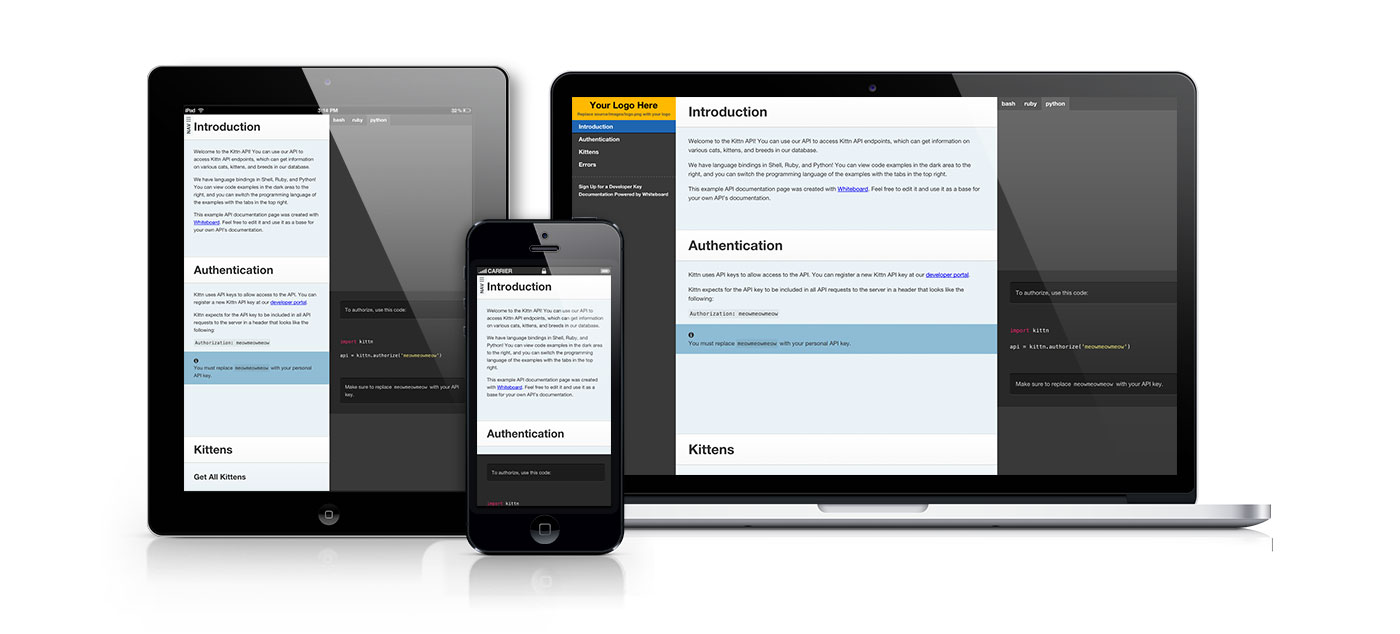
Check out a Whiteboard [example API documentation](https://pociot.dev/whiteboard/).
## Getting Started with Whiteboard
### Prerequisites
You're going to need:
- **[Node JS](https://nodejs.org/en/)**
_Yes, that's it!_
### Getting Set Up
1. Clone this repository to your hard drive with `git clone https://github.com/mpociot/whiteboard.git`
2. `cd whiteboard`
3. Install the dependencies: `npm install`
4. Start the test server: `npm start`
Now go ahead and visit and you will be presented with a beautiful example API documentation as a starting point.
Go ahead and modify the markdown file at `source/index.md` to suit your needs.
### Publishing your API documentation
The easiest way to publish your API documentation is using this command within your `whiteboard` directory:
`npm run-script generate`
This will generate a `public` folder which you can upload anywhere you want.
> **Windows users:** You need to install the global `hexo-cli` package using `npm install -g hexo-cli`. To publish your API documentation under windows use `hexo generate`.
If you want other (more automated) deployment options like **git**, **heroku**, **rsync** or **ftp** - please take a look at the [Hexo deployment documentation](https://hexo.io/docs/deployment.html).
### Generate the documentation programmatically
To generate the API documentation programmatically, for example in your automated build process, use the whiteboard module.
The `generate` method will return a promise.
```js
var Whiteboard = require('whiteboard');
Whiteboard.generate()
.then(function(){
// Generation was successful
})
.catch(function(){
// Handle error
})
```
### Slate compatibility
Since both Whiteboard and Slate use regular markdown files to render the API documentation, your existing Slate API documentation should work just fine. If you encounter any issues, please [submit an issue](https://github.com/mpociot/whiteboard/issues).
### In depth documentation
For further documentation, read the [Slate Wiki](https://github.com/tripit/slate/wiki) or the [hexo documentation](https://hexo.io/docs/).
### Documentations built with Whiteboard
* [DISTRIBUTOR API Documentation](https://wifidistribution.com/docs) from [wifidistribution.com](https://wifidistribution.com)
* [CommoPrices API Documentation](https://api.commoprices.com/docs/) from [commoprices.com](https://commoprices.com/)
* [TradeIt JSON API](https://www.trade.it/documentation/api) from [trade.it](https://www.trade.it/)
Feel free to submit a PR with a link to your documentation.
### Contributors
Slate was built by [Robert Lord](https://lord.io) while at [TripIt](http://tripit.com).
Whiteboard was built by Marcel Pociot.