https://github.com/mrange/minijson
Minimal conforming JSON parser for F#
https://github.com/mrange/minijson
Last synced: about 1 year ago
JSON representation
Minimal conforming JSON parser for F#
- Host: GitHub
- URL: https://github.com/mrange/minijson
- Owner: mrange
- License: apache-2.0
- Created: 2015-07-16T10:42:39.000Z (almost 11 years ago)
- Default Branch: master
- Last Pushed: 2017-06-17T14:02:12.000Z (about 9 years ago)
- Last Synced: 2025-06-11T23:17:45.422Z (about 1 year ago)
- Language: F#
- Size: 274 KB
- Stars: 12
- Watchers: 5
- Forks: 3
- Open Issues: 0
-
Metadata Files:
- Readme: README.md
- License: LICENSE
Awesome Lists containing this project
README
# MiniJson
[](https://travis-ci.org/mrange/MiniJson)
MiniJson is a [conforming](http://jsonlint.com) [JSON](http://json.org) parser for F# licensed under
[Apache License, Version 2.0](http://www.apache.org/licenses/LICENSE-2.0)
MiniJson has decent performance (compares favourable to [Json.NET](http://www.newtonsoft.com/json) and [FSharp.Data](https://github.com/fsharp/FSharp.Data))
and provides decent error messages (possible to suppress if performance is of importance).
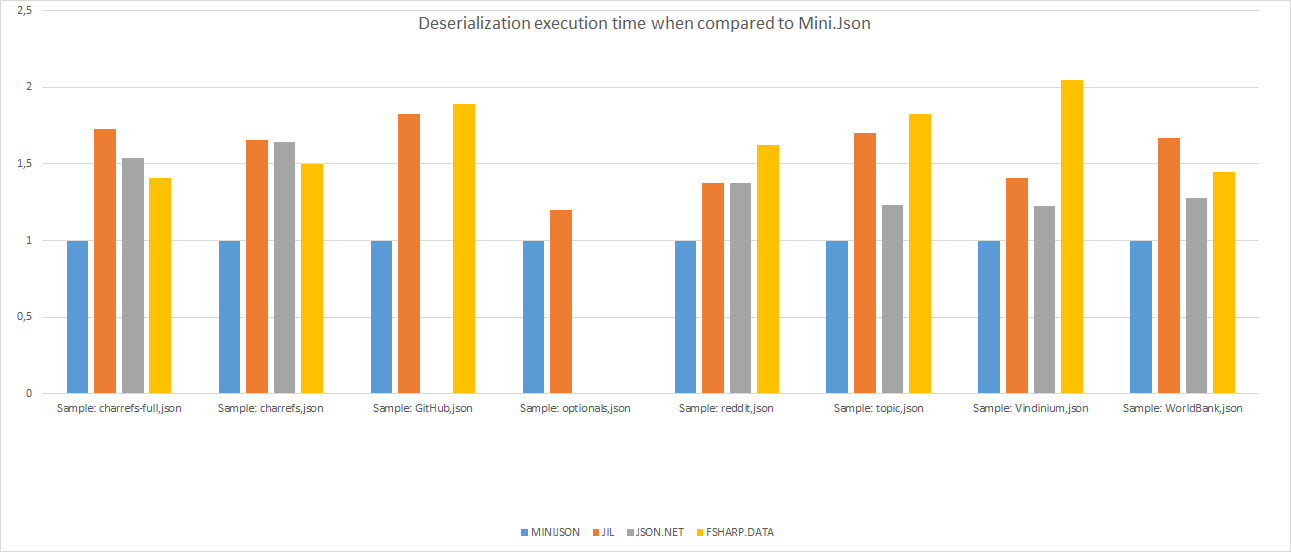
MiniJson deserialization compared to popular JSON libraries. Lower is better.
Example of error message when trying to parse an invalid JSON document: "{"abc":}"
```
Failed to parse input as JSON
{"abc":}
-------^ Pos: 7
Expected: '"', '-', '[', '{', digit, false, null or true
```
The best way of referencing MiniJson is to use [Paket](http://www.nuget.org/packages/Paket/)
[http references](http://fsprojects.github.io/Paket/http-dependencies.html)
[paket.dependencies](http://fsprojects.github.io/Paket/dependencies-file.html)
```
http https://raw.githubusercontent.com/mrange/MiniJson/master/src/MiniJson/MiniJson.fs
http https://raw.githubusercontent.com/mrange/MiniJson/master/src/MiniJson/MiniJson.Dynamic.fs
```
[NuGet](http://www.nuget.org/packages/M3.MiniJson/) can also be used to reference MiniJson
To install MiniJson using NuGet, run the following command in the [Package Manager Console](http://docs.nuget.org/consume/package-manager-console)
```
PM> Install-Package M3.MiniJson
```
Using MiniJson is straight-forward (F#)
```fsharp
open MiniJson.JsonModule
open MiniJson.DynamicJsonModule
[]
let main argv =
let jsonText = """[{"id":"123", "name":"Mr. Big", "age":30}, {"id":"123", "name":"Mr. X"}]"""
match parse true jsonText with // true for full error-info
| Failure (msg, pos) -> printfn "Failure@%d\n%s" pos msg
| Success json ->
printfn "Success\n%s" <| toString true json // true to indent JSON
let root = json.Query
for i = 0 to root.Length - 1 do
let v = root.[i]
let id = v?id.AsString
let name = v?name.AsString
let age = v?age.AsFloat
printfn "Record - %d: id:%s, name:%s, age:%f" i id name age
0
```
Even though MiniJson is primarily designed with F# in mind there are adaptor
functionality to make MiniJson usable from C#/VB
```csharp
using System;
using MiniJson.Adaptor;
class Program
{
static void Main(string[] args)
{
var jsonText = @"[{""id"":""123"", ""name"":""Mr. Big"", ""age"":30}, {""id"":""123"", ""name"":""Mr. X""}]";
var jsonParser = new JsonParser (jsonText, true);
Console.WriteLine ("ParseResult: {0}", jsonParser);
dynamic[] users = jsonParser.DynamicResult.GetChildren ();
foreach (dynamic user in users)
{
string id = user.id ;
string name = user.name ;
double age = user.age.ConvertToFloat (-1.0);
Console.WriteLine ("Record: id:{0}, name:{1}, age:{2}", id, name, age);
}
}
}
```
# TODO
1. Migrate to F# project scaffold
1. Add MiniJson Strong Name