https://github.com/mre8065/mydotfiles
My personal dotfiles for Arch btw
https://github.com/mre8065/mydotfiles
arch-linux arch-rice dotfiles hyprland linux-rice
Last synced: 9 months ago
JSON representation
My personal dotfiles for Arch btw
- Host: GitHub
- URL: https://github.com/mre8065/mydotfiles
- Owner: MrE8065
- License: gpl-3.0
- Created: 2025-08-16T18:44:22.000Z (11 months ago)
- Default Branch: main
- Last Pushed: 2025-08-29T13:59:49.000Z (10 months ago)
- Last Synced: 2025-08-29T16:43:37.838Z (10 months ago)
- Topics: arch-linux, arch-rice, dotfiles, hyprland, linux-rice
- Language: Lua
- Homepage:
- Size: 65.3 MB
- Stars: 13
- Watchers: 1
- Forks: 3
- Open Issues: 0
-
Metadata Files:
- Readme: README.md
- License: LICENSE
Awesome Lists containing this project
README

Welcome!
System overview
Final look
How to install?
What will change?
Keybinds
Packages
After Installation
# 👋 Welcome!
Hi! This is my first rice, so if you find any errors or need help, feel free to [create an issue](https://github.com/MrE8065/MyDotfiles/issues) and i will try to help :).
> [!TIP]
> Check my little CLI tool to manage dotfiles, [copydots](https://github.com/MrE8065/copydots). I use it here!
# 🔍 System overview
| Distro | [Arch](https://archlinux.org) |
| :-----------------: | :-----------------------------------------------------------------------------------------------------------------------: |
| WM | [Hyprland](https://hypr.land) |
| Terminal | [Kitty](https://github.com/kovidgoyal/kitty) |
| Bar | [Waybar](https://github.com/Alexays/Waybar) |
| Shell | [Zsh](https://www.zsh.org) with [Oh My Zsh](https://ohmyz.sh) |
| Shell Prompt | [Starship](https://starship.rs) |
| App launcher | [Wofi](https://hg.sr.ht/~scoopta/wofi) |
| File manager | [Thunar](https://docs.xfce.org/xfce/thunar/start) |
| Editor | [Neovim](https://github.com/neovim/neovim) |
| Editor 2 | [VSCode](https://code.visualstudio.com/) |
| Browser | [Firefox](https://firefox.com) |
| Power menu | [wlogout](https://github.com/ArtsyMacaw/wlogout) |
| Notification Center | [Swaync](https://github.com/ErikReider/SwayNotificationCenter) |
| Lockscreen | [Hyprlock](https://github.com/hyprwm/hyprlock) |
| Display Manager | [SDDM](https://github.com/sddm/sddm) |
| Wallpaper switcher | [Waypaper](https://github.com/anufrievroman/waypaper) with [swww](https://github.com/LGFae/swww) |
| Music player | [Spotify](https://www.spotify.com) with [spicetify](https://spicetify.app) |
| Screenshot tool | [Hyprshot](https://github.com/Gustash/Hyprshot) |
| Image viewer | [qview](https://interversehq.com/qview/) |
| GTK theme | [Materia dark](https://github.com/nana-4/materia-theme) |
| Cursor theme | [Bibata](https://github.com/ful1e5/Bibata_Cursor) |
| Icons theme | [Papirus](https://github.com/PapirusDevelopmentTeam/papirus-icon-theme) |
| Fonts | [Noto Fonts](https://fonts.google.com/noto) and [JetBrainsMono from Nerd Fonts](https://www.nerdfonts.com/font-downloads) |
# 👀 Final look
Here you can see how the system will look after the customization. Cool, right?


# 🛠️ How to install?
> [!IMPORTANT]
> The installation script is designed for [Arch Linux](https://wiki.archlinux.org/title/Arch_Linux) with Hyprland already installed (archinstall or manual. If you install it manualy, make sure everything works before running the script). **May** work on other distros.
> [!WARNING]
> I asume that you already have the `git` package installed. If not, what are you waiting for?
I recommend to take a look at the [Packages](./scripts/packages.sh) script to see all the packages that will be installed. In case you don't want something, go and modify it.
That been said, to install, simply execute this commands:
```
git clone https://github.com/MrE8065/MyDotfiles.git ~/MyDotfiles
cd ~/MyDotfiles
./install.sh
```
> [!IMPORTANT]
> After the installation is done, take a look to the [after installation](#after-installation) recommendations to adjust important adjustments.
# ❓ What will change?
Waybar
## Overview
Minimal, clean and efficient. It includes all the features that I think are important to have in a bar.


### Notifications
It will open the [swaync panel](#swaync).
### Time
If you hover, it will display a simple calendar with the current date. Right click to see next month and left click to see the previous one.
### Updates
It will show any available updates for the packages installed thanks to the `checkupdates-with-aur` package.
### Music player
Shows the current playing track name and artist. Central click to pause/resume, left to previous track and right click for next one. Hover to show the player name.
It only appears when a supported player is active.
### Taskbar
Just the `taskbar` module from waybar.
### Workspaces
5 simple bars that grow if they are selected or if there's apps opend in them.

### Expanding Group
Button to hide/reveal certain widgets you don’t need all the time. In here you can find:
- **Tray**: Default `tray` module from waybar.
- **Hyprpicker Widget**: Lets you use `hyprpicker`, display values when hovered, and copy the hex value to your clipboard. It also changes color!
### Network
Shows the connetion type (wifi/ethernet), if you hover shows the network name. Click to open `nm-connection-editor`.
### Sound
Shows the volume percentage and device icon. Scroll to change volume and click to open `pavucontrol`.
### Brightness
Shows the current brightness of the screen and allows to modify it scrolling up or down. If you click on the icon, the bluelight filter will activate. (If you are on a laptop, the script will install `brightnessctl` to control the brightness and, if you are on a desktop computer, it will install `ddcutil`, so you can control even external monitors!)
### Power menu
Opens the [wlogout menu](#wlogout)
Wofi
## Overview
Simple apps menu with a search bar. It also shows apps options (triangle to the left).


Swaync
## Overview
Notification center with clear button and _Do not disturb_ mode.


Hyprlock
## Overview
Lockscreen. Uses the current wallpaper from Pywal to generate the background and colors, displays a greeting with your username.


Nvim
## Overview
Uses Lazyvim to create a simple, useful and functional IDE. Colorscheme follows pywal generated colors! Features the following plugins:
- alpha-nvim
- nvim-autopairs
- noice.nvim
- lushwal.nvim
- nvim-colorizer.lua
- gitsigns.nvim
- mini.icons
- lualine.nvim
- markview.nvim
- nvim-cmp
- nvim-tree.lua
- snacks.nvim
- telescope.nvim
- nvim-treesitter
- which-key.nvim


Wlogout
## Overview
Simple power menu. Shows a row with the different power options.


Wallpapers
## Overview
Use `waypaper` to select the image you want from `~/wallpapers`. Applies the wallpaper using `swww` and the `change.sh` script in `~/.config/waypaper` folder generates a new Pywal palette and update the system colors.

> The system is running in an HDD, that's why the recording is a bit laggy
Pywalfox
## Overview
Modifies `Firefox` or `Librefox` so that it change its colors automatically when `Pywal` updates its color scheme.
> [!IMPORTANT]
> **MAKE SURE TO ALSO INSTALL THE [BROWSER ADDON](https://addons.mozilla.org/en-US/firefox/addon/pywalfox/)**


Starship
## Overview
Custom terminal prompt. Uses pywal colors.


Fastfetch
## Overview
Display system info and shows the world that you are using Arch BTW!


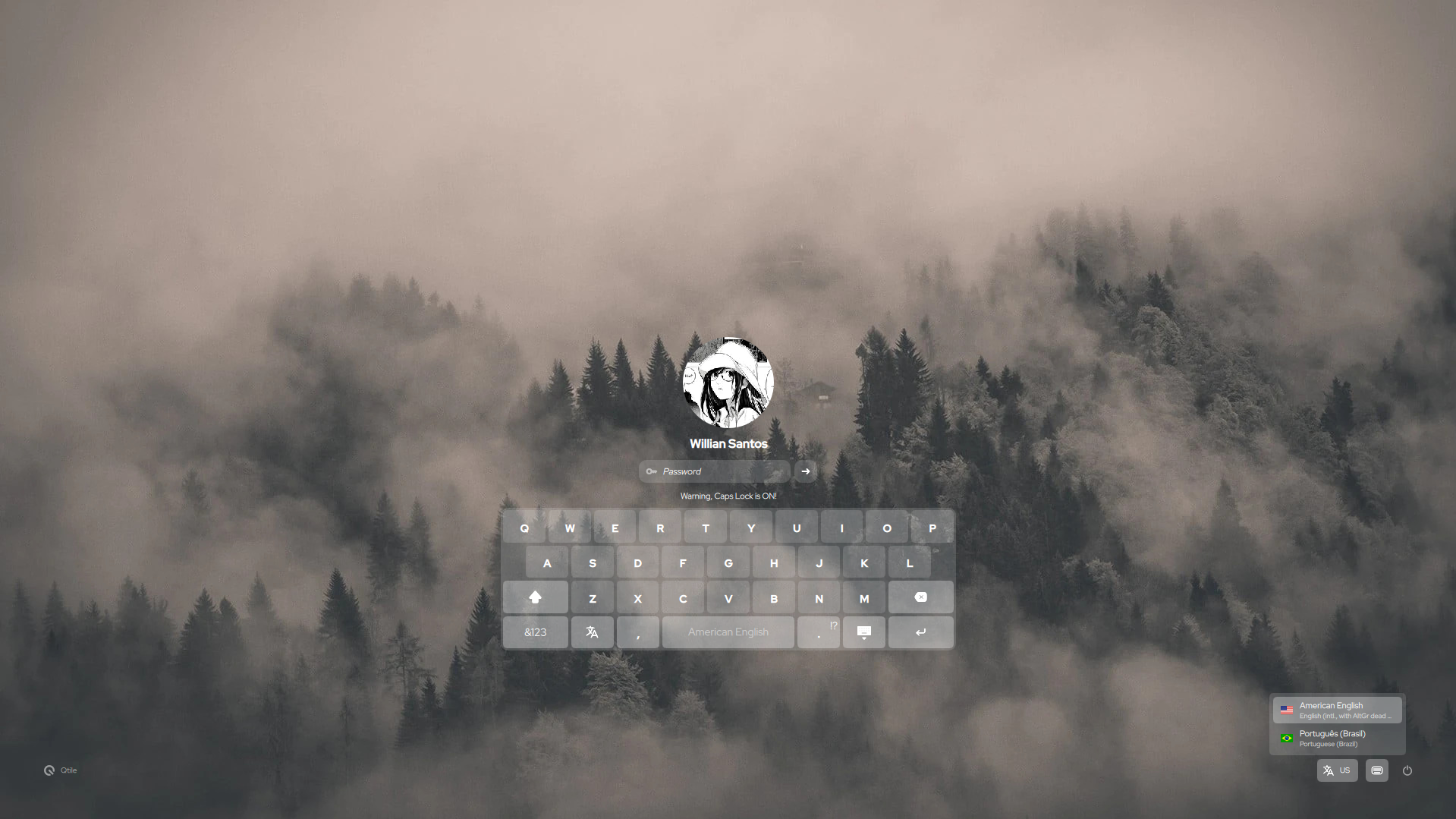
Sddm
## Overview
Theme from [SilentSDDM](https://github.com/uiriansan/SilentSDDM).
Boot animation
## Overview
Custom boot animation [I made myself](https://github.com/MrE8065/PSLinux). Uses `plymouth`.
https://github.com/user-attachments/assets/cb767248-547b-402e-99c9-042714291f87
GTK Themes
## Overview
| Theme | Name |
|-----------|-------------------|
| Cursor | Bibata |
| Icon | Papirus Dark |
| System | Materia-Dark |
# ⌨️ Keybinds
`Mod+Q` - Close app
`Mod+R` - Open App Launcher
`Mod+B` - Open browser
`Mod+E` - Open file manager
`Mod+W` - Open wallpaper changer
`Mod+I` - Open emoji menu
`Mod+Shift+S` - Open capture menu
`Mod+K` - Open clipboard history
`Mod+Alt+K` - Clean clipboard history
`Mod+F` - Maximize app
`Mod+Shift+F` - Fullscreen app
`Mod+V` - Toggle floating window
`Mod+L` - Activate lockscreen
`Mod+Shift+R` - Reload waybar and swaync
`Mod+M` - Quit Hyprland
> [!Tip]
> This are just the most used keybinds.
>
> More can be found and changed in `~/.config/hypr/hyprland.conf`
# 📦 Packages
Check the [packages](./scripts/packages.sh) script to see all the packages that will be installed.
# 💽 After installation
After the installation is completed you should make some adjustments:
- Enable plymouth. The script only adds the mkinitcpio hook. You need to configure your boot loader to show the splash ([check the Arch wiki for more info](https://wiki.archlinux.org/title/Plymouth))
- Adjust config files to fit your screen resolution.
- The bar thickness (`~/.config/waybar/style.css`)
- The size of the apps launcher (`~/.config/wofi/config`)
- The size of the notifications center (`~/.config/swaync/config.json`)
- The buttons of the power menu (`~/.config/wlogout/style.css`)
> [!TIP]
> The css files have comments to help changing important values