https://github.com/mrhdias/fastkiss
FastKISS - Nim's FastCGI Flexible Web Framework
https://github.com/mrhdias/fastkiss
fastcgi nim-lang web
Last synced: about 1 year ago
JSON representation
FastKISS - Nim's FastCGI Flexible Web Framework
- Host: GitHub
- URL: https://github.com/mrhdias/fastkiss
- Owner: mrhdias
- License: mit
- Created: 2020-09-27T19:36:18.000Z (almost 6 years ago)
- Default Branch: master
- Last Pushed: 2024-02-23T22:02:06.000Z (over 2 years ago)
- Last Synced: 2025-03-31T07:17:26.230Z (over 1 year ago)
- Topics: fastcgi, nim-lang, web
- Language: Nim
- Homepage:
- Size: 4.18 MB
- Stars: 16
- Watchers: 2
- Forks: 0
- Open Issues: 0
-
Metadata Files:
- Readme: README.md
- License: LICENSE
Awesome Lists containing this project
README
# FastKISS - A FastCGI Web Framework for Nim
⚠️ WARNING: This framework is still in heavy development. ⚠️
**Fast** & **K**eep **I**t **S**mall and **S**imple is an FastCGI Host/Server Framework for [Nim](https://www.nim-lang.org) Web Applications. It was developed against Nginx, but should work with any web server that implements the FCGI spec. This work was based on the [FastCGI library for Nim](https://github.com/ba0f3/fastcgi.nim).
The FastCGI server allows you to easily integrate your FastKiss web application into a standard web server environment, taking advantage of existing features provided by a web server developed for this purpose. This allows you to use all the state of the art features such as advanced protocol support (HTTPS, HTTP/2.0), HTTP keep-alive, high performance static file delivery, HTTP compression, or URL redirect/rewrite services without increases the overhead and complexity of building anything into your application code.
```nim
import fastkiss
from fastkiss/utils import decodeData
import regex
from strformat import `&`
proc main() =
let app = newApp()
app.config.port = 9000 # optional if default port
app.get("/", proc (req: Request) {.async.} =
respond "Hello World!"
)
app.get(r"/test/(\w+)".re, proc (req: Request) {.async.} =
respond &"Hello {req.matches.groupCaptures(0)[0]}"
)
# http://example:8080/test/abc-012/def-345/test/xpto
app.get(r"/test/(?:([a-z\d]+-[a-z\d]+)/)+test/(\w+)".re, proc (req: Request) {.async.} =
respond &"Hello Multi Capture {$req.matches.groupCaptures(0)} and {$req.matches.groupCaptures(1)}"
)
# http://example:8080/myquery?a=1&b=2&c=3
app.get("/myquery", proc (req: Request) {.async.} =
resp "My Query:\n"
for k, v in decodeData(req.url.query):
resp &"{k} = {v}\n"
)
app.match(["GET", "POST"], "/method", proc (req: Request) {.async.} =
respond &"Hello Method {$req.reqMethod}"
)
app.get("/static", proc (req: Request) {.async.} =
sendFile "./test.txt"
)
app.run()
main()
```
If you are using FastKiss to generate dynamic content of significant size, such as large binary images or large text-based datasets, then you need to consider the use of "**resp**" function instead of "**respond**" to minimize the memory footprint and preserve scalability.
Using "**resp**" function allows FastKiss to return chunks of data back to the client without the need to build an entire structure, or resource in-memory. See [example](https://github.com/mrhdias/fastkiss/blob/master/examples/loadimage.nim). You can use the "**resp**" function like the php "echo" function. You can even include files with code in the same way as you do with a php. See this [example](https://github.com/mrhdias/fastkiss/tree/master/examples/basicwebsite).
```nim
import fastkiss
import tables
from strformat import `&`
proc showPage(req: Request) {.async.} =
let t = {1: "one", 2: "two", 3: "three"}.toTable
"""
Test
""".resp
for k, v in pairs(t):
resp &"""
{k}
{v}
"""
"""
""".resp
proc main() =
let app = newApp()
app.get("/", showPage)
app.run()
main()
```
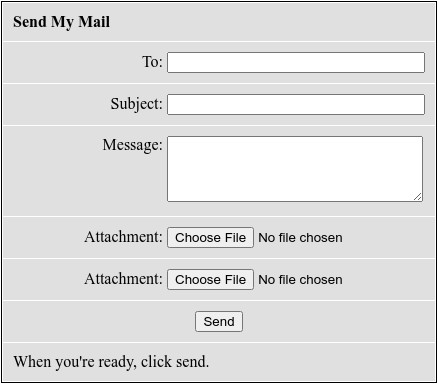
Here's a complete [example](https://github.com/mrhdias/fastkiss/blob/master/examples/sendmymail.nim) of an app to send emails with attachments.
NGINX FastCGI Configuration File Example
```
server {
listen 8080;
server_name example;
# add example to hosts file
# nano -w /etc/hosts
#
# 127.0.0.1 example
#
location / {
# Comment this line if you if you don't need http cookies
fastcgi_param HTTP_COOKIE $http_cookie;
# Comment this line if you if you don't need Basic Autentication
fastcgi_param HTTP_AUTHORIZATION $http_authorization;
# Uses REMOTE_ADDR value whenever it needs to deal with visitor IP address.
fastcgi_param REMOTE_ADDR $http_x_real_ip;
client_max_body_size 1000M;
include fastcgi_params;
fastcgi_pass 127.0.0.1:9000;
}
}
```
APACHE2 FastCGI Configuration File Example
```
Listen 127.0.0.1:8080
LoadModule proxy_module modules/mod_proxy.so
LoadModule proxy_fcgi_module modules/mod_proxy_fcgi.so
LoadModule rewrite_module modules/mod_rewrite.so
# Need a server with SSL support
# LoadModule http2_module modules/mod_http2.so
ServerName example
ServerAlias anotherexample
ServerAdmin admin@example.tld
ErrorLog /var/log/httpd/example_error.log
CustomLog /var/log/httpd/example_requests.log combined
ProxyPass "/" "fcgi://localhost:9000/"
# https://httpd.apache.org/docs/2.4/custom-error.html
ErrorDocument 503 "Service Temporary Unavailable"
# Need a server with SSL support
# Protocols h2 http/1.1
# Comment this two lines below if you if you don't need Basic Autentication
RewriteEngine on
RewriteRule .* - [E=HTTP_AUTHORIZATION:%{HTTP:Authorization}]
```
Test
```
$ nimble install https://github.com/mrhdias/fastkiss
$ nano -w example.nim
$ nim c -r example.nim
$ sudo systemctl start nginx / httpd
$ wget -qO- http://example:8080/test
Hello World!!⏎
```
To compile a release version use:
```
$ nim c -d:release example.nim
$ ./example
```
### Configuration Options
```nim
config.port = 9000 # Default Port
config.address = ""
config.reuseAddr = true # Default value
config.reusePort = false # Default value
# Default temporary directory of the current user to save temporary files
config.tmpUploadDir = getTempDir()
# The value true will cause the temporary files left after request processing to be removed.
config.autoCleanTmpUploadDir = true
# To serve static files such as images, CSS files, and JavaScript files
config.staticDir = ""
# Sets the maximum allowed size of the client request body
config.maxBody = 8388608 # Default 8MB = 8388608 Bytes
```
### Available Router Methods
Routes that respond to any HTTP verb
```nim
get*(
server: AsyncFCGIServer,
pattern: string | Regex,
callback: proc (request: Request): Future[void] {.closure, gcsafe.}
)
post*(
server: AsyncFCGIServer,
pattern: string | Regex,
callback: proc (request: Request): Future[void] {.closure, gcsafe.}
)
put*(
server: AsyncFCGIServer,
pattern: string | Regex,
callback: proc (request: Request): Future[void] {.closure, gcsafe.}
)
patch*(
server: AsyncFCGIServer,
pattern: string | Regex,
callback: proc (request: Request): Future[void] {.closure, gcsafe.}
)
delete*(
server: AsyncFCGIServer,
pattern: string | Regex,
callback: proc (request: Request): Future[void] {.closure, gcsafe.}
)
options*(
server: AsyncFCGIServer,
pattern: string | Regex,
callback: proc (request: Request): Future[void] {.closure, gcsafe.}
)
```
Route that responds to multiple HTTP verbs
```nim
match*(
server: AsyncFCGIServer,
methods: openArray[string],
pattern: string | Regex,
callback: proc (request: Request): Future[void] {.closure, gcsafe.}
)
```
Route that responds to all HTTP verbs
```nim
any*(
server: AsyncFCGIServer,
pattern: string | Regex,
callback: proc (request: Request): Future[void] {.closure, gcsafe.}
)
```