https://github.com/mrjul/resharper.enhancedtooltip
A plugin for JetBrains Resharper that colorizes the tooltip and parameter information.
https://github.com/mrjul/resharper.enhancedtooltip
resharper resharper-plugin tooltip
Last synced: about 1 year ago
JSON representation
A plugin for JetBrains Resharper that colorizes the tooltip and parameter information.
- Host: GitHub
- URL: https://github.com/mrjul/resharper.enhancedtooltip
- Owner: MrJul
- License: apache-2.0
- Created: 2013-12-10T23:14:08.000Z (over 12 years ago)
- Default Branch: master
- Last Pushed: 2024-11-15T10:34:02.000Z (over 1 year ago)
- Last Synced: 2025-03-28T10:07:40.898Z (about 1 year ago)
- Topics: resharper, resharper-plugin, tooltip
- Language: C#
- Homepage:
- Size: 2.6 MB
- Stars: 172
- Watchers: 23
- Forks: 27
- Open Issues: 21
-
Metadata Files:
- Readme: README.md
- Changelog: CHANGELOG.md
- License: LICENSE
- Security: SECURITY.md
Awesome Lists containing this project
README
 ReSharper.EnhancedTooltip
======
What's ReSharper.EnhancedTooltip?
--------------
It's a plugin for [JetBrains ReSharper](http://www.jetbrains.com/resharper/) that enhances the tooltip and parameter information popup.
- Colorizes tooltips and parameter information popups for C#.
- Displays icons for identifiers and issues in the tooltip.
- Uses the colors and font configured in Visual Studio.
- Can optionally display more documentation (return type, remarks).
- Can optionally display base type and implemented interfaces in the tooltip.
- Can optionally display full attribute information in the tooltip.
- Everything is configurable.
Installation
------------
Visual Studio 2017, 2019 and 2022 are supported.
ReSharper 2022.1 must be installed.
(Note: older versions are still available for previous ReSharper versions).
Install the plugin using the built-in Extension Manager from the ReSharper menu.
Tooltip Highlighting
--------------------
The tooltip that appears on mouse over is now syntax highlighted. Note that only the tooltips provided by ReSharper are currently colored.

Parameter Info Highlighting
---------------------------
The parameter information popup is now syntax highlighted.
The colors used for the types are either the ones having a name starting by _ReSharper_ if _Color identifiers_ is used, or the Visual Studio ones starting with _User Types_ otherwise.

Options
-------
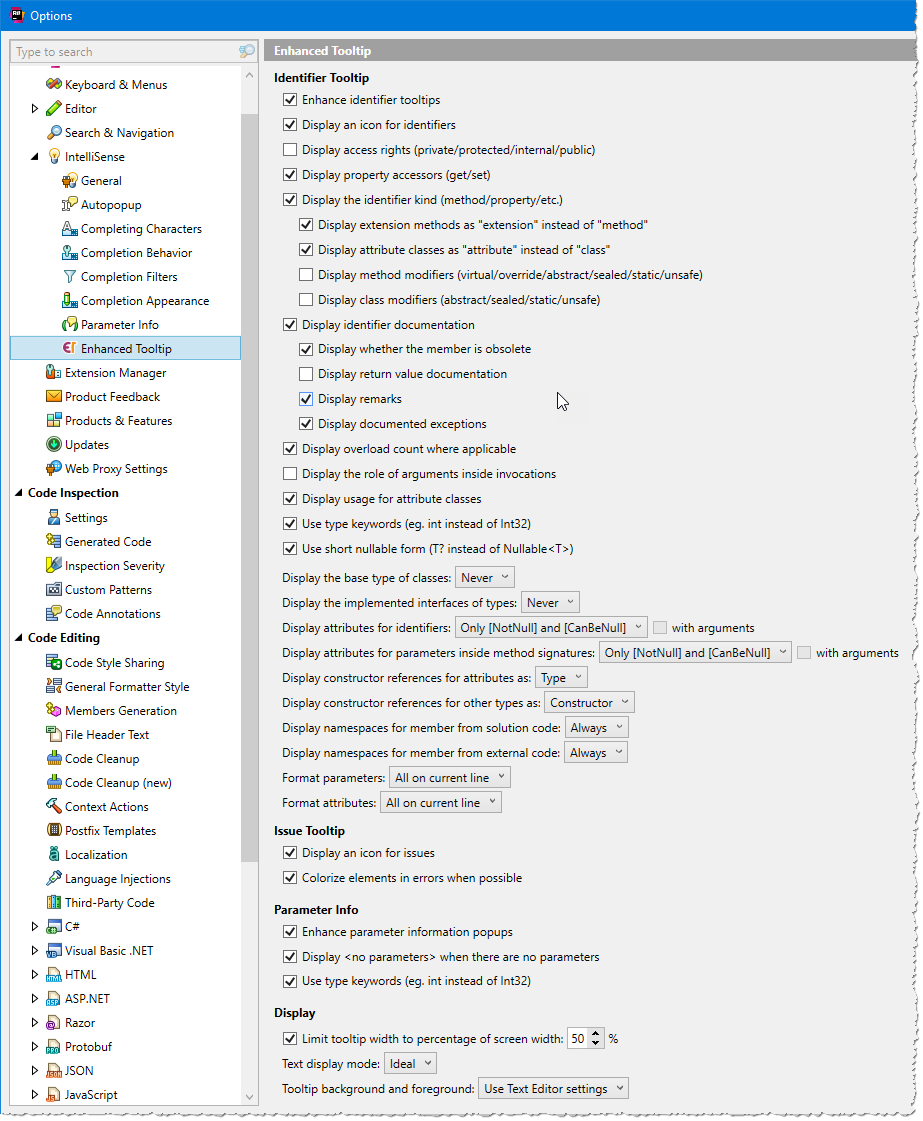
Enhanced Tooltip provides many options to configure the display as you like.
The options page is located at ReSharper → Options → Environment → IntelliSense → Enhanced Tooltip.
Current Limitations
-----------
- Colors only work in C# files. The standard tooltip and parameter information popup are used in other file types.
- The parameter information popup isn't highlighted for calls using named parameters.
Licensed under [Apache License 2.0](http://www.apache.org/licenses/LICENSE-2.0)