https://github.com/mrmagic2020/openrct2-dynamicdashboard
A dynamic dashboard for OpenRCT2 scenarios including all the statistics.
https://github.com/mrmagic2020/openrct2-dynamicdashboard
dashboard dynamic intransient openrct2 openrct2-mods openrct2-plugin statistics
Last synced: 5 months ago
JSON representation
A dynamic dashboard for OpenRCT2 scenarios including all the statistics.
- Host: GitHub
- URL: https://github.com/mrmagic2020/openrct2-dynamicdashboard
- Owner: mrmagic2020
- License: mit
- Created: 2023-05-20T23:32:17.000Z (about 3 years ago)
- Default Branch: develop
- Last Pushed: 2024-05-22T23:54:39.000Z (about 2 years ago)
- Last Synced: 2024-05-23T02:21:29.716Z (about 2 years ago)
- Topics: dashboard, dynamic, intransient, openrct2, openrct2-mods, openrct2-plugin, statistics
- Language: TypeScript
- Homepage: https://mrmagic2020.github.io/openrct2-dynamicdashboard/
- Size: 10.6 MB
- Stars: 2
- Watchers: 1
- Forks: 0
- Open Issues: 5
-
Metadata Files:
- Readme: README.md
- Changelog: CHANGELOG.md
- License: LICENSE
Awesome Lists containing this project
README
# openrct2-dynamicdashboard
_A dynamic dashboard for OpenRCT2 scenarios including all the statistics._







> [!TIP]
> This plugin is under rapid development. [Check for updates](https://github.com/mrmagic2020/openrct2-dynamicdashboard/releases/latest) regularly for the latest features, bug fixes and performance optimisations.
> [!NOTE]
> Some features of this page are only supported by GitHub. If you're not on GitHub, you can go [here](https://github.com/mrmagic2020/openrct2-dynamicdashboard?#readme) for a better experience.
## Contents
- [Overview](#overview)
- [Installation](#installation)
- [Usage](#usage)
- [Update Mode](#update-mode)
- [Sync Now](#sync-now)
- [Show Progress Bar / Value](#show-progress-bar--value)
- [Indicators](#indicators)
- [Advanced Options](#advanced-options)
- [Colour Scheme](#colour-scheme)
- [Contributing](#contributing)
- [Bug Report / Feature Request](#bug-report--feature-request)
- [Build from Source](#build-from-source)
## Overview
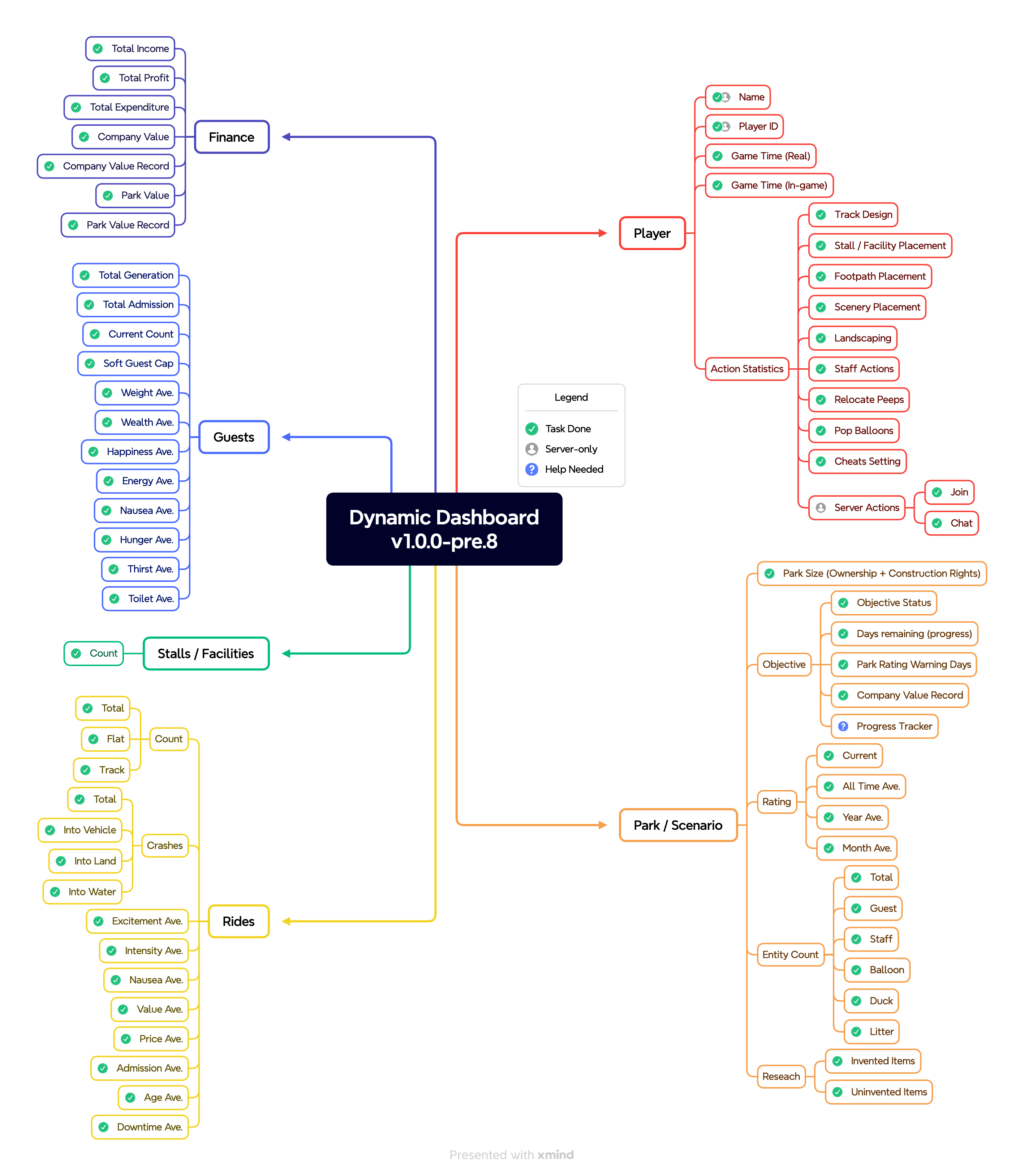
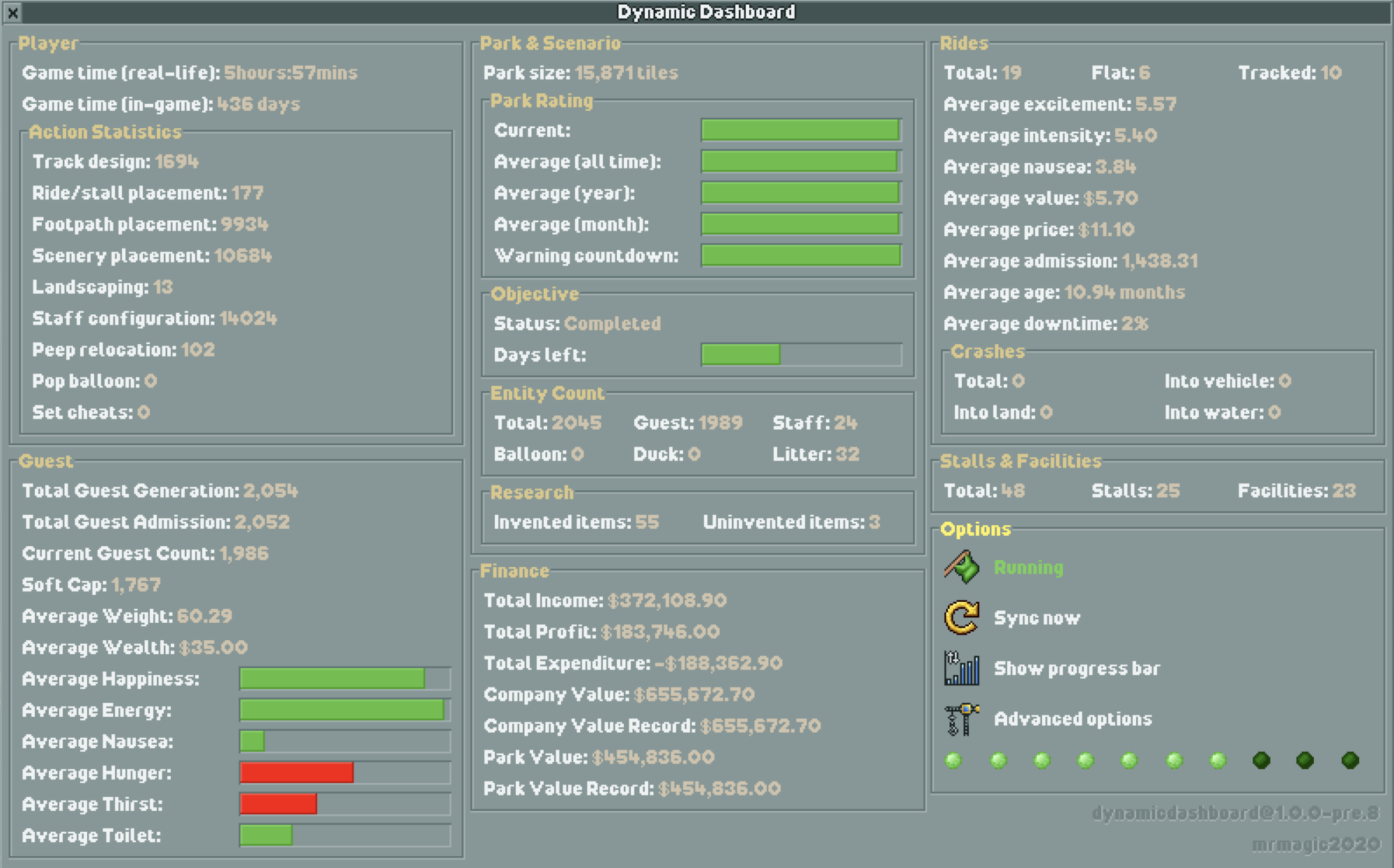
Feature Preview
Screenshot v1.0.0-pre.8
## Installation
1. Download the latest release [here](https://github.com/mrmagic2020/openrct2-dynamicdashboard/releases/latest).
2. Drag `dynamicdashboard.js` into the plugin folder of OpenRCT2.
3. Enjoy the stats!
## Usage
**Shortcut Key:** Press `SHIFT+D` to open dynamic dashboard. Customisable in OpenRCT2 game options.
### Update Mode
With each click of the button, dynamic dashboard iterates through the following modes.
| Mode | Description |
| --------------------------------------------------------------------------------------------------------------------------- | -------------------------------------------------------------------------------------------------------------------------------------------------------------------------------------------------------------------------------------------------------------------------------------------- |
|  | All statistics will update automatically, or [Sync Now](#sync-now) at any time. |
|  | Statistics that are obtained by reading map values (e.g. entity count, guest stats, park ratings) will be paused. Statistics based on detecting game events (e.g. player action, guest generation, ride crashes) will continue to update. Manually update by pressing [Sync Now](#sync-now). |
|  | All statistics will cease to update. |
### Sync Now


Use this button to update statistics manually. Disabled when [Update Mode](#update-mode) is set to `Paused`.
### Show Progress Bar / Value


Toggles progress bar / exact value display for applicable statistics.
> [!TIP]
> If your progress bar looks weird, try changing your render mode to **OpenGL** in the options menu.
### Indicators

Seen when [Update Mode](#update-mode) is set to `Running`. Statistics are updated when all lights turn green (at least it is intended to do so).


Seen when [Update Mode](#update-mode) is set to `Manual`. All lights flash yellow when [Sync Now](#sync-now) is pressed.

Seen when [Update Mode](#update-mode) is set to `Paused`.
### Advanced Options
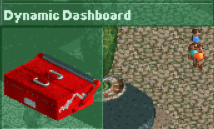
Since `v1.0.0-pre.8`, the plugin has been updated to include advanced options. Advanced options can be accessed via the toolbox menu or the dashboard itself.

### Colour Scheme
Since `v1.0.0-pre.8`, you can customise the colours of the dashboard to your liking.

## Contributing
We're excited to have you here and appreciate your interest in contributing to our OpenRCT2 plugin project!
### Bug Report / Feature Request
Feel free to [open an Issue](https://github.com/mrmagic2020/openrct2-dynamicdashboard/issues/new/choose)! We will address the problem as soon as possible.
### Build from Source
1. Install latest version of [Node](https://nodejs.org/en/) and make sure to include NPM in the installation options.
2. Clone the project to a location of your choice on your PC.
3. Open command prompt, use `cd` to change your current directory to the root folder of this project and run `npm install`.
4. Copy the `openrct2.d.ts` TypeScript API declaration file to `lib` folder.
5. Run `npm run build` (release build) or `npm run build:dev` (develop build) to build the project.
- For the release build, the default output folder is `(project directory)/dist`.
- For the develop build, the project tries to put the plugin into your game's plugin directory.
---
Special thanks to [OpenRCT2](https://openrct2.org), the OpenRCT2 Community, [Basssiiie](https://github.com/Basssiiie)'s wonderful [typescript plugin template](https://github.com/Basssiiie/OpenRCT2-Simple-Typescript-Template) and [OpenRCT2-FlexUI](https://github.com/Basssiiie/OpenRCT2-FlexUI)! This wouldn't be possible without them.
🌟 Support us by starring the repo and spreading the word!