https://github.com/mrmarble/zmk-viewer
cli tool to generate preview images from a zmk .keymap file
https://github.com/mrmarble/zmk-viewer
cli generator keymap layout zmk
Last synced: about 1 year ago
JSON representation
cli tool to generate preview images from a zmk .keymap file
- Host: GitHub
- URL: https://github.com/mrmarble/zmk-viewer
- Owner: MrMarble
- License: mit
- Created: 2022-01-24T22:39:53.000Z (over 4 years ago)
- Default Branch: master
- Last Pushed: 2024-06-26T19:39:13.000Z (about 2 years ago)
- Last Synced: 2025-05-11T04:27:31.831Z (about 1 year ago)
- Topics: cli, generator, keymap, layout, zmk
- Language: Go
- Homepage:
- Size: 604 KB
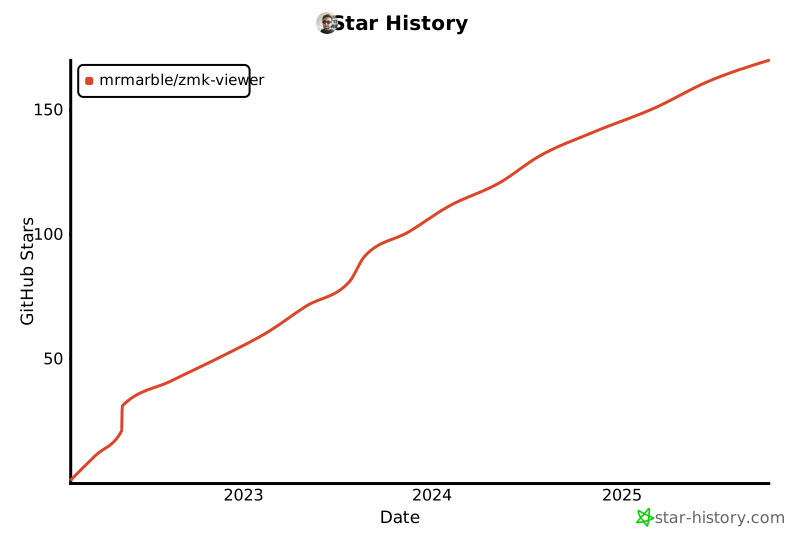
- Stars: 158
- Watchers: 3
- Forks: 10
- Open Issues: 8
-
Metadata Files:
- Readme: README.md
- License: LICENSE
Awesome Lists containing this project
README
# ZMK viewer

[](https://github.com/MrMarble/zmk-viewer/actions/workflows/codeql.yml)
[](https://github.com/MrMarble/zmk-layout-viewer/actions/workflows/golangci-lint.yml)
A **work in progress** Cli tool to generate preview images from a zmk .keymap file.
## Installation
You can download a pre compiled binary directly from the [releases](https://github.com/mrmarble/zmk-viewer/releases) for your OS/Architecture.
### Linux/MacOS
I made an [installation script](/scripts/install.sh) that should download the latest available version corresponding to your OS and architecture. `sudo` is needed to copy the binary to `/usr/local/bin`
```sh
curl -sL https://raw.githubusercontent.com/MrMarble/zmk-viewer/master/scripts/install.sh | sudo -E bash -
# or with wget
wget -O - https://raw.githubusercontent.com/MrMarble/zmk-viewer/master/scripts/install.sh | sudo -E bash -
```
### Windows
Download the executable directly from the [releases](https://github.com/mrmarble/zmk-viewer/releases)
### Others
If you already have Go in your system you can use go install to build the binary without cloning the repo first.
```sh
go install github.com/mrmarble/zmk-viewer/cmd/zmk-viewer@latest # or target a specific version @v0.1.0
```
## Usage
```shell
Usage: zmk-viewer generate
Generate layout image.
Arguments:
Keyboard name to fetch layout.
Flags:
-h, --help Show context-sensitive help.
-D, --debug Enable debug mode
--version Print version information and quit
-f, --file=STRING ZMK .keymap file
-l, --layout-file=STRING info.json file
-t, --transparent Use a transparent background.
-r, --raw Draw the ZMK codes instead of the key labels.
-s, --single Generate a single image.
-u, --unified Generate a single image with all the layers.
-o, --output="." Output directory.
```
Keyboard name should be the same as in https://config.qmk.fm.
```shell
zmk-viewer generate cradio
```
Will output this image:

You can pass a .keymap file ([this one for reference](https://github.com/zmkfirmware/zmk/blob/main/app/boards/shields/cradio/cradio.keymap)) to generate the layout with bindings
### Normal
```shell
zmk-viewer generate -f ~/zmk-config/config/cradio.keymap cradio
```
will output an image for each layer:


### Single
```shell
zmk-viewer generate -f ~/zmk-config/config/cradio.keymap cradio --single
```
will output one image with all layers:

### Unified
```shell
zmk-viewer generate -f ~/zmk-config/config/cradio.keymap cradio --unified
```
will output one image with all layers stacked:

## ⭐ Stargazers
[](https://star-history.com/#mrmarble/zmk-viewer&Date)