https://github.com/mrottow/vite-wordpress
A Vite 6 configuration for block & traditional WordPress development with HMR & Vite DevServer integration & WP Interactivity API support.
https://github.com/mrottow/vite-wordpress
vite vite-plugin vitejs wordpress wordpress-development
Last synced: 11 months ago
JSON representation
A Vite 6 configuration for block & traditional WordPress development with HMR & Vite DevServer integration & WP Interactivity API support.
- Host: GitHub
- URL: https://github.com/mrottow/vite-wordpress
- Owner: mrOttoW
- Created: 2024-12-09T05:46:24.000Z (over 1 year ago)
- Default Branch: main
- Last Pushed: 2024-12-26T05:40:58.000Z (over 1 year ago)
- Last Synced: 2025-07-05T10:52:44.125Z (12 months ago)
- Topics: vite, vite-plugin, vitejs, wordpress, wordpress-development
- Language: TypeScript
- Homepage:
- Size: 1.62 MB
- Stars: 7
- Watchers: 1
- Forks: 1
- Open Issues: 0
-
Metadata Files:
- Readme: README.md
Awesome Lists containing this project
README

⚡️Vite 6 Config for Traditional WordPress Development
Providing an opinionated & "Go To" Vite configuration for building WordPress blocks & traditional WordPress development with WP Interactivity API support and HMR & Vite DevServer integration.






## Features
- Compiles and outputs JavaScript, CSS, and other assets directly into WordPress-ready formats.
- Glob options to configure input paths.
- Complete Vite development server & HMR (Hot Module Replacement) integration.
- JSX/React code supported in `.js` files instead of using `.jsx`.
- Support for WP Interactivity API blocks.
- Scripts with `@wordpress/interactivity` imports will be compiled as modules.
- The Vite development server will enable HMR for WP Interactivity API blocks.
- Automatically externalizes WordPress globals like `wp` and libraries like `React` to reduce bundle sizes.
- Includes a preset of globals for wp dependencies and other common libraries in WordPress like react, react-dom, jquery, lodash etc.. (see src/globals.ts) with option to add additional globals.
- Uses `rollup-plugin-external-globals` plugin under the hood to ensure that globals are not imported for non-modules in compiled files but are instead defined externally.
- Paths in (block).json files like `file:./index.js` will be resolved with hashed file names when `manifest` is enabled.
- Automatically reloads PHP files during development.
- Preserved folder structure in the output directory.
- Use vite `development` mode to compile unminified with sourcemaps (sourcemaps are also included during `serve` command)
- All configurations can be overridden using Vite's default configuration options.
## Installation
Install the plugin via npm:
```bash
npm install --save-dev vite-wordpress
```
or yarn
```bash
yarn add -D vite-wordpress
```
## Usage
### Basic Setup
Add the plugin to your `vite.config.js` (no other Vite configurations needed):
```javascript
import { ViteWordPress } from 'vite-wordpress';
export default {
plugins: [
ViteWordPress({
base: '/wp-content/plugins/my-plugin',
input: ['main.js'],
}),
],
};
```
See all options here.
## Example Project Structure
```
project-root/
├── src/
│ ├── js
│ │ └── main.js
│ ├── css
│ │ └── main.pcss
│ └── blocks
│ └── example-block
│ ├─ style.pcss (imported into index.js)
│ └─ index.js
├── build/
│ ├── js
│ │ └── main.js
│ ├── css
│ │ └── main.css
│ └── blocks
│ └── example-block
│ ├─ index.css
│ └─ index.js
├── vite.config.js
└── package.json
```
Vite config for the given example.
```javascript
import { ViteWordPress } from 'vite-wordpress';
export default {
plugins: [
ViteWordPress({
base: '/wp-content/plugins/my-plugin',
input: ['js/*.js', 'css/*.pcss', 'blocks/*/*.js'],
}),
],
};
```
Project examples (WordPress plugins) can be found here:
- Dynamic block: https://github.com/mrOttoW/vite-wordpress-plugin-block-example
- WP Interactivity API block: https://github.com/mrOttoW/vite-wordpress-plugin-interactivity-block-example
## Dev Server & HMR
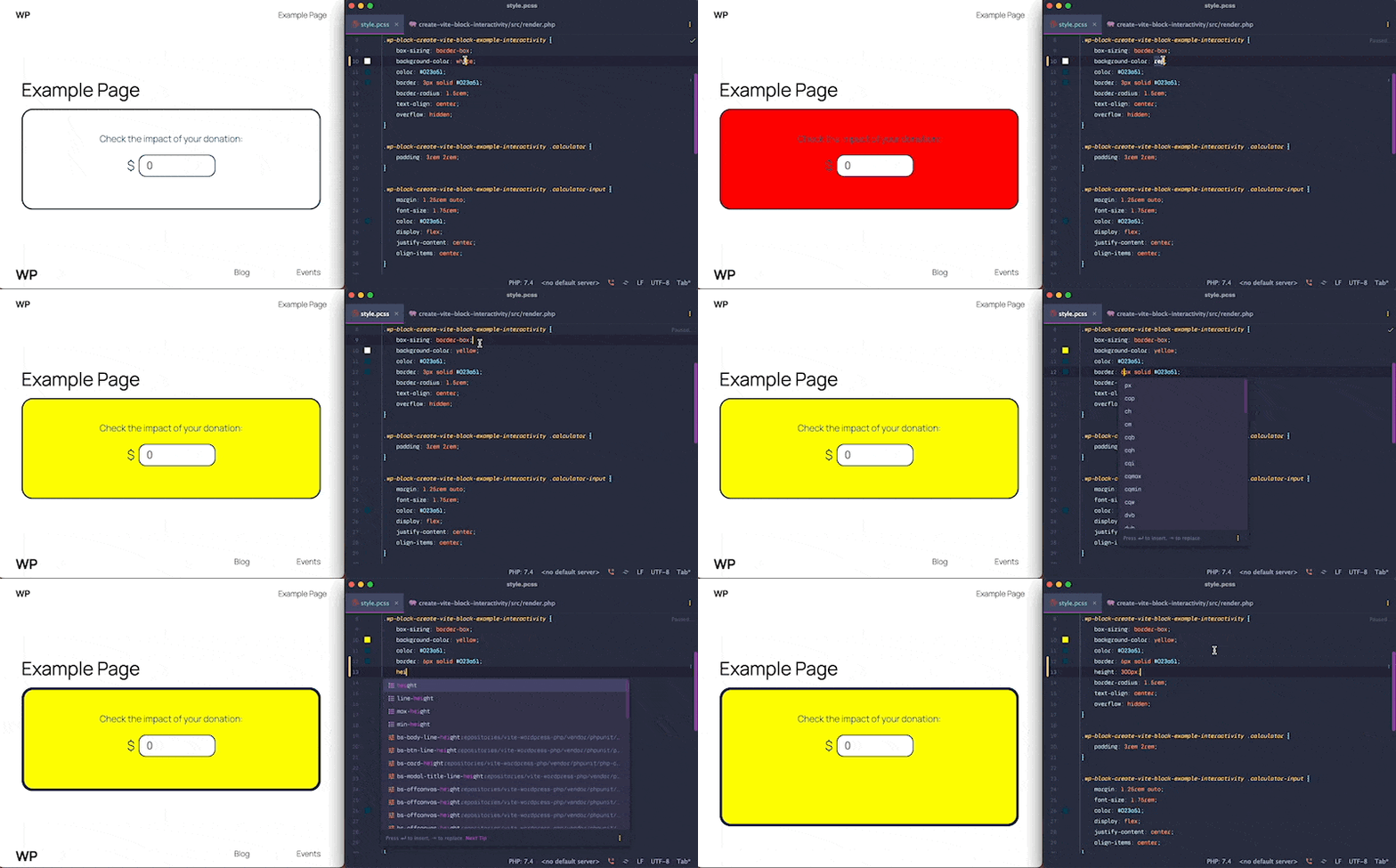
Install the `vite-wordpress-php` composer package.
```bash
composer require mrottow/vite-wordpress
```
The `vite-wordpress` node package can be used in hand with the vite-wordpress-php composer package to
integrate Vite's development server and HMR into WordPress, as well as manage the manifest file (if enabled), which can be used by simply adding
the following into your plugin or theme.
```php
(new ViteWordPress\DevServer())->register();
```
Aside to the integration, `vite-wordpress` exposes the plugin's configurations & a map of the latest build on the development server which is used by `vite-wordpress-php`
to automatically detect all enqueued scripts and template paths from the project through hooks and resolves these to source files served by the development
server. It updates script tags from these specific scripts to use as modules and injects Vite's client to enable HMR (Hot Module Replacement).
It's compatible with a traditional setup with `vite-wordpress` without the need for a manifest (non-hashed) but also works well with a manifest.
You can read more about this on the repository's README page.
## Asset File & Cache busting
Use https://github.com/mrOttoW/vite-php-asset-file to include a hash, manage dependencies identified in the code, and handle imported CSS assets.
Example project structure:
```
project-root/
├── src/
│ ├─ custom-slider.pcss (imported into custom-slider.js)
│ └─ custom-slider.js
├── build/
│ ├─ custom-slider.css
│ ├─ custom-slider.js
│ └─ custom-slider.asset.php
...
```
Example of registering and enqueueing the asset file based on the given example within a theme.
```php
$asset_file = require get_stylesheet_directory() . 'build/custom-slider.asset.php';
wp_register_script(
'my-custom-slider',
get_stylesheet_directory_uri() . 'build/custom-slider.js',
$asset_file['dependencies'],
$asset_file['version'],
);
foreach ( $asset_file['assets'] as $css_handle => $css_path ) {
wp_register_style(
$css_handle,
get_stylesheet_directory_uri() . "build/{$css_path}",
[],
$asset_file['version']
);
}
wp_enqueue_script('my-custom-slider')
```
Alternatively you can use the manifest and hashed file names for cache busting.
## Manifest & Hash
The `manifest` enabler in the plugin will add the manifest file but also add hash to file names.
```diff
export default {
plugins: [
ViteWordPress({
base: '/wp-content/plugins/my-plugin',
input: ['main.js'],
+ manifest: true
}),
],
};
```
You can use the Manifest Resolver from vite-wordpress-php to handle reading and accessing the Vite manifest file and additionally integrates it into the dev server.
#### Example using the facade:
```php
use ViteWordPress\DevServer;
use ViteWordPress\Manifest;
$manifest = Manifest::create( 'absolute/path/to/manifest.json' ); // Also works with a PHP manifest file.
// When using the dev server you need to include the manifest.
( new DevServer( $manifest ) )->register();
// Enqueue scripts hook.
add_action( 'wp_enqueue_scripts', function () {
$file_name = Manifest::get_file( 'app.js' );
wp_enqueue_script( 'my-app', get_stylesheet_directory() . "build/{$file_name}" );
} );
```
### block.json
`vite-wordpress` ensures that JSON files are emitted as assets instead of being converted into JavaScript files.
This keeps the `block.json` file readable and compatible with functions like `register_block_type()` in WordPress.
It is also crucial for the `block.json` file to retain its original name to remain accessible in WordPress,
preventing it from being hashed when the `manifest` option is enabled.
Additionally, all URLs found in the `block.json` file will automatically be resolved to their corresponding hashed filenames.
For example the following `block.json` configurations:
```json
{
"editorScript": "file:./index.js",
"editorStyle": "file:./index.css",
"style": "file:./style.css",
"render": "file:./render.php",
"viewScript": "file:./view.js"
}
```
Will include the hashed file names after compilation.
```json
{
"editorScript": "file:./index.BFKxLtHH.js",
"editorStyle": "file:./index.BvpkZCOy.css",
"style": "file:./style.WLomad7Q.css",
"render": "file:./render.Aelou6by.php",
"viewScript": "file:./view.BQK8SocZ.js"
}
```
### manifest.php
The following plugin also allows you to generate a PHP manifest file that is compatible with the DevServer:
https://github.com/mrOttoW/vite-php-manifest
## WP Interactivity API
`vite-wordpress` also provides out-of-the-box support for development with the
WP Interactivity API.
Any scripts that import `@wordpress/interactivity` (e.g., view scripts) will be compiled as modules, allowing them to
be resolved by the WordPress import map.
Additionally, `vite-wordpress` ensures that the development server ignores these static imports, allowing them to be resolved by WordPress rather than by Vite.
This will prevent errors from Vite's internal `vite:import-analysis` plugin failing the resolve import.
A project example (WordPress plugin) can be found here:
https://github.com/mrOttoW/vite-wordpress-plugin-interactivity-block-example
## Asset Callers
Let's say you have the following project:
```
project-root/
├── classes/
│ ├── Plugin.php
│ ├── Helpers.php
│ ├── Fonts.php
│ └── Integration.php
├── templates/
│ ├── table.php
│ ├── button.php
│ └── card.php
├── src/
│ ├── js
│ │ └── main.js
│ ├── css
│ │ └── main.pcss
│ └── assets/
│ ├── svg/
│ │ ├── star.svg
│ │ └── coffee.svg
│ ├── images/
│ │ ├── background.png
│ │ └── logo.png
│ └── fonts/
│ └── arial.woff
├── vite.config.js
....
```
And you have various PHP functions that retrieve asset files from the `assets` folder, used across different template files or classes like:
```php
get_font('arial.woff')
```
You can use the following plugin to identify and emit assets referenced in PHP functions or callers during the build process. This ensures that Vite compiles only the assets used throughout the project:
https://github.com/mrOttoW/vite-php-asset-callers
The plugin parses PHP code to locate embedded assets, such as image files, SVGs, fonts, or other resources. It then processes and emits these assets for compilation in the final bundle.
## Options
### `outDir`
_Type:_ `string`
_Default:_ `'build'`
Directory for output files.
---
### `srcDir`
_Type:_ `string`
_Default:_ `'src'`
Directory for source files.
---
### `base`
_Type:_ `string`
_Default:_ `''`
_Example:_ `'/wp-content/themes/my-theme'`
Sets the base public path for generating URLs for assets in CSS/JS. If set, it will be appended with the `outDir` during the `build` command (e.g., `/wp-content/themes/my-theme/{outDir}`).
This is also used to link source files to build files during development.
---
### `input`
_Type:_ `string[]`
_Default:_ `[]`
List of input files relative to `srcDir` with glob options.
---
### `css`
_Type:_ `string`
_Default:_ `'pcss'`
CSS extension used for uncompiled files.
---
### `manifest`
_Type:_ `boolean | string`
_Default:_ `false`
Generate a manifest file. Accepts `true`, `false`, or a custom path (this will also add a hash to all compiled files).
---
### `preserveDirs`
_Type:_ `boolean`
_Default:_ `true`
Preserve folder structure in the output. If set to `false`, all files are flattened into a single directory.
---
### `globals`
_Type:_ `object`
_Default:_ `{}`
Maps module names to global variables to mark them as external dependencies (in addition to preset globals).
---
### `alias`
_Type:_ `object`
_Default:_ `{}`
Define path aliases.
---
### `target`
_Type:_ `string | string[] | false`
_Default:_ `'es2017'`
Esbuild target.
---
### `wrapper`
_Type:_ `boolean`
_Default:_ `true`
Enable or disable code wrappers for JavaScript chunks.
---
### `banner`
_Type:_ `string | function`
_Default:_ `document.addEventListener('DOMContentLoaded', () => {'use strict';`
Code wrapper banner to prepend to output JS files.
---
### `footer`
_Type:_ `string | function`
_Default:_ `});`
Code wrapper footer to append to output JS files.