https://github.com/mrousavy/bmppwd
🔐 BmpPwd is a .NET Class Library for overloadable en/decrypting strings or binary data to a System.Drawing.Image
https://github.com/mrousavy/bmppwd
bitmap cryptography decryption encryption image password
Last synced: about 1 year ago
JSON representation
🔐 BmpPwd is a .NET Class Library for overloadable en/decrypting strings or binary data to a System.Drawing.Image
- Host: GitHub
- URL: https://github.com/mrousavy/bmppwd
- Owner: mrousavy
- License: mit
- Created: 2017-02-02T05:43:07.000Z (over 9 years ago)
- Default Branch: master
- Last Pushed: 2020-06-18T08:31:01.000Z (about 6 years ago)
- Last Synced: 2025-03-21T16:21:18.592Z (over 1 year ago)
- Topics: bitmap, cryptography, decryption, encryption, image, password
- Language: C#
- Homepage: https://mrousavy.github.io/BmpPwd/
- Size: 4.03 MB
- Stars: 7
- Watchers: 2
- Forks: 2
- Open Issues: 0
-
Metadata Files:
- Readme: README.md
- Funding: .github/FUNDING.yml
- License: LICENSE
Awesome Lists containing this project
README
#  BmpPwd
**BmpPwd** is a .NET Standard 2.0 class library for encrypting and decrypting plain text to an Image (see: [`System.Drawing.Common`](https://www.nuget.org/packages/System.Drawing.Common/))
[](https://www.nuget.org/packages/BmpPwd/)

Applications like [LaZagne](https://github.com/AlessandroZ/LaZagne) can easily find stored **(and encrypted)** Passwords from various Applications. To prevent this, **BmpPwd** will convert your Text with your En/Decryption Algorithm of choice _(Default: Cipher)_ to a _System.Drawing.Image_ which contains your Text.
To decrypt a **BmpPwd-Encrypted Image**, a Program must know:
* Location of the stored Image
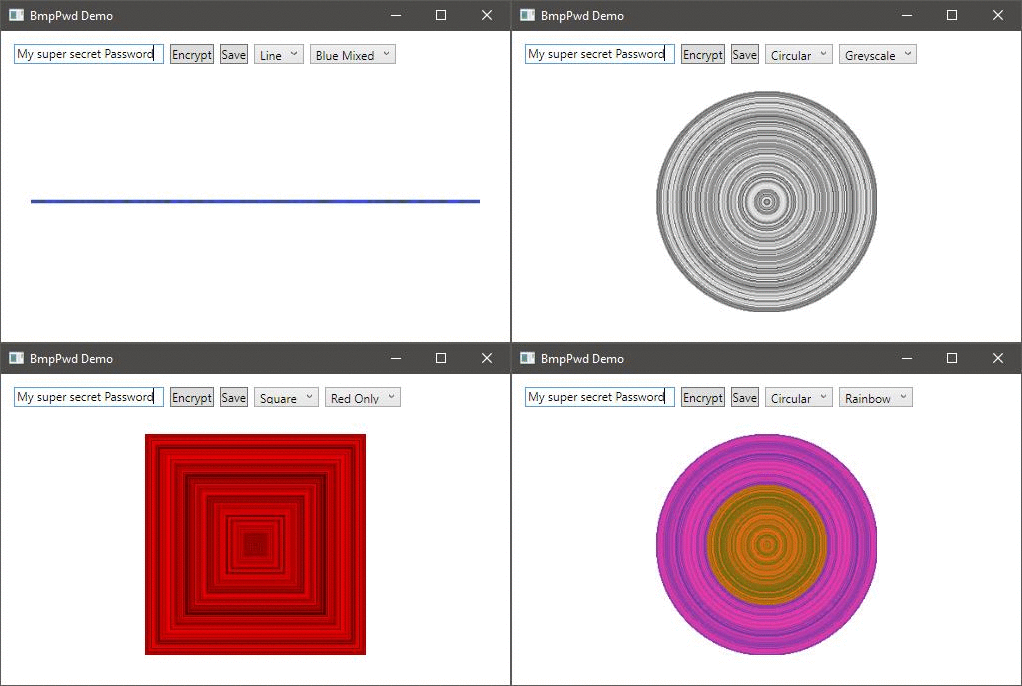
* BmpPwd Encryption Shape/Drawing Scheme
* BmpPwd Encryption Color Scheme
* BmpPwd Decryption Method
* En/Decryption Algorithm _(Default: Cipher)_
* Pass-Phrase/Key for En/Decryption Algorithm
* Random Salt for En/Decryption Algorithm
[**Download the Demo Application** (.zip)](https://github.com/mrousavy/BmpPwd/releases/download/2.0.0/BmpPwdDemo.zip)
### Install
+ NuGet
* [BmpPwd is also available on NuGet!](https://www.nuget.org/packages/BmpPwd) Install via NuGet Package Manager Console:
```nuget
PM> Install-Package BmpPwd
```
or by browsing NuGet Marketplace for `BmpPwd`
+ Manually
1. [Download the latest Library (.dll)](https://github.com/mrousavy/BmpPwd/releases/download/1.0.0.5/BmpPwd.dll)
2. Add the .dll to your Project (Right click `References` in the Project Tree View, click `Add References` and `Browse` to the `.dll` File)
# How to use
## Using the default AES Cipher (Rijndael)
> Note: On .NET Core and .NET Standard the Rijndael Implementation uses a key block-size of `128` bytes. On .NET Framework `256` bytes are used. For compatibility reasons, BmpPwd uses `128` bytes on all platforms. See: [Cipher.cs](BmpPwd/Cipher.cs#L15). Use `BmpPwd.Encrypt` and supply a custom `Cipher()` instance with a custom `keysize` parameter.
### Encrypt a string
* C#:
```cs
using System.Drawing.Common;
using BmpPwd;
// ...
var encryptedImage = BmpPwd.BmpPwd.Encrypt("MyPassword", "The string to be encrypted");
```
* VB:
```vb
Imports System.Drawing.Common
Imports BmpPwd
' ...
Dim encryptedImage = BmpPwd.BmpPwd.Encrypt("MyPassword", "The string to be encrypted")
```
**⚠️: Be careful when saving the Image to not use lossy image compression, like JPEG. Lossy-compressing the Image will result in losing details and results in an un-decryptable image. Save as PNG or BMP to maintain pixel quality.**
### Decrypt an Image
* C#:
```cs
using System.Drawing.Common;
using BmpPwd;
// ...
string decryptedText = BmpPwd.Decrypt("MyPassword", encryptedImage);
```
* VB:
```vb
Imports System.Drawing.Common
Imports BmpPwd
' ...
Dim decryptedText = BmpPwd.Decrypt("MyPassword", encryptedImage)
```
## Custom Encryption Implementation
### Implement your custom Encryption class
* C#:
```cs
public class MyCryptoClass : ICrypto {
// Implement Encrypt(..) and Decrypt(..) here
}
```
* VB:
```vb
Public Class MyCryptoClass
Implements ICrypto
' Implement Encrypt(..) and Decrypt(..) here
End Class
```
### Use
* C#:
```cs
using System.Drawing.Common;
using BmpPwd;
// ...
var encryptedImage = BmpPwd.BmpPwd.Encrypt("MyPassword",
"The string to be encrypted",
new MyCryptoClass(),
BmpPwd.DrawingScheme.Square,
BmpPwd.ColorScheme.BlueMixed);
```
* VB:
```vb
Imports System.Drawing.Common
Imports BmpPwd
' ...
Dim encryptedImage = BmpPwd.BmpPwd.Encrypt(
"MyPassword",
"The string to be encrypted",
new MyCryptoClass(),
BmpPwd.DrawingScheme.Square,
BmpPwd.ColorScheme.BlueMixed)
```
# Screenshots

# See also
## Performance Benchmark

**BmpPwd** does perform nearly as good as normal **Cipher string encryption**.
Use `Line` if you care about small performance benefits.
# Thanks for using BmpPwd!
> License: [MIT](https://github.com/mrousavy/BmpPwd/blob/master/LICENSE) | mrousavy 2020