https://github.com/mrsaeeddev/new-portfolio
https://github.com/mrsaeeddev/new-portfolio
Last synced: 5 months ago
JSON representation
- Host: GitHub
- URL: https://github.com/mrsaeeddev/new-portfolio
- Owner: mrsaeeddev
- License: mit
- Created: 2020-03-07T04:52:05.000Z (over 6 years ago)
- Default Branch: master
- Last Pushed: 2023-01-04T14:29:02.000Z (over 3 years ago)
- Last Synced: 2025-04-02T12:49:33.138Z (about 1 year ago)
- Language: JavaScript
- Size: 3.77 MB
- Stars: 0
- Watchers: 2
- Forks: 0
- Open Issues: 26
-
Metadata Files:
- Readme: README.md
- License: LICENSE
Awesome Lists containing this project
README
# Prist | A Gatsby & Prismic Starter
A light-themed starter powered by [Gatsby v2](https://www.gatsbyjs.org) and [Prismic](https://prismic.io/) to showcase portfolios and blogs.

### 👩💻 [Demo website](http://prist.marguerite.io)
## ✨ Features
- Landing page with customizable Hero, Portfolio preview, and About component.
- [Emotion](https://emotion.sh/docs/styled) styled components
- Blog layout and pages
- Portfolio layout and pages
- Google Analytics
- Mobile ready
## 🚀 Getting Started
[](https://app.netlify.com/start/deploy?repository=https://github.com/margueriteroth/gatsby-prismic-starter-prist)
1. **Create a Gatsby site.**
Use the Gatsby CLI to create a new site, specifying this project. If you don't have the CLI installed already, see [Gastby instructions](https://www.gatsbyjs.org/tutorial/part-zero/#using-the-gatsby-cli).
```sh
gatsby new YOUR-PROJECT-NAME https://github.com/margueriteroth/gatsby-prismic-starter-prist
```
2. **Start developing.**
Navigate into your new site's directory, install node modules, and start it up.
```sh
cd YOUR-PROJECT-NAME
npm install
gatsby develop
```
3. **Open the code and start customizing!**
Your site is now running at `http://localhost:8000`!
_Note: You'll also see a second link: _`http://localhost:8000/___graphql`_. This is a tool you can use to experiment with querying your data. Learn more about using this tool in the [Gatsby tutorial](https://www.gatsbyjs.org/tutorial/part-five/#introducing-graphiql)._
## 👩🎤 Configuring Prismic
1. **Create account and repo**
Head over to [Prismic](https://prismic.io/signup) and create your new account. Once you have an account, create a new repository.
2. **Add the repo to your new project**
In your `gatsby-config.js` file, add your Prismic Repo name to the `repositoryName` field:
```
`gatsby-plugin-sharp`,
{
resolve: 'gatsby-source-prismic-graphql',
options: {
repositoryName: 'REPO-NAME', // (REQUIRED, replace with your own)
}
},
```
3. **Define your Custom Types**
This starter uses 3 Custom Types:

Create the three following Custom Types by selecting "Create New" in the top right of your screen, and selecting either Repeatable Type or Single Type.
**1. Homepage** (Single)
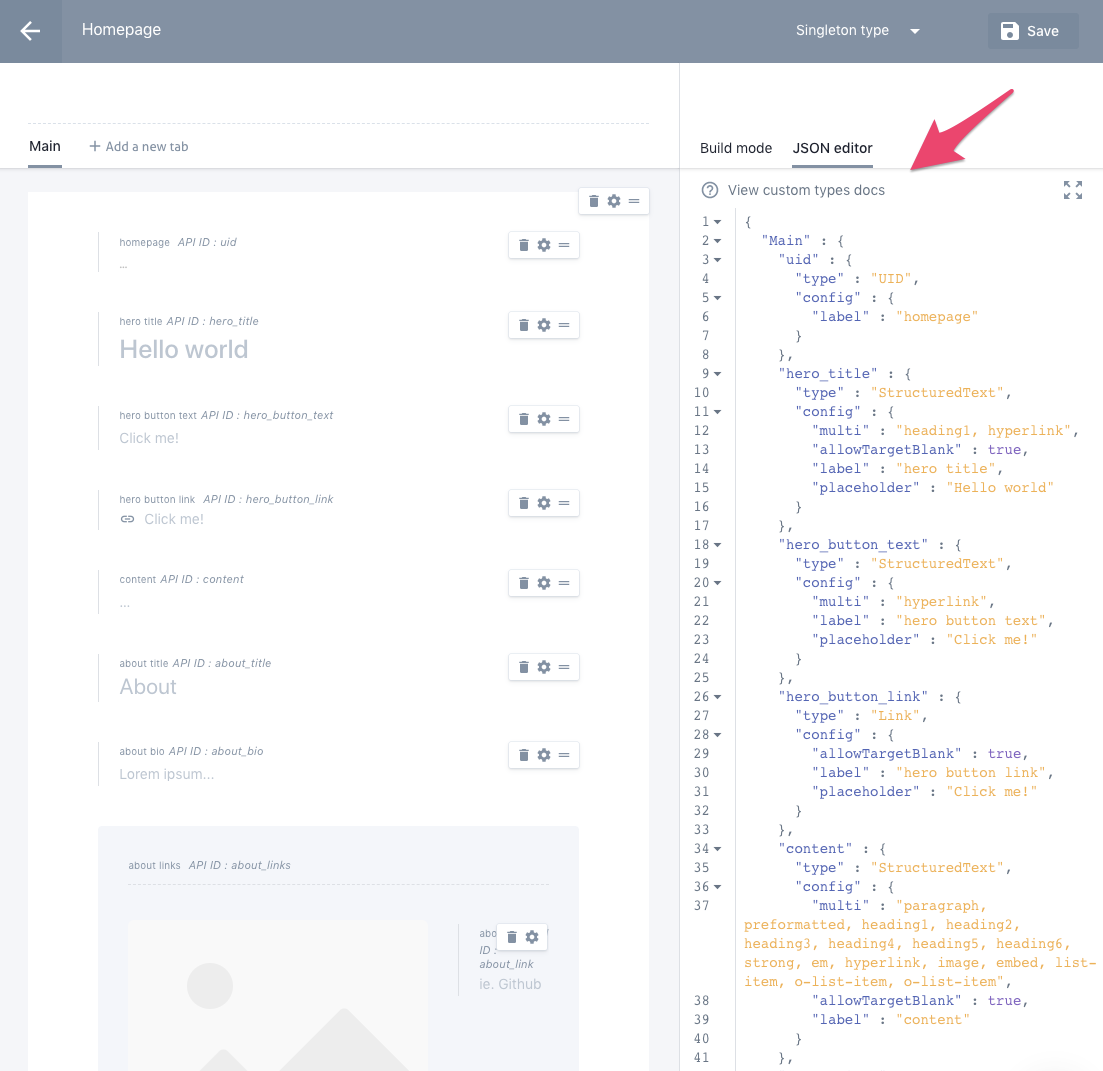
In the right panel, select *JSON editor* and paste the following:
```
{
"Main" : {
"uid" : {
"type" : "UID",
"config" : {
"label" : "homepage"
}
},
"hero_title" : {
"type" : "StructuredText",
"config" : {
"multi" : "heading1, hyperlink",
"allowTargetBlank" : true,
"label" : "hero title",
"placeholder" : "Hello world"
}
},
"hero_button_text" : {
"type" : "StructuredText",
"config" : {
"multi" : "hyperlink",
"label" : "hero button text",
"placeholder" : "Click me!"
}
},
"hero_button_link" : {
"type" : "Link",
"config" : {
"allowTargetBlank" : true,
"label" : "hero button link",
"placeholder" : "Click me!"
}
},
"content" : {
"type" : "StructuredText",
"config" : {
"multi" : "paragraph, preformatted, heading1, heading2, heading3, heading4, heading5, heading6, strong, em, hyperlink, image, embed, list-item, o-list-item, o-list-item",
"allowTargetBlank" : true,
"label" : "content"
}
},
"about_title" : {
"type" : "StructuredText",
"config" : {
"single" : "heading3",
"label" : "about title",
"placeholder" : "About"
}
},
"about_bio" : {
"type" : "StructuredText",
"config" : {
"multi" : "paragraph, preformatted, heading5, heading6, strong, em, hyperlink, image, embed, list-item, o-list-item, o-list-item",
"allowTargetBlank" : true,
"label" : "about bio",
"placeholder" : "Lorem ipsum..."
}
},
"about_links" : {
"type" : "Group",
"config" : {
"fields" : {
"about_link" : {
"type" : "StructuredText",
"config" : {
"single" : "hyperlink",
"allowTargetBlank" : true,
"label" : "about link",
"placeholder" : "ie. Github"
}
}
},
"label" : "about links"
}
}
}
}
```
**2. Post** (Repeatable)
```
{
"Main" : {
"post_title" : {
"type" : "StructuredText",
"config" : {
"single" : "heading1, heading2, heading3, heading4, heading5, heading6",
"label" : "post title"
}
},
"uid" : {
"type" : "UID",
"config" : {
"label" : "post uid"
}
},
"post_category" : {
"type" : "StructuredText",
"config" : {
"single" : "heading5",
"label" : "post category"
}
},
"post_preview_description" : {
"type" : "StructuredText",
"config" : {
"multi" : "paragraph, strong, em, hyperlink, list-item",
"label" : "post preview description"
}
},
"post_author" : {
"type" : "Select",
"config" : {
"options" : [ "Prist Team", "Marguerite Roth" ],
"default_value" : "Prist Team",
"label" : "post author"
}
},
"post_hero_image" : {
"type" : "Image",
"config" : {
"constraint" : { },
"thumbnails" : [ ],
"label" : "post hero image"
}
},
"post_hero_annotation" : {
"type" : "StructuredText",
"config" : {
"single" : "heading6, strong, em, hyperlink",
"allowTargetBlank" : true,
"label" : "post hero annotation"
}
},
"post_body" : {
"type" : "StructuredText",
"config" : {
"multi" : "paragraph, preformatted, heading1, heading2, heading3, heading4, heading5, heading6, strong, em, hyperlink, image, embed, list-item, o-list-item, o-list-item",
"allowTargetBlank" : true,
"label" : "post body"
}
},
"post_date" : {
"type" : "Date",
"config" : {
"label" : "post date"
}
}
}
}
```
**3. Project** (Repeatable)
```
{
"Main" : {
"project_title" : {
"type" : "StructuredText",
"config" : {
"single" : "heading1",
"label" : "project title"
}
},
"uid" : {
"type" : "UID",
"config" : {
"label" : "project uid"
}
},
"project_category" : {
"type" : "StructuredText",
"config" : {
"single" : "heading5",
"label" : "project category"
}
},
"project_preview_description" : {
"type" : "StructuredText",
"config" : {
"multi" : "paragraph, strong, em, hyperlink",
"allowTargetBlank" : true,
"label" : "project preview description"
}
},
"project_preview_thumbnail" : {
"type" : "Image",
"config" : {
"constraint" : { },
"thumbnails" : [ ],
"label" : "project preview thumbnail"
}
},
"project_hero_image" : {
"type" : "Image",
"config" : {
"constraint" : { },
"thumbnails" : [ ],
"label" : "project hero image"
}
},
"project_description" : {
"type" : "StructuredText",
"config" : {
"multi" : "paragraph, preformatted, heading1, heading2, heading3, heading4, heading5, heading6, strong, em, hyperlink, image, embed, list-item, o-list-item, o-list-item",
"allowTargetBlank" : true,
"label" : "project description"
}
},
"project_post_date" : {
"type" : "Date",
"config" : {
"label" : "project post date"
}
}
}
}
```