https://github.com/mryslab/kitronik_motor_board
A MicroPython class to control the kitronik motor driver for the micro:bit
https://github.com/mryslab/kitronik_motor_board
Last synced: 2 months ago
JSON representation
A MicroPython class to control the kitronik motor driver for the micro:bit
- Host: GitHub
- URL: https://github.com/mryslab/kitronik_motor_board
- Owner: MrYsLab
- License: other
- Created: 2018-01-18T01:14:19.000Z (over 8 years ago)
- Default Branch: master
- Last Pushed: 2018-01-21T16:36:06.000Z (over 8 years ago)
- Last Synced: 2025-11-20T07:02:57.443Z (7 months ago)
- Language: Python
- Size: 906 KB
- Stars: 3
- Watchers: 1
- Forks: 2
- Open Issues: 0
-
Metadata Files:
- Readme: README.md
- License: LICENSE
Awesome Lists containing this project
README
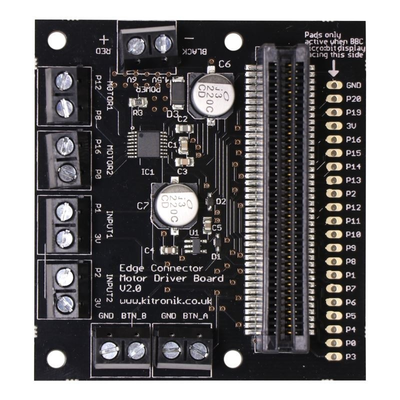
## A micro:bit MicroPython Class To Control The
## [Kitronik Motor Driver Board](https://www.kitronik.co.uk/5620-motor-driver-board-for-the-bbc-microbit-v2.html)
```
# k_motor.py API
class KMotor:
# Motor Directions
FORWARD = 0
REVERSE = 1
# Motor Selectors
MOTOR_1 = 0
MOTOR_2 = 1
def __init__(self):
"""
Turn off both motors and clear the display
"""
def motor_on(self, motor, direction, speed=100):
"""
Turn motor with the given direction and speed.
If speed is out of range, the NO image will
be displayed and no motor will be turned on.
:param motor: KMotor.MOTOR1 or KMotor.Motor2
:param direction: KMotor.FORWARD or KMOTOR.REVERSE
:param speed: 0 - 100
def motor_off(self, motor):
"""
Place motor in coast mode
:param motor: KMotor.MOTOR1 or KMotor.Motor2
def motor_brake(self, motor):
"""
Brake the selected motor.
:param motor:
```
## Using the class
[This article](https://microbit-playground.co.uk/howto/add-python-module-microbit-micropython) explains how to add
a third party library, like k_motor.py, to the micro:bit persistent file system.
Although more "pythonic" than simply adding the KMotor class to the top of of the application, as was done for the [included
example](https://github.com/MrYsLab/kitronic_motor_board/blob/master/examples/run_motors.py), this method has some drawbacks. If you
make any changes to the application, the entire procedure of loading of the application and library has to be repeated.
Therefore, adding the k_motor to the top of the application during development is more convenient. Once the application is
debugged and complete, using the persistent file system method is totally appropriate.
To help save value memory space in the micro:bit, a minimized file,
[k_motor_minimized.py](https://github.com/MrYsLab/kitronic_motor_board/blob/master/k_motor_minimized.py)
has been provided for your convenience. It removes all comments and
unnecessary while space from k_motor.py.