https://github.com/msamsami/qna-builder
Similarity-based question-and-answering (QnA) chat bot
https://github.com/msamsami/qna-builder
chatbot conversational-bot qna-model
Last synced: 10 months ago
JSON representation
Similarity-based question-and-answering (QnA) chat bot
- Host: GitHub
- URL: https://github.com/msamsami/qna-builder
- Owner: msamsami
- Created: 2021-10-07T15:03:37.000Z (over 4 years ago)
- Default Branch: main
- Last Pushed: 2023-07-13T02:02:18.000Z (almost 3 years ago)
- Last Synced: 2025-07-14T22:51:08.809Z (12 months ago)
- Topics: chatbot, conversational-bot, qna-model
- Language: Python
- Homepage:
- Size: 291 KB
- Stars: 2
- Watchers: 1
- Forks: 0
- Open Issues: 0
-
Metadata Files:
- Readme: README.md
Awesome Lists containing this project
README
# QnA Builder



[](https://pypi.org/project/qna-builder/)


## Introduction
**QnA Builder** is a simple, no-code way to build chatbots in Python. It provides a similarity-based conversational dialog
engine, **QnA Bot**, which makes it easy to generate automated responses to input questions according to a set of known
conversations, i.e., question-answer pairs, stored in a ***knowledge base***. QnA Bot relies on a collection of
question-answer pairs to generate answers for new inputs.
## Install
The easiest way to install the qna-builder is by using `pip`:
```shell
pip install qna-builder
```
This library is shipped as an all-in-one module implementation with minimalistic dependencies and requirements.
## Getting started
A QnA Bot can be set up and used in four simple steps:
1. Import `QnABot` class
```python
from qnabuilder import QnABot
```
2. Initialize a bot
```python
bot = QnABot()
```
3. Fit the bot engine to a knowledge base
```python
bot.fit(kb="knowledge_base.json")
```
4. Generate answers
```python
bot.answer("Hey. What's up?")
```
`"All good. What's up with you?"`
## Algorithms
Currently, QnA Bot engine supports the following algorithms for similarity-based answer generation:
- TF-IDF Vectorization (`'tfidf'`)
- Murmurhash3 Vectorization (`'murmurhash'`)
- Count Vectorization (`'count'`)
Supported similarity metrics are as follows:
- Cosine similarity (`'cosine'`)
- Euclidean distance (`'euclidean'`)
- Manhattan distance (`'manhattan'`)
## Knowledge base editor
By calling `run_editor()` method of `QnAKnowledgeBase` class, the knowledge base editor window will open up in
your web browser and allows you to edit your knowledge base by adding, removing, or modifying questions/answers.
```python
from qnabuilder import QnAKnowledgeBase
kb = QnAKnowledgeBase('my_knowledge_base.json')
kb.run_editor()
```
Here, you can see a screenshot of the knowledge base editor:
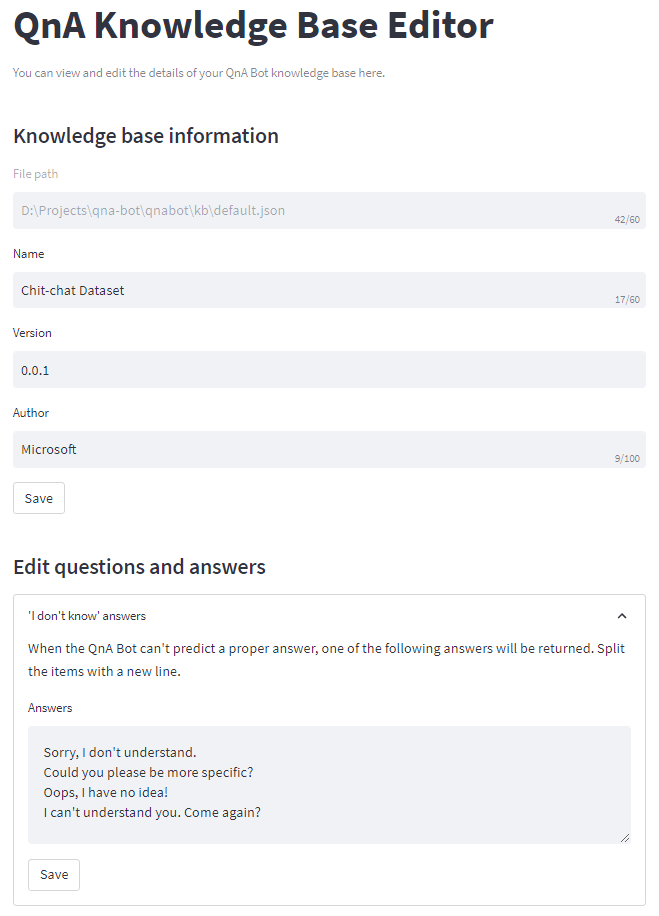
Note that you need to install the optional requirement [streamlit](https://streamlit.io/) to be able to use the
knowledge base editor.
## Tests
To run the tests, install development requirements:
```
pip install -r requirements_dev.txt
```
Then, run pytest:
```
pytest
```