https://github.com/mshirazkamran/filebin-api
A wrapper over the filebin.net API. Let's you upload, download files without hosting them on your own. A temporary file storage
https://github.com/mshirazkamran/filebin-api
api application-programming-interface cli-app file-upload filebin python python-script python3 requests-library-python requests-python venv-python
Last synced: 4 months ago
JSON representation
A wrapper over the filebin.net API. Let's you upload, download files without hosting them on your own. A temporary file storage
- Host: GitHub
- URL: https://github.com/mshirazkamran/filebin-api
- Owner: mshirazkamran
- License: mit
- Created: 2025-05-09T15:02:51.000Z (about 1 year ago)
- Default Branch: master
- Last Pushed: 2025-09-18T11:35:51.000Z (10 months ago)
- Last Synced: 2025-09-25T14:25:24.674Z (10 months ago)
- Topics: api, application-programming-interface, cli-app, file-upload, filebin, python, python-script, python3, requests-library-python, requests-python, venv-python
- Language: Python
- Homepage:
- Size: 15.4 MB
- Stars: 1
- Watchers: 1
- Forks: 0
- Open Issues: 0
-
Metadata Files:
- Readme: README.md
- License: LICENSE
Awesome Lists containing this project
- awesome-cli-apps-in-a-csv - Filebin cli - CLI tool to share files temporarily from the terminal (share short code to download on the other machine). (<a name="transfer"></a>Data transfer)
- awesome-cli-apps - Filebin cli - CLI tool to share files temporarily from the terminal (share short code to download on the other machine). (<a name="transfer"></a>Data transfer)
README
Filebin cli
### A cli tool to **share files temporarily** without any hassle, directly from your terminal. No login. No setup. Just share the **short code** to download on the other machine. Ensures some privacy (refer to [Useful tips](#useful-to-know) )
it interacts with the file-sharing service [filebin.net](https://filebin.net).
---
## 📑 Table of Contents
- [Useful tips](#useful-to-know)
- [Features](#features)
- [Installation](#installation)
- [Quick Start & Examples](#quick-start--examples)
- [Upload Files](#-upload-files)
- [Get Bin Details](#-get-bin-details)
- [Download Files](#-download-files)
- [Download Bin as archive](#️-download-archive)
- [Manage Bins](#️-manage-bins)
- [🧾 Command Reference](#-command-reference)
- [`upload`](#upload)
- [`details`](#details)
- [`download`](#download)
- [`lock`](#lock)
- [`delete`](#delete)
- [`archive`](#archive)
- [🔧 Requirements](#-requirements)
- [🧑💻 Author](#-author)
- [LICENSE](#license)
---
## Useful To know:
- Bins are like folders where you can upload files. They can be downloaded, updated with files, locked and deleted
- Short code is a mapping for bins that allows to remember your bin. eg: sweet-mango16 for binid A904hbhu897SAD4Q
- Bins are auto deleted after 7 days, that is if not deleted by the user himself
- Ensures some level of privacy because the bins are made with 16 digit unique alhpanumeric id and only the people having the link(or short code) can access the content
---
## Features
- **Upload :** one or multiple files to a new or existing bin.
- **Shortcode Access :**: Use **human-readable shortcodes** like `good-apple81` or `sweet-mango37` instead of remembering long bin IDs to interact with bins and files.
- **Download :** As simple files or download complete bin as archive (tar and zip supported)
- **List :** the contents of any bin with basic or detailed metadata.
- **Lock :** a bin to make it read-only.
- **Delete :** an entire bin permanently.
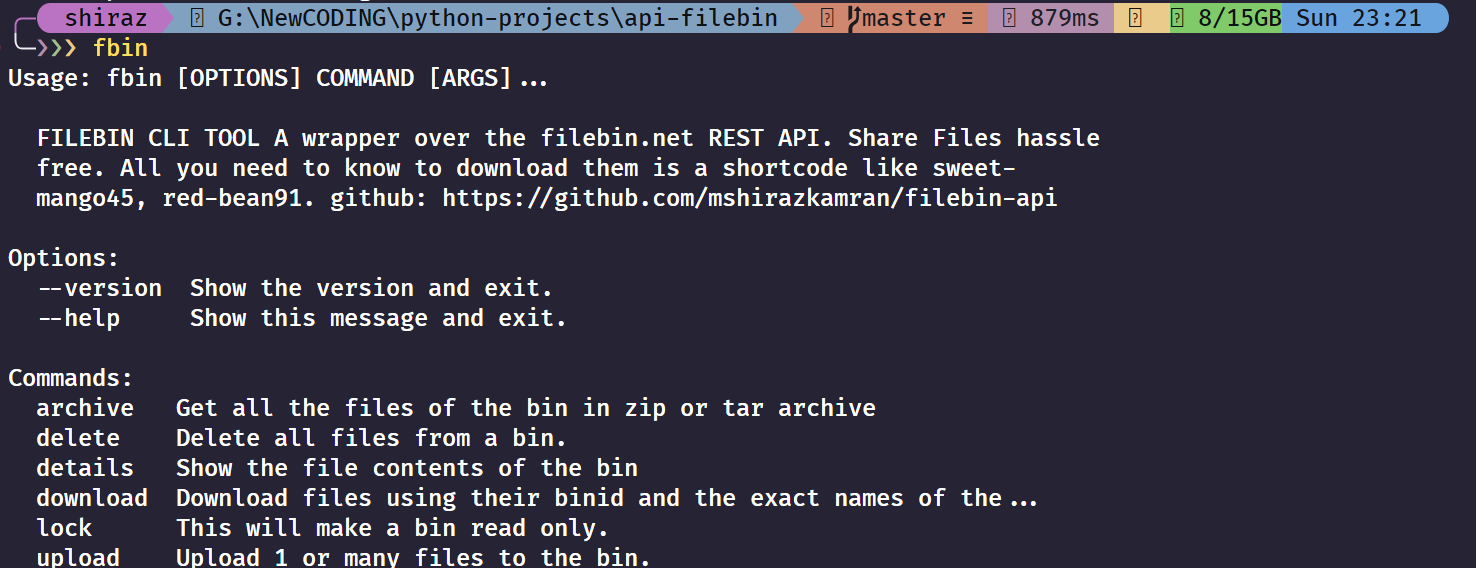
## NOTE: Works on python 3.7.9+ due to openssl 1.1.1 dependency
## Installation
Install the tool from PyPI using pip:
```
pip install filebin-cli
```
## Quick Start & Examples
---
### 📤 Upload Files
* **Upload a single file to a new bin:**
```bash
fbin upload document.pdf
```
* **Upload multiple files to a new bin:**
```bash
fbin upload image.jpg report.docx archive.zip
```
* **Upload a file to a specific, existing bin using a bin ID:**
```bash
fbin upload --binid 3s8h9gqz2d new-file.txt
```
* **Upload a file using a shortcode:**
```bash
fbin upload -b good-apple81 new-file.txt
```
---
### 📋 Get Bin Details
* **List the files in a bin using a bin ID:**
```bash
fbin details 3s8h9gqz2d
```
* **List the files using a shortcode:**
```bash
fbin details good-apple81
```
* **Get detailed metadata:**
```bash
fbin details -d sweet-mango37
```
---
### 📥 Download Files
* **Download a single file from a bin using bin ID:**
```bash
fbin download --binid 3s8h9gqz2d document.pdf
```
* **Download a single file using shortcode:**
```bash
fbin download --binid sweet-mango37 document.pdf
```
* **Download multiple files:**
```bash
fbin download good-apple81 image.jpg report.docx
```
* **Download files to a specific directory:**
```bash
fbin download good-apple81 main.py -p /path/to/my/downloads
```
---
## 🗜️ Download Archive
* **Download all files from a bin as a ZIP archive (default):**
```bash
fbin archive A5yv3s8h9gqz2d
```
* **Download all files from a bin as a TAR archive (using shortcode):**
```bash
fbin archive --type tar good-orange92
```
* **Specify a custom output directory for the archive:**
```bash
fbin archive --type zip --path ./downloads white-cat12
```
---
### 🛠️ Manage Bins
* **Lock a bin (permanent action):**
```bash
fbin lock good-apple81
```
* **Delete a bin and all contents (permanent action):**
```bash
fbin delete sweet-mango37
```
---
## 🧾 Command Reference
### `upload`
Uploads one or more files. If no `--binid` is provided, a new bin is created automatically.
**Usage:**
```bash
fbin upload [OPTIONS] [PATHS]...
````
**Arguments:**
* `PATHS...`: One or more paths to the files you want to upload.
**Options:**
* `--binid TEXT`: Specify an existing bin ID or shortcode to upload to.
### `details`
Fetches and displays the metadata for all files in a specified bin.
**Usage:**
```bash
fbin details [OPTIONS] BINID_OR_SHORTCODE
```
**Arguments:**
* `BINID_OR_SHORTCODE`: The ID or shortcode of the bin you want to inspect.
**Options:**
* `-d, --details`: Display detailed metadata, including timestamps and MD5 hash.
### `download`
Downloads one or more files from a bin.
**Usage:**
```bash
fbin download [OPTIONS] BINID_OR_SHORTCODE [FILENAMES]...
```
**Arguments:**
* `BINID_OR_SHORTCODE`: The ID or shortcode of the bin to download from.
* `FILENAMES...`: The exact name(s) of the file(s) to download.
**Options:**
* `-p, --path TEXT`: The local directory path where files should be saved. Defaults to the current directory.
### `lock`
Permanently locks a bin, making it read-only. No new files can be uploaded.
**Usage:**
```bash
fbin lock BINID_OR_SHORTCODE
```
**Arguments:**
* `BINID_OR_SHORTCODE`: The ID or shortcode of the bin to lock.
-----
### `archive`
Downloads all files in a bin as a `.zip` or `.tar` archive.
**Usage:**
```bash
fbin archive [OPTIONS] BINID
```
**Arguments:**
* `BINID`: The ID of the bin to archive.
**Options:**
* `--path, -p TEXT`: The destination directory to save the archive (default: `root`).
* `--type, -t [tar|zip]`: The archive format to use (required, default: `zip`).
---
### `delete`
Permanently deletes a bin and all of its contents.
**Usage:**
```bash
fbin delete BINID_OR_SHORTCODE
```
**Arguments:**
* `BINID_OR_SHORTCODE`: The ID or shortcode of the bin to delete.
-----
## 🔧 Requirements
* `click`
* `requests`
refer to requirements.txt for more info
-----
## 🧑💻 Author
Made and managed by [@mshirazkamran](https://github.com/mshirazkamran)
-----
## LICENSE
This tool is Licensed under the MIT license.