https://github.com/mskian/san-proxy
Socks5 Proxy Extension for Chromium based Web Browser ❇
https://github.com/mskian/san-proxy
chrome-extension chrome-extensions chromium chromium-extension css extension html https javascript proxy proxy-https proxy-server socks socks5 socks5-proxy
Last synced: 12 months ago
JSON representation
Socks5 Proxy Extension for Chromium based Web Browser ❇
- Host: GitHub
- URL: https://github.com/mskian/san-proxy
- Owner: mskian
- License: mit
- Created: 2020-05-15T06:12:27.000Z (about 6 years ago)
- Default Branch: master
- Last Pushed: 2022-06-18T10:50:31.000Z (about 4 years ago)
- Last Synced: 2025-04-20T19:48:02.505Z (about 1 year ago)
- Topics: chrome-extension, chrome-extensions, chromium, chromium-extension, css, extension, html, https, javascript, proxy, proxy-https, proxy-server, socks, socks5, socks5-proxy
- Language: JavaScript
- Homepage: https://chrome.google.com/webstore/detail/san-proxy/hfkbfaacabmkdnemhpffhhhpnecnmkjg
- Size: 194 KB
- Stars: 12
- Watchers: 3
- Forks: 4
- Open Issues: 3
-
Metadata Files:
- Readme: README.md
- License: LICENSE
Awesome Lists containing this project
README
# San Proxy 🔐
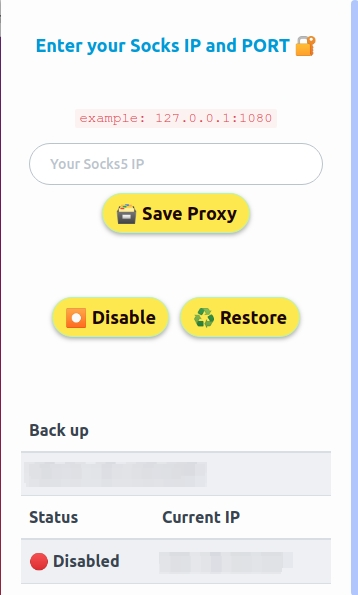
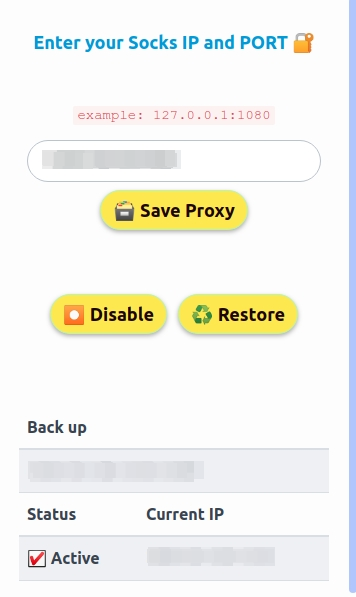
A simple and Lightweight Chromium based Extension for Connect the Socks5 Proxy
[](https://chrome.google.com/webstore/detail/san-proxy/hfkbfaacabmkdnemhpffhhhpnecnmkjg)
## Why this Extension ❔
I build this Extension to Connect the Socks5 Proxy on My Browser only - Browse Anonymously 👀
## Requirements 📃
- Socks Proxy - `blazingseollc.com` and `www.webshare.io` Recommended Proxy providers
> Currently it supports **IP Authorization** Method only -
## Installation 📦
> For Development and Test the Latest Features
- Download or Clone this Github Respo
- Open the Extension Management Page - `chrome://extensions`
- Enable Developer Mode by clicking the toggle switch next to Developer mode.
- Click the `LOAD UNPACKED` button and select the unzipped extension directory
> Clear the Extension Error logs Open - `chrome://extensions/` you can find the Error button Just click and Open it > Clear all > Refresh the Extension (Sometimes it does not Connect or display proxy status Properly due to error logs)
## Features 💅
- Supports on Browser Build with Chromium
- Socks5 Proxy with Port - Supports HTTP, HTTPS and FTP Connections
- Disable option
- Get Proxy Status and IP
- System Font
- Spectre.css Framework
- Light Weight and Optimized
- Backup the Storage
- Proxy Status
- Restore Option
## To Do ⚙
- [ ] Multiple Proxy Support
- [x] Backup
- [ ] Proxy Authorization
- [X] Better Error Validation
## LICENSE ☑
MIT