https://github.com/msx752/WindowsForms.Console
Component for WindowsForm
https://github.com/msx752/WindowsForms.Console
console-application console-visualization fconsole windows-forms winformconsole winforms-controls
Last synced: 9 months ago
JSON representation
Component for WindowsForm
- Host: GitHub
- URL: https://github.com/msx752/WindowsForms.Console
- Owner: msx752
- License: mit
- Created: 2017-05-22T15:58:41.000Z (about 9 years ago)
- Default Branch: master
- Last Pushed: 2024-09-06T10:13:40.000Z (almost 2 years ago)
- Last Synced: 2025-01-02T05:16:12.549Z (over 1 year ago)
- Topics: console-application, console-visualization, fconsole, windows-forms, winformconsole, winforms-controls
- Language: C#
- Homepage:
- Size: 1.43 MB
- Stars: 22
- Watchers: 4
- Forks: 4
- Open Issues: 0
-
Metadata Files:
- Readme: README.md
- License: LICENSE
- Security: SECURITY.md
Awesome Lists containing this project
README
[](https://www.nuget.org/packages/WindowsForms.Console)
[](https://www.nuget.org/packages/WindowsForms.Console)
[](https://ci.appveyor.com/project/msx752/windowsform-console)
# WindowsForms.Console
Component of WindowsForm
# Usage
- import nuget package to the project
```
Install-Package WindowsForms.Console
```
- add 'FConsole' component to FormControl ([you can see how to](https://stackoverflow.com/questions/2101171/how-to-add-user-control-in-the-toolbox-for-c-net-for-winforms-by-importing-the))
- look at sample project [(for more example)](https://github.com/msx752/WindowsForms.Console/tree/master/SampleProject/SampleFormApplicationCore)
## Example Usage
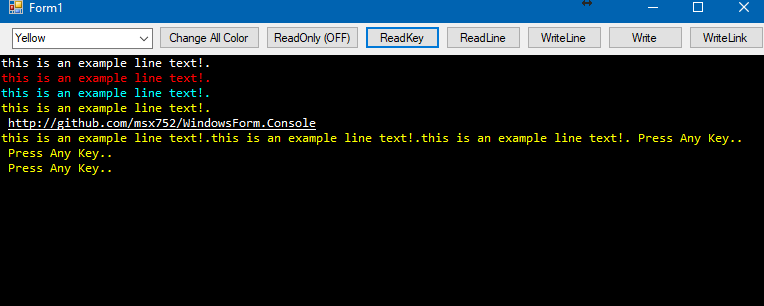
All examples assume you have added the FConsole control to your form (named `fconsole1`). Both direct usage and extension methods are shown. For input, async/await is recommended.
```csharp
// Write a line to the console
fconsole1.WriteLine("Hello, World!");
this.WriteLine("Hello, World!"); // Extension method (inside a Form)
// Write a line with a specific color
fconsole1.WriteLine("Success!", Color.Green);
this.WriteLine("Success!", Color.Green); // Extension method
// Write text without a newline
fconsole1.Write("Processing...");
this.Write("Processing..."); // Extension method
// Write colored text without a newline
fconsole1.Write("Warning!", Color.Orange);
this.Write("Warning!", Color.Orange); // Extension method
// Read a line from the console (asynchronous)
string input = await fconsole1.ReadLine();
string input2 = await this.ReadLine(); // Extension method
// Read a single key from the console (asynchronous)
char key = await fconsole1.ReadKey();
char key2 = await this.ReadKey(); // Extension method
```
> **Note:** `ReadLine` and `ReadKey` are asynchronous and should be awaited inside an async method for best UI responsiveness. Synchronous blocking is possible but not recommended on the UI thread.
# Supported Platforms
[moved to security.md](https://github.com/msx752/WindowsForms.Console/blob/master/SECURITY.md)
# Dependencies
- System.Windows.Form
- System
# FrameworkReferences for the .NetCore and upper
- Microsoft.WindowsDesktop.App.WindowsForm
# Example Project
- component is used in [MSniper Project](https://github.com/msx752/MSniper)