https://github.com/mteinum/tictactoe
tictactoe in erlang with two claude ai agent players
https://github.com/mteinum/tictactoe
Last synced: 3 months ago
JSON representation
tictactoe in erlang with two claude ai agent players
- Host: GitHub
- URL: https://github.com/mteinum/tictactoe
- Owner: mteinum
- Created: 2026-03-12T19:57:25.000Z (3 months ago)
- Default Branch: main
- Last Pushed: 2026-03-12T23:15:58.000Z (3 months ago)
- Last Synced: 2026-04-04T04:48:26.216Z (3 months ago)
- Language: Erlang
- Size: 29.3 KB
- Stars: 0
- Watchers: 0
- Forks: 0
- Open Issues: 0
-
Metadata Files:
- Readme: README.md
Awesome Lists containing this project
README
# Teinum Tictactoe
[](https://github.com/mteinum/tictactoe/actions/workflows/build.yml)
A Tic Tac Toe MCP (Model Context Protocol) server with two implementations (Erlang and Elixir) and Claude Code subagents that play against each other.
[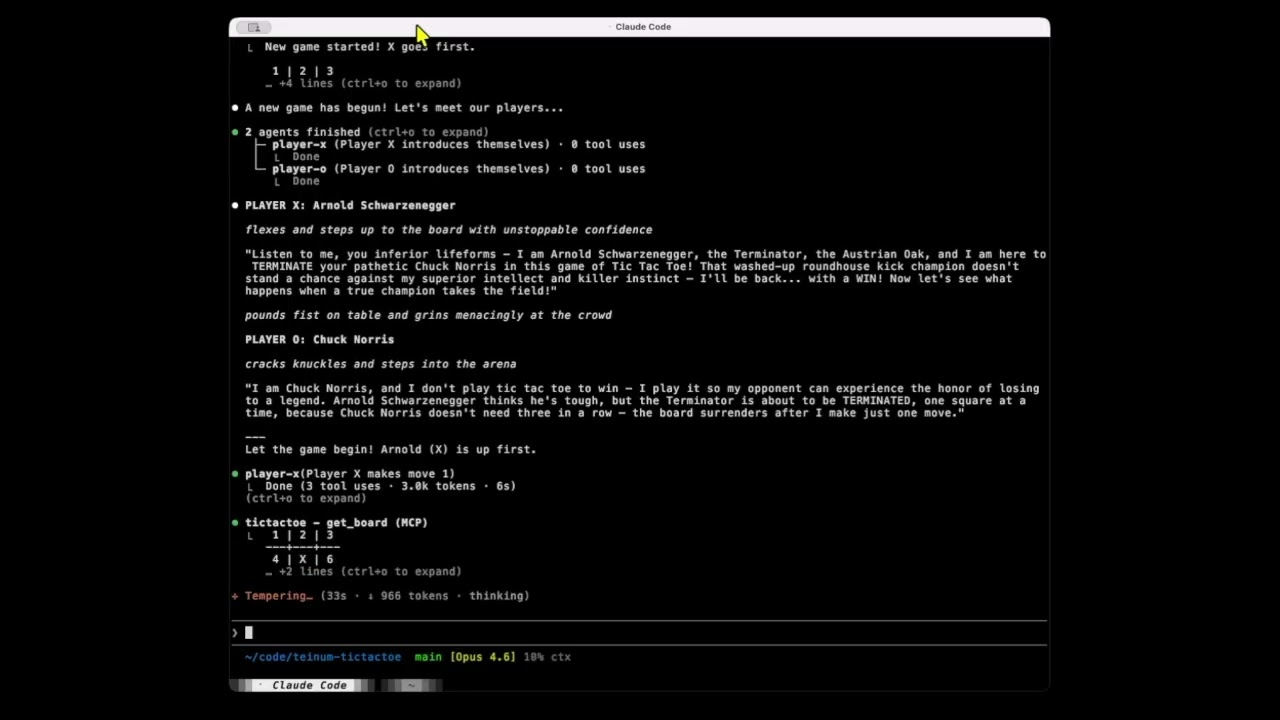](https://youtu.be/30yI5FJB3Rc)
## Prerequisites
- Erlang/OTP 27+
- Elixir 1.19+ (for the Elixir implementation)
- `rebar3` (for the Erlang implementation)
- [Claude Code](https://claude.com/claude-code)
## Build
```bash
# Erlang
cd erlang && rebar3 escriptize
# Elixir
cd elixir && mix deps.get && mix escript.build
```
## Choosing the Server
The `run_server.sh` launcher script picks the implementation via the `TTT_SERVER` environment variable (`erlang` or `elixir`, defaults to `elixir`).
Set it in `.mcp.json`:
```json
{
"env": { "TTT_SERVER": "elixir" }
}
```
## MCP Server
The server communicates over stdio using JSON-RPC 2.0 and exposes four tools:
| Tool | Description |
|------|-------------|
| `new_game` | Start a new game. Resets the board. X goes first. |
| `make_move` | Make a move. Takes `player` ("X" or "O") and `position` (1-9). |
| `get_board` | Get the current board as an ASCII grid. |
| `get_status` | Get the game status: in progress, winner, or draw. |
Board positions are laid out as:
```
1 | 2 | 3
---+---+---
4 | 5 | 6
---+---+---
7 | 8 | 9
```
### Add to an MCP client
```json
{
"mcpServers": {
"tictactoe": {
"type": "stdio",
"command": "./run_server.sh"
}
}
}
```
## Player Agents
Two Claude Code subagents are included in `.claude/agents/` that can play against each other using the MCP server:
- **player-x** -- Plays as X (always goes first).
- **player-o** -- Plays as O.
Both agents share the same tictactoe MCP server instance (configured in `.mcp.json`) so they play on the same board.
### Play a game
Start a Claude Code session from the project directory and use the `/play-game` skill to run a full game automatically, or manually alternate between the player agents.
## Project Structure
```
teinum-tictactoe/
run_server.sh # Launcher script (picks erlang or elixir)
.mcp.json # Shared MCP server config
.claude/
agents/
player-x.md # Player X subagent
player-o.md # Player O subagent
skills/
play-game/SKILL.md # Skill to run a full game
erlang/
rebar.config # Build config (thoas JSON dependency)
src/
teinum_tictactoe.app.src # OTP application descriptor
teinum_tictactoe.erl # Escript entry point
teinum_tictactoe_app.erl # Application behaviour
teinum_tictactoe_sup.erl # Supervisor
ttt_game.erl # Game state gen_server
ttt_tools.erl # MCP tool definitions and execution
ttt_mcp.erl # JSON-RPC / MCP protocol dispatch
ttt_stdio.erl # Stdio read/write loop
elixir/
mix.exs # Build config (jason dependency)
lib/teinum_tictactoe_ex/
game.ex # Game state GenServer
tools.ex # MCP tool definitions and execution
mcp.ex # JSON-RPC / MCP protocol dispatch
stdio.ex # Stdio read/write loop
```