https://github.com/mthli/better-youtube-summary-server
Literally Better YouTube Summary 🎯
https://github.com/mthli/better-youtube-summary-server
openai summary youtube
Last synced: about 1 year ago
JSON representation
Literally Better YouTube Summary 🎯
- Host: GitHub
- URL: https://github.com/mthli/better-youtube-summary-server
- Owner: mthli
- License: agpl-3.0
- Created: 2023-06-10T19:07:26.000Z (about 3 years ago)
- Default Branch: master
- Last Pushed: 2024-03-27T16:36:54.000Z (over 2 years ago)
- Last Synced: 2025-03-26T23:07:52.774Z (over 1 year ago)
- Topics: openai, summary, youtube
- Language: Python
- Homepage: https://chromewebstore.google.com/detail/better-youtube-summary/gobfmldfaojjoanejhccieilnmglclba
- Size: 273 KB
- Stars: 199
- Watchers: 5
- Forks: 38
- Open Issues: 4
-
Metadata Files:
- Readme: README.md
- License: LICENSE
Awesome Lists containing this project
README
# better-youtube-summary-server
Literally Better YouTube Summary 🎯
[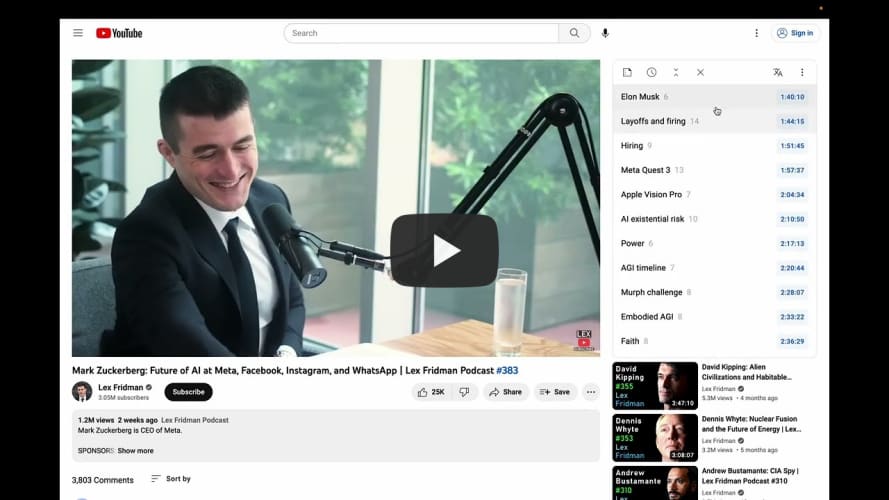](https://www.youtube.com/watch?v=NyhrKImPSDQ "Better YouTube Summary Extension Showcase")
**This project is no longer maintained,**
because OpenAI banned my account due to "accessing the API from an [unsupported location](https://platform.openai.com/docs/supported-countries)" 👎
The frontend implementation can be found in [mthli/better-youtube-summary-extension](https://github.com/mthli/better-youtube-summary-extension).
If you want to deploy it yourself, please replace the `bys.mthli.com` with your own domain.
## Development
Currently this project is developed on **macOS 13.3 (22E252).**
But this project **can't run on macOS** actually, just for coding.
First install dependencies as follow:
```bash
# Install 'redis' if you don't have.
# https://redis.io/docs/getting-started/installation/install-redis-on-mac-os
brew install redis
brew services start redis
# Install 'python3' if you don't have.
brew install python3
# Install 'pyenv' if you don't have.
# https://github.com/pyenv/pyenv#automatic-installer
curl https://pyenv.run | bash
# Install 'pipenv' if you don't have.
pip3 install --user pipenv
# Install all dependencies needed by this project.
pipenv install
pipenv install --dev
```
Then just open you editor and have fun.
## Deployment
This project should be deployed to **Debian GNU/Linux 11 (bullseye).**
First install dependencies as follow:
```bash
# Install 'nginx' if you don't have.
sudo apt-get install nginx
sudo systemd enable nginx
sudo systemd start nginx
# Install 'redis' if you don't have.
sudo apt-get install redis
sudo systemd enable redis
sudo systemd start redis
# Install 'certbot' if you don't have.
sudo apt-get install certbot
sudo apt-get install python3-certbot-nginx
# Install 'pm2' if you don't have.
curl -o- https://raw.githubusercontent.com/nvm-sh/nvm/v0.39.3/install.sh | bash
nvm install node # restart your bash, then
npm install -g pm2
pm2 install pm2-logrotate
# Install 'python3' if you don't have.
sudo apt-get install python3
sudo apt-get install python3-pip
# Install 'pyenv' if you don't have.
# https://github.com/pyenv/pyenv#automatic-installer
curl https://pyenv.run | bash
# Install 'pipenv' if you don't have.
pip install --user pipenv
# Install all dependencies needed by this project.
pipenv install
pipenv install --dev
```
Before run this project:
- Set `openai_api_key` defined in `./rds.py` with `redis-cli`
- Put `./bys.mthli.com.conf` to `/etc/nginx/conf.d/` directory
- Execute `sudo certbot --nginx -d bys.mthli.com` to generate certificates, or
- Execute `sudo certbot renew` to avoid certificates expired after 90 days
Then just execute commands as follow:
```bash
# Make sure you are not in pipenv shell.
pm2 start ./pm2.json
```
## License
```
better-youtube-summary-server - Literally Better YouTube Summary.
Copyright (C) 2023 Matthew Lee
This program is free software: you can redistribute it and/or modify
it under the terms of the GNU Affero General Public License as published
by the Free Software Foundation, either version 3 of the License, or
(at your option) any later version.
This program is distributed in the hope that it will be useful,
but WITHOUT ANY WARRANTY; without even the implied warranty of
MERCHANTABILITY or FITNESS FOR A PARTICULAR PURPOSE. See the
GNU Affero General Public License for more details.
You should have received a copy of the GNU Affero General Public License
along with this program. If not, see .
```