https://github.com/multiplehats/better-auth-ui-svelte
Beautiful shadcn/ui components in Svelte built for better-auth.
https://github.com/multiplehats/better-auth-ui-svelte
Last synced: 4 months ago
JSON representation
Beautiful shadcn/ui components in Svelte built for better-auth.
- Host: GitHub
- URL: https://github.com/multiplehats/better-auth-ui-svelte
- Owner: multiplehats
- Created: 2025-11-06T14:57:27.000Z (7 months ago)
- Default Branch: main
- Last Pushed: 2025-12-31T14:24:12.000Z (5 months ago)
- Last Synced: 2026-01-01T18:37:47.916Z (5 months ago)
- Language: Svelte
- Size: 2.56 MB
- Stars: 4
- Watchers: 0
- Forks: 0
- Open Issues: 0
-
Metadata Files:
- Readme: README.md
- Changelog: CHANGELOG.md
Awesome Lists containing this project
README
# Better Auth UI - Svelte 5
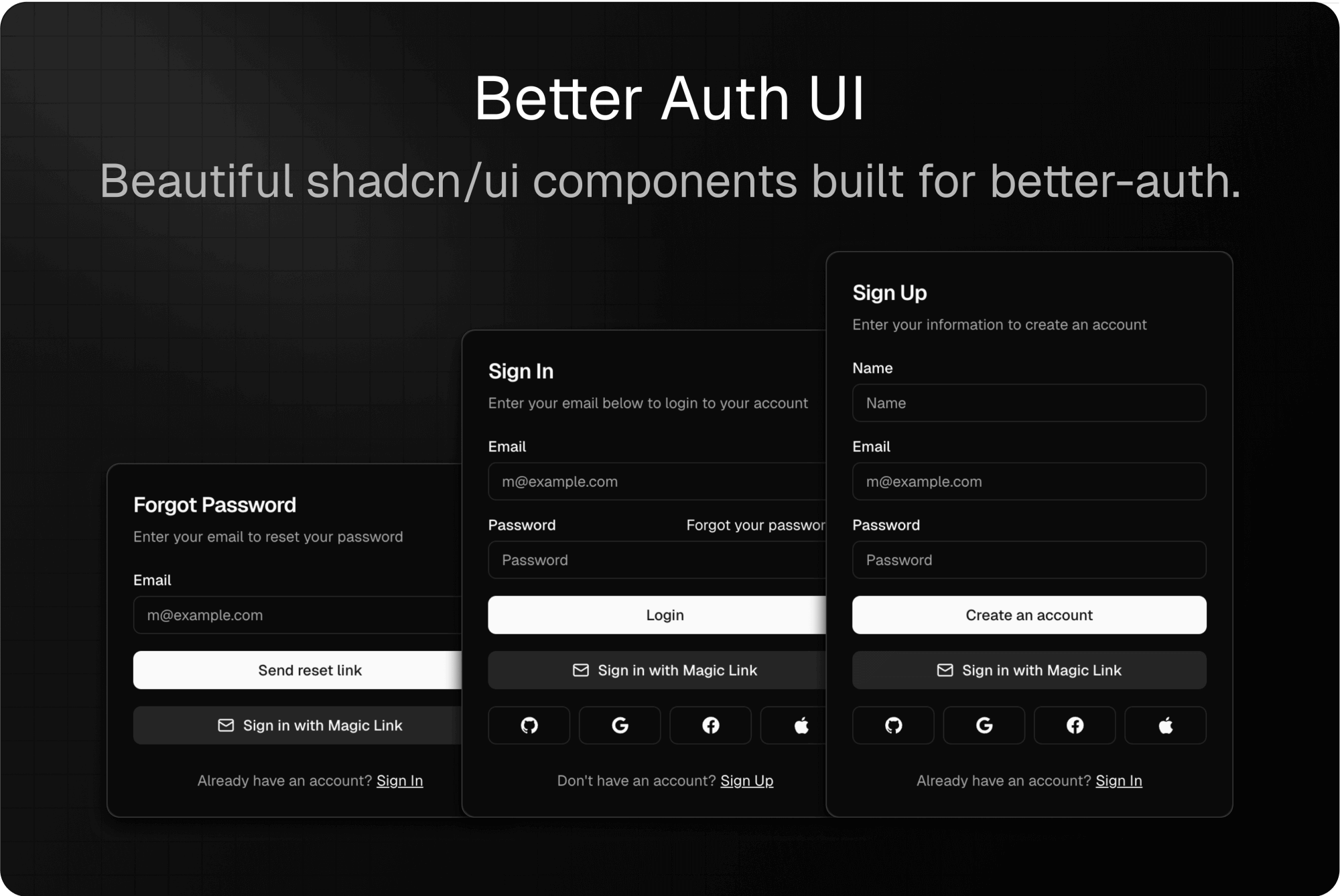
Pre-built, customizable authentication UI components for [Better Auth](https://www.better-auth.com) in Svelte 5.
This is a **complete Svelte 5 port** of the [Better Auth UI React library](https://github.com/daveyplate/better-auth-ui) with **full feature parity**. The API is nearly identical to the original React library, making it easy to follow the [official documentation](https://better-auth-ui.com). All credits for the original design and architecture go to [daveycodez](https://github.com/daveycodez).
## ⚠️ Early Stage Warning
> **Important:** This library is in early stage development. While we have achieved full feature parity with the React version and all components have been ported, the library has not been battle-tested in production environments yet. Issues may arise. **Use at your own risk until we reach v1.0 stable.**
## About This Port
This Svelte port was primarily built to support my own projects including [stacksee.com](https://stacksee.com) and [textatlas.com](https://textatlas.com). While it currently maintains full feature parity with the original React library, **this port may evolve independently over time**. I may add new features, make different architectural decisions, or implement functionality specifically tailored to my project needs that diverge from the original library.
If you're looking for a library that strictly mirrors the React version, please be aware that this port's API and features may change to better serve the needs of my projects and the Svelte ecosystem.
## Why Choose Better Auth UI?
- **Easy** – Plug & play authentication components
- **Customizable** – Fully styled with TailwindCSS and shadcn-svelte, easy to extend
- **Robust** – Built with Svelte 5 runes and modern best practices
## Key Features
- ✨ **Full Feature Parity** - Complete port of all React components and functionality
- 🚀 **Svelte 5 Runes** - Built with the latest Svelte 5 reactive primitives
- 🔐 **Better Auth Integration** - Native integration with Better Auth's Svelte client
- 🛣️ **Path Helpers** - Server & client-side path utilities (unique to Svelte port)
- 🎨 **Tailwind CSS** - Fully styled with Tailwind CSS v4
- 📦 **shadcn-svelte Components** - Built on top of high-quality UI components
- ✅ **Form Validation** - Zod 4 schema validation out of the box
- 🌐 **Localization Ready** - Easy to customize all text strings
- 📱 **Fully Responsive** - Mobile-first design
## Installation
Ensure you have Better Auth and shadcn set up in your project first.
Them install the package:
```bash
pnpm add better-auth-ui-svelte
## bun add better-auth-ui-svelte
## npm install better-auth-ui-svelte
## yarn add better-auth-ui-svelte
```
### Peer Dependencies
Make sure you have these installed in your project:
- `svelte` ^5.0.0
- `better-auth` ^1.3.0
- `bits-ui` ^2.0.0
- `@lucide/svelte` ^0.400.0
- `tailwindcss` ^4.0.0
- `zod` ^4.0.0
- `svelte-sonner` ^0.4.0
### TailwindCSS Configuration
For **TailwindCSS v4**, add the following `@import` to your global CSS file:
```css
/* app.css or global.css */
@import 'better-auth-ui-svelte/css';
```
For **TailwindCSS v3** _(Deprecated)_, add the following to your Tailwind config:
```js
content: ['./node_modules/better-auth-ui-svelte/dist/**/*.{js,svelte}'];
```
## SvelteKit Integration
Follow these steps to integrate Better Auth UI into your SvelteKit project:
### Step 1: Set Up Better Auth Client
Create your Better Auth client instance (e.g., in `src/lib/auth-client.ts`):
```typescript
import { createAuthClient } from 'better-auth/svelte';
export const authClient = createAuthClient({
baseURL: 'http://localhost:5173',
// Add any plugins you need
plugins: [
// organizationClient(),
// twoFactorClient(),
// etc.
]
});
```
### Step 2: Set Up AuthUIProvider
The `` wraps your application with authentication context. Set it up in your root layout:
```svelte
import { AuthUIProvider } from 'better-auth-ui-svelte';
import { Toaster } from 'svelte-sonner';
import { authClient } from '$lib/auth-client';
import { goto, invalidateAll } from '$app/navigation';
{@render children()}
```
The [``](#authui-provider-props) can be customized with additional settings:
```svelte
await invalidateAll()}
social={{
providers: ['github', 'google', 'facebook']
}}
magicLink
passkey
multiSession
twoFactor={['otp', 'totp']}
>
```
### Step 3: Create Auth Pages with Dynamic Routes
Create a dynamic route to handle all authentication views. Create the file `src/routes/auth/[path]/+page.svelte`:
```svelte
import { AuthView, authViewPaths } from 'better-auth-ui-svelte';
import type { PageProps } from './$types.js';
let { data, params }: PageProps = $props();
```
This single dynamic route handles all authentication views:
- `/auth/sign-in` – Sign in via email/password and social providers
- `/auth/sign-up` – New account registration
- `/auth/magic-link` – Email login without a password
- `/auth/forgot-password` – Request password reset email
- `/auth/reset-password` – Set new password after receiving reset link
- `/auth/two-factor` – Two-factor authentication
- `/auth/recover-account` – Recover account via backup code
- `/auth/email-otp` – Email OTP verification
- `/auth/sign-out` – Log the user out
- `/auth/callback` – OAuth callback handler
- `/auth/accept-invitation` – Accept organization invitation
## Usage Examples
### Using Individual Forms
You can use individual authentication forms directly in your pages:
```svelte
import { SignInForm, SignUpForm } from 'better-auth-ui-svelte';
{
console.log('Signed in!');
}}
/>
```
### Conditional Rendering
Use `` and `` to conditionally render content:
```svelte
import { SignedIn, SignedOut } from 'better-auth-ui-svelte';
```
### User Button
Display a user button with avatar and dropdown menu:
```svelte
import { UserButton } from 'better-auth-ui-svelte';
```
### Admin Dashboard
For applications using the Better Auth admin plugin, create an admin interface with dynamic routes:
```svelte
import { AdminView } from 'better-auth-ui-svelte';
import type { PageProps } from './$types.js';
let { params }: PageProps = $props();
```
This creates admin routes at:
- `/app/admin/dashboard` - Overview with stats and charts
- `/app/admin/users` - User management table
- `/app/admin/organizations` - Organization management table
Or use the dashboard component directly with custom configuration:
```svelte
import { AdminDashboard } from 'better-auth-ui-svelte';
```
## Available Components
### Core Components
- **``** - Dynamic authentication view handler (sign in, sign up, forgot password, etc.)
- **``** - Context provider for auth configuration
- **``** - Loading state component
### Authentication Forms
- **``** - Email/password sign in
- **``** - User registration
- **``** - Password reset request
- **``** - Set new password
- **``** - Magic link authentication
- **``** - Two-factor authentication
- **``** - Account recovery
- **``** - Email OTP verification
### User Components
- **``** - User dropdown menu with avatar
- **``** - User avatar with fallback to initials
- **``** - Renders children only when authenticated
- **``** - Renders children only when not authenticated
### Settings Components
#### Account Settings
- **``** - Complete account settings UI
- **``** - Manage connected accounts
- **``** - Avatar upload and management
- **``** - Update user name
- **``** - Update username
- **``** - Generic field update card
- **``** - Account deletion with confirmation
#### Security Settings
- **``** - Complete security settings UI
- **``** - Email change with verification
- **``** - Password change with validation
- **``** - Active sessions management
- **``** - Passkey authentication management
- **``** - Two-factor authentication setup
- **``** - API key management
### Organization Components
- **``** - Switch between organizations
- **``** - Create new organization
- **``** - Organization details view
- **``** - Organization settings
- **``** - Member management
- **``** - Invitation management
- **``** - User's received invitations
### Admin Components
> **Note:** Admin components require the Better Auth [admin plugin](https://www.better-auth.com/docs/plugins/admin) to be configured in your auth setup.
- **``** - Main admin interface with tabbed navigation (Dashboard, Users, Organizations)
- **``** - Admin dashboard with stats, charts, and table previews
- **``** - User management table with actions (ban, impersonate, delete, etc.)
- **``** - Organization management table
- **``** - Organization member details dialog
- **``** - Ban user with reason and expiration
- **``** - Update user role
- **``** - Impersonate user confirmation
- **``** - Admin password reset
- **``** - Revoke user sessions
- **``** - Delete user confirmation
- **``** - Delete organization (admin)
- **``** - Remove organization member (admin)
- **``** - Bulk delete confirmation
- **``** - Create new user
### Utility Components
- **``** - OAuth callback handler
- **``** - Sign out component
- **``** - Redirect unauthenticated users to sign in
- **``** - Redirect users to sign up
- **``** - Password input with visibility toggle
- **``** - Form error display component
## Customization
### Localization
Customize all text strings by passing a `localization` prop to ``:
```svelte
import { AuthUIProvider, authLocalization } from 'better-auth-ui-svelte';
import { authClient } from '$lib/auth-client';
const customLocalization = {
...authLocalization,
SIGN_IN: 'Log In',
SIGN_UP: 'Create Account',
EMAIL: 'Email Address',
PASSWORD: 'Your Password'
};
```
### Styling
All components accept a `className` prop for custom styling:
```svelte
```
For granular styling control, use the `classNames` prop:
```svelte
```
### AuthUI Provider Props
The `` accepts the following configuration options:
```typescript
interface AuthUIProviderProps {
// Required
authClient: ReturnType;
// Navigation (SvelteKit)
navigate?: (href: string) => void;
// Session management
onSessionChange?: () => void | Promise;
// Social authentication
social?: {
providers?: ('google' | 'github' | 'facebook' | 'apple' | 'discord' | 'twitter')[];
};
// Additional auth methods
magicLink?:
| boolean
| {
resendCooldown?: number;
redirectToSentPage?: boolean;
};
emailVerification?:
| boolean
| {
resendCooldown?: number;
redirectToVerifyPage?: boolean;
};
passkey?: boolean;
// Two-factor authentication
twoFactor?: ('otp' | 'totp')[];
// Multi-session support
multiSession?: boolean;
// Localization
localization?: Partial;
// Avatar handling
avatar?: {
upload?: (file: File) => Promise;
delete?: (url: string) => Promise;
};
// Settings page configuration
settings?: {
url?: string;
};
// Organization configuration
organization?: {
pathMode?: 'id' | 'slug';
basePath?: string;
slug?: string;
};
}
```
## Path Helpers (Svelte-Specific Feature)
> **Note:** This feature is unique to the Svelte port and not available in the original React version of Better Auth UI. Added by [Chris Jayden](https://github.com/multiplehats) to ease server-side implementation in SvelteKit.
Better Auth UI for Svelte includes utility functions to generate authentication paths that work both client-side and server-side. This makes it easy to maintain consistent paths across your application and handle redirects in hooks, load functions, and components.
### Why Use Path Helpers?
- **Server-Side Compatible** - Works in `hooks.server.ts`, `+page.server.ts`, and `+layout.server.ts`
- **Type-Safe** - TypeScript ensures you use valid path names
- **Single Source of Truth** - Change paths once, updates everywhere
- **No Hardcoding** - Never hardcode `/auth/sign-in` paths again
### Basic Usage
```typescript
import { getAuthPath, getAuthUrl } from 'better-auth-ui-svelte';
// Get auth paths (default: '/auth')
getAuthPath('SIGN_IN'); // '/auth/sign-in'
getAuthPath('SIGN_UP'); // '/auth/sign-up'
getAuthPath('FORGOT_PASSWORD'); // '/auth/forgot-password'
// Get full URLs (useful for emails, redirects)
getAuthUrl('RESET_PASSWORD', {
baseURL: 'https://example.com'
}); // 'https://example.com/auth/reset-password'
// Account and organization paths
getAccountPath('SETTINGS'); // '/account/settings'
getOrganizationPath('MEMBERS'); // '/organization/members'
// Admin paths
getAdminPath('DASHBOARD'); // '/admin/dashboard'
getAdminPath('USERS'); // '/admin/users'
getAdminPath('ORGANIZATIONS'); // '/admin/organizations'
```
### Server-Side Redirects
Use path helpers in your server hooks for authentication redirects:
```typescript
// src/hooks.server.ts
import { redirect } from '@sveltejs/kit';
import { getAuthPath } from 'better-auth-ui-svelte';
export async function handle({ event, resolve }) {
const session = await getSession(event);
// Redirect unauthenticated users to sign-in
if (!session && event.url.pathname.startsWith('/app')) {
throw redirect(303, getAuthPath('SIGN_IN'));
}
// Redirect authenticated users away from auth pages
if (session && event.url.pathname === getAuthPath('SIGN_IN')) {
throw redirect(303, '/app');
}
return resolve(event);
}
```
### Shared Configuration
Create a shared config file to keep paths consistent across your app:
```typescript
// src/lib/config/auth-config.ts
import type { PathConfig } from 'better-auth-ui-svelte';
export const authPathConfig: PathConfig = {
basePath: '/auth',
// Optionally customize individual paths
viewPaths: {
SIGN_IN: 'login', // /auth/login instead of /auth/sign-in
SIGN_UP: 'register' // /auth/register instead of /auth/sign-up
}
};
```
Then use it everywhere:
```svelte
import { AuthUIProvider } from 'better-auth-ui-svelte';
import { authClient } from '$lib/auth-client';
import { authPathConfig } from '$lib/config/auth-config';
```
```typescript
// src/hooks.server.ts
import { getAuthPath } from 'better-auth-ui-svelte';
import { authPathConfig } from '$lib/config/auth-config';
// Use same config for server-side redirects
throw redirect(303, getAuthPath('SIGN_IN', authPathConfig));
```
### Available Functions
```typescript
// Auth paths
getAuthPath(view, config?) // Get auth path
getAuthUrl(view, config?) // Get full URL with baseURL
getAllAuthPaths(config?) // Get all auth paths as object
// Account paths
getAccountPath(view, config?)
getAccountUrl(view, config?)
getAllAccountPaths(config?)
// Organization paths
getOrganizationPath(view, config?)
getOrganizationUrl(view, config?)
getAllOrganizationPaths(config?)
// Admin paths
getAdminPath(view, config?)
getAdminUrl(view, config?)
getAllAdminPaths(config?)
```
## Exports
The library exports the following utilities:
```typescript
// Component exports
export { AuthView, AuthUIProvider, SignInForm, SignUpForm, UserButton, UserAvatar, ... };
// Path constants
export { authViewPaths, accountViewPaths, organizationViewPaths, adminViewPaths };
// Path helpers (unique to Svelte port)
export {
getAuthPath,
getAuthUrl,
getAccountPath,
getAccountUrl,
getOrganizationPath,
getOrganizationUrl,
getAdminPath,
getAdminUrl,
getAllAuthPaths,
getAllAccountPaths,
getAllOrganizationPaths,
getAllAdminPaths
};
// Utilities
export { createForm, getViewByPath };
// Context helpers
export { getAuthUIConfig, getAuthClient, getLocalization };
// Localization
export { authLocalization };
// Types
export type {
AuthUIConfig,
User,
Session,
AuthLocalization,
PathConfig,
AccountPathConfig,
OrganizationPathConfig,
AdminPathConfig,
UserWithRole,
Organization,
OrganizationMember,
OrganizationWithMembers,
OrganizationInvitation,
UsersAdminTableProps,
OrganizationsAdminTableProps,
AdminViewProps
};
```
## Development
### Prerequisites
- Node.js 18+ and pnpm
- Docker (for Mailpit and PostgreSQL)
### Getting Started
1. **Install dependencies**
```bash
pnpm install
```
2. **Configure environment variables**
Copy `.env.example` to `.env` and update the values:
```bash
cp .env.example .env
```
3. **Start Mailpit for email testing**
Mailpit provides a local SMTP server and web UI for testing emails:
```bash
docker compose up -d
```
Access the Mailpit web UI at http://localhost:8025 to view emails sent during development (magic links, OTP codes, etc.)
4. **Start development server**
```bash
pnpm dev
```
### Development Commands
```bash
# Build library
pnpm run build
# Lint and format
pnpm run lint
pnpm run format
# Stop Mailpit
docker compose down
```
### Email Testing
All authentication emails (magic links, OTP codes) are sent through Mailpit in development:
- **SMTP Server**: localhost:1025
- **Web UI**: http://localhost:8025
- Emails are captured locally and never sent to real addresses
- Click on emails in the UI to view and test links
## Architecture
Better Auth UI for Svelte is built with:
- **Svelte 5 Runes** (`$state`, `$derived`, `$effect`) for reactive state
- **Better Auth Svelte Client** for authentication state and methods
- **Svelte Context** for configuration and dependency injection
- **Zod 4** for schema validation
- **Bits UI** via shadcn-svelte for accessible UI primitives
- **Tailwind CSS v4** for styling
## Differences from React Version
This Svelte port maintains **full feature parity** with the React version. The API is nearly identical, with these framework-specific differences:
1. **Path Helpers**: Unique to this Svelte port - utility functions for generating auth paths that work client and server-side (see [Path Helpers](#path-helpers-svelte-specific-feature))
2. **Navigation**: Instead of Next.js router, use SvelteKit's `goto` function
3. **Session Management**: Use `invalidateAll()` instead of `router.refresh()`
4. **Dynamic Routes**: Use SvelteKit's `[path]` syntax instead of Next.js `[path]`
5. **Reactivity**: Built with Svelte 5 runes instead of React hooks
6. **Link Component**: SvelteKit doesn't need a custom Link component
7. **Form Handling**: Uses TanStack Svelte Form instead of React Hook Form (same API)
## Contributing
Contributions are welcome! Please feel free to submit a Pull Request.
## License
MIT
## Credits
- Original React version by [daveycodez](https://github.com/daveyplate/better-auth-ui)
- Complete Svelte 5 port with full feature parity by Chris Jayden [multiplehats](https://github.com/multiplehats)
- Built with [Better Auth](https://www.better-auth.com)
- UI components from [shadcn-svelte](https://www.shadcn-svelte.com)
## Related Projects
- [Better Auth](https://www.better-auth.com) - Framework agnostic authentication library
- [Better Auth UI (React)](https://github.com/daveyplate/better-auth-ui) - Original React version
- [Better Auth UI Docs](https://better-auth-ui.com) - Official documentation (React-based, but API is nearly identical)
- [shadcn-svelte](https://www.shadcn-svelte.com) - Beautifully designed Svelte components