https://github.com/mummanajagadeesh/obstacle-avoidance-robot-w
A robot equipped with basic sensors that detects obstacles and changes direction to avoid collisions without using advanced algorithms
https://github.com/mummanajagadeesh/obstacle-avoidance-robot-w
obstacle-avoidance-robot webots webots-simulations
Last synced: over 1 year ago
JSON representation
A robot equipped with basic sensors that detects obstacles and changes direction to avoid collisions without using advanced algorithms
- Host: GitHub
- URL: https://github.com/mummanajagadeesh/obstacle-avoidance-robot-w
- Owner: Mummanajagadeesh
- License: mit
- Created: 2024-07-17T09:56:30.000Z (almost 2 years ago)
- Default Branch: main
- Last Pushed: 2024-09-30T07:44:56.000Z (over 1 year ago)
- Last Synced: 2025-01-25T08:41:45.712Z (over 1 year ago)
- Topics: obstacle-avoidance-robot, webots, webots-simulations
- Language: CSS
- Homepage:
- Size: 4.97 MB
- Stars: 1
- Watchers: 1
- Forks: 0
- Open Issues: 0
-
Metadata Files:
- Readme: README.md
- License: LICENSE
Awesome Lists containing this project
README
# Obstacle Avoidance Robot Simulation
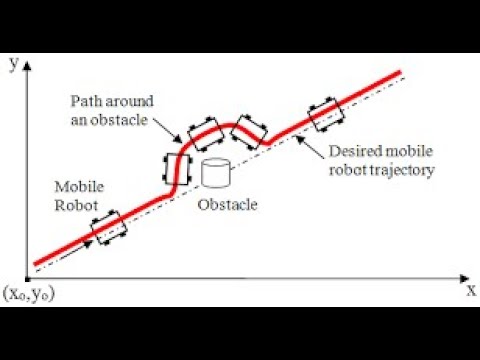
This repository contains the simulation of an **Obstacle Avoidance Robot**. The robot is based on the **e-puck** model and uses proximity sensors to detect and avoid obstacles in its path. It moves in a different direction whenever an obstacle is detected, making decisions based on simple sensor readings. The robot's motion control does not use any algorithms or PID controllers—just basic logic based on obstacle detection.
## Demo
Click the image below to watch a demo of the robot in action:
[](https://www.youtube.com/watch?v=O75YmInmh-U)
## How It Works
### Robot Design
The **e-puck** robot is equipped with six proximity sensors, which are used to detect obstacles around the robot. The robot’s movements are controlled by two independent wheel motors, allowing it to move forward or change direction when an obstacle is detected.
- **Proximity Sensors**: Six proximity sensors (`ps0`, `ps1`, `ps2`, `ps5`, `ps6`, and `ps7`) detect nearby obstacles. These sensors provide readings that help the robot determine if it should continue moving forward or change its direction.
- **Motors**: The left and right wheel motors control the robot’s movement. These motors are programmed to either drive forward or reverse depending on the sensor readings.
### Obstacle Avoidance Logic
- The robot moves forward by default until one or more sensors detect an obstacle in its path.
- When an obstacle is detected (sensor value above a threshold), the robot reverses its direction and continues to explore its surroundings.
- The control strategy is simple: If any sensor detects a nearby obstacle (reading > 100), the robot slows down or reverses to avoid the obstacle.
## Code Explanation
The controller code is written in Python using the Webots robotics simulator. Here’s an overview of the core logic:
### Main Controller Code
```python
"""oar_py controller."""
from controller import Robot
TIMESTEP = 32
MAX_SPEED = 6.28
def run_robot(robot):
left_motor = robot.getDevice('left wheel motor')
right_motor = robot.getDevice('right wheel motor')
left_motor.setPosition(float('inf'))
right_motor.setPosition(float('inf'))
left_motor.setVelocity(0.0)
right_motor.setVelocity(0.0)
# Enable proximity sensors
list_ps = []
for ind in [0, 1, 2, 5, 6, 7]:
sensor_name = 'ps' + str(ind)
list_ps.append(robot.getDevice(sensor_name))
list_ps[-1].enable(TIMESTEP)
while robot.step(TIMESTEP) != -1:
left_speed = MAX_SPEED
right_speed = MAX_SPEED
# Check each proximity sensor's value
for ps in list_ps:
ps_val = ps.getValue()
if ps_val > 100: # If obstacle detected
left_speed = -MAX_SPEED # Reverse direction
# Set the motor velocities based on sensor values
left_motor.setVelocity(left_speed)
right_motor.setVelocity(right_speed)
if __name__ == "__main__":
my_robot = Robot()
run_robot(my_robot)
```
### Key Points of the Code:
- **Proximity Sensors**: The proximity sensors (`ps0`, `ps1`, `ps2`, `ps5`, `ps6`, and `ps7`) are enabled and used to detect obstacles. If any sensor detects a nearby object (reading > 100), it triggers a change in direction.
- **Movement Control**: By default, the robot moves forward with maximum speed. When an obstacle is detected, the left motor speed is set to a negative value, causing the robot to reverse and adjust its path.
- **Loop Execution**: The `while` loop continuously checks sensor readings and adjusts motor velocities accordingly, allowing the robot to avoid obstacles dynamically.
---
## Installation and Usage
### Requirements
- **Webots**: You will need the Webots robotics simulator to run this project. Download it from [here](https://cyberbotics.com/).
- **Python**: Ensure that Python is installed, as the controller code is written in Python.
### Steps to Run
1. Clone this repository to your local machine:
```bash
git clone https://github.com/Mummanajagadeesh/obstacle-avoidance-robot-w.git
cd obstacle-avoidance-robot-w
```
2. Open Webots and load the **obstacle_avoidance_robot.wbt** world file in the simulation folder.
3. Run the simulation to watch the e-puck robot avoid obstacles in real-time.
---
## Future Enhancements
- **Path Planning Algorithms**: Future versions of this robot could incorporate path-planning algorithms (e.g., A*, Dijkstra) to navigate more efficiently in environments with obstacles.
- **PID Control**: Implementing a PID controller would enable smoother movement and finer control when the robot adjusts its path.
- **Obstacle Categorization**: Add more complex behavior by allowing the robot to classify different types of obstacles and respond differently (e.g., stopping in front of some objects and avoiding others).
---
## License
This project is licensed under the MIT License - see the [LICENSE](LICENSE) file for details.