https://github.com/murongg/markra
A WYSIWYG Markdown editor with native AI. Fully open source. Free to use. Your data stays local.
https://github.com/murongg/markra
ai-editor ai-writing desktop-app local-first markdown-editor react tauri typescript wysiwyg-markdown
Last synced: 17 days ago
JSON representation
A WYSIWYG Markdown editor with native AI. Fully open source. Free to use. Your data stays local.
- Host: GitHub
- URL: https://github.com/murongg/markra
- Owner: murongg
- License: agpl-3.0
- Created: 2026-05-04T12:54:11.000Z (about 2 months ago)
- Default Branch: main
- Last Pushed: 2026-05-31T06:22:06.000Z (about 1 month ago)
- Last Synced: 2026-05-31T07:10:43.283Z (about 1 month ago)
- Topics: ai-editor, ai-writing, desktop-app, local-first, markdown-editor, react, tauri, typescript, wysiwyg-markdown
- Language: TypeScript
- Homepage: https://editor.markra.app
- Size: 5.6 MB
- Stars: 320
- Watchers: 1
- Forks: 12
- Open Issues: 4
-
Metadata Files:
- Readme: README.md
- License: LICENSE
- Agents: AGENTS.md
Awesome Lists containing this project
README

A WYSIWYG Markdown editor with native AI.
Fully open source. Free to use. Your data stays local.
English | 简体中文 | Web Editor | Download | Key Features | Contributing | License









Markra is a local-first, open-source Markdown editor that brings AI into the writing flow. Edit in WYSIWYG or source mode, keep everything as plain `.md` files on disk, and let AI polish, rewrite, or expand your content — with full preview before any change lands.
No cloud sync, no account required. AI calls only go where you point them.
## Screenshots

WYSIWYG Markdown editing with local files and the document in one workspace.
| Native AI commands | Review AI edits |
| --- | --- |
|  |  |
| Markra AI side panel | Multi-provider AI settings |
| --- | --- |
|  |  |
## Download
Use the web editor at [editor.markra.app](https://editor.markra.app/).
Download the latest desktop builds from [GitHub Releases](https://github.com/murongg/markra/releases/latest): macOS Apple Silicon/Intel, Windows installer/portable, and Linux AppImage.
## Key Features
### WYSIWYG Markdown
- Render links, images, HTML, KaTeX math, Mermaid diagrams, and GFM tables inline — expand any element back to source when needed.
- Slash commands and drag handles for block-level editing; full source mode one click away.
- Adjustable writing width, font size, and line height.
### Native AI
- Inline AI on selected text, or open the side panel for document-wide tasks.
- Quick actions: polish, rewrite, continue, summarize, translate.
- Preview every AI edit before applying — accept, reject, or copy.
- Sessions are searchable, renamable, and archivable.
### Local Workspace
- Open a single file or an entire folder; browse, create, rename, and delete from the file tree.
- Document tabs, outline navigation, and double-bracket link completion.
- Paste images to local storage, S3, or WebDAV.
### Blocks, Tables, and Code
- GitHub-style callouts (note, tip, important, warning, caution).
- Visual table controls for rows, columns, sizing, and alignment.
- Syntax-highlighted code blocks with language picker and one-click copy.
### Themes and Export
- Built-in themes or scoped custom CSS with import/export/reset.
- Export to standalone HTML or PDF with full page, margin, and metadata control.
### Multi-Provider AI
Supports cloud models, local models, and any OpenAI-compatible endpoint. Separate model selection for inline editing and the side panel.
**Built-in providers:** OpenAI · Anthropic · Google Gemini · DeepSeek · Mistral · Groq · OpenRouter · Together.ai · Qwen · Xiaomi MiMo · Volcengine Ark · xAI · Azure OpenAI · Ollama
**Web search:** Provider-native search, Bing, and SearXNG — with configurable result and content limits.
## Use Cases
Product docs · Blog posts · Research notes · Technical writing with tables, code, and math · AI-assisted drafting and polishing · Personal knowledge bases
## Philosophy
- **Local first** — files and workspace data stay on your disk.
- **Open and free** — core features are inspectable and never paywalled.
- **Writing first** — AI, file management, and settings serve the document, not the other way around.
- **Confirm before apply** — AI edits are previews until you say yes.
## Roadmap
- More stable workspace behavior and edge-case handling
- Smarter AI edit previews and conflict resolution
- Full-text search and knowledge organization
- Richer export templates and sharing workflows
## Getting Started
1. Open the [web editor](https://editor.markra.app/) or [download](https://github.com/murongg/markra/releases/latest) the latest desktop release for your platform.
2. Open a Markdown file or folder.
3. Write — use WYSIWYG, slash commands, or source mode.
4. Configure AI providers in settings when you're ready for AI assistance.
## Contributing
Contributions are welcome — whether it's product experience, Markdown editing, AI workflows, cross-platform fixes, or docs. See [issues](https://github.com/murongg/markra/issues) for open tasks or start a discussion.
## Sponsors
[](https://sponsors.mrong.me/)
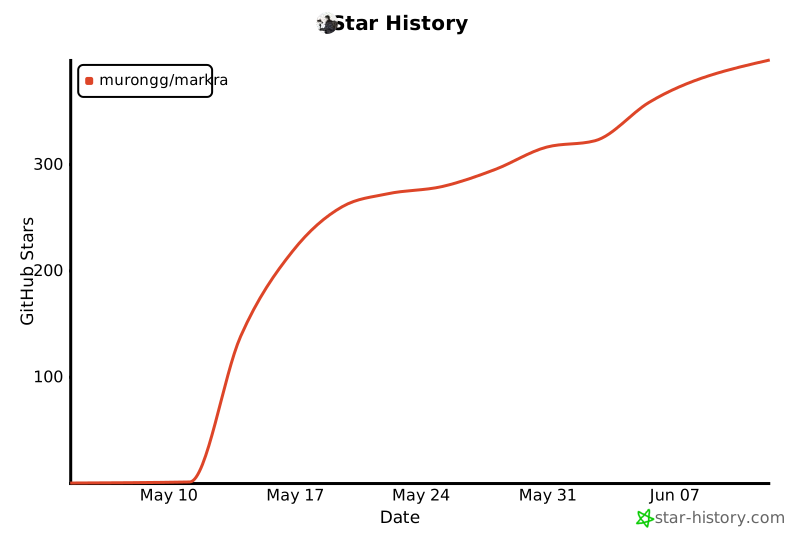
## Star History
## License
Markra is licensed under AGPL-3.0.