https://github.com/mutualmobile/mmspreadsheetview
https://github.com/mutualmobile/mmspreadsheetview
Last synced: about 1 year ago
JSON representation
- Host: GitHub
- URL: https://github.com/mutualmobile/mmspreadsheetview
- Owner: mutualmobile
- License: mit
- Created: 2013-09-26T16:23:59.000Z (over 12 years ago)
- Default Branch: master
- Last Pushed: 2020-12-07T12:25:55.000Z (over 5 years ago)
- Last Synced: 2024-04-14T18:05:11.559Z (about 2 years ago)
- Language: Objective-C
- Size: 196 KB
- Stars: 193
- Watchers: 18
- Forks: 34
- Open Issues: 11
-
Metadata Files:
- Readme: README.md
- License: LICENSE
Awesome Lists containing this project
README
#Mutual Mobile Spreadsheet View
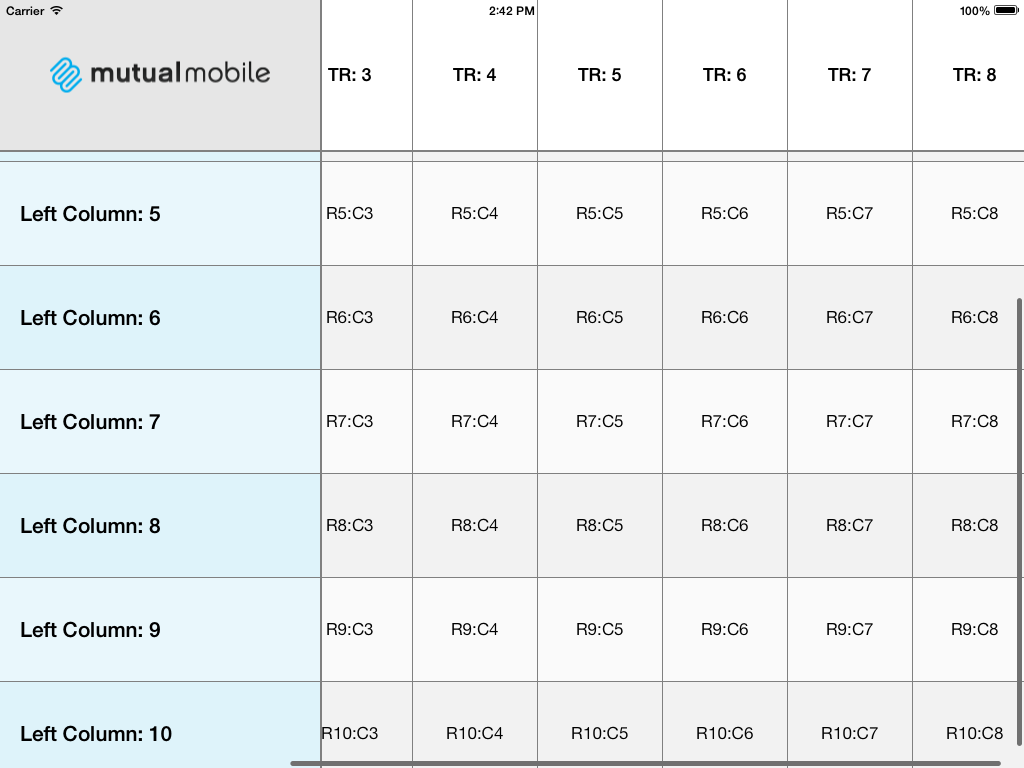
`MMSpreadsheetView` is a configurable spreadsheet-like view. Depending on the initial header row or column configuration, up to four collection views will be coordinated to provide the user interface. Although originally designed for use on iPad in full-screen, it scales down well for use in smaller views.
---
##Documentation
Official appledoc documentation can be found at [CocoaDocs](http://cocoadocs.org/docsets/MMSpreadsheetView/).
---
##Installing MMSpreadsheetView
[](https://cocoadocs.org/docsets/MMSpreadsheetView)
[](https://cocoadocs.org/docsets/MMSpreadsheetView)
You can install MMSpreadsheetView in your project by using [CocoaPods](https://github.com/cocoapods/cocoapods):
```Ruby
pod 'MMSpreadsheetView', '~> 0.0.3'
```
---
##Initializing a Spreadsheet View
The designated initializer for `MMSpreadsheetView` requires passing in the number of header rows and columns as well as the initial bounds rect. Register the cell classes you will be using and set the delegate and dataSource. Finally, add the view as a subview.
```Objective-C
// Create the spreadsheet in code.
MMSpreadsheetView *spreadSheetView = [[MMSpreadsheetView alloc] initWithNumberOfHeaderRows:1 numberOfHeaderColumns:1 frame:self.view.bounds];
// Register your cell classes.
[spreadSheetView registerCellClass:[MMGridCell class] forCellWithReuseIdentifier:@"GridCell"];
[spreadSheetView registerCellClass:[MMTopRowCell class] forCellWithReuseIdentifier:@"TopRowCell"];
[spreadSheetView registerCellClass:[MMLeftColumnCell class] forCellWithReuseIdentifier:@"LeftColumnCell"];
// Set the delegate & datasource spreadsheet view.
spreadSheetView.delegate = self;
spreadSheetView.dataSource = self;
// Add the spreadsheet view as a subview.
[self.view addSubview:spreadSheetView];
self.spreadSheetView = spreadSheetView;
```
---
##Caveats
-
Performance: As the number of cells shown increases, scrolling performance declines. A large grid (1000x1000) takes a long time to initialize, but if the cell sizes are large enough (150x150) or greater, scrolling performance is not affected. However, a small grid (50x50) of (20x20) cells basically doesn't scroll. -
NSIndexPath convenience category: The library includes a convenience category for NSIndexPath to reduce confusion. The additions of indexPath.mmSpreadsheetRow and indexPath.mmSpreadsheetColumn represent their respective elements. -
CollectionView pass-through methods: The following methods provide support for copy/paste actions on cells. All three should be implemented if any are.- spreadsheetView:shouldShowMenuForItemAtIndexPath:
- spreadsheetView:canPerformAction:forItemAtIndexPath:withSender:
- spreadsheetView:performAction:forItemAtIndexPath:withSender:
-
Unintended gesture handling: MMSpreadsheetView hooks into the collection view pan gesture recognizers to implement "exclusive touch," which disables tap registration on other sections of the grid until the first touch ends. Also, touches are disabled when the view is in a bounce to prevent locking the view in an awkward state.
---
##Credit
Designed and Developed by these fine folks at [Mutual Mobile](http://mutualmobile.com):
###Development
* [Jeff Lacey](http://twitter.com/canispater)
* [Kevin Harwood](http://twitter.com/kevinharwood)
---
##Feedback
We'd love to hear feedback on the library. Create Github issues, or hit us up on Twitter.
---
##License 
`MMSpreadsheetView` is available under the MIT license. See the LICENSE file for more info.