https://github.com/mycelial/mycelial
Move your data with ease.
https://github.com/mycelial/mycelial
data-pipelines edge-computing etl etl-pipeline rust
Last synced: about 1 year ago
JSON representation
Move your data with ease.
- Host: GitHub
- URL: https://github.com/mycelial/mycelial
- Owner: mycelial
- License: apache-2.0
- Created: 2023-06-19T14:28:37.000Z (about 3 years ago)
- Default Branch: main
- Last Pushed: 2024-05-22T14:28:34.000Z (about 2 years ago)
- Last Synced: 2024-05-22T14:41:05.741Z (about 2 years ago)
- Topics: data-pipelines, edge-computing, etl, etl-pipeline, rust
- Language: Rust
- Homepage: https://mycelial.com
- Size: 1.52 MB
- Stars: 71
- Watchers: 6
- Forks: 9
- Open Issues: 3
-
Metadata Files:
- Readme: README.md
- License: LICENSE
Awesome Lists containing this project
README
## What is Mycelial?
Mycelial is an open-source software solution that moves data from sources to destinations.
For example, consider an Edge Machine Learning application that stores its
information in a local [SQLite](https://sqlite.org/) database.
So, how do you get the information off of your edge device and onto a system
where the information can be analyzed?
Well, with Mycelial you can declaratively create data pipelines that move your
data from a source system like SQLite, to a destination system like
[Snowflake](https://www.snowflake.com/).
## How does it work?
There are two main components in Mycelial: daemons and a control plane. (Mycelial, Inc. offers a hosted control plane as well! See [app.mycelial.com](https://app.mycelial.com) to sign up!)
The daemon is installed and executed on source and destination computers. These
daemons will register with the control plane, and they will receive
data pipeline specifications from the server.
The control plane offers you a way to set up data pipeline specifications, which move
your data from one location to another via the installed daemons. You can set up
these data pipelines via a drag-and-drop web interface, or you can add these
pipelines via [api](/docs/API.md) calls.
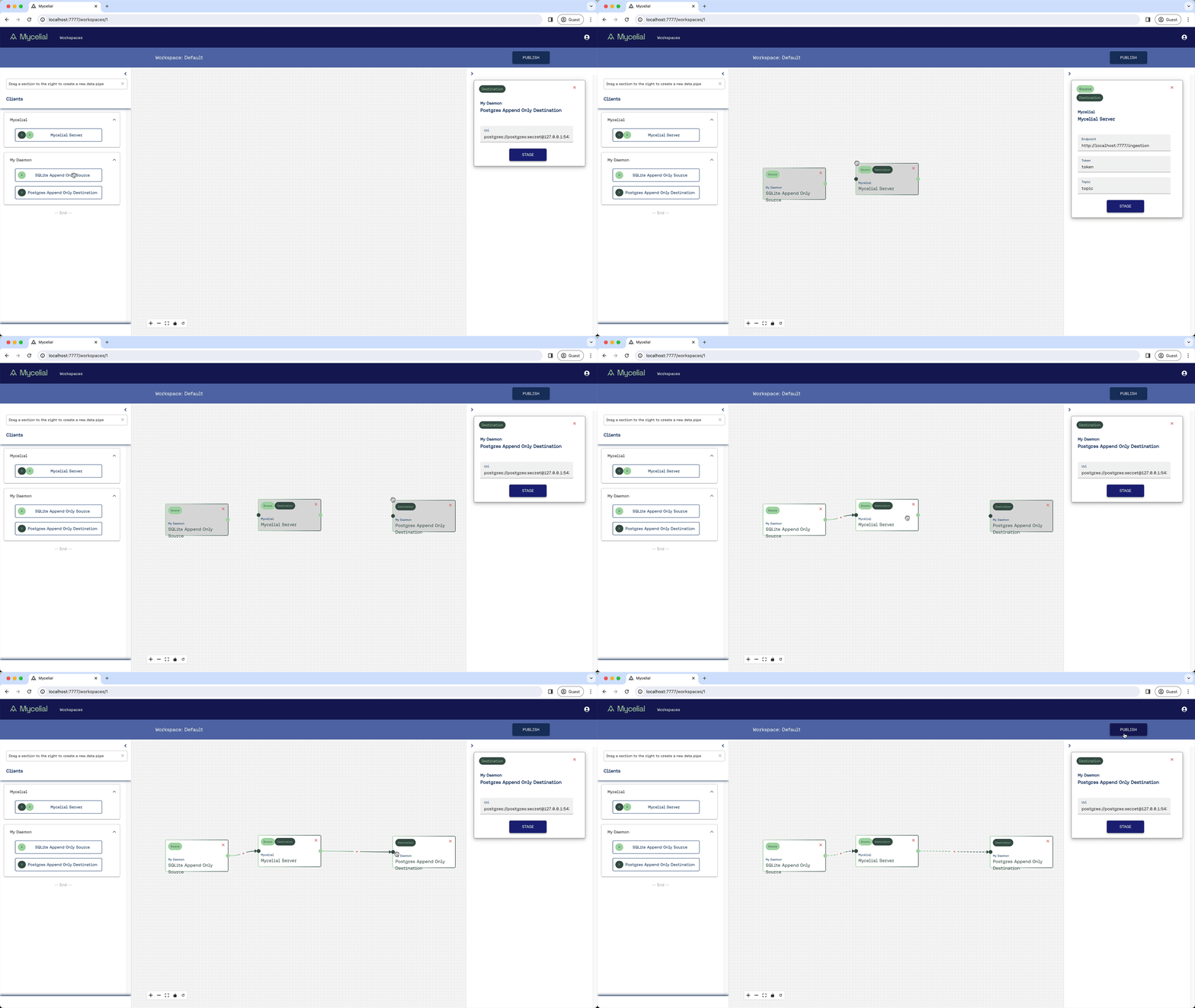
Once you've installed Mycelial (daemon[s] and control plane), you can easily begin moving
your data from source systems to destination systems of your choosing. Currently
Mycelial has connectors for:
- Postgres
- SQLite
- MySQL
- Kafka
- Snowflake
- Amazon Redshift, and
- File streaming
## How do I get started?
Follow our [Tutorial](/docs/Tutorial.md) to start using Mycelial from the
command line.
Watch this short demo:
[](http://www.youtube.com/watch?v=4WHOPRPfqgo "Mycelial Demo")
## API
API [documentation](/docs/API.md)
## Community
- [Discord](https://discord.gg/q7RbA7vBWz)
- [@mycelial](https://twitter.com/mycelial)
- [Newsletter](https://mycelial.com/#newsletter)
## License
Mycelial is available under the [Apache 2 license](LICENSE).