https://github.com/mykeels/slack-theme-cli
A CLI tool for changing Slack's desktop app colors
https://github.com/mykeels/slack-theme-cli
cli dark-mode dark-theme night-mode shell-script slack
Last synced: over 1 year ago
JSON representation
A CLI tool for changing Slack's desktop app colors
- Host: GitHub
- URL: https://github.com/mykeels/slack-theme-cli
- Owner: mykeels
- Created: 2018-11-13T12:37:34.000Z (over 7 years ago)
- Default Branch: master
- Last Pushed: 2022-11-11T01:54:32.000Z (over 3 years ago)
- Last Synced: 2025-03-27T02:11:35.078Z (over 1 year ago)
- Topics: cli, dark-mode, dark-theme, night-mode, shell-script, slack
- Language: Shell
- Homepage:
- Size: 624 KB
- Stars: 249
- Watchers: 9
- Forks: 25
- Open Issues: 7
-
Metadata Files:
- Readme: README.md
Awesome Lists containing this project
README
# Slack Theme CLI
A Command-Line Tool for changing Slack's desktop app colors, like
## Night Mode

## Midnight-Blue Mode
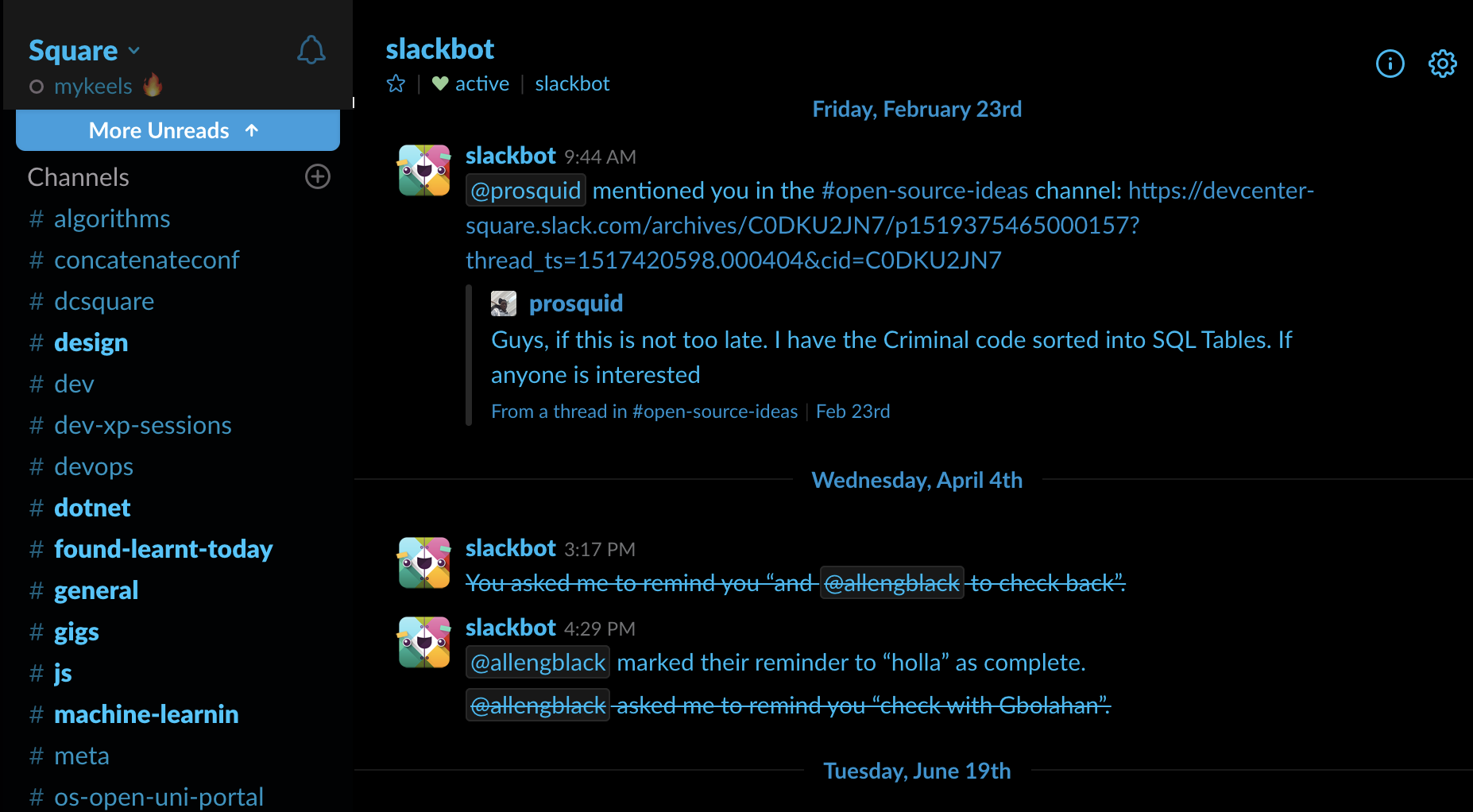
## Aubergine Mode

## How to install
To download and install, run the following code in your terminal:
### For Windows (with WSL)
```sh
curl https://raw.githubusercontent.com/mykeels/slack-theme-cli/master/slack-theme -O && bash slack-theme install && . ~/.profile
```
### For Mac Users
```sh
curl https://raw.githubusercontent.com/mykeels/slack-theme-cli/master/slack-theme -O && bash slack-theme install && . ~/.bash_profile
```
### For Linux Users
```sh
curl https://raw.githubusercontent.com/mykeels/slack-theme-cli/master/slack-theme -O && sudo bash ./slack-theme install && SILENT="$(source ~/.profile)"
```
### For Zsh Users
If you use zsh as your shell environment, you might want to run this instead:
#### Mac (Zsh)
```sh
curl https://raw.githubusercontent.com/mykeels/slack-theme-cli/master/slack-theme -O && SLACK_THEME_SHELL_PROFILE=~/.zshrc bash slack-theme install && . ~/.zshrc
```
#### Linux (Zsh)
```sh
curl https://raw.githubusercontent.com/mykeels/slack-theme-cli/master/slack-theme -O && sudo SLACK_THEME_SHELL_PROFILE=~/.zshrc bash ./slack-theme install && SILENT="$(source ~/.zshrc)"
```
## How to use
See command break-down below:
```txt
SYNOPSIS
slack-theme
slack-theme day
slack-theme night
slack-theme night-mono
slack-theme aubergine
slack-theme aubergine-mono
slack-theme arc-dark
slack-theme midnight-blue
slack-theme midnight-blue-mono
slack-theme solarized-dark
slack-theme solarized-light
slack-theme install
slack-theme uninstall
COMMANDS
day
Revert to Day Mode
night
Use Black CSS
night-mono
Use Night-Mono CSS
aubergine
Use Aubergine CSS
aubergine-mono
Use Aubergine-Mono CSS
arc-dark
Use Arc-Dark CSS
midnight-blue
Use Midnight-Blue CSS
midnight-blue-mono
Use Midnight-Blue-Mono CSS
solarized-dark
Use Solarized-Dark CSS
solarized-light
Use Solarized-Light CSS
```
## See Also
- [Slack Black Theme](https://github.com/widget-/slack-black-theme)
## Credits 😍
Huge thanks to:
- [Slack Night Mode](https://github.com/laCour/slack-night-mode)
- [Easy Dark Mode for Slack](https://dev.to/changoman/easy-dark-mode-for-slack-1mmn)