https://github.com/n0bisuke/google-auth-token-generator
https://github.com/n0bisuke/google-auth-token-generator
Last synced: over 1 year ago
JSON representation
- Host: GitHub
- URL: https://github.com/n0bisuke/google-auth-token-generator
- Owner: n0bisuke
- Created: 2021-02-22T04:06:06.000Z (over 5 years ago)
- Default Branch: main
- Last Pushed: 2022-04-11T06:49:16.000Z (over 4 years ago)
- Last Synced: 2025-02-18T23:03:43.047Z (over 1 year ago)
- Language: JavaScript
- Size: 17.6 KB
- Stars: 3
- Watchers: 2
- Forks: 1
- Open Issues: 0
-
Metadata Files:
- Readme: readme.md
Awesome Lists containing this project
README
[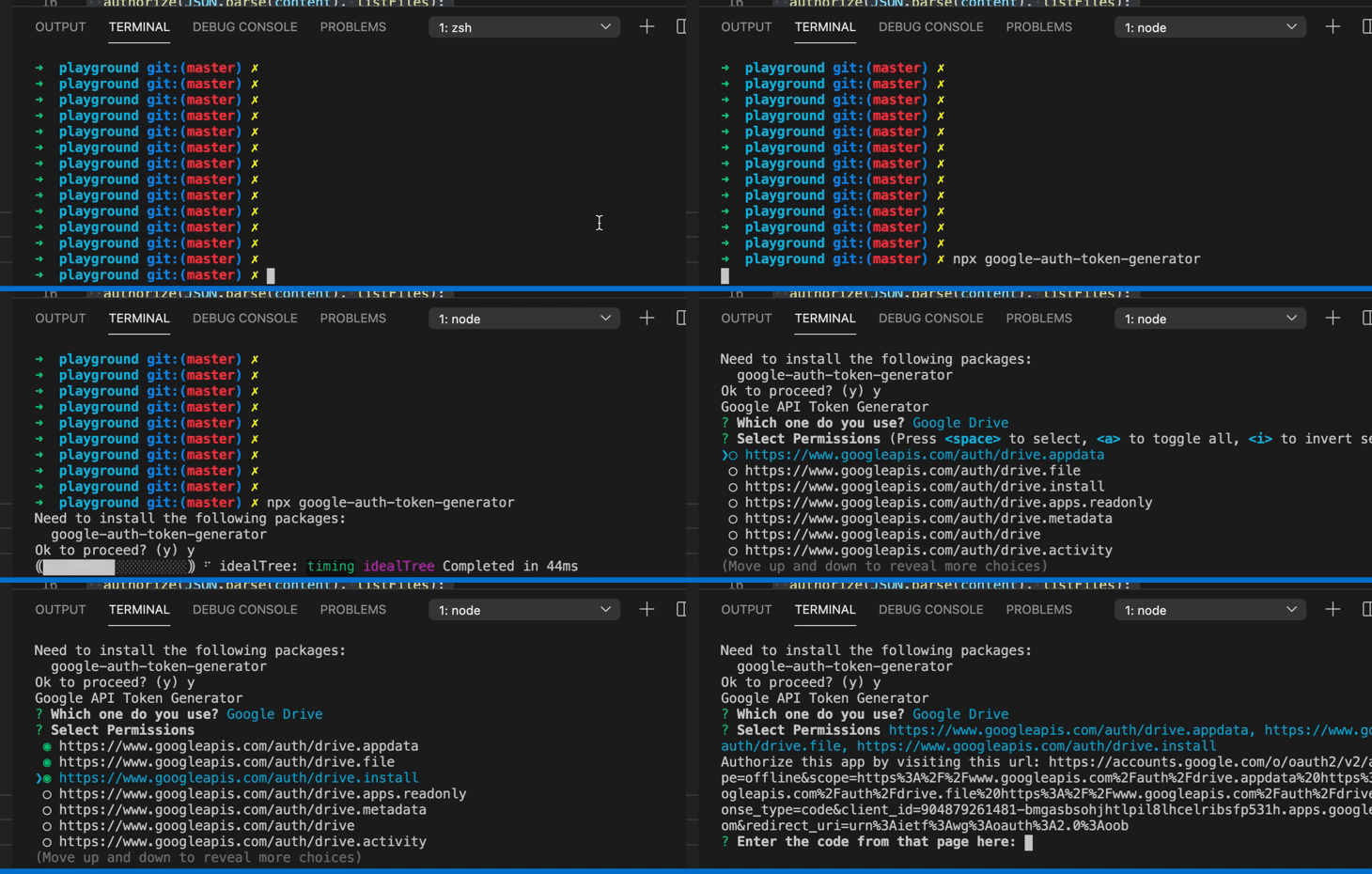](https://gyazo.com/92b73b1253594a5c39761079492cb9da)
## google-auth-token-generator
Gooogle系APIのtoken.jsonを取得するためのCLIツールです。
npx経由で実行すればインストール不要です。
* Google Drive
* Gmail
* Google Calender
* Youtube Data API
* Google Sheets
に対応しています。(2021/5/3時点)
## 使い方
* 1. CLIツールとして、token.jsonの生成が出来ます。
* 2. oAuthClientの生成関数のモジュールとして利用できます。
### 1. token.jsonの生成
* 1. Googleのサイトから利用したいAPIの`credentials.json`を取得します。
* 2. `npx google-auth-token-generator`を実行します。
* 3. `token.json`が生成されます
### 2. oAuthClientの生成モジュール
読み込みます。[googleapis](https://github.com/googleapis/google-api-nodejs-client)も追加でインストールしましょう。
```js
const {google} = require('googleapis');
const {oAuth2ClientGen} = require('google-auth-token-generator');
```
利用する際は以下のように読み込みます。
ファイル名は任意に変更できますがcredentials.jsonとtoken.jsonがデフォルトです。
```js
const auth = oAuth2ClientGen({
library: google,
/*ファイル利用の場合*/
CREDENTIALS_PATH: `credentials.json`, // optional
TOKEN_PATH: 'token.json'; // optional
});
```
また、環境変数などを利用したい場合はCREDENTIALSとTOKENのキーにセットして下さい。ファイル読み込みはしません。
```js
const auth = oAuth2ClientGen({
library: google,
/*環境変数利用の場合*/
CREDENTIALS: process.env.GOOGLE_CREDENTIAL, //optional
TOKEN: process.env.GOOGLE_TOKEN, //optional
});
```
#### Google Spread SheetsのAPI利用サンプル
```js
'use strict';
const {google} = require('googleapis');
const {oAuth2ClientGen} = require('google-auth-token-generator');
(async () => {
const auth = oAuth2ClientGen({library: google});
const sheets = google.sheets({version: 'v4', auth});
try {
const res = await sheets.spreadsheets.values.get({
spreadsheetId: '1BxiMVs0XRA5nFMdKvBdBZjgmUUqptlbs74OgvE2upms',
range: 'Class Data!A2:E',
});
const rows = res.data.values;
if (rows.length) {
console.log('Name, Major:');
// Print columns A and E, which correspond to indices 0 and 4.
rows.map((row) => {
console.log(`${row[0]}, ${row[4]}`);
});
} else {
console.log('No data found.');
}
} catch (error) {
console.log('The API returned an error: ' + error);
}
})();
```
## how to use
* 1. Get `credentials.json` first from the Google API site.
* 2. run `npx google-auth-token-generator`
* 3. A `token.json` file will be generated.