https://github.com/naarvent/spotify-tui
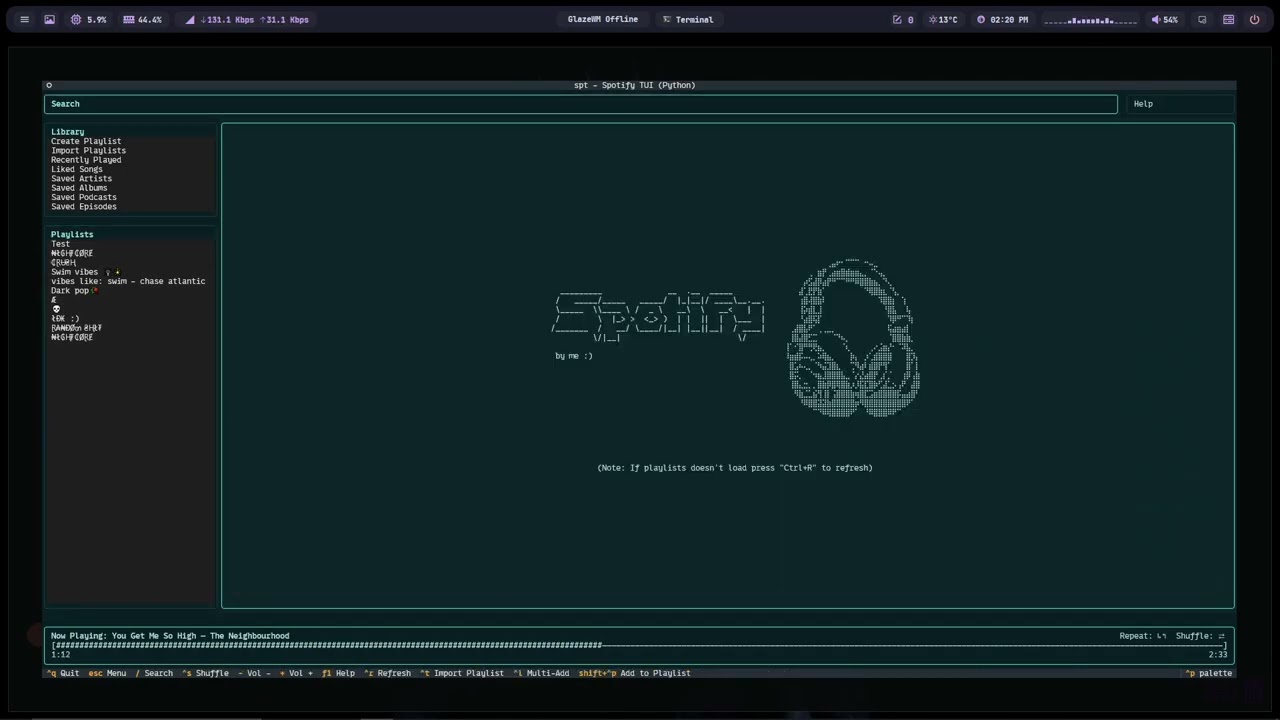
A terminal-based Spotify client built with Python, Spotipy and Textual. It provides a keyboard-driven TUI for searching, browsing and controlling Spotify playback, viewing synced lyrics, managing playlists and devices, and more. It's inspired by Rigellute's "spotify-tui".
https://github.com/naarvent/spotify-tui
cli english hotkeys keyboard media-control python script spotify spotify-api spotify-tui spotipy spotipy-api spotipy-library terminal terminal-based
Last synced: 4 months ago
JSON representation
A terminal-based Spotify client built with Python, Spotipy and Textual. It provides a keyboard-driven TUI for searching, browsing and controlling Spotify playback, viewing synced lyrics, managing playlists and devices, and more. It's inspired by Rigellute's "spotify-tui".
- Host: GitHub
- URL: https://github.com/naarvent/spotify-tui
- Owner: naarvent
- License: mit
- Created: 2025-10-27T17:08:06.000Z (8 months ago)
- Default Branch: main
- Last Pushed: 2026-01-12T17:06:47.000Z (5 months ago)
- Last Synced: 2026-01-12T22:54:35.673Z (5 months ago)
- Topics: cli, english, hotkeys, keyboard, media-control, python, script, spotify, spotify-api, spotify-tui, spotipy, spotipy-api, spotipy-library, terminal, terminal-based
- Homepage:
- Size: 60.5 KB
- Stars: 3
- Watchers: 0
- Forks: 0
- Open Issues: 0
-
Metadata Files:
- Readme: README.md
- License: LICENSE
Awesome Lists containing this project
README
# Spotify TUI — SPT (Python) 🎧🐍
[](https://opensource.org/licenses/MIT) [](https://www.python.org/) [](https://github.com/naarvent/Spotify-From-Terminal/issues) [](https://github.com/naarvent/Spotify-From-Terminal/stargazers)
---
### [Demo on YouTube!](https://youtu.be/MJm7DcUdPUs)
[](https://youtu.be/MJm7DcUdPUs)
---
## Important: If the app gets stuck on startup, delete the OAuth cache file Documents/naarvent's projects/Spotify_TUI/.cache_spotify_token to force re-authentication.
---
A terminal-based Spotify client built with Python, Spotipy and Textual. It provides a keyboard-driven TUI for searching, browsing and controlling Spotify playback, viewing synced lyrics, managing playlists and devices, and more.
---
## Table of Contents 📚
- [Summary 📝](#summary-)
- [Features ✨](#features-)
- [Requirements & Installation 🛠️](#requirements--installation-️)
- [Environment & Credentials 🔐](#environment--credentials-)
- [How it works (high level) ⚙️](#how-it-works-high-level-️)
- [APIs & External Services 🌐](#apis--external-services-)
- [Keybindings / Controls ⌨️](#keybindings--controls-️)
- [Configuration & Cache 📂](#configuration--cache-)
- [Troubleshooting & Notes 📝](#troubleshooting--notes-)
- [License 📄](#license-)
---
## Summary 📝
`spt` is a full-featured TUI for Spotify built using:
- **Textual** for the terminal UI
- **Spotipy** for the Spotify Web API
- **Requests** for lyrics and metadata providers
It supports search, playback, playlists, devices, lyrics, multi-selection workflows, and rich UI panels.
---
## Features ✨
- Full Spotify search (tracks, albums, artists, playlists)
- Playback control: play / pause / next / previous / seek / shuffle / repeat
- Synced LRC lyrics when available; plain lyric fallback
- Multi-review / multi-add batch playlist operations
- Playlist creation, import, and modification
- Device selection and playback transfer
- Real-time playback sync with progress bar
- Persistent cache + config + OAuth token storage
- Expandable / collapsible Library & Playlists panels via keyboard
---
## Requirements & Installation 🛠️
**Recommended:** Python 3.10+
Install dependencies:
```bash
pip install spotipy textual requests rich pyfiglet
```
Run the app:
```bash
python spt_tui.py
```
---
## Environment & Credentials 🔐
`spt` requires Spotify credentials (or it will prompt you to provide them on first run):
- `SPOTIPY_CLIENT_ID`
- `SPOTIPY_CLIENT_SECRET`
- `SPOTIPY_REDIRECT_URI`
If not provided via environment variables, the app will prompt for them and can save them locally in `spt_config.json`.
Scopes include playback, playlists, library, and user data as defined in the script.
---
## How it works (high level) ⚙️
- Textual builds a two-column TUI: Search/Library/Playlists (left) and Details/Results/Lyrics (right).
- Spotipy handles authentication, tokens, and playback/playlist operations.
- Lyrics are fetched using LRCLib and lyrics.ovh, parsed into synced or pseudo-synced lines.
- A periodic task syncs playback state and updates the UI.
- Keyboard shortcuts drive all navigation and actions.
---
## APIs & External Services 🌐
- **Spotify Web API** — playback, search, library, playlists, devices
- **LRCLib** — synced LRC lyrics
- **lyrics.ovh** — plain lyric fallback
---
## Keybindings / Controls ⌨️
Below are the keybindings as defined in the application (`spt_tui.py`). Use these keys to navigate and control the TUI.
### General / Navigation
- `escape` — Menu
- `ctrl+q` — Quit
- `up` — Up
- `down` — Down
- `/` — Search (focus search input)
- `left` — Move focus to the left column (sections, library, playlists). When a playlist/album/lyrics view is open in the right panel, pressing `Left` returns focus to the left column and effectively closes or exits the detailed right view so you can navigate other items.
- `right` — Move focus to the right panel (details, track list, lyrics). From the left column select an item and press `Right` (or `Enter`) to open it in the right panel; the right key focuses that panel for interaction.
### Main / Navigation
- `Esc` — Return to main menu
- `Ctrl+Q` — Quit
- `↑ / ↓` — Move between sections and list items
- `/` — Focus search input
- `Enter` — Open / Play selected item
### Open / Play / Playback
- `enter` — Open/Play
- `space` — Play/Pause
- `n` — Next
- `p` — Prev/Restart
- `r` — Repeat (cycle: off → context → track)
- `Ctrl+S` — Toggle shuffle
- `c` — Queue (add track to queue)
### Playback Controls
- `Space` — Play / Pause
- `n` — Next track
- `p` — Previous / Restart
- `r` — Cycle repeat (off → context → track)
- `c` — Add selected track to Queue
- `Ctrl+S` — Toggle shuffle
- `- / +` — Volume down / up (uses configured seconds using "<")
- `Ctrl+Left / Ctrl+Right` — Seek back / Seek forward (uses configured seconds using "<")
- `m` — Mute / Unmute
### Shuffle / Volume / Seek / Mute
- `ctrl+s` — Toggle shuffle
- `-` — Volume down (Vol -)
- `+` — Volume up (Vol +)
- `m` — Mute
- `ctrl+left` — Seek back (uses configured seconds using "<")
- `ctrl+right` — Seek forward (uses configured seconds using "<")
- `<` — Prompt seek settings
### Devices & Settings
- `d` — Open device manager (transfer playback)
- `<` — Open seek/volume settings
### Devices, Help & Views
- `d` — Manage devices
- `?` — Help
- `f1` — Help
- `l` — Toggle lyrics
- `ctrl+r` — Refresh
- `ctrl+c` — Open Queue
### Library & Playlist / Queue Management
- `f` — Toggle Favorite (Like / Unlike selected track)
- `Ctrl+Shift+P` — Add selected track(s) to a playlist
- `Ctrl+D` — Delete (playlist or remove item)
- `Ctrl+R` — Refresh / reload content
- `Ctrl+C` — Open Queue view
### Multi-Add / Selection Mode
- `Ctrl+L` — Toggle Multi-Add mode
- In Multi-Add: use movement keys and `Enter` to toggle selection
- `Ctrl+A` — Confirm selection (when prompted / in multi-add flows)
- `Ctrl+O` — Add all / confirm add-all action
### Additional / Help / Misc
- `?` or `F1` — Toggle Help view
- `Left / Right` arrows — Move focus between left column and right panel
- Log file: `Documents/naarvent's projects/Spotify_TUI/spt_py_textual_spotify.log`
---
## Configuration & Cache 📂
Default location for cache, config and logs (created under the user's Documents folder):
```
Documents/naarvent's projects/Spotify_TUI/
```
Files:
- `spt_config.json` — saved credentials
- `.cache_spotify_token` — OAuth token cache
- `spt_py_textual_spotify.log` — log file (rotating)
---
## Search — prefixes & smart parsing 🔎
The app supports quick filters by starting the query with a prefix (case-insensitive). These are parsed by the search routine:
- `/ART ` — search artists
- `/ALB ` — search albums
- `/TRK ` — search tracks
- `/PLY ` — search playlists
- `/PDC ` — search podcasts
- `/EPS ` — search episodes from podcasts
You can also write natural queries (e.g., `FEEL.`)—the app applies smart parsing and multiple candidate queries to maximize relevant results.
---
## Lyrics — sources & behavior 🎵
`spt` attempts to provide synced and plain lyrics using multiple external services and local caching:
- LRCLib (`https://lrclib.net`) — primary source for synced LRC lyrics (fetches `.lrc` when available).
- lyrics.ovh (`https://api.lyrics.ovh`) — fallback for plain lyrics when synced versions are not found.
- Local lyrics cache stored under the same cache directory to avoid repeated network lookups.
If synced LRC lyrics are found, the app parses timestamps into a timeline and highlights the current line in sync with playback. If only plain lyrics are available, the app will generate a pseudo-timed timeline to display lines progressively.
If lyrics aren't showing, try `Ctrl+R` to refresh data or ensure the network and external services are reachable.
---
## Troubleshooting & Notes 📝
- If playlists don't load: press `Ctrl+R` (Refresh).
- Lyrics fall back to plain text if synced LRC is not available.
- Device switching requires an active Spotify client/device.
- Check `spt_py_textual_spotify.log` for detailed debug output.
---
## License 📄
This project is licensed under the MIT License — see the `LICENSE` file for details.