https://github.com/nafey/minimalytics
https://github.com/nafey/minimalytics
Last synced: over 1 year ago
JSON representation
- Host: GitHub
- URL: https://github.com/nafey/minimalytics
- Owner: nafey
- License: mit
- Created: 2025-01-12T04:03:56.000Z (over 1 year ago)
- Default Branch: master
- Last Pushed: 2025-03-17T04:40:26.000Z (over 1 year ago)
- Last Synced: 2025-03-17T05:29:52.260Z (over 1 year ago)
- Language: Go
- Size: 433 KB
- Stars: 0
- Watchers: 1
- Forks: 0
- Open Issues: 0
-
Metadata Files:
- Readme: README.md
- License: LICENSE
Awesome Lists containing this project
- awesome-sqlite - Minimalytics - Stand-alone, minimalist analytics CLI/Web UI that stores and aggregates billions of events per month using a single SQLite database. (Apps and Communities buidling on SQLite)
README
# Minimalytics
[](LICENSE)
Minimalytics is a **standalone minimalist analytics tool** built on SQLite. Designed for resource-constrained environments, it provides a lightweight solution for tracking and visualizing event data with a minimal footprint. Whether you're tracking internal services or need a simple analytics tool, Minimalytics delivers performance without the bloat.
---
## Features
- **Track Events**: Record and monitor analytics for various events.
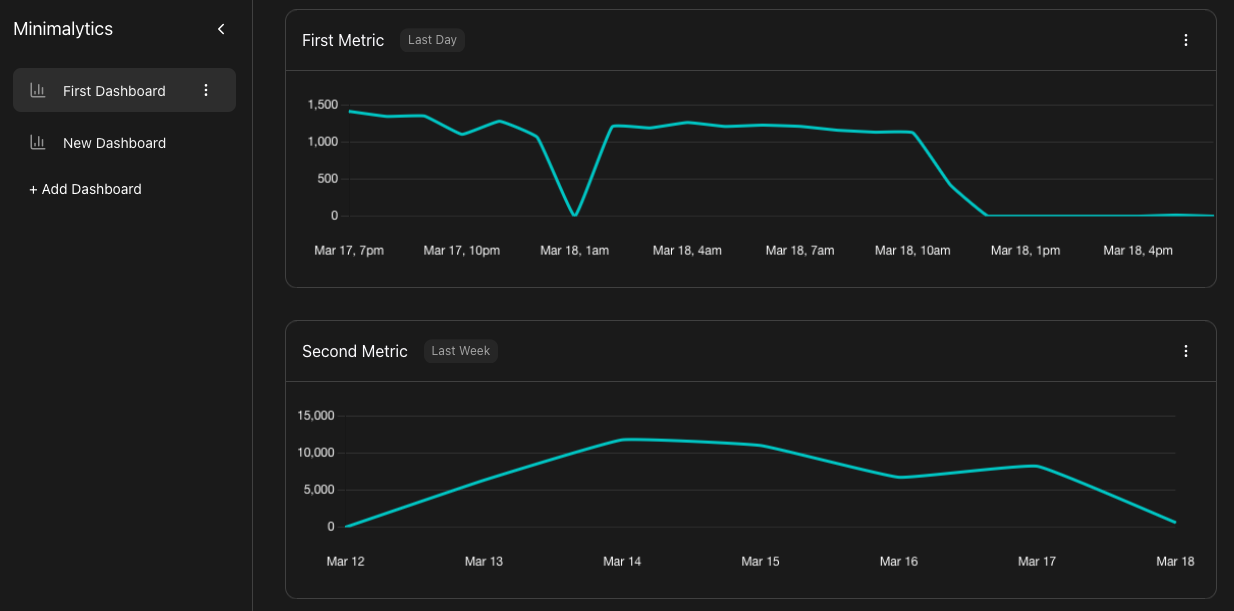
- **Web UI**: Manage dashboards and visualize event data with interactive graphs.
- **Scalable**: Supports over a billion events per month with a minimal storage footprint (~20 MB).
- **Lightweight**: Built with efficiency in mind, ensuring low memory and storage usage.
---
## Installation
### Linux and macOS
1. Clone the repository:
```bash
git clone https://github.com/nafey/minimalytics.git
cd minimalytics
```
2. Build the project:
```bash
go build -o build/minim .
```
3. Install the binary system-wide:
```bash
sudo mv build/minim /usr/local/bin/
```
---
## Usage
### Starting the Server
1. Check if the server is running:
```bash
minim status
```
2. Start the server:
```bash
minim server start
```
### Recording Events
To record an event, send a `POST` request to the event API:
```bash
curl -X POST http://localhost:3333/api/event/ -H "Content-Type: application/json" -d '{"event": ""}'
```
Replace `` with the name of the event you want to track.
### Accessing the Web Dashboard
1. Open your browser and navigate to:
```
http://localhost:3333/
```
2. Go to **"First Dashboard"** and click **"Add Graph"**.
3. Select the appropriate properties and click **"Done"**.
4. Your dashboard is now ready to display event data.
### Disabling Web Access
To disable access to the web dashboard, run:
```bash
minim web disable
```
---
## Why Minimalytics?
This project was born out of the need for a lightweight analytics tool to track internal services on a resource-constrained VPS. Most SaaS analytics products either lack the scalability or exceed their free tier limits when tracking millions of events per month. Minimalytics addresses this gap by offering a **minimalist, high-performance solution** for resource-constrained environments.
---
## How It Works
- **Event Aggregation**: Minimalytics saves space by aggregating events, storing only aggregate features (e.g., total invocations per day) instead of individual events.
- **SQLite Storage**: Event data is stored in an SQLite file, initialized during the first run of `minim`.
- **Server Hosting**: The `minim` CLI starts a server that:
- Hosts the API endpoint for event submission.
- Serves the web UI (built using [minimui](https://github.com/nafey/minimui) and placed in the `static` folder).
- **Web UI**: Source for the Web UI is available at [minimui](https://github.com/nafey/minimui).
---
## Future Features
- Support for **sum, avg, min, and max** on event values.
- Improved **UI/UX**.
- Multiple metrics in the same graph.
- Additional visualizations: **Bar Chart, Pie Chart**, etc.
- **User ID-based analytics**: Funnels, cohorts, and more.
---
## Unsupported Features
- Details on individual events.
- Hourly event resolution beyond 48 hours.
- Minute resolution beyond 60 minutes.
---
## Contributing
Contributions are welcome! If you'd like to contribute, please:
1. Fork the repository.
2. Create a new branch for your feature or bugfix.
3. Submit a pull request.
---
## License
Minimalytics is licensed under the [MIT License](LICENSE).
Enjoy using Minimalytics! For questions or feedback, feel free to open an issue on GitHub.