https://github.com/nakst/luigi
A barebones single-header GUI library for Win32, X11 and Essence.
https://github.com/nakst/luigi
Last synced: over 1 year ago
JSON representation
A barebones single-header GUI library for Win32, X11 and Essence.
- Host: GitHub
- URL: https://github.com/nakst/luigi
- Owner: nakst
- License: other
- Created: 2020-12-22T11:11:11.000Z (over 5 years ago)
- Default Branch: main
- Last Pushed: 2025-02-23T21:25:44.000Z (over 1 year ago)
- Last Synced: 2025-02-23T22:26:25.865Z (over 1 year ago)
- Language: C
- Homepage:
- Size: 578 KB
- Stars: 446
- Watchers: 16
- Forks: 23
- Open Issues: 11
-
Metadata Files:
- Readme: README.md
- License: LICENSE
Awesome Lists containing this project
- awesome-c - luigi - A barebones single-header GUI library for Win32, X11 and Essence. [MIT](https://spdx.org/licenses/MIT.html) (Graphical User Interface)
- awesome-c-zh - luigi - 用于Win32,X11和Essence的准系统单标题GUI库。[](https://spdx.org/licenses/MIT.html) (图形用户界面)
- awesome-c - luigi - A barebones single-header GUI library for Win32, X11 and Essence. [MIT](https://spdx.org/licenses/MIT.html) (Graphical User Interface)
README
# luigi
A barebones single-header GUI library for Win32, X11 and Essence.
## Projects made with luigi
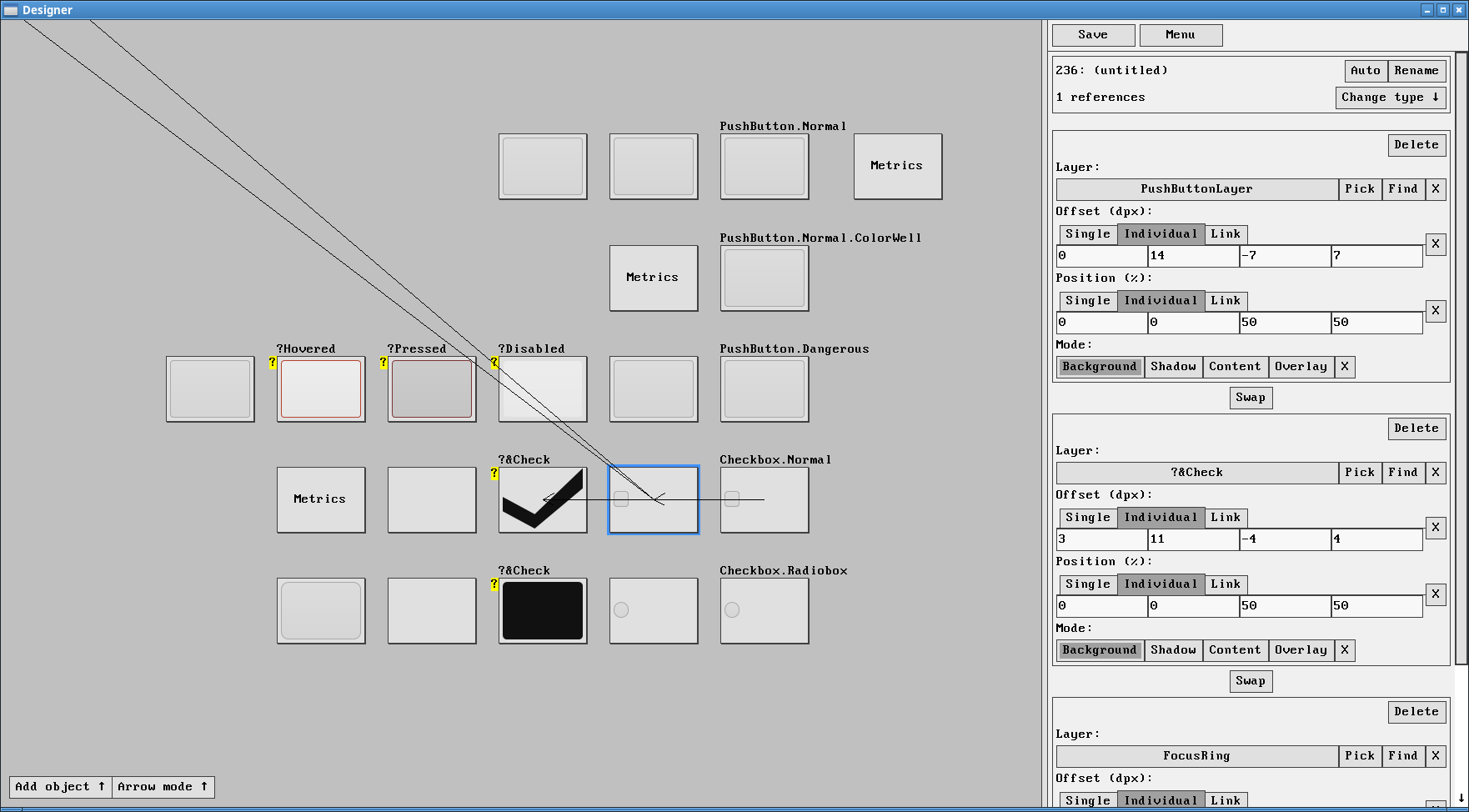
Designer, https://gitlab.com/nakst/essence/-/blob/master/util/designer2.cpp
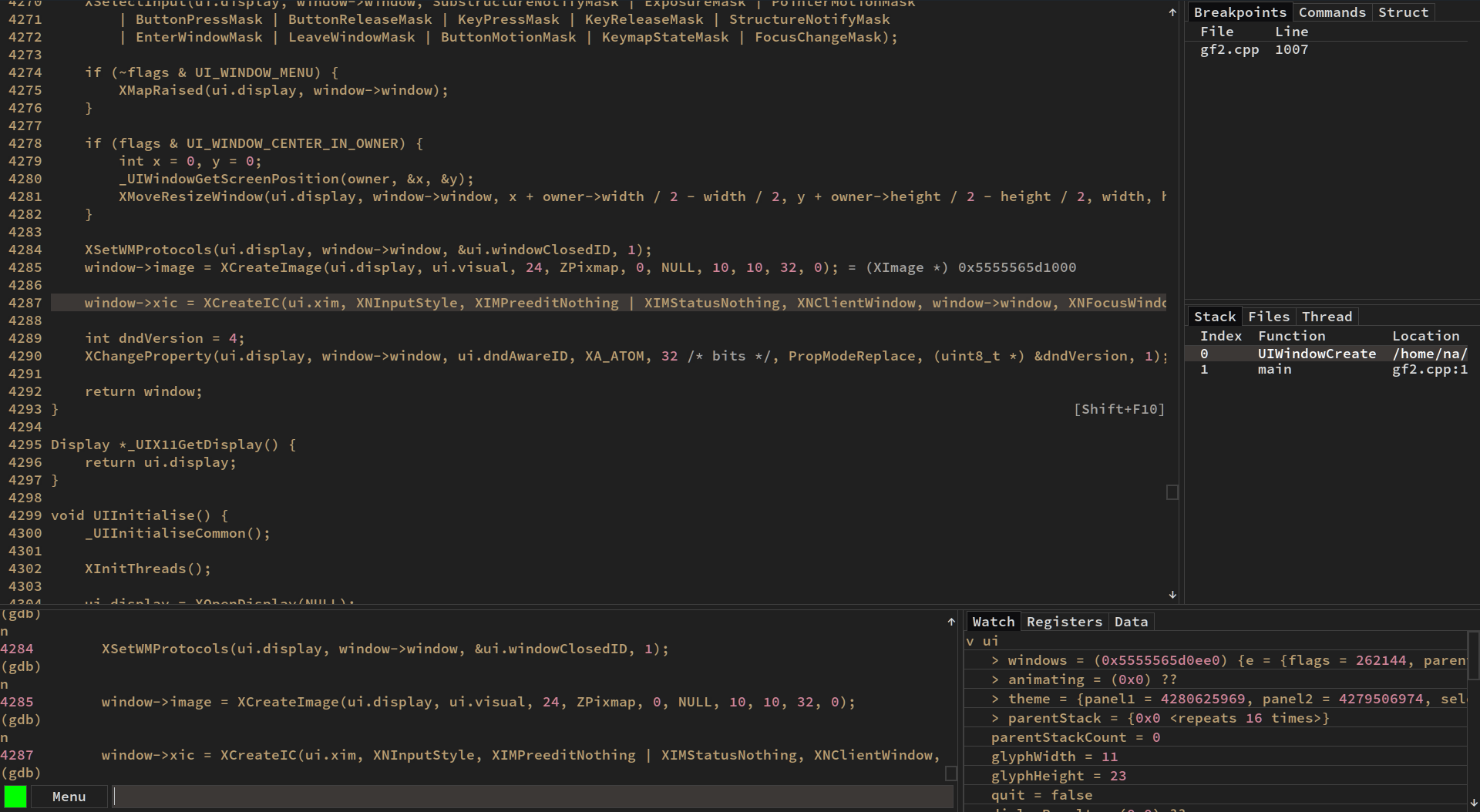
GDB frontend, https://github.com/nakst/gf/
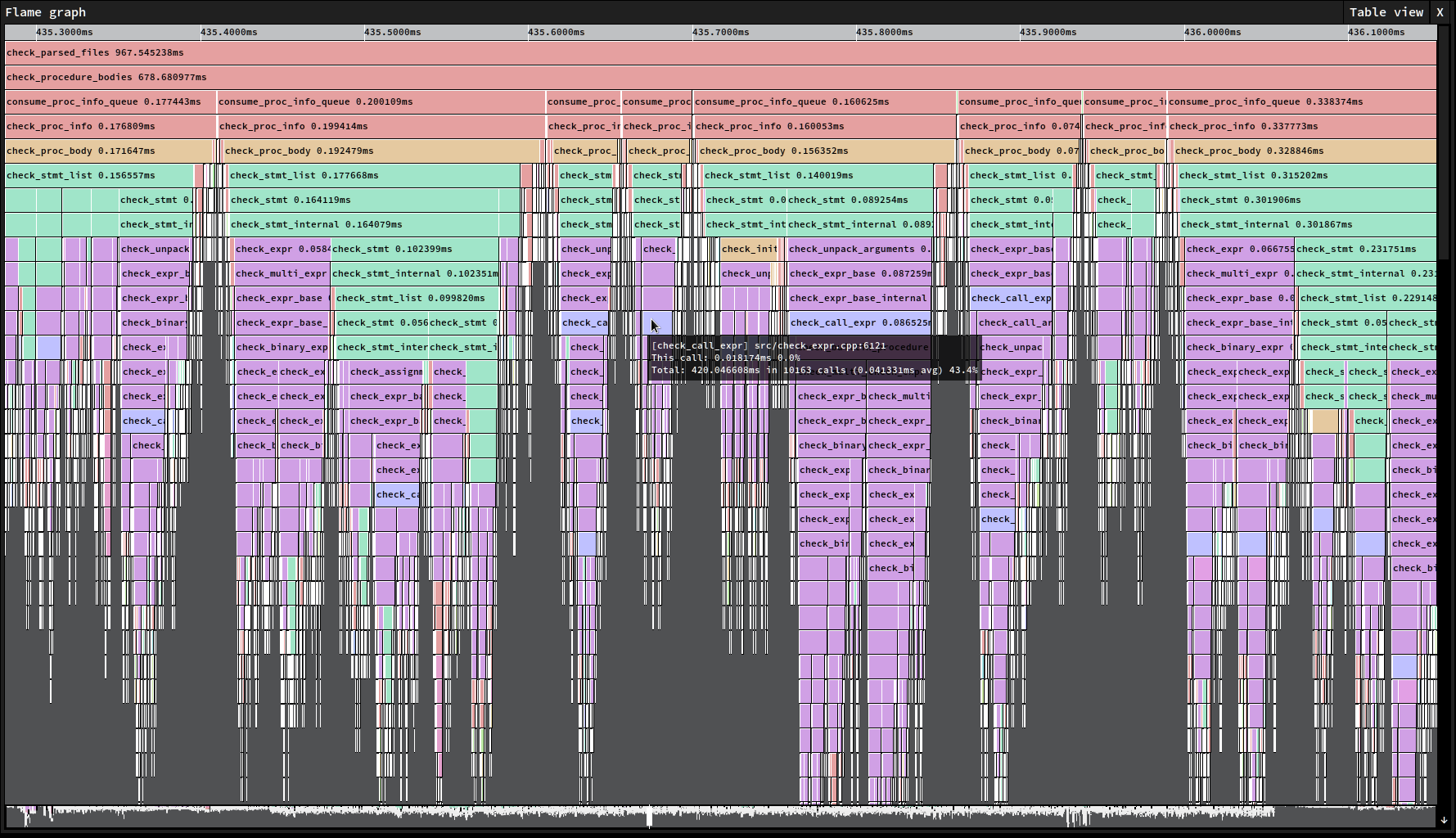
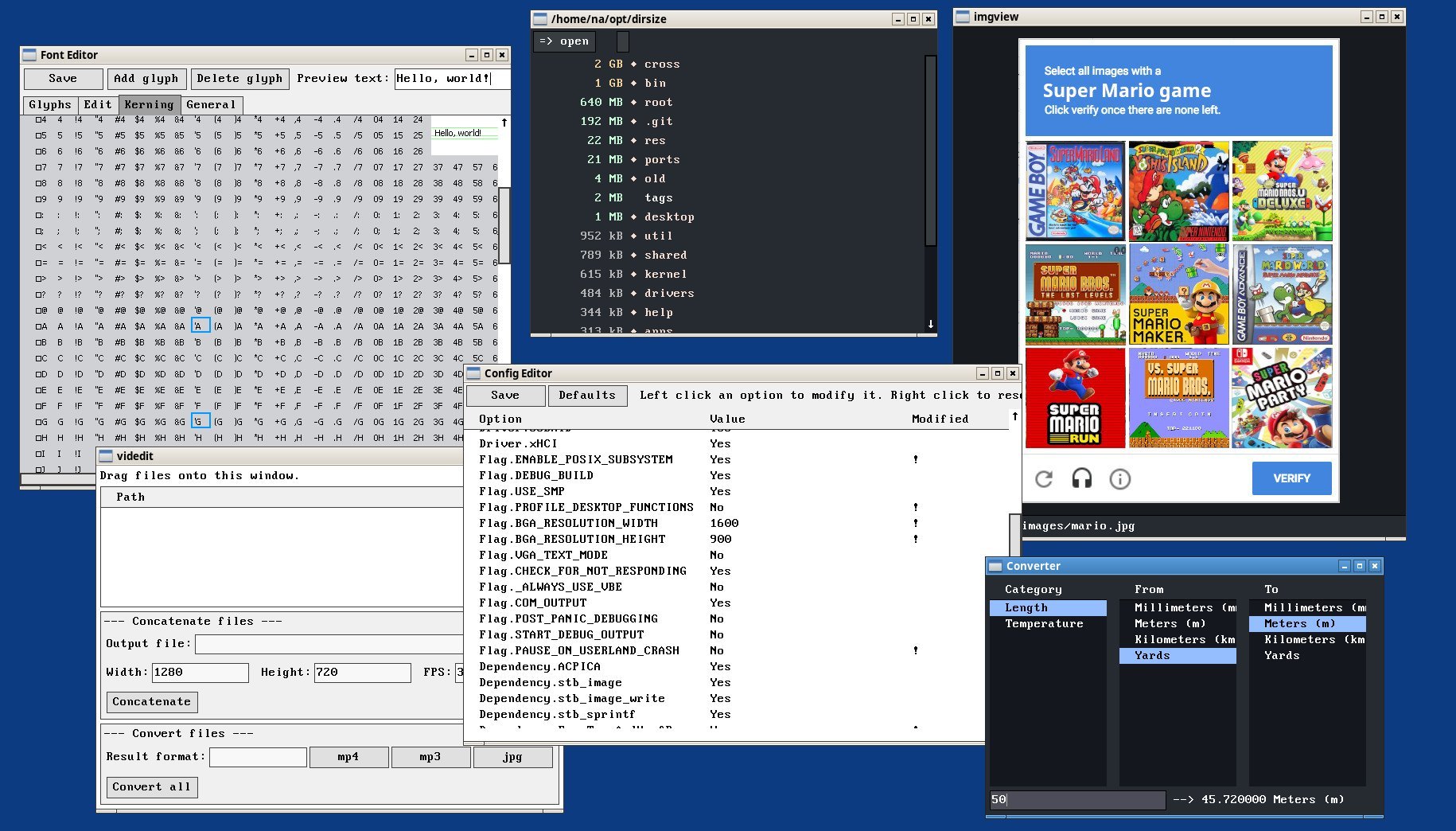
Various utility applications:
## Bindings for other languages
- Nim: https://github.com/neroist/luigi (MIT)
- Teak: https://github.com/nakst/teak/tree/master/modules/luigi (MIT; incomplete)
- Rust: https://github.com/ankddev/luigi-rs (MIT)
## Building the example
### Windows
Update `luigi_example.c` to `#define UI_WINDOWS` at the top of the file, and then run the following command in a Visual Studio command prompt:
```
cl /O2 luigi_example.c user32.lib gdi32.lib shell32.lib
```
### Linux
Update `luigi_example.c` to `#define UI_LINUX` at the top of the file, and then run the following command in Bash:
```
gcc -O2 luigi_example.c -lX11 -lm -o luigi
```
## Linking with FreeType
If you want to use FreeType for font rendering, pass the additional arguments to `gcc`:
```
-lfreetype -D UI_FREETYPE -I
```
Then add, after the call to `UIInitialise`,
```c
UIFontActivate(UIFontCreate("font_path.ttf", 11 /* font size */));
```
## Documentation
### Introduction
As with other single-header libraries, to use it in your project define `UI_IMPLEMENTATION` in exactly one translation unit where you include the header.
Furthermore, everytime you include the header, you must either define `UI_WINDOWS` or `UI_LINUX` to specify the target platform.
To initialise the library, call `UIInitialise`. You can then create a window using `UIWindowCreate` and populate it using the `UI...Create` functions.
Once you're ready, call `UIMessageLoop`, and input messages will start being processed.
Windows are built up of *elements*, which are allocated and initialised by `UI...Create` functions. These functions all return a pointer to the allocated element.
At the start of every element is a common header of type `UIElement`, contained in the field `e`.
When you create an element, you must specify its parent element and its flags.
Each element determines the position of its children, and every element is clipped to its parent (i.e. it cannot draw outside the bounds of the parent).
The library uses a message-based system to allow elements to respond to events and requests.
The enumeration `UIMessage` specifies all the different messages that can be sent to an element using the `UIElementMessage` function.
A message is passed with two parameters, an integer `di` and a pointer `dp`, and the element receiving the message must return an integer in response.
If the meaning of the return value is not specified, or the element does not handle the message, it should return 0.
After ensuring the element has not been marked for deletion,
`UIElementMessage` will first try sending the message to the `messageUser` function pointer in the `UIElement` header.
If this returns 0, then the message will also be sent to the `messageClass` function pointer.
The `UI...Create` functions will set the `messageClass` function pointer, and the user may optionally set the `messageUser` to also receive messages sent to the element.
For example, the `messageClass` function set by `UIButtonCreate` will handle drawing the button when it receives the `UI_MSG_PAINT` message.
The user will likely want to set `messageUser` so that they can receive the `UI_MSG_CLICKED` message, which indicates that the button has been clicked.
### Basic example
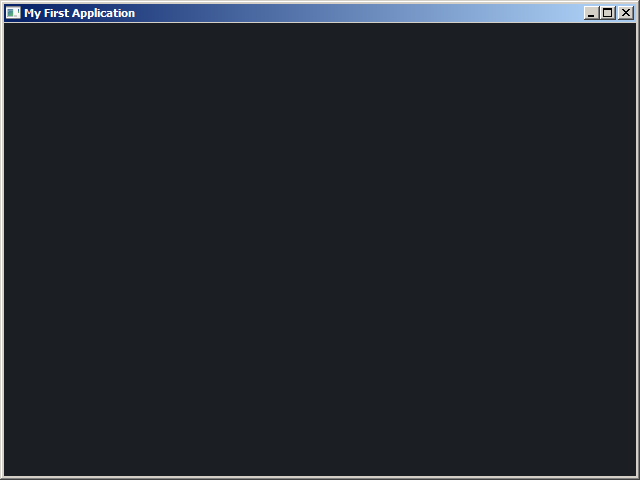
The following source code demonstrates how to create an empty window.
```c
// Define UI_LINUX instead if you're on Linux.
#define UI_WINDOWS
// Put the library implementation in this translation unit.
#define UI_IMPLEMENTATION
#include "luigi.h"
// Use main() instead if you're on Linux.
int WinMain(HINSTANCE instance, HINSTANCE previousInstance, LPSTR commandLine, int showCommand) {
// Initialise the library.
UIInitialise();
// Create a window.
UIWindow *window = UIWindowCreate(0, 0, "My First Application", 640, 480);
// Process input messages from the operating system.
return UIMessageLoop();
}
```
Since we haven't added anything to the window, its contents will be uninitialized - so don't worry if you see some random pixels.
To start adding elements to the window, we first need to add a panel which will be responsible for laying out the other elements in the window.
```c
UIInitialise();
UIWindow *window = UIWindowCreate(0, 0, "My First Application", 640, 480);
// Create a gray panel, filling the window, with medium spacing.
// By default, a panel places its children from top to bottom.
// You can additionally specify the UI_PANEL_HORIZONTAL flag if you want a left-to-right layout.
// If you want to customize the spacing between child element, modify panel->gap.
// If you want to customize the border between the panel and its children, modify panel->border.
UIPanel *panel = UIPanelCreate(&window->e, UI_PANEL_GRAY | UI_PANEL_MEDIUM_SPACING);
return UIMessageLoop();
```
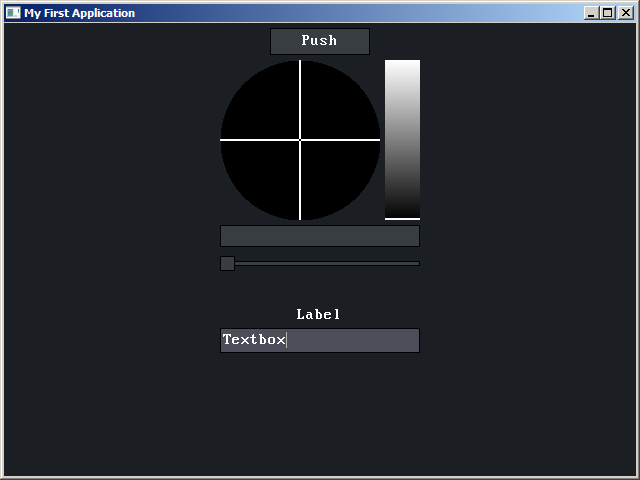
We can now add some elements to the panel.
```c
// Global variables:
UIButton *button;
UIColorPicker *colorPicker;
UIGauge *gauge;
UISlider *slider;
UISpacer *spacer;
UILabel *label;
UITextbox *textbox;
...
UIPanel *panel = UIPanelCreate(&window->e, UI_PANEL_GRAY | UI_PANEL_MEDIUM_SPACING);
button = UIButtonCreate(&panel->e, 0, "Push", -1);
colorPicker = UIColorPickerCreate(&panel->e, 0);
gauge = UIGaugeCreate(&panel->e, 0);
slider = UISliderCreate(&panel->e, 0);
spacer = UISpacerCreate(&panel->e, 0, 0 /* width */, 20 /* height */);
label = UILabelCreate(&panel->e, 0, "Label", -1);
textbox = UITextboxCreate(&panel->e, 0);
```
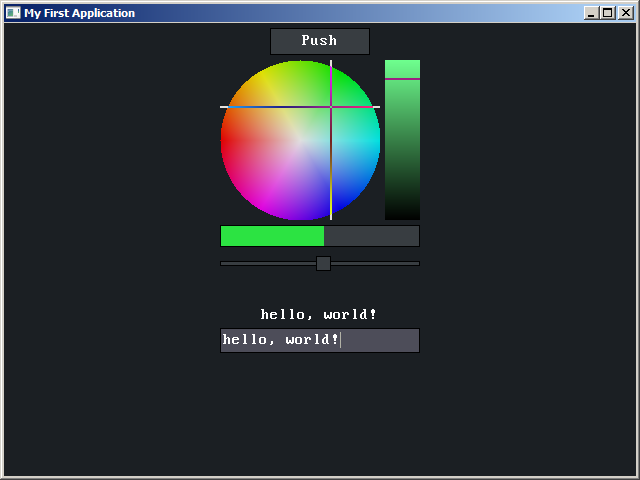
Let's add some interactivity to the interface. Set the message callbacks for the button, slider and textbox.
We can process input messages in these callbacks, and respond to them however we want.
```c
button->e.messageUser = ButtonMessage;
slider->e.messageUser = SliderMessage;
textbox->e.messageUser = TextboxMessage;
```
In the button's callback, we'll change the color in the color picker to white when the button is clicked.
```c
int ButtonMessage(UIElement *element, UIMessage message, int di, void *dp) {
if (message == UI_MSG_CLICKED) {
colorPicker->saturation = 0;
colorPicker->value = 1;
UIElementRefresh(&colorPicker->e); // Update and repaint the color picker.
}
return 0;
}
```
In the slider's callback, we'll make the gauge match the slider's position.
```c
int SliderMessage(UIElement *element, UIMessage message, int di, void *dp) {
if (message == UI_MSG_VALUE_CHANGED) {
gauge->position = slider->position;
UIElementRefresh(&gauge->e);
}
return 0;
}
```
Finally, in the textbox's callback, we'll make the label match the textbox's contents.
```c
int TextboxMessage(UIElement *element, UIMessage message, int di, void *dp) {
if (message == UI_MSG_VALUE_CHANGED) {
UILabelSetContent(label, textbox->string, textbox->bytes);
UIElementRefresh(&label->e);
// The label's size might have changed,
// so we need to refresh the parent panel, to update its layout.
UIElementRefresh(label->e.parent);
}
return 0;
}
```
### UIRectangle
This contains 4 integers, `l`, `r`, `t` and `b` which represent the left, right, top and bottom edges of a rectangle.
Usually, the coordinates are in pixels relative to the top-left corner of the relevant window.
### UIElement
The common header for all elements.
```c
struct UIElement {
uint64_t flags;
struct UIElement *parent;
struct UIElement *next;
struct UIElement *children;
struct UIWindow *window;
UIRectangle bounds, clip, repaint;
void *cp;
int (*messageClass)(struct UIElement *element, UIMessage message, int di, void *dp);
int (*messageUser)(struct UIElement *element, UIMessage message, int di, void *dp);
};
```
`flags` contains a bitset of flags for the element. The first 16-bits are specific to each type of element. The upper 16-bits are common to all elements.
Here are the common flags are available:
* `UI_ELEMENT_V_FILL` is a hint to the parent element that this element should take up all available vertical space.
* `UI_ELEMENT_H_FILL` is a hint to the parent element that this element should take up all available horizontal space.
* `UI_ELEMENT_REPAINT` marks the element for repainting. Do not set directly; see `UIElementRepaint`.
* `UI_ELEMENT_DESTROY` marks the element to be destroyed. Do not set directly; see `UIElementDestroy`.
* `UI_ELEMENT_DISABLED` marks the element as disabled. It will not receive input events.
* `UI_ELEMENT_HIDE` marks the element as hidden. It will not receive input events, be drawn, or take up space in the parent's layout.
* `UI_ELEMENT_TAB_STOP` marks the element as a tab stop. The user may focus it using the tab key.
* `UI_ELEMENT_PARENT_PUSH` automatically adds the element to the parent stack. See `UIParentPush`.
* `UI_ELEMENT_NON_CLIENT` indicates the element behaves less like a child of its parent, but rather is integral to the existence of its parent. For example, scrollbars in a table will be marked as non-client. This flag has several effects: UIElementDestroyDescendents will not destroy non-client elements; the `UI_MSG_CLIENT_PARENT` message will not be sent to the parent during its creation; and panels will not include it in their layout.
`parent` contains a pointer to the element's parent. `next` contains a pointer to the element's sibling.
`children` contains a pointer to the element's first child (children are linked by the `next` pointer).
`window` contains a pointer to the window that contains the element.
`bounds` contains the element's bounds, expressed in pixels relative to the top-left corner of the containing window. `clip` gives the clip region in a similar fashion. Do not set either of these directly; instead, use `UIElementMove`.
`cp` is a context pointer available for the user.
`messageClass` and `messageUser` contain function pointers to the element's message handlers.
`messageClass` is set when the element is first created, and has lower priority than `messageUser` when receiving messages.
`messageUser` can be optionally set by the user of the element to inspect and handle its messages.
If `messageUser` returns a non-zero value, then `messageClass` will not receive the message.
If `messageUser` is `NULL`, then `messageClass` will always receive the message.
Do not call these directly; see `UIElementMessage`.
### All functions
```c
// General.
void UIInitialise();
int UIMessageLoop();
uint64_t UIAnimateClock(); // In ms.
// Creating elements.
UIElement *UIElementCreate(size_t bytes, UIElement *parent, uint32_t flags, int (*messageClass)(UIElement *, UIMessage, int, void *), const char *cClassName);
UIButton *UIButtonCreate(UIElement *parent, uint32_t flags, const char *label, ptrdiff_t labelBytes);
UICode *UICodeCreate(UIElement *parent, uint32_t flags);
UIColorPicker *UIColorPickerCreate(UIElement *parent, uint32_t flags);
UIGauge *UIGaugeCreate(UIElement *parent, uint32_t flags);
UILabel *UILabelCreate(UIElement *parent, uint32_t flags, const char *label, ptrdiff_t labelBytes);
UIMDIChild *UIMDIChildCreate(UIElement *parent, uint32_t flags, UIRectangle initialBounds, const char *title, ptrdiff_t titleBytes);
UIMDIClient *UIMDIClientCreate(UIElement *parent, uint32_t flags);
UIMenu *UIMenuCreate(UIElement *parent, uint32_t flags);
UIPanel *UIPanelCreate(UIElement *parent, uint32_t flags);
UIScrollBar *UIScrollBarCreate(UIElement *parent, uint32_t flags);
UISlider *UISliderCreate(UIElement *parent, uint32_t flags);
UISpacer *UISpacerCreate(UIElement *parent, uint32_t flags, int width, int height);
UISplitPane *UISplitPaneCreate(UIElement *parent, uint32_t flags, float weight);
UITabPane *UITabPaneCreate(UIElement *parent, uint32_t flags, const char *tabs /* separate with \t, terminate with \0 */);
UITable *UITableCreate(UIElement *parent, uint32_t flags, const char *columns /* separate with \t, terminate with \0 */);
UITextbox *UITextboxCreate(UIElement *parent, uint32_t flags);
UIWindow *UIWindowCreate(UIWindow *owner, uint32_t flags, const char *cTitle, int width, int height);
// General elements.
bool UIElementAnimate(UIElement *element, bool stop);
void UIElementDestroy(UIElement *element);
void UIElementDestroyDescendents(UIElement *element);
UIElement *UIElementFindByPoint(UIElement *element, int x, int y);
void UIElementFocus(UIElement *element);
UIRectangle UIElementScreenBounds(UIElement *element); // Returns bounds of element in same coordinate system as used by UIWindowCreate.
void UIElementRefresh(UIElement *element);
void UIElementRepaint(UIElement *element, UIRectangle *region);
void UIElementMove(UIElement *element, UIRectangle bounds, bool alwaysLayout);
int UIElementMessage(UIElement *element, UIMessage message, int di, void *dp);
UIElement *UIParentPush(UIElement *element);
UIElement *UIParentPop();
// Specific elements.
void UICodeFocusLine(UICode *code, int index); // Line numbers are 1-indexed!!
int UICodeHitTest(UICode *code, int x, int y); // Returns line number; negates if in margin. Returns 0 if not on a line.
void UICodeInsertContent(UICode *code, const char *content, ptrdiff_t byteCount, bool replace);
void UILabelSetContent(UILabel *code, const char *content, ptrdiff_t byteCount);
void UIMenuAddItem(UIMenu *menu, uint32_t flags, const char *label, ptrdiff_t labelBytes, void (*invoke)(void *cp), void *cp);
void UIMenuShow(UIMenu *menu);
int UITableHitTest(UITable *table, int x, int y); // Returns item index. Returns -1 if not on an item.
bool UITableEnsureVisible(UITable *table, int index); // Returns false if the item was already visible.
void UITableResizeColumns(UITable *table);
void UITextboxReplace(UITextbox *textbox, const char *text, ptrdiff_t bytes, bool sendChangedMessage);
void UITextboxClear(UITextbox *textbox, bool sendChangedMessage);
void UITextboxMoveCaret(UITextbox *textbox, bool backward, bool word);
void UIWindowRegisterShortcut(UIWindow *window, UIShortcut shortcut);
void UIWindowPostMessage(UIWindow *window, UIMessage message, void *dp); // Thread-safe.
// Graphics.
void UIDrawBlock(UIPainter *painter, UIRectangle rectangle, uint32_t color);
void UIDrawInvert(UIPainter *painter, UIRectangle rectangle);
void UIDrawLine(UIPainter *painter, int x0, int y0, int x1, int y1, uint32_t color);
void UIDrawGlyph(UIPainter *painter, int x, int y, int c, uint32_t color);
void UIDrawRectangle(UIPainter *painter, UIRectangle r, uint32_t mainColor, uint32_t borderColor, UIRectangle borderSize);
void UIDrawBorder(UIPainter *painter, UIRectangle r, uint32_t borderColor, UIRectangle borderSize);
void UIDrawString(UIPainter *painter, UIRectangle r, const char *string, ptrdiff_t bytes, uint32_t color, int align, UIStringSelection *selection);
int UIMeasureStringWidth(const char *string, ptrdiff_t bytes);
int UIMeasureStringHeight();
// Helpers.
bool UIColorToHSV(uint32_t rgb, float *hue, float *saturation, float *value);
void UIColorToRGB(float hue, float saturation, float value, uint32_t *rgb);
UIRectangle UIRectangleIntersection(UIRectangle a, UIRectangle b);
UIRectangle UIRectangleBounding(UIRectangle a, UIRectangle b);
UIRectangle UIRectangleAdd(UIRectangle a, UIRectangle b);
UIRectangle UIRectangleTranslate(UIRectangle a, UIRectangle b);
bool UIRectangleEquals(UIRectangle a, UIRectangle b);
bool UIRectangleContains(UIRectangle a, int x, int y);
char *UIStringCopy(const char *in, ptrdiff_t inBytes);
```
### All messages
```c
// General events.
UI_MSG_PAINT, // dp = pointer to UIPainter
UI_MSG_DESTROY,
UI_MSG_UPDATE, // di = UI_UPDATE_... constant
UI_MSG_ANIMATE,
UI_MSG_CLIENT_PARENT, // dp = pointer to UIElement *, set it to the parent for client elements
// Layouting.
UI_MSG_LAYOUT,
UI_MSG_GET_WIDTH, // di = height (if known); return width
UI_MSG_GET_HEIGHT, // di = width (if known); return height
// Scrollbars.
UI_MSG_SCROLLED, // sent to parent of the scrollbar
// Mouse input.
UI_MSG_CLICKED,
UI_MSG_LEFT_DOWN,
UI_MSG_LEFT_UP,
UI_MSG_MIDDLE_DOWN,
UI_MSG_MIDDLE_UP,
UI_MSG_RIGHT_DOWN,
UI_MSG_RIGHT_UP,
UI_MSG_MOUSE_MOVE,
UI_MSG_MOUSE_DRAG,
UI_MSG_MOUSE_WHEEL, // di = delta; return 1 if handled
// Cursors.
UI_MSG_FIND_BY_POINT, // dp = pointer to UIFindByPoint; return 1 if handled
UI_MSG_GET_CURSOR, // return cursor code
UI_MSG_PRESSED_DESCENDENT, // dp = pointer to child that is/contains pressed element
// Keyboard input.
UI_MSG_KEY_TYPED, // dp = pointer to UIKeyTyped; return 1 if handled
// Element-specific.
UI_MSG_VALUE_CHANGED, // sent to notify that the element's value has changed
UI_MSG_TABLE_GET_ITEM, // dp = pointer to UITableGetItem; return string length
UI_MSG_CODE_GET_MARGIN_COLOR, // di = line index (starts at 1); return color
UI_MSG_CODE_GET_LINE_HINT, // dp = pointer to UITableGetItem (line in index field); return string length
UI_MSG_WINDOW_CLOSE, // return 1 to prevent default (process exit for UIWindow; close for UIMDIChild)
```
## Is it lightweight and blazing fast? 🚀
No, this would require a rewrite in JavaScript, which I do not currently plan to do.