https://github.com/nanato12/term-printer
Print 'text color' and 'text format' on Term with Python
https://github.com/nanato12/term-printer
colorization pypi-package python-colored-output python3 terminal terminal-color
Last synced: 12 months ago
JSON representation
Print 'text color' and 'text format' on Term with Python
- Host: GitHub
- URL: https://github.com/nanato12/term-printer
- Owner: nanato12
- License: apache-2.0
- Created: 2021-06-15T03:46:21.000Z (almost 5 years ago)
- Default Branch: main
- Last Pushed: 2021-06-17T04:21:27.000Z (almost 5 years ago)
- Last Synced: 2025-06-27T03:04:39.519Z (12 months ago)
- Topics: colorization, pypi-package, python-colored-output, python3, terminal, terminal-color
- Language: Python
- Homepage: https://pypi.org/project/term-printer/
- Size: 3.04 MB
- Stars: 14
- Watchers: 2
- Forks: 0
- Open Issues: 0
-
Metadata Files:
- Readme: README.md
- License: LICENSE
Awesome Lists containing this project
README
# term-printer
Print 'text color' and 'text format' on Term with Python
**※ It may not work depending on the OS and shell used.**
## PIP
```bash
$ pip install term-printer
```
## import
```python
from term_printer import Color, Color256, ColorRGB, StdText, cprint
```
If you want to override bultin `print` function
```python
from term_printer import Color, Color256, ColorRGB, StdText, cprint as print
```
## Usage
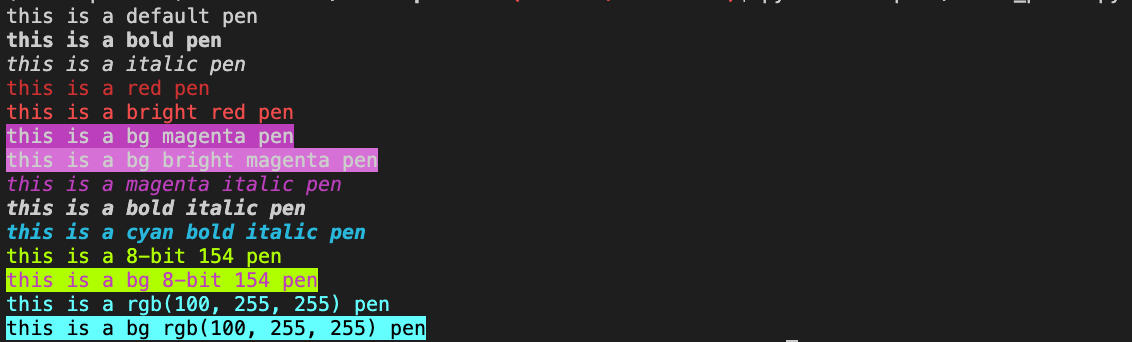
### 1. Attrs print
Applies to all characters.
You can specify `Format`, `Color`, `Color256`, and `ColorRGB`.
Able to specify more than one.
#### **[source](https://github.com/nanato12/term-printer/blob/main/examples/attrs_print.py)**
```python
from term_printer import Color, Color256, ColorRGB, Format, cprint
# default
cprint("this is a default pen")
# bold
cprint("this is a bold pen", attrs=[Format.BOLD])
# italic
cprint("this is a italic pen", attrs=[Format.ITALIC])
# red color
cprint("this is a red pen", attrs=[Color.RED])
# bright red color
cprint("this is a bright red pen", attrs=[Color.BRIGHT_RED])
# background magenta color
cprint("this is a bg magenta pen", attrs=[Color.BG_MAGENTA])
# background bright magenta color
cprint("this is a bg bright magenta pen", attrs=[Color.BG_BRIGHT_MAGENTA])
# magenta color & italic
cprint("this is a magenta italic pen", attrs=[Color.MAGENTA, Format.ITALIC])
# bold & italic
cprint("this is a bold italic pen", attrs=[Format.BOLD, Format.ITALIC])
# cyan color & bold & italic
cprint("this is a cyan bold italic pen", attrs=[Color.CYAN, Format.BOLD, Format.ITALIC])
# 8-bit color 154
cprint("this is a 8-bit 154 pen", attrs=[Color256(154)])
# 8-bit bg color 154 and magenta color
cprint("this is a bg 8-bit 154 pen", attrs=[Color256(154, is_bg=True), Color.MAGENTA])
# rgb(100, 255, 255) color
cprint("this is a rgb(100, 255, 255) pen", attrs=[ColorRGB(100, 255, 255)])
# bg rgb(100, 255, 255) color and black color
cprint(
"this is a bg rgb(100, 255, 255) pen",
attrs=[ColorRGB(100, 255, 255, is_bg=True), Color.BLACK],
)
```
#### result
### 2. StdText print
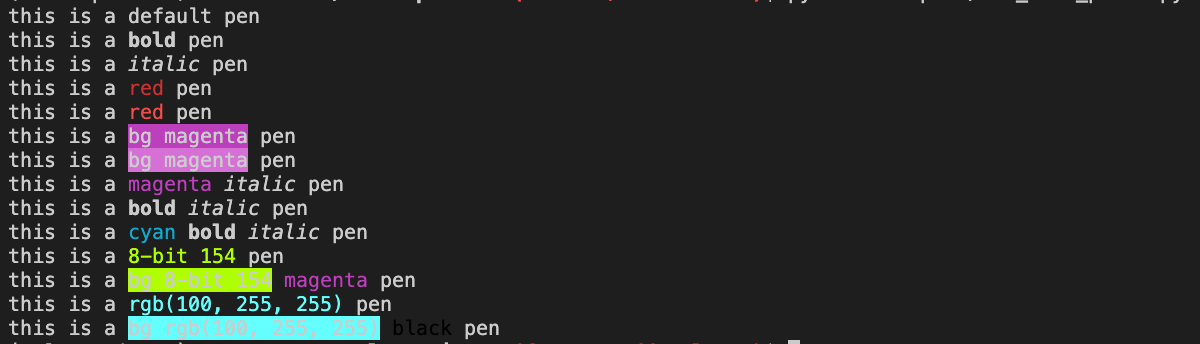
#### **[source](https://github.com/nanato12/term-printer/blob/main/examples/std_text_print.py)**
```python
from term_printer import Color, Format, StdText, cprint
# default
cprint("this is a default pen")
# bold
cprint(f"this is a {StdText('bold', Format.BOLD)} pen")
# italic
cprint(f"this is a {StdText('italic', Format.ITALIC)} pen")
# reverse
cprint(f"this is a {StdText('reverse', Format.REVERSE)} pen")
# red color
cprint(f"this is a {StdText('red', Color.RED)} pen")
# background magenta color
cprint(f"this is a {StdText('bg magenta', Color.BG_MAGENTA)} pen")
# magenta color & italic
cprint(f"this is a {StdText('magenta', Color.MAGENTA)} {StdText('italic', Format.ITALIC)} pen")
# bold & italic
cprint(f"this is a {StdText('bold', Format.BOLD)} {StdText('italic', Format.ITALIC)} pen")
# cyan color & bold & italic
cprint(f"this is a {StdText('cyan', Color.CYAN)} {StdText('bold', Format.BOLD)} {StdText('italic', Format.ITALIC)} pen")
```
#### result
## Color
```python
class Color(Enum)
```
Enum class.
Example
```python
from term_printer import Color
Color.RED # RED foreground color
Color.BG_RED # RED background color
Color.BLUE # BLUE foreground color
Color.BG_BLUE # BLUE background color
```
### **[source](https://github.com/nanato12/term-printer/blob/main/examples/std_text_print.py#L20-L52)**
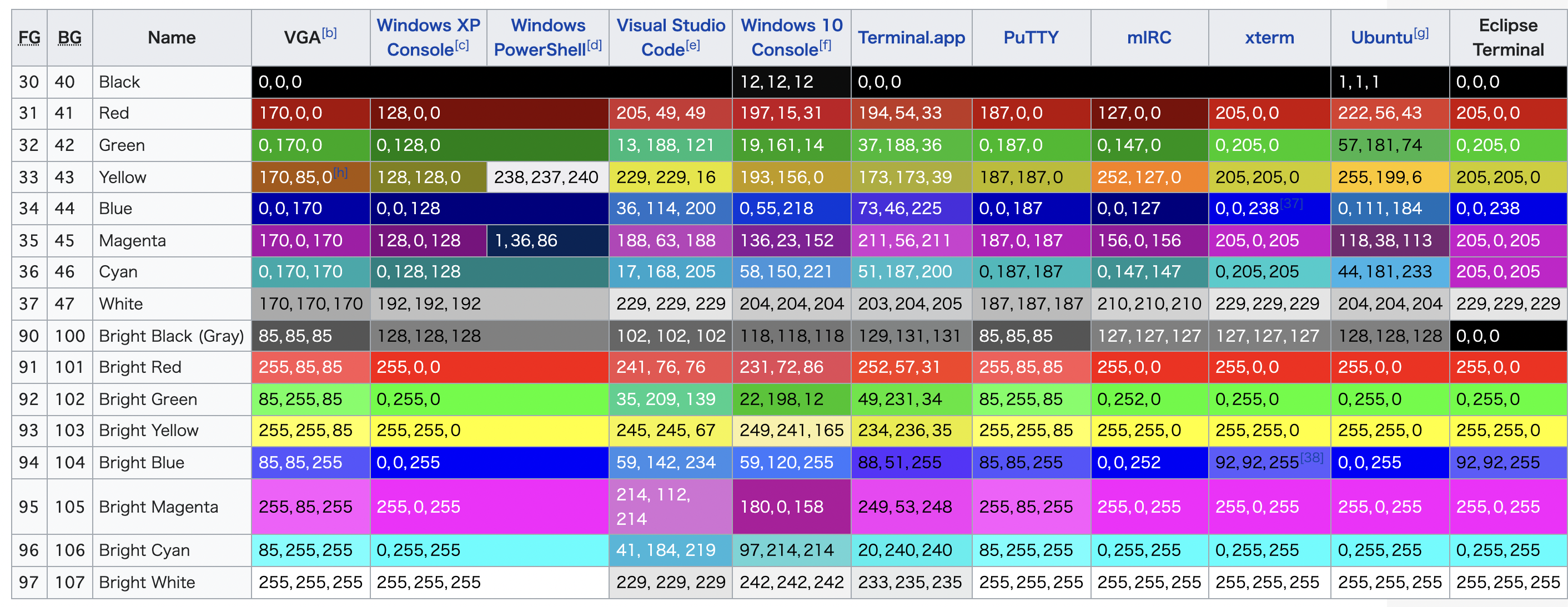
Definition is [3-bit and 4-bit colors](https://en.wikipedia.org/wiki/ANSI_escape_code#8-bit)
## Color256
```python
class Color256(n: int, is_bg: bool = False)
```
- First argument takes `int` (0 - 255).
- Second argument takes `bool` (default: False).
False: change foreground color
True: change background color
Example
```python
from term_printer import Color256
Color256(9) # RED foreground color
Color256(9, True) # RED background color
Color256(12) # BLUE foreground color
Color256(12, True) # BLUE background color
```
Definition is [8-bit 256 colors](https://en.wikipedia.org/wiki/ANSI_escape_code#8-bit)

## ColorRGB
```python
class ColorRGB(r: int, g: int, b: int, is_bg: bool = False)
```
- Three arguments takes `int` (0 - 255).
- Fourth argument takes `bool` (default: False).
False: change foreground color
True: change background color
Example
```python
from term_printer import ColorRGB
ColorRGB(255, 0, 0) # RED foreground color
ColorRGB(255, 0, 0, True) # RED background color
ColorRGB(0, 0, 255) # BLUE foreground color
ColorRGB(0, 0, 255, True) # BLUE background color
```
## Format
```python
class Format(Enum):
BOLD = 1
FAINT = 2
ITALIC = 3
UNDERLINE = 4
BLINK = 5
FAST_BLINK = 6
REVERSE = 7
CONCEAL = 8
STRIKE = 9
```
Enum class.
Example
```python
from term_printer import Format
Format.BOLD # BOLD font
Format.FAINT # FAINT font
Format.ITALIC # ITALIC font
Format.UNDERLINE # UNDERLINE font
```
Definition is [SGR](https://en.wikipedia.org/wiki/ANSI_escape_code#SGR_(Select_Graphic_Rendition)_parameters)