https://github.com/nathanstitt/dayz
A calendar component for React
https://github.com/nathanstitt/dayz
calendar hacktoberfest react
Last synced: over 1 year ago
JSON representation
A calendar component for React
- Host: GitHub
- URL: https://github.com/nathanstitt/dayz
- Owner: nathanstitt
- Created: 2015-10-12T03:35:13.000Z (almost 11 years ago)
- Default Branch: master
- Last Pushed: 2022-12-11T03:05:28.000Z (over 3 years ago)
- Last Synced: 2025-01-09T07:35:28.532Z (over 1 year ago)
- Topics: calendar, hacktoberfest, react
- Language: JavaScript
- Homepage:
- Size: 4.99 MB
- Stars: 239
- Watchers: 8
- Forks: 42
- Open Issues: 6
-
Metadata Files:
- Readme: README.md
Awesome Lists containing this project
README
## A day/week/monthly calendar component for React
[](https://travis-ci.org/nathanstitt/dayz)
## Features
* Only includes the minimal amount of features needed.
* There is no paging controls provided, as they can easily be implemented outside the component. This allows Dayz to be used both as a traditional next or previous month calendar or as part of a scrolling infinite view.
* Modern styling and layout
* Uses css grid and flexbox layout
* All heights/widths are specified as percentages so the component will size to fit whatever container it's rendered into.
* Styles are written in [scss](dayz.scss) with variables which can be modified for customized builds.
* Care is taken to retain elements when switching view types, this allows minimal DOM reflow and allows nice animation effects where events warp into position.
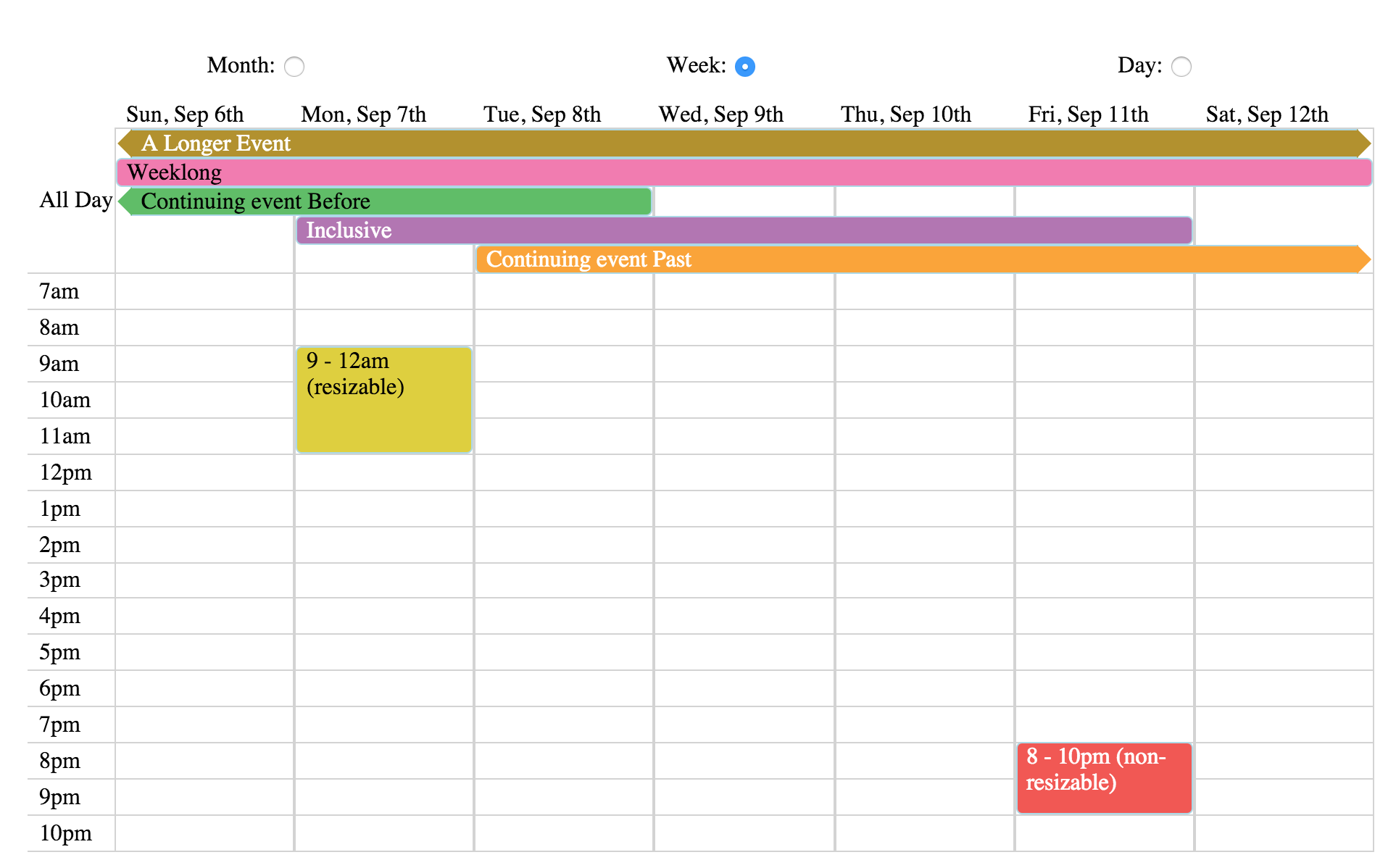
## Demo
An interactive demo can be viewed at: http://nathanstitt.github.io/dayz/
The demo source for the demo is [demo.jsx](demo.jsx)
## Usage
```bash
npm install dayz --save
-- or --
yarn add dayz
```
```js
import React from 'react';
import Dayz from 'dayz';
// could also import the sass if you have a loader at dayz/dayz.scss
import "dayz/dist/dayz.css";
import moment from 'moment';
// would come from a network request in a "real" app
const EVENTS = new Dayz.EventsCollection([
{ content: 'A short event',
range: moment.range( date.clone(),
date.clone().add(1, 'day') ) },
{ content: 'Two Hours ~ 8-10',
range: moment.range( date.clone().hour(8),
date.clone().hour(10) ) },
{ content: "A Longer Event",
range: moment.range( date.clone().subtract(2,'days'),
date.clone().add(8,'days') ) }
]);
class MyComponent extends React.Component {
render() {
return
}
}
```
## API
The Dayz component accepts these properties:
* **date** (required): An `momentjs` instance that controls what range is displayed. The calendar will automatically calculate the month or week that contains this date and display the appropriate range.
* **events** (optional): An `Dayz.EventsCollection` instance that contains events that should be displayed on the calendar.
* `Dayz.EventsCollection` accepts two arguments:
* An array of events
* a list of optional properties. Currently two options that can be set are:
* **displayAllDay**, If set to `true` it will show events that are marked as an all day event at the top of the week and day views prior to showing other events. If `false`, events marked as an all day event will completely fill the column for the day, with other events appearing on top of it. defaults to `true`. Please note: Although sometimes useful, if set to false it can create a very cluttered calendar.
* **displayLabelForAllDays**, If set to `false`, for events that are shown on multiple days only the first event will have the `content` attribute shown. In any other case `content` will be shown on every day. This prop works only if `displayAllDay` is `false`.
* **highlightDays**: either a function or an array of days that should be highlighted. Each day can be a string date that momentjs accepts, a JS Date object, or a momentjs date. if using a function, it will be passed the day and should return either false, or a string to use for the className.
* **dayEventHandlers** event handlers to attach on the Day element, such as onClick, onMouseOver, etc.
* if **onClick** or **onDoubleClick** is given to dayEventHandlers, the call back will be passed two variables, the event and a `momentjs` date. Hours/Minutes are added to the date to reflect how far down the Y axis was clicked.
* **display** (optional, defaults to 'month'): One of month, week, or day.
* **onEventClick**, **onEventDoubleClick** (optional): A function that will be called whenever an event is clicked, it's passed two variables, the event and the layout information for the event. The layout has an `event` subkey that includes the event itself.
* **displayHours** (optional): defaults to 7am to 7pm or the earliest/latest event's hour.
* **timeFormat** (optional): defaults to `ha` configures y labels time format
* **locale** (optional): defaults to `en`. A string to determine the localization.
* **weekStartsOn** (optional): defaults to `undefined`. Determines whether the week should start on Monday or Sunday. By default it uses what the localization offers (see `locale` prop). It can accept either `0` to start the week on Sunday or `1` to start the week on Monday.
Dayz applies these css classes:
* The reference **date** prop will have a css class "current"
* Days before and after that date will get "before" and "after" respectively
* highlighted days will be marked as "highlight" by default, or whatever is returned from the function
### Development
- `npm start` starts up a local development web-server which rebuilds files when changed
- the demo can then be accessed at http://localhost:2222/docs/
- `npm test` runs unit tests
- `npm run build` compiles files in preparation for publishing