https://github.com/nativescript-community/flipper-plugin-nativescript-performance
Inspect React Native performance with Flipper
https://github.com/nativescript-community/flipper-plugin-nativescript-performance
Last synced: 5 months ago
JSON representation
Inspect React Native performance with Flipper
- Host: GitHub
- URL: https://github.com/nativescript-community/flipper-plugin-nativescript-performance
- Owner: nativescript-community
- License: mit
- Created: 2020-10-24T13:57:42.000Z (over 5 years ago)
- Default Branch: master
- Last Pushed: 2020-07-20T13:06:38.000Z (almost 6 years ago)
- Last Synced: 2025-06-28T01:41:50.067Z (about 1 year ago)
- Homepage:
- Size: 1.17 MB
- Stars: 0
- Watchers: 0
- Forks: 0
- Open Issues: 0
-
Metadata Files:
- Readme: README.md
- Funding: .github/FUNDING.yml
- License: LICENSE
Awesome Lists containing this project
README
# Flipper React Native Performance Plugin
This is a plugin for the debug tool [Flipper](https://fbflipper.com) that measures the startup of your React Native app.
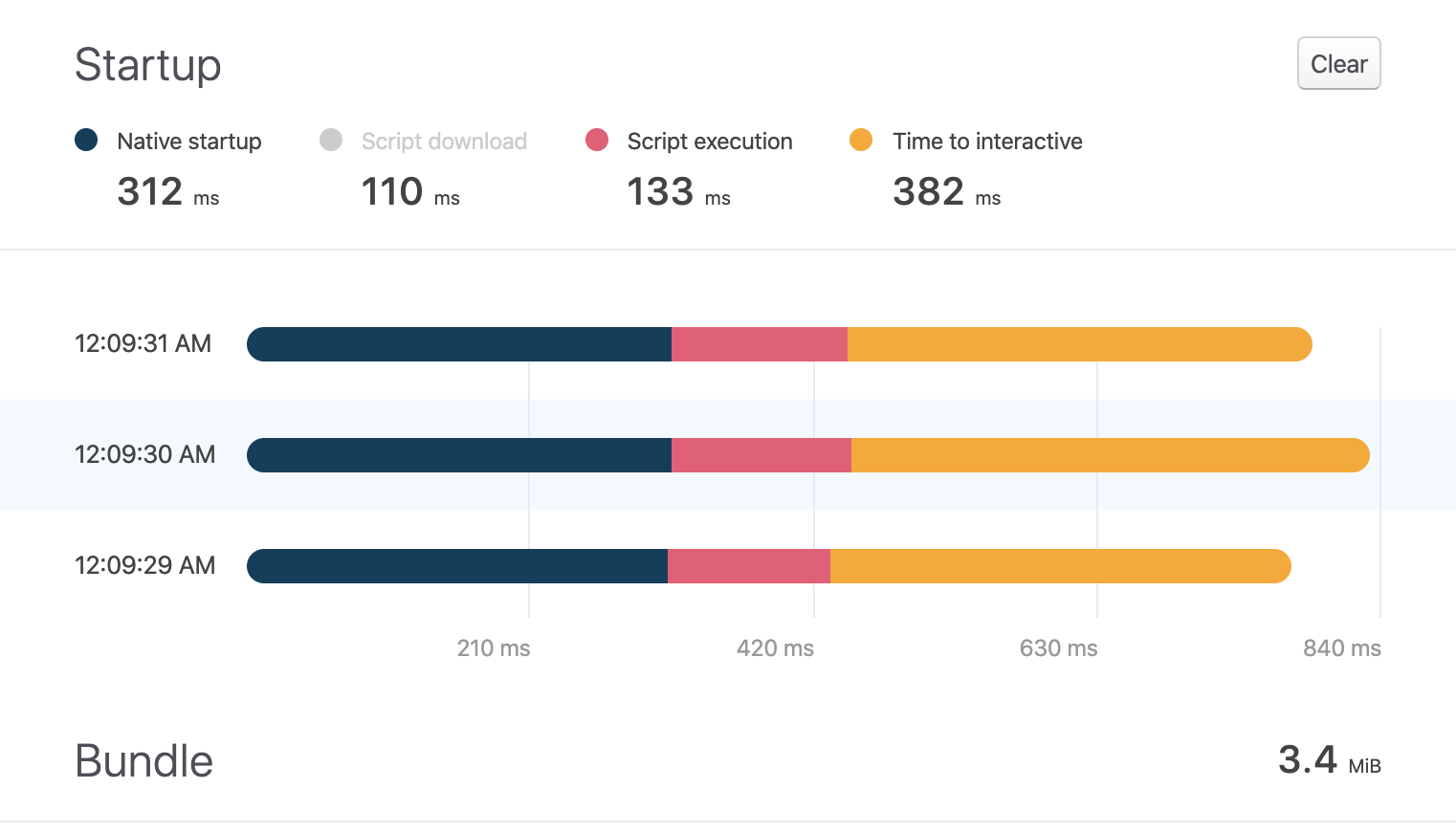
It provides the following metrics:
- Native startup time
- Script download time
- Script execution time
- Script bundle size
- Time to interactive of root view
Currently only these standard metrics on iOS is supported, but the aim is to further expand profiling capabilities and add Android support in the future.
## Installation
```
yarn add --dev flipper-plugin-react-native-performance
```
## Setup
### Flipper
First, make sure you have successfully [setup Flipper with your React Native app](https://fbflipper.com/docs/getting-started.html#setup-your-react-native-app).
### Flipper Desktop
1. Go to **Manage Plugins** by pressing the button in the lower left corner of the Flipper app, or in the **View** menu
2. Select **Install Plugins** and search for `react-native-performance`
3. Press the **Install** button
### iOS
Edit your `Podfile` by adding the following:
```diff
def flipper_pods()
...
+ pod 'flipper-plugin-react-native-performance', :path => "../node_modules/flipper-plugin-react-native-performance/ios", :configuration => 'Debug'
end
```
Edit your `AppDelegate.m` by adding the following:
```diff
+ #if DEBUG
+ #ifdef FB_SONARKIT_ENABLED
+ #import
+ #endif
+ #endif
@implementation AppDelegate
- (BOOL)application:(UIApplication *)application didFinishLaunchingWithOptions:(NSDictionary *)launchOptions
{
[self initializeFlipper:application];
RCTBridge *bridge = [[RCTBridge alloc] initWithDelegate:self launchOptions:launchOptions];
+ #if DEBUG
+ #ifdef FB_SONARKIT_ENABLED
+ [[FlipperReactPerformancePlugin sharedInstance] setBridge:bridge];
+ #endif
+ #endif
...
}
- (void) initializeFlipper:(UIApplication *)application {
...
+ [client addPlugin: [FlipperReactPerformancePlugin sharedInstance]];
[client start];
...
}
```
#### Setup for React Native Navigation
Edit your `AppDelegate.m` like above, but for the `application:didFinishLaunchingWithOptions` method, add the following instead:
```diff
- (BOOL)application:(UIApplication *)application didFinishLaunchingWithOptions:(NSDictionary *)launchOptions
{
[self initializeFlipper:application];
NSURL *jsCodeLocation = [[RCTBundleURLProvider sharedSettings] jsBundleURLForBundleRoot:@"index" fallbackResource:nil];
[ReactNativeNavigation bootstrap:jsCodeLocation launchOptions:launchOptions];
+ #if DEBUG
+ #ifdef FB_SONARKIT_ENABLED
+ [[FlipperReactPerformancePlugin sharedInstance] setBridge:[ReactNativeNavigation getBridge]];
+ #endif
+ #endif
...
}
```
## Demo
See the projects in the [`examples`](https://github.com/oblador/flipper-plugin-react-native-performance/tree/master/examples) folder.
## License
MIT © Joel Arvidsson 2019 – present