https://github.com/nativescript-community/push
https://github.com/nativescript-community/push
Last synced: about 1 year ago
JSON representation
- Host: GitHub
- URL: https://github.com/nativescript-community/push
- Owner: nativescript-community
- License: apache-2.0
- Created: 2020-04-17T09:02:59.000Z (about 6 years ago)
- Default Branch: master
- Last Pushed: 2023-11-22T15:02:14.000Z (over 2 years ago)
- Last Synced: 2025-05-13T01:10:00.080Z (about 1 year ago)
- Language: TypeScript
- Size: 170 KB
- Stars: 9
- Watchers: 1
- Forks: 3
- Open Issues: 4
-
Metadata Files:
- Readme: README.md
- Changelog: CHANGELOG.md
- Funding: .github/FUNDING.yml
- License: LICENSE
Awesome Lists containing this project
README
[npm-image]:http://img.shields.io/npm/v/@nativescript-community/push.svg
[npm-url]:https://npmjs.org/package/@nativescript-community/push
[downloads-image]:http://img.shields.io/npm/dm/@nativescript-community/push.svg
This plugin is an "extract" of the messaging part of [nativescript-plugin-firebase](https://github.com/EddyVerbruggen/nativescript-plugin-firebase)
It is only for people wanting to use firebase as less as possible ! No firebase on iOS!!!
Thanks to Eddy for allowing this!
### Android
Open your Firebase project at the Google console and click 'Add app' to add an Android app. Follow the steps (make sure the bundle id is the same as your `nativescript.id` in `package.json` and you'll be able to download
`google-services.json` which you'll add to your NativeScript project at `app/App_Resources/Android/google-services.json`
There is a little quirk: you will currently not get the title and body if the notification was received while the application was in the background, but you will get the *data* payload.
### iOS
#### Enable push support in Xcode
Open /platforms/ios/yourproject.__xcworkspace__ (!) and go to your project's target and head over to "Capabilities" to switch this on (if it isn't already):

> Without this enabled you will receive push messages in the foreground, but **NOT in the background** / when the app is killed.
#### Copy the entitlements file
The previous step created a the file`platforms/ios/YourAppName/(Resources/)YourAppName.entitlements`.
Copy that file to `app/App_Resources/iOS/app.entitlements` (if it doesn't exist yet, otherwise merge its contents),
so it's not removed when you remove and re-add the iOS platform. The relevant content for background push in that file is:
```xml
aps-environment
development
```
> Note that the filename should be `app.entitlements`, see the path above.
#### Configure push notifications in `Info.plist`
Tell the plugin to allow an external push provider by adding this to `App_Resources/iOS/Info.plist` (without this, the push token will always be `undefined`!):
```xml
UseExternalPushProvider
```
And to allow processing when a background push is received, add this as well:
```xml
UIBackgroundModes
remote-notification
```
The end result should look like [this](https://github.com/EddyVerbruggen/nativescript-plugin-firebase/blob/58d2792421be0d9c3d8fbdddd4abd6c782b30723/demo-push/app_resources/iOS/Info.plist#L46-L51).
####
## API
### `init`
In your main application JS file, you must call `init()`.
```typescript
import * as messaging from '@nativescript-community/push';
messaging.init();
```
### `areNotificationsEnabled`
On both iOS and Android the user can disable notifications for your app.
If you want to check the current state of this setting, you can do:
```typescript
import * as messaging from "@nativescript-community/push";
console.log(`Notifications enabled? ${messaging.areNotificationsEnabled()}`);
```
### `registerForPushNotifications`
The easiest way to register for (receiving) push notifications is calling `registerForPushNotifications`, and passing in a few handlers:
```typescript
import * as messaging from "@nativescript-community/push";
messaging.registerForPushNotifications({
onPushTokenReceivedCallback: (token: string): void => {
console.log("Firebase plugin received a push token: " + token);
},
onMessageReceivedCallback: (message: messaging.Message) => {
console.log("Push message received:", message));
},
// Whether you want this plugin to automatically display the notifications or just notify the callback. Currently used on iOS only. Default true.
showNotifications: true,
// Whether you want this plugin to always handle the notifications when the app is in foreground. Currently used on iOS only. Default false.
showNotificationsWhenInForeground: true
}).then(() => console.log("Registered for push"));
```
> Any pending notifications (while your app was not in the foreground) will trigger the `onMessageReceivedCallback` handler.
> With the `token` received in `onPushTokenReceivedCallback` you can send a notification to this device.
### `getCurrentPushToken`
If - for some reason - you need to manually retrieve the current push registration token of the device, you can do:
```typescript
import * as messaging from "@nativescript-community/push";
messaging.getCurrentPushToken()
.then(token => console.log(`Current push token: ${token}`));
```
### Interactive notifications (iOS only for now)
To register the app to receive interactive pushes you need to call `messaging.registerForInteractivePush(model)`.
And you may hook to the `model.onNotificationActionTakenCallback` callback to know what action the user took interacting with the notification.
Each action has either type `button` or `input`, and you can set `options` to do any or all of:
- Launch the app: `foreground`.
- Only allow the action when the device is unlocked: `authenticationRequired`.
- Make the text red to indicate something will be removed/deleted/killed: `destructive`.
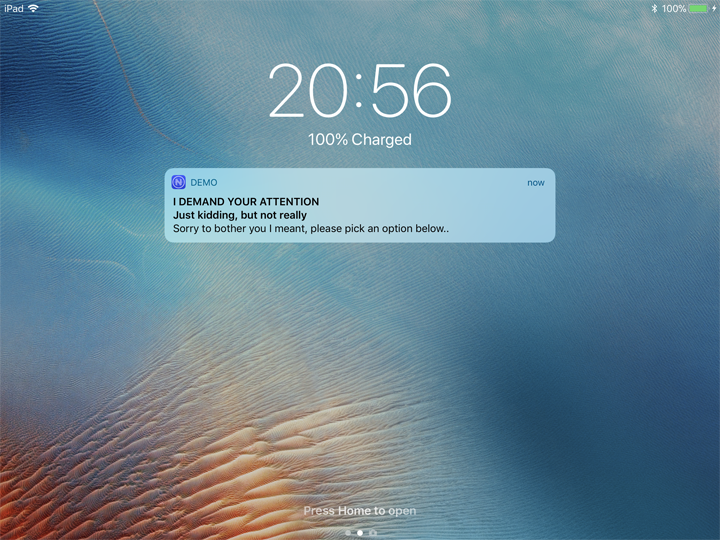
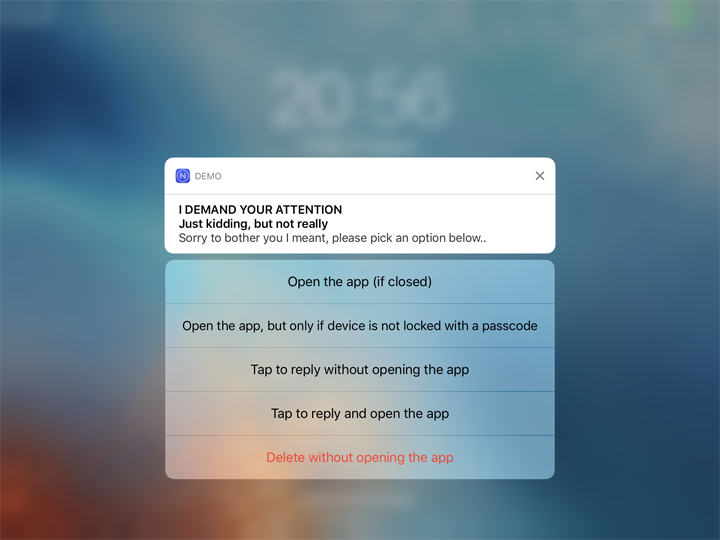
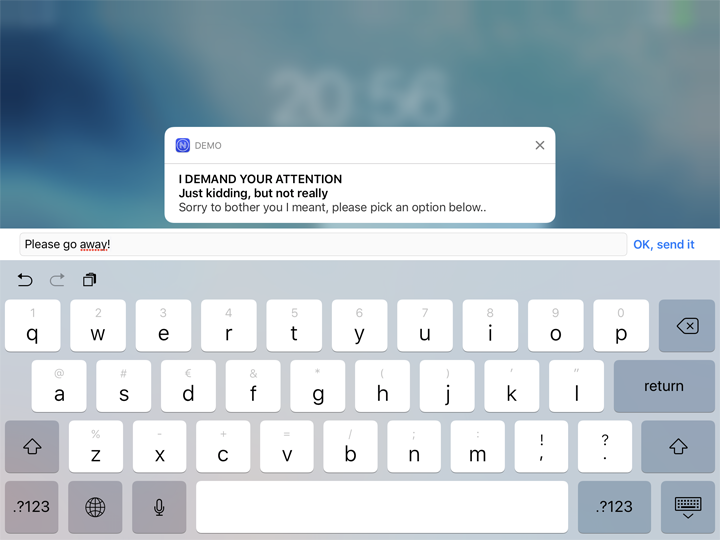
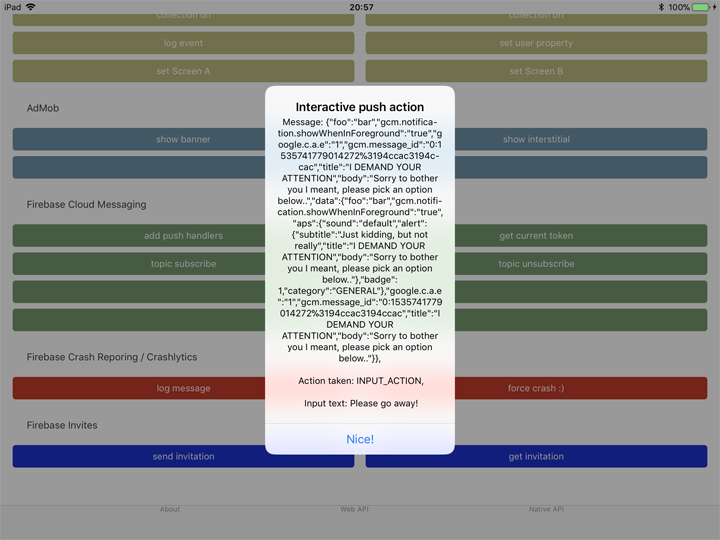
Consider this example, where an interactive push notification is received which the user expands and picks the fourth option.
They then type their reply, and (because of how the action was configured) the app launches and captures the reply.
```typescript
import * as messaging from "@nativescript-community/push";
const model = new messaging.PushNotificationModel();
model.iosSettings = new messaging.IosPushSettings();
model.iosSettings.badge = false;
model.iosSettings.alert = true;
model.iosSettings.interactiveSettings = new messaging.IosInteractivePushSettings();
model.iosSettings.interactiveSettings.actions = [
{
identifier: "OPEN_ACTION",
title: "Open the app (if closed)",
options: messaging.IosInteractiveNotificationActionOptions.foreground
},
{
identifier: "AUTH",
title: "Open the app, but only if device is not locked with a passcode",
options: messaging.IosInteractiveNotificationActionOptions.foreground | messaging.IosInteractiveNotificationActionOptions.authenticationRequired
},
{
identifier: "INPUT_ACTION",
title: "Tap to reply without opening the app",
type: "input",
submitLabel: "Fire!",
placeholder: "Load the gun..."
},
{
identifier: "INPUT_ACTION",
title: "Tap to reply and open the app",
options: messaging.IosInteractiveNotificationActionOptions.foreground,
type: "input",
submitLabel: "OK, send it",
placeholder: "Type here, baby!"
},
{
identifier: "DELETE_ACTION",
title: "Delete without opening the app",
options: messaging.IosInteractiveNotificationActionOptions.destructive
}
];
model.iosSettings.interactiveSettings.categories = [{
identifier: "GENERAL"
}];
model.onNotificationActionTakenCallback = (actionIdentifier: string, message: messaging.Message) => {
console.log(`onNotificationActionTakenCallback fired! Message: ${JSON.stringify(message)}, Action taken: ${actionIdentifier}`);
};
messaging.registerForInteractivePush(model);
```
To send an interactive push, add the `"category"` property to the notification, with a value corresponding to the `category` defined in the model you've registered in the app.
The payload to trigger the notification in the screenshots above is:
```json
{
"aps": {
"alert": {
"title": "Realtime Custom Push Notifications",
"subtitle": "Now with iOS 10 support!",
"body": "Add multimedia content to your notifications"
},
"sound": "default",
"badge": 1,
"category": "GENERAL",
"showWhenInForeground": true,
"data": {
"foo": "bar"
}
}
}
```
> *IMPORTANT* Use the `click_action` only for push notifications on iOS. When such a message is tapped in the Android notification center the app WON'T be opened. This will probably be fixed in the future.
## Testing push notifications
### iOS
For testing notifications on iOS the easiest tool I found is [Pusher](https://github.com/noodlewerk/NWPusher):

### Android
For testing on Android I prefer using [Postman](https://www.getpostman.com/) to *POST* to the FCM REST API. Look at which headers you need to set, and how the payload needs to be added:

