https://github.com/navdevl/prathipa
https://github.com/navdevl/prathipa
Last synced: 12 months ago
JSON representation
- Host: GitHub
- URL: https://github.com/navdevl/prathipa
- Owner: Navdevl
- License: mit
- Created: 2018-09-22T14:08:47.000Z (over 7 years ago)
- Default Branch: master
- Last Pushed: 2018-09-22T14:20:43.000Z (over 7 years ago)
- Last Synced: 2025-01-18T09:44:41.878Z (over 1 year ago)
- Language: CSS
- Size: 3.73 MB
- Stars: 0
- Watchers: 2
- Forks: 0
- Open Issues: 0
-
Metadata Files:
- Readme: README.md
- License: LICENSE
Awesome Lists containing this project
README
# Nederburg theme for hugo
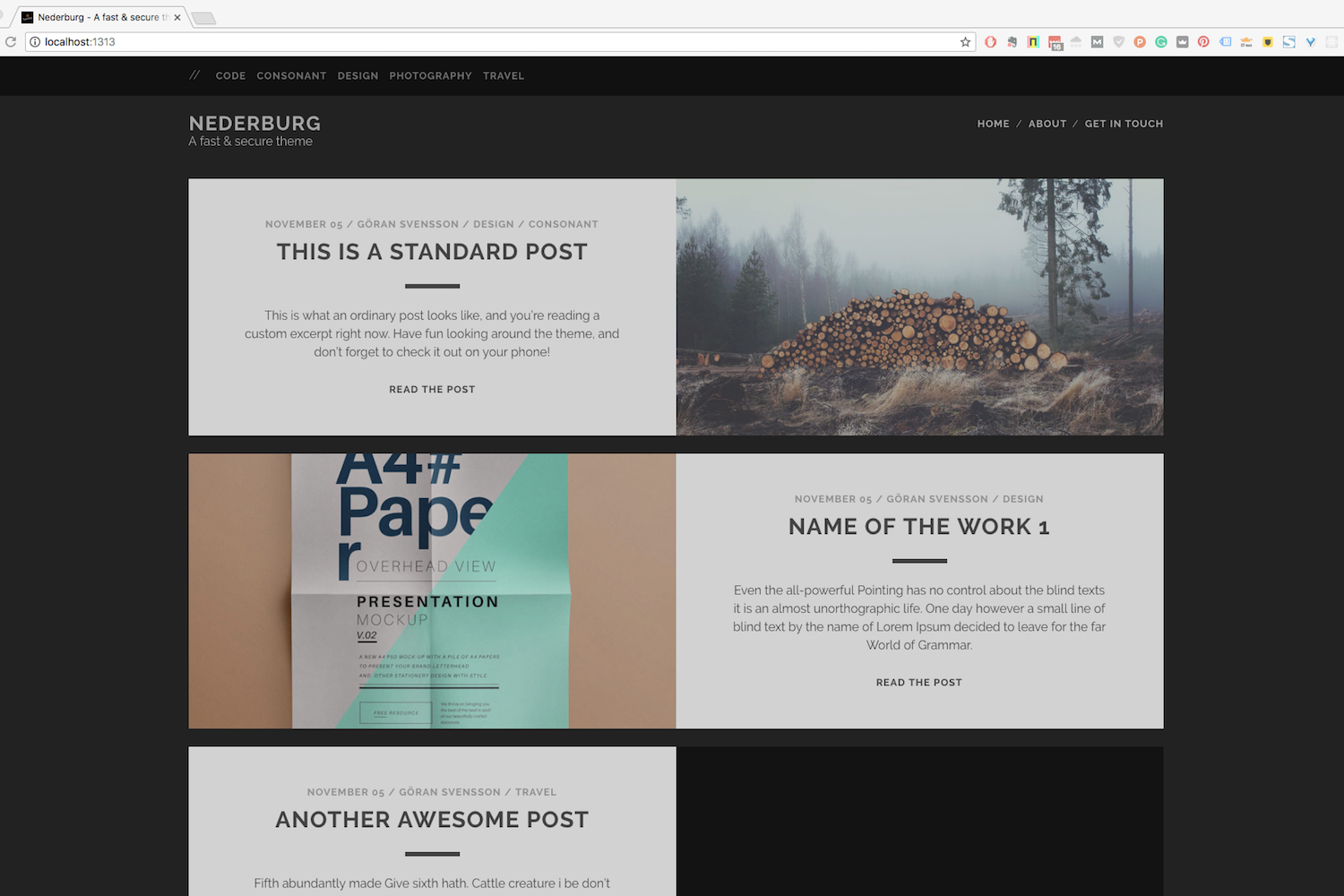
Nederburg is a fast and secure theme.
This Hugo theme was ported from [competethemes](https://www.competethemes.com/tracks/).
## Installation
Go to the directory where you have your Hugo site and run:
```
$ mkdir themes
$ cd themes
$ git clone https://github.com/appernetic/hugo-nederburg-theme.git
```
For more information read the official [setup guide](https://gohugo.io/overview/installing/) of Hugo or use [Appernetic](https://appernetic.io/).
## Configuration
After installing the Nederburg theme successfully, we recommend you to take a look at the [exampleSite](https://github.com/appernetic/hugo-nederburg-theme/tree/master/exampleSite) directory. You will find a working Hugo site configured with the Nederburg theme that you can use as a starting point for your site.
First, let's take a look at the [config.toml](https://github.com/appernetic/hugo-nederburg-theme/tree/master/exampleSite/config.toml). It will be useful to learn how to customize your site. Feel free to play around with the settings.
### Gravatar
To have an image in your author bio shown after posts, go to [Gravatar](https://gravatar.com/) and configure it and then add the email address that you have associated with it in the email section in settings:
```toml
email = "your@gravatar.email"
```
### Style
Nederburg uses the minified production version of the style sheet from the wordpress version.
### More style customizations?
Create `css/custom.css` in your `<>/static` folder and add all your custom styling.
### Comments
The optional comments system is powered by [Disqus](https://disqus.com). If you want to enable comments, create an account in Disqus and write down your shortname in the config file.
```toml
disqusShortname = "your-disqus-short-name"
```
You can disable the comments system by leaving the `disqusShortname` empty.
### Google Analytics
You can optionally enable Google Analytics. Type your tracking code in the ``.
```toml
googleAnalytics = "UA-XXXXX-X"
```
Leave the `googleAnalytics` key empty to disable it.
### Make the contact form working
Since this page will be static, you can use [formspree.io](//formspree.io/) as proxy to send the actual email. Each month, visitors can send you up to one thousand emails without incurring extra charges. Begin the setup by following the steps below:
1. Enter your email address under 'email' in the [`config.toml`](https://github.com/appernetic/hugo-nederburg-them/tree/master/exampleSite/config.toml)
2. Upload the generated site to your server
3. Send a dummy email yourself to confirm your account
4. Click the confirm link in the email from [formspree.io](//formspree.io/)
5. You're done. Happy mailing!
## Multiple Writers Features
Thanks to Lukas Herman's PR there is now a multiple writers feature. In order to support multiple writers, an extra key, "writers" is added, in config.toml. The format looks like the following:
```
[params.writers."Göran Svensson"]
link = "https://appernetic.io/"
email = "goran@molnsys.com"
bio = [
"Göran is an avid blogger and the founder of Appernetic.io. This is the author bio shown after posts."
]
facebook = "full Göran profile url in facebook"
googleplus = "full profile url in googleplus"
twitter = "full profile url in twitter"
linkedin = "full profile url in linkedin"
stackoverflow = "full profile url in stackoverflow"
instagram = "full profile url in instagram"
github = "full profile url in github"
pinterest = "full profile url in pinterest"
```
Now you must have an author in the config for the author bio section to be visible. If you have a writer and set it in the markdown file it will override the author in the config. See the exampleSite folder for a working solution.
### Nearly finished
In order to see your site in action, run Hugo's built-in local server.
```
$ hugo server
```
Now enter [`localhost:1313`](http://localhost:1313) in the address bar of your browser.
## Things to do and not (yet) implemented
- Add the possibility for a description for each category.
- ~~Add pagination to the front page.~~
- Add dropdown menu option to the left sub menu.
- Add previous next pagination in blog post.
- Add a search function.
- Do a SEO check of site structure and code
- Page speed check
- ~~Add a default favicon~~
- Check that Disqus don’t break anything.
## Contributing
Have you found a bug or got an idea for a new feature? Feel free to use the [issue tracker](https://github.com/appernetic/hugo-nederburg-theme/issues) to let me know. Or make directly a [pull request](https://github.com/appernetic/hugo-nederburg-theme/pulls).
## License
This port is released under the MIT License.
## Thanks
Thanks to [Steve Francia](https://github.com/spf13) for creating Hugo and the awesome community around the project. And also thanks to [competethemes](https://www.competethemes.com/tracks/) for creating this awesome theme.
## Sponsors
List of all the great people and organisations that help us fund this open source work.
If you want to help support check out my Patreon @ https://www.patreon.com/appernetic
[Timothy D. Swieter](https://github.com/Swieter)