https://github.com/navpreetdevpuri/lyndadownloader
Python script for downloading video courses from Lynda.com.
https://github.com/navpreetdevpuri/lyndadownloader
lynda-courses-download lynda-downloader python-automation
Last synced: about 1 year ago
JSON representation
Python script for downloading video courses from Lynda.com.
- Host: GitHub
- URL: https://github.com/navpreetdevpuri/lyndadownloader
- Owner: NavpreetDevpuri
- Created: 2019-06-15T08:53:08.000Z (about 7 years ago)
- Default Branch: master
- Last Pushed: 2021-04-22T05:53:46.000Z (about 5 years ago)
- Last Synced: 2024-10-19T02:16:38.506Z (over 1 year ago)
- Topics: lynda-courses-download, lynda-downloader, python-automation
- Language: Python
- Homepage:
- Size: 20.4 MB
- Stars: 23
- Watchers: 2
- Forks: 5
- Open Issues: 0
-
Metadata Files:
- Readme: README.md
Awesome Lists containing this project
README
###### By Navpreet Devpuri
**Notes**:
1. When using `LyndaDownloaderLearningPaths.py` then make sure you opened that learning path and clicked on button `Start learning`.
2. Run Python script LyndaDownloader.py :) and download 'Exercise Files' manually.
3. If some error occurred or stoped while downloading then just restart python script it will repause download.
4. If you started downloading some course then finish it as soon as possible because after some time link will be expire.
### Step 1) register new card from [here](https://find.sonomalibrary.org/custom/web/registration/index.html) and get your card number. if you have an account then continue from step 3.
OR
Just open browser console and run following script, It will generate ID
```javascript
console.log("Generating ID...");
var res = await (await fetch("https://datas-1.sirsi.net/CTS/SON/selfRegistration.pl", {
"headers": {
"accept": "text/html,application/xhtml+xml,application/xml;q=0.9,image/avif,image/webp,image/apng,*/*;q=0.8,application/signed-exchange;v=b3;q=0.9",
"accept-language": "en-GB,en-US;q=0.9,en;q=0.8",
"cache-control": "max-age=0",
"content-type": "application/x-www-form-urlencoded",
"sec-ch-ua": "\" Not A;Brand\";v=\"99\", \"Chromium\";v=\"90\", \"Google Chrome\";v=\"90\"",
"sec-ch-ua-mobile": "?0",
"sec-fetch-dest": "document",
"sec-fetch-mode": "navigate",
"sec-fetch-site": "cross-site",
"sec-fetch-user": "?1",
"upgrade-insecure-requests": "1"
},
"referrer": "https://find.sonomalibrary.org/",
"referrerPolicy": "strict-origin-when-cross-origin",
"body": `patron_firstName=John&patron_lastName=Bailey&patron_birthDateEntry=04%2F13%2F2000&patron_birthDate=2000-04-13&patronAddress1_STREET=PO+BOX+338&patronAddress_cityST=bn&patronAddress1_POSTALCODE=95415-0338&patronAddress1_PHONE_Entry=231-412-4123&patronAddress1_PHONE=2314124123&patronAddress1_EMAIL=sdfasdfds%40gmail.com&patronAddress1_EMAIL_CONFIRM=sdfasdfds%40gmail.com&patron_pin=1234&patron_confirmPin=1234&patron_library=wind&patronExtendedInformation_NOFITY_VIA=email&user_profile=PUBLIC&enterprise_locale=en_US&enterprise_profile=default®istrationSubmit=Register`,
"method": "POST",
"mode": "cors",
"credentials": "omit"
})).text();
var toFind = "eCard number is:";
var startIndex = res.indexOf(toFind) + toFind.length + 1;
var endIndex = res.slice(startIndex).indexOf("");
var cardNumber = res.slice(startIndex, startIndex + endIndex);
console.log(`Login Link: https://www.lynda.com/portal/sip?org=sonomalibrary.org\nLibrary Card Number: ${cardNumber}\nPassword: 1234`)
```
### Step 2) login by using card number and password [here](https://www.lynda.com/portal/sip?org=sonomalibrary.org)
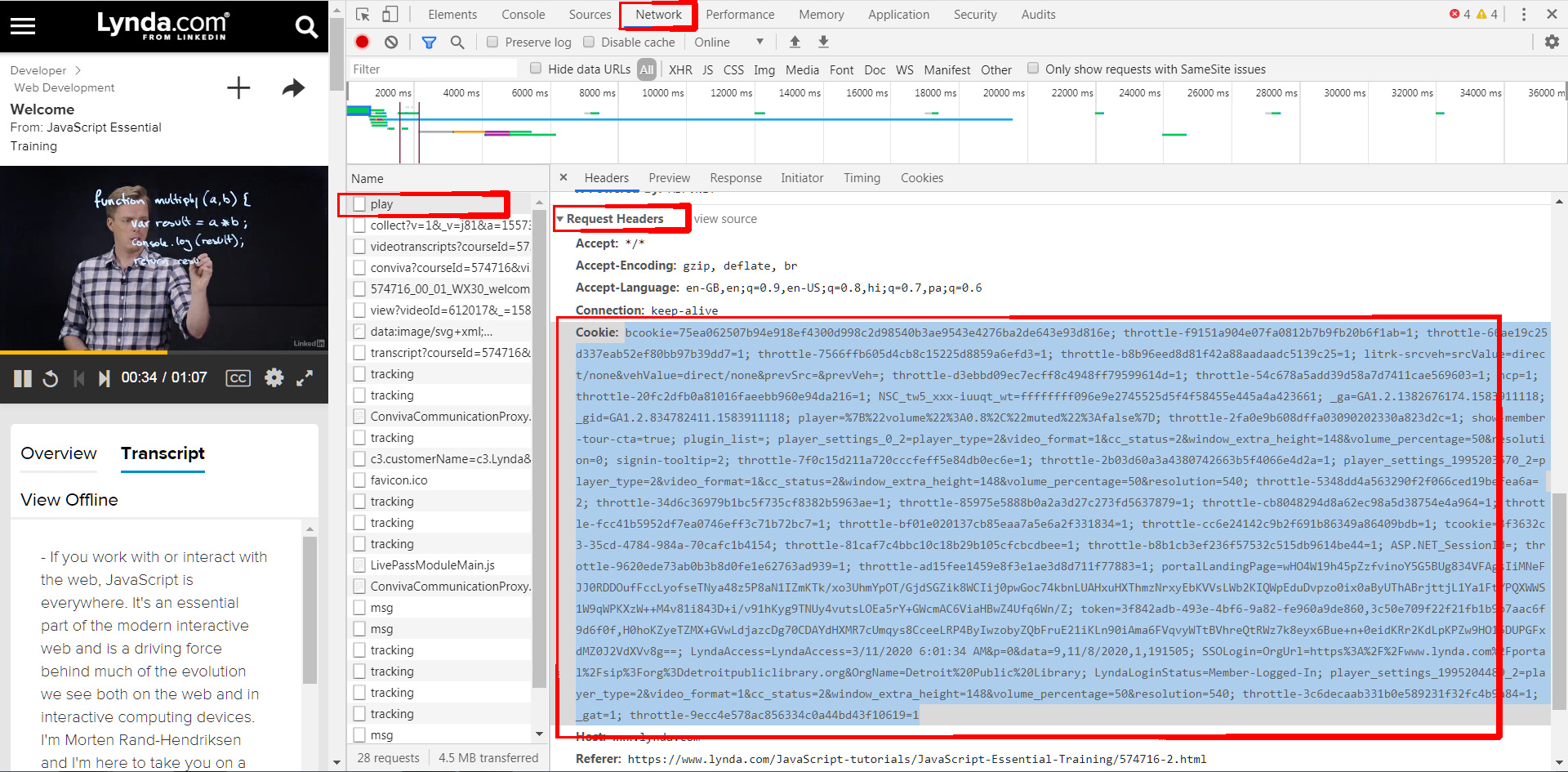
### Step 3) open chrome's devloper option by pressing ctrl + shift + I then open networking tab and play any video then find 'play' in 'Request Headers' and copy cookies (bcooklie=....etc)
## On windows
1. Download and install ***Python3.x.x*** from [link](https://www.python.org/downloads/windows/)
2. Make sure to check ***Add Python3 to PATH*** on first step of installation.
3. Open CMD and run command `pip3 install requests` or `pip install requests`
4. Know you can run python script on Windows
##### For example :
```python
python 'C:\Users\navpreetdevpuri\Downloads\LyndaDownloader.py'
or
python 'C:\Users\navpreetdevpuri\Downloads\LyndaDownloader.py' -url 'https://www.lynda.com/C-tutorials/C-Essential-Training/772322-2.html' -savedir 'C:\Users\navpreetdevpuri\Downloads\' -q 2
```
## On Android (Its better to use Pydroid 3 instead of Termux)
##### You can also run this script in android (How to run python script on android ?)
1. Download and install **Termux** app. (remember to give *storage permission* from phone's settings and *turn off battery optimization* for Termux app to make app run long)
2. Run following commads :
- `apt-get update`
- `apt-get install python`
- `pip install requests`
3. Know you can run python script on android
-savedir or -sd argument is compulsory for android.
##### For example :
```python
python '/storage/emulated/0/Download/LyndaDownloader.py' -savedir '/storage/emulated/0/Download/'
or
python '/storage/emulated/0/Download/LyndaDownloader.py' -url 'https://www.lynda.com/C-tutorials/C-Essential-Training/772322-2.html' -savedir '/storage/emulated/0/Download/' -q 2
```
## On Linux
1. Run following commads to install Python:
- `sudo apt-get update`
- `sudo apt-get -y install python3`
- `sudo apt-get -y install python3-pip`
- `sudo pip3 install requests` or `pip install requests`
2. Know you can run python script on Linux
##### For example :
```python
python3 '/home/navpreetdevpuri/Downloads/LyndaDownloader.py'
or
python3 '/home/navpreetdevpuri/Downloads/LyndaDownloader.py' -url 'https://www.lynda.com/C-tutorials/C-Essential-Training/772322-2.html' -sd '/home/navpreetdevpuri/Downloads/' -quality 720p
```
### Optional arguments with python script
***If you run script without this arguments then It will ask this things on run time***
1. ***-url*** : **Url link** of Lynda course.
2. ***-savedir or -sd*** : Directory **location (Full path)** on your system where you want to save files (by default set to the same location as LyndaDownloader.py).
3. ***-quality or -q*** : **Video quality** (360p or 0, 540p or 1, 720p or 2).
4. ***-fromfolder or -ff*** : In case you want to download only few topics by entring **starting topic number** (by default set to 1 which means start download from 1st topic of course).